





wirenut
Members
-
Joined
-
Last visited
-
After the latest update to the container, the labels are showing again for me. After the latest update, labels are showing again for me.
-
Parity check completed without errors. Reboot and all came up as expected. Hopefully i am past this now. Dual parity really helped in this situation, and the fact that the failed disc was able to be rebuilt before crashing. Thanks for the assist @JorgeB
-
The 4TB disk rebuild completed without error. Currently running a non-correcting parity check to validate.
-
jumped the gun on my solution. After a reboot disc 10 had read errors and the reallocated sector count was high and climbing. stopped array and am currently rebuilding to an old spare 4TB drive i was saving for another build. diagnostics is from shutdown of array... tower-diagnostics-20261004-1208.zip
-
Rebuild completed without error. Thanks.
-
just to update i fixed the file system errors maint mode and smart tests and stats are good. I have now started a data rebuild. fingers crossed.
-
Had to change the fans in my norco ss-500 drive cages. Got everything back together and the array booted up fine. Started a parity check and discs 6 -10 (they are all in the same cage) showed read errors and before could stop it discs 9 & 10 went red. grabbed a diagnostics (attached) and shutdown. Reseated the cables to the cage and I believe the molex power connecter wasn't seated all the way. Restarted server hoping it might be well but 9&10 are still showing red with unmountable or no file system error. Can i get the discs to go green again or do i need to rebuild them from dual parity? Please help. tower-diagnostics-20261003-1806.zip
-
Yes! Working as normal. Thanks!!
-
yep, verified when i got home. replacement disk rebuilding. Thanks!
-
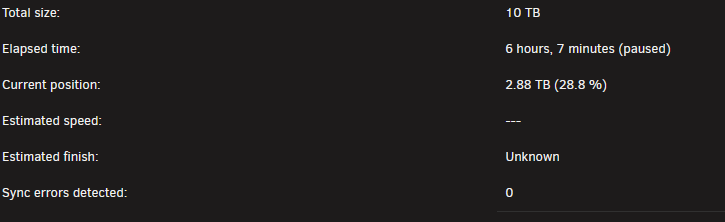
Monthly parity check stated as scheduled this morning. 12:20 pm email notification came as expected and result was pass. 4 minutes later received email notification that disk 6 has 442 read errors. Logged in remotely as I'm at work and see the they are now 44,158 and climbing. Paused parity check and created this post for advice. tower-diagnostics-20260930-1258.zip
-
No guarantees here, but If you went to Settings -> Network Settings in Unraid and manually set the DNS Servers to the ones listed and it still fails, try setting DNS server 2 to 1.1.1.1 or 8.8.8.8 and see if that helps.
-
Yes, you need to change/verify the boot order in your bios for your internal boot drive to be 1st. Keep in mind you will still need to leave your USB drive for license verification. If you move your license to TPM, and your internal boot drive is successful, you should then be able to remove the USB and use it for something else.
-
7.2.6 to 7.2.7 update went smoothly for me. All seems well. Thanks!
-
an update to 'fix common problems' v2026.05.16 solved the issue with a couple steps. update fix common problems and scan again. mark warning as ignore and scan again. unmark ignore warning and scan again. This is what worked for me.
-
fix common problems reports this to me this morning: The plugin dynamix.password.validator.plg is not known to Community Applications and is possibly incompatible with your server. Want to get this sorted prior to 7.3 update. Is this depreciated or something else? Currently running unraid v7.2.6


