





rjlan
Members
-
Joined
Everything posted by rjlan
-
I fixed this issue by adding an environmental variable JWT_ENABLED=false It's supposed to be false by default
-
Might have a v1.3.0 issue related to font. I'm able to connect to RDP sessions with no issue, but I'm unable to establish any SSH connections. Error when connecting with client An internal error has occurred within the Guacamole server, and the connection has been terminated. If the problem persists, please notify your system administrator, or check your system logs. Here is the error I'm seeing in the log guacd[326]: INFO: Unable to load font "monospace" guacd[326]: ERROR: Unable to set initial font "monospace" Edit: I rolled back to 1.2.0 and up and running again, no font errors in the log. Edit 2: Issue resolved https://github.com/linuxserver/docker-guacd/issues/9
-
Cool. Back on the stock kernel that ships with unraid and plugin installed. Working great 👍
-
Awesome, thank you! Do we still need to compile the kernel with GVT-g to use this plugin?
-
had a minor setup issue with firefox syncserver returning a 404 error. about:sync-log 1620246309675 Sync.LogManager DEBUG Flushing file log 1620246309684 Sync.LogManager DEBUG Log cleanup threshold time: 1619382309684 1620246309704 Sync.LogManager DEBUG Done deleting files. 1620246309939 Services.Common.RESTRequest DEBUG GET https://profile.accounts.firefox.com/v1/profile 304 1620246310644 FirefoxAccounts INFO Polling device commands. 1620246310645 Sync.Service DEBUG User-Agent: Firefox/88.0 (Linux x86_64) FxSync/1.90.0.20210415204500.desktop 1620246310645 Sync.Service INFO Starting sync at 2021-05-05 16:25:10 in browser session zcF8cHnxK2Vk 1620246310645 Sync.Service DEBUG In sync: should login. 1620246310645 Sync.Service INFO User logged in successfully - verifying login. 1620246310645 FirefoxAccounts TRACE not checking freshness of profile as it remains recent 1620246310646 Sync.SyncAuthManager DEBUG unlockAndVerifyAuthState already has (or can fetch) sync keys 1620246310646 Sync.Status DEBUG Status.login: error.login.reason.network => success.status_ok 1620246310646 Sync.Status DEBUG Status.service: error.login.failed => error.login.failed 1620246310646 Sync.Service DEBUG Fetching unlocked auth state returned success.status_ok 1620246310646 FirefoxAccounts TRACE not checking freshness of profile as it remains recent 1620246310646 Sync.SyncAuthManager INFO Getting sync key 1620246310646 Sync.SyncAuthManager INFO Getting a sync token from: https://selfhosted.url/1.0/sync/1.5 1620246310646 Sync.SyncAuthManager DEBUG Getting a token using OAuth 1620246310646 FirefoxAccounts DEBUG getOAuthToken enter 1620246310646 FirefoxAccounts TRACE getCachedToken returning cached token 1620246310646 FirefoxAccounts DEBUG getOAuthToken returning a cached token 1620246310647 Services.Common.TokenServerClient DEBUG Beginning OAuth token exchange: https://selfhosted.url/1.0/sync/1.5 1620246310647 Services.Common.RESTRequest DEBUG GET request to https://selfhosted.url/1.0/sync/1.5 1620246310648 Services.Common.RESTRequest DEBUG GET request to https://api.accounts.firefox.com/v1/account/device/commands?index=0 1620246310650 Services.Common.RESTRequest DEBUG GET https://selfhosted.url/1.0/sync/1.5 404 1620246310650 Services.Common.TokenServerClient DEBUG Got token response: 404 1620246310650 Services.Common.TokenServerClient WARN Error processing token server response: TypeError: right-hand side of 'in' should be an object, got number(resource://services-common/tokenserverclient.js:303:11) JS Stack trace: [email protected]:303:11 [email protected]:245:19 1620246310650 Sync.SyncAuthManager ERROR Non-authentication error in _fetchTokenForUser: TokenServerClientError({"message":{}})(resource://services-common/tokenserverclient.js:39:36) JS Stack trace: [email protected]:37:16 [email protected]:251:19 1620246310650 Sync.Status DEBUG Status.login: success.status_ok => error.login.reason.network 1620246310650 Sync.Status DEBUG Status.service: error.login.failed => error.login.failed 1620246310650 Sync.SyncAuthManager INFO Failed to fetch the cluster URL: TokenServerClientError({"message":{}})(resource://services-common/tokenserverclient.js:39:36) JS Stack trace: [email protected]:37:16 [email protected]:251:19 1620246310650 Sync.Service DEBUG verifyLogin failed: TokenServerClientError({"message":{}})(resource://services-common/tokenserverclient.js:39:36) JS Stack trace: [email protected]:37:16 [email protected]:251:19 1620246310650 Sync.Status DEBUG Status.login: error.login.reason.network => error.login.reason.network 1620246310650 Sync.Status DEBUG Status.service: error.login.failed => error.login.failed 1620246310650 Sync.ErrorHandler ERROR Sync encountered a login error 1620246310651 Sync.SyncScheduler DEBUG Clearing sync triggers and the global score. 1620246310651 Sync.SyncScheduler DEBUG Next sync in 3600000 ms. (why=schedule) 1620246310651 FirefoxAccounts TRACE not checking freshness of profile as it remains recent 1620246310651 Sync.Service DEBUG Exception calling WrappedLock: Error: Login failed: error.login.reason.network(resource://services-sync/service.js:1038:15) JS Stack trace: [email protected]:1038:15 1620246310651 Sync.Service DEBUG Not syncing: login returned false. 1620246310652 FirefoxAccounts TRACE not checking freshness of profile as it remains recent fix for me was to insert a /token to your custom server address you plug into your firefox browser. an fyi in case others come across this issue https://github.com/mozilla-mobile/fenix/issues/15590
-
I was able to 'fix' OnlyOfficeDocumentServer by pointing my reverse proxy to http instead of https. Its less a fix and more a workaround, but it got me up and running again. I noticed that if I tried pulling up the /welcome page by connecting directly instead of via nextcloud that I get nothing, but http is working fine.
-
From what I read in the linked thread, it's my understanding that it does work but there are some limitations. Will very much need some support from LimeTech to fully utilize the feature. Maybe @scorcho99 can chime in and elaborate.
-
@ich777 Would love to see GVT-g as an option to compile into the kernel. There's a thread about it here. Being able to pass IGP to multiple virtual machines is a killer feature that a lot of users here could make good use of
-
Oh I get what you're saying, I have to make a variable GAME_V and set to latest. I saw it before in the thread but I thought you were talking about the container version. /me *derp* 🤦♂️ Thanks bro Edit - No notes or anything in my template, is mine possibly outdated or something?
-
MinecraftBasicServer has not updated to 1.16.4. Update was rolled out early November, so it's been behind for a bit
-
Got the message about recommending not using H5AI. Do you have any recommendations/alternatives? Looked briefly at docker hub and there are several that are running recently updated versions but I'm not sure what sources to use and if they should be trusted
-
@crazykidguy So I hadn't setup any extensions yet, but since you asked I dug into it. You will need to create an appdata folder and link it somewhere (anywhere) in the container (guacamole frontend, not guacd). Then you will need to create a variable GUACAMOLE_HOME of the directory you linked inside the container. See attached screenshot. Then create a folder in the appdata directory named extensions and download and extract guacamole-auth-totp-1.2.0.jar into that folder. Restart the container and you're done. Sources: https://guacamole.apache.org/doc/gug/guacamole-docker.html#guacamole-docker-guacamole-home https://guacamole.apache.org/doc/gug/totp-auth.html#installing-totp-auth TOTP Jar https://guacamole.apache.org/releases/1.2.0/ Edit - You will be prompted to setup TOTP at login. Out-of-the-box it doesn't appear to be optional, all users will have to setup TOTP

-
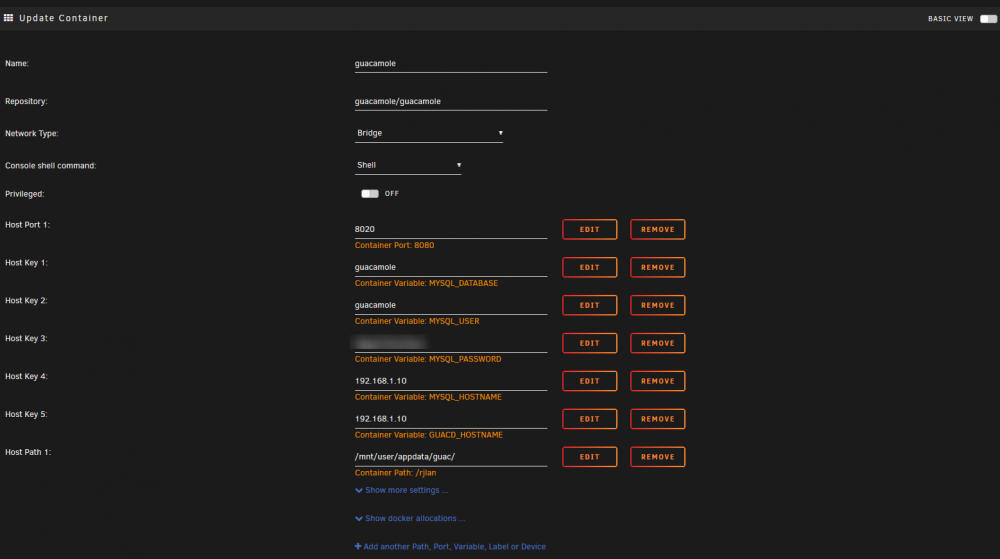
You can use this as the frontend. See screenshot for an idea of what you will need to configure. Note that you will also need a database and will need to import some sql for it to work. I added a path to my appdata folder to copy the sql that will be needed to import into the database. I used maria as the db and used phpmyadmin to create the database, user, and import the 2 sql files which can be find in /opt/guacamole/mysql/schema Hope this helps and good luck!
-
I'm no pro, but here's how I'm doing updates. You will need docker-compose, so get it as is shown in the video or via nerd tools 1) Get and replace (appdata/jitsi/github/docker-jitsi-meet) the edited docker compose file. I labeled the containers and set the network name (proxynet) as shown in the video. If using a different network, just change the name (very last line). You won't have to fiddle around in portainer anymore. 2) Pop open a terminal and cd to the github repo you pulled down which should be something like /mnt/cache/appdata/jitsi/github/docker-jitsi-meet/ cd /mnt/cache/appdata/jitsi/github/docker-jitsi-meet/ 3) Time to pull the new images. In console, run: docker-compose pull 4) Set up the new containers: docker-compose up -d --remove-orphans 5) Optional - remove old images docker image prune 6) You will need to setup authentication again if you so desire, as it appears to be stored in the container (and so is lost when replaced by the update). Open a terminal to the xmpp.meet.jitsi container: prosodyctl --config /config/prosody.cfg.lua register username meet.jitsi password Unfortunately unraid will still show an update available, not sure what to do about that. Hope this helps, good luck! docker-compose.yml
-
Very cool, works great out-of-the-box. Is there a way to make a custom dashboard without having to work inside the container? https://docs.netdata.cloud/web/gui/custom/
-
-
I'm folding with just my gpu, but I'm getting 100% cpu usage from fah. I've not seen this behavior from other fah installs (on windows). There should be some usage for feeding the gpu, but it shouldn't load up a whole core. Curious if anyone else is experiencing this. <config> <!-- Client Control --> <fold-anon v='true'/> <!-- HTTP Server --> <allow v='192.168.1.0/24'/> <!-- Network --> <proxy v=':8080'/> <!-- Remote Command Server --> <password v=' '/> <!-- Slot Control --> <power v='full'/> <!-- User Information --> <passkey v=' '/> <team v='223518'/> <user v='rjlan'/> <!-- Web Server --> <web-allow v='192.168.1.0/24'/> <!-- Folding Slots --> <slot id='1' type='GPU'/> </config> Update: Using my old only nvidia card for my unraid install, apparently nvidia cards are notorious for using a whole core (per gpu). I'm still curious if others are experiencing the same
-
I was hoping I could some help on using mariadb for the database. I got everything setup with maria but it I need to add arguments to the startup command but I'm not familiar with how to do that with docker. Thanks





