





Mattti1912
Members
-
Joined
-
Last visited
Everything posted by Mattti1912
-
Hello people Anyone who knows how to import books, to this app?? i know you can enable a upload buttom, but is it possible to add from another share on the array?? Thank you!
-
Hello good people.) I´m having a problem, i can install the binhex-qbittorrent and acces it normaly, but i cant access when i enable vpn in the container.. Im using protonvpn and i have tried to reinstall multiple times.. I followed this guide: https://github.com/binhex/documentation/blob/master/docker/faq/vpn.md I´ve tried to follow the guide but i cant make it work.. i think that it´s the lan network i have to change.. But i have put in my own network and the cidr /24.. What can i be doing wrong?? I also use wireguard, as protocol.. Installed as bridge.. Hope you can help me:) Thank you! Hello again, i think i found the problem. I tried to download the conf again.. Tried to switch to protonvpn linux config.. And now it works:)) Thank you!
-
Hello.. I´ve just reinstalled binhex-qbittorrentvpn, because of an error:( The problem i´ve got now is, that i am using protonvpn, and before when it was installed. My port changed everytime i restarted my container.. It´s not happening now.. I have added +pmp on my username, and i have deactivated Nat-pmp in my webgui.. When i use curl ifconfig.co/country i get the right ip.. but i dont know how to make qbittorrent change port automatically??? Hope someone can help.. Thank you
-
Hello.. Anyone who know how to install nextcloud aio without domain and tailscale?? At the moment i´m using twingate?? Thank you!
-
Hello again. thank you! English is not my first language.. So im not sure i understand this correctly? If i use this tool, it will change all of my files owner to nobody?? what does that meen?? and how do i change back to me as a root user?? Directory permission will be set to 777. Which is read/write and execute..?? My files would be set to 666 which is read/write?? About my appdata it's on my cache drive.. it says this " Note that this tool may negatively affect any docker containers if you allow your appdata share to be included." Does that meen that i have to reinstall my docker containers such as jellyfin, qbittorrent etc..?? Lastly how do i change my files/folders permissions back to me as a user?? Thank you for all your help.. regards:)
-
Hello again, and thank you I saw that i had 2 of the same names on the share but with different big letters.. So i have deleted the one i dont need:) Can i try the new permissions without it deleting anything?? Thank you!
-
Hello again... I´m using smb.. Here is my diagnostics tower-diagnostics-20250211-1843.zip
-
Hello again, thank you for reply... I went back to unraid 6.12.15.. The problem is that i can´t transfer to the server, from either windows or linux?? I do not know what to do here?? Anyone with a suggestion ?? Thank you..
-
Hello.. I´m having some problems with permissions.. I have got 2tb free space, but i cant move/copy my files from my pc to my unraid server..?? So how do i change my permissions?? Thank you!
-
Hello again. Thank you for your help:) For now i do not need a dual nic.... I ´ve started a thread in hardware.. Thank you!
-
Hello good people:) I´m going to update my nic in my server.. I need a cheap 2.5gb card.. Are there any difference in which brand are supported?? Or other brands that are not supported?? I dont need a dual:) Thank you...
-
Hello good people:) I´m going to update my nic in my server.. I need a cheap 2.5gb card.. Are there any difference in which brand are supported?? Thank you...
-
Hello... I´ve got a problem (wrong pool state).. Anyone know how to fix??
-
Hi.. I´ve been looking for a solution like this one:) And now my setup works again.. Thank you so much
-
Hello again.. Now i´ve tried to fix this problem for hours.. And i have got some progress.. I have installed nginx proxy manager, and installed all my hosts, the problem is now that no matter what host i use i´ll be send to unraids login screen.. Anyone who know how to fix this?? Thank you! regards
-
Hello again. I´m having a lot of problems with adguard and nginx proxy manager.. Could it be because of the ports from http: 1880 and https 18443?? i only want to use in house on lan, so i have not portforwarded.. ?? I have unraid on 192.168.1.200 and adguard on unraid på 192.168.1.300?? I have tried this adguard.home.local 192.168.1.233 in dns rewrites ports : nginx uses 7818, for dashboard.. Http port: 1880 og https: 18443.. Could some of that be the problem?? Thank you.. Regards
-
Hello again.. Thank you That is set as above..
-
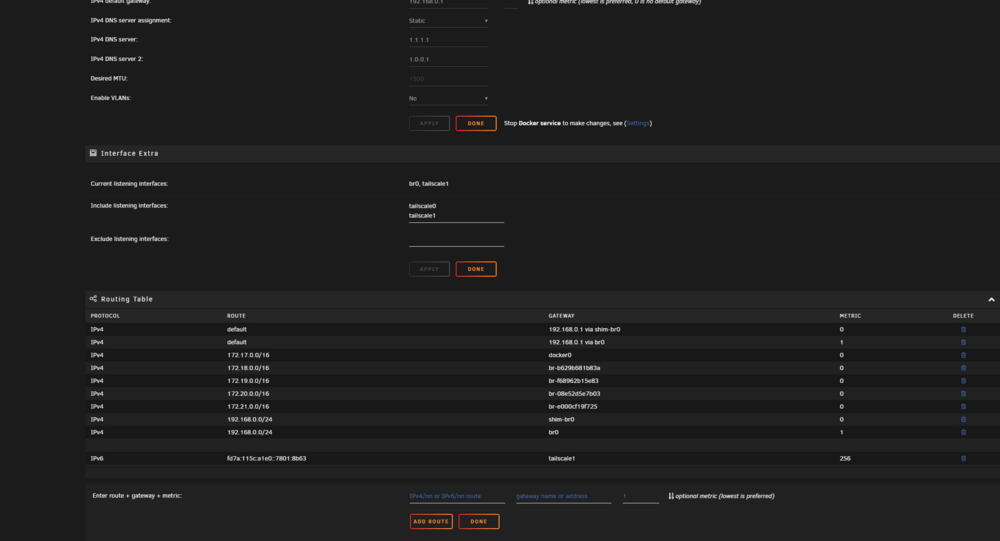
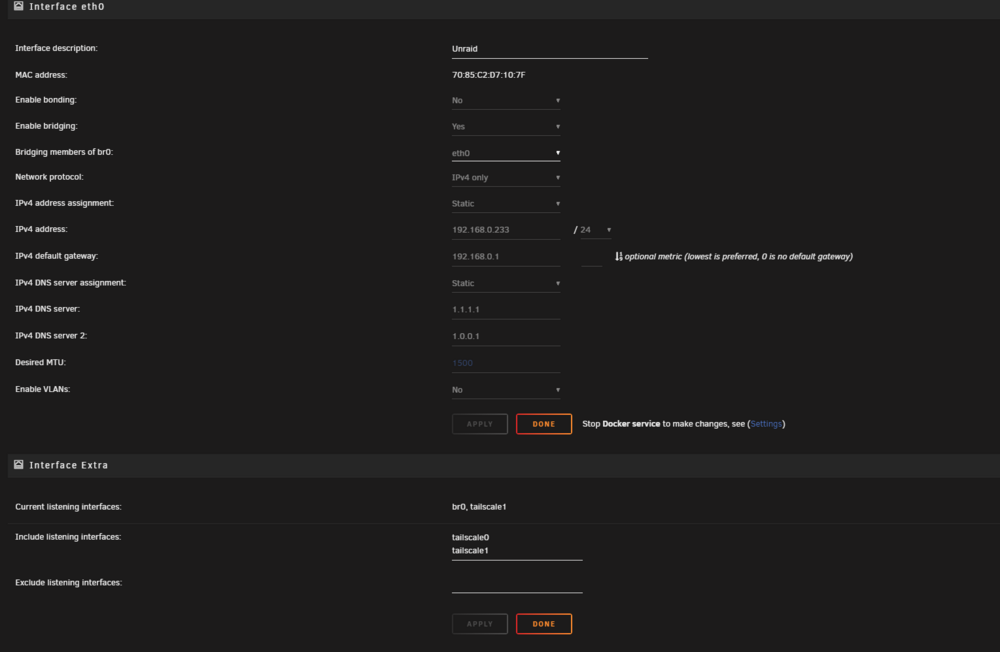
Hello people:) Hope you can help me. I´m trying to fix my nginx proxy manager. it used to work, but not anymore?? I believe that it´s because of my network setup.. I keep getting dns errors, and i dont know why.. So i was wondering if it´s possible to reset all network settings?? Thank you!
-
Hello Im having some trouble with having npm to work?? This is my output.. User: npm PUID:0 ID:0 GROUP:0 Group: npm PGID:0 ID:0 ------------------------------------- ❯ Starting nginx ... ❯ Starting backend ... [1/5/2025] [2:01:42 PM] [Global ] › ℹ info Using Sqlite: /data/database.sqlite [1/5/2025] [2:01:42 PM] [Migrate ] › ℹ info Current database version: none [1/5/2025] [2:01:42 PM] [Setup ] › ℹ info Logrotate Timer initialized [1/5/2025] [2:01:42 PM] [Global ] › ⬤ debug CMD: logrotate /etc/logrotate.d/nginx-proxy-manager [1/5/2025] [2:01:42 PM] [Setup ] › ℹ info Logrotate completed. [1/5/2025] [2:01:42 PM] [IP Ranges] › ℹ info Fetching IP Ranges from online services... [1/5/2025] [2:01:42 PM] [IP Ranges] › ℹ info Fetching https://ip-ranges.amazonaws.com/ip-ranges.json [1/5/2025] [2:01:58 PM] [IP Ranges] › ✖ error getaddrinfo EAI_AGAIN ip-ranges.amazonaws.com [1/5/2025] [2:01:58 PM] [SSL ] › ℹ info Let's Encrypt Renewal Timer initialized [1/5/2025] [2:01:58 PM] [SSL ] › ℹ info Renewing SSL certs expiring within 30 days ... [1/5/2025] [2:01:58 PM] [IP Ranges] › ℹ info IP Ranges Renewal Timer initialized [1/5/2025] [2:01:58 PM] [Global ] › ℹ info Backend PID 155 listening on port 3000 ... [1/5/2025] [2:01:58 PM] [SSL ] › ℹ info Completed SSL cert renew process [1/5/2025] [2:13:19 PM] [Global ] › ℹ info PID 155 received SIGTERM [1/5/2025] [2:13:19 PM] [Global ] › ℹ info Stopping. ❯ Configuring npm user ... 0 usermod: no changes ❯ Configuring npm group ... ❯ Checking paths ... ❯ Setting ownership ... ❯ Dynamic resolvers ... ❯ IPv6 ... Enabling IPV6 in hosts in: /etc/nginx/conf.d - /etc/nginx/conf.d/default.conf - /etc/nginx/conf.d/include/assets.conf - /etc/nginx/conf.d/include/block-exploits.conf - /etc/nginx/conf.d/include/force-ssl.conf - /etc/nginx/conf.d/include/ip_ranges.conf - /etc/nginx/conf.d/include/letsencrypt-acme-challenge.conf - /etc/nginx/conf.d/include/log.conf - /etc/nginx/conf.d/include/proxy.conf - /etc/nginx/conf.d/include/ssl-ciphers.conf - /etc/nginx/conf.d/include/resolvers.conf - /etc/nginx/conf.d/production.conf Enabling IPV6 in hosts in: /data/nginx - /data/nginx/proxy_host/1.conf ❯ Docker secrets ... I do not know how to fix this.. Hope you have an idea Thank you regards..
-
Hello again:) This is the output.. Anyone with a idea of how to fix this?? User: npm PUID:0 ID:0 GROUP:0 Group: npm PGID:0 ID:0 ------------------------------------- ❯ Starting nginx ... ❯ Starting backend ... [1/5/2025] [2:01:42 PM] [Global ] › ℹ info Using Sqlite: /data/database.sqlite [1/5/2025] [2:01:42 PM] [Migrate ] › ℹ info Current database version: none [1/5/2025] [2:01:42 PM] [Setup ] › ℹ info Logrotate Timer initialized [1/5/2025] [2:01:42 PM] [Global ] › ⬤ debug CMD: logrotate /etc/logrotate.d/nginx-proxy-manager [1/5/2025] [2:01:42 PM] [Setup ] › ℹ info Logrotate completed. [1/5/2025] [2:01:42 PM] [IP Ranges] › ℹ info Fetching IP Ranges from online services... [1/5/2025] [2:01:42 PM] [IP Ranges] › ℹ info Fetching https://ip-ranges.amazonaws.com/ip-ranges.json [1/5/2025] [2:01:58 PM] [IP Ranges] › ✖ error getaddrinfo EAI_AGAIN ip-ranges.amazonaws.com [1/5/2025] [2:01:58 PM] [SSL ] › ℹ info Let's Encrypt Renewal Timer initialized [1/5/2025] [2:01:58 PM] [SSL ] › ℹ info Renewing SSL certs expiring within 30 days ... [1/5/2025] [2:01:58 PM] [IP Ranges] › ℹ info IP Ranges Renewal Timer initialized [1/5/2025] [2:01:58 PM] [Global ] › ℹ info Backend PID 155 listening on port 3000 ... [1/5/2025] [2:01:58 PM] [SSL ] › ℹ info Completed SSL cert renew process [1/5/2025] [2:13:19 PM] [Global ] › ℹ info PID 155 received SIGTERM [1/5/2025] [2:13:19 PM] [Global ] › ℹ info Stopping. ❯ Configuring npm user ... 0 usermod: no changes ❯ Configuring npm group ... ❯ Checking paths ... ❯ Setting ownership ... ❯ Dynamic resolvers ... ❯ IPv6 ... Enabling IPV6 in hosts in: /etc/nginx/conf.d - /etc/nginx/conf.d/default.conf - /etc/nginx/conf.d/include/assets.conf - /etc/nginx/conf.d/include/block-exploits.conf - /etc/nginx/conf.d/include/force-ssl.conf - /etc/nginx/conf.d/include/ip_ranges.conf - /etc/nginx/conf.d/include/letsencrypt-acme-challenge.conf - /etc/nginx/conf.d/include/log.conf - /etc/nginx/conf.d/include/proxy.conf - /etc/nginx/conf.d/include/ssl-ciphers.conf - /etc/nginx/conf.d/include/resolvers.conf - /etc/nginx/conf.d/production.conf Enabling IPV6 in hosts in: /data/nginx - /data/nginx/proxy_host/1.conf ❯ Docker secrets ...
-
Hello:) Anyone who how to fix this one?? [IP Ranges] › ✖ error getaddrinfo EAI_AGAIN ip-ranges.amazonaws.com Thank you!
-
Hello again.. I've tried to setup this for hours.. I dont know what the problem is but i cant use nginx proxy manager, at all?? I've tried to enable host access custom networks... And i have tried to remove and reinstall the dockers, many times.. No luck? I dont know what the problem is but it seems to be a problem with entire container.. Cant do anything local either.?? Anyone who could have an idea?? Thank you!
-
Hello again.. I've tried to setup this for hours.. I dont know what the problem is but i cant use nginx proxy manager, at all?? I've tried to enable host access custom networks... And i have tried to remove and reinstall the dockers, many times.. No luck? I dont know what the problem is but it seems to be a problem with entire container.. Cant do anything local either.?? Anyone who could have an idea?? Thank you!
-
Hello i´m having a problem with nginx and adguard combined.. I ´ve installed adguard and nginx on two seperate networks in unraid.. but i cant get it to work?? The problem is how do i send all dns rewrites from adguard to nginx, so that i cant acces the service with the port numbers?? I found out that adguard does not use port-numbers... I´ve got a nginx on a 192.168.0.250 and adguard om 192.168.0.222.. I want to be able to use nginx reverse proxy manager but only internally in my own lan-network... Hope someone can help me..:) Thank you Regards
-
Hello Anyone who knows how to set up this container without a domain??,, I cant really find that out?? Thank you!

