





AnimusAstralis
Members
-
Joined
-
Last visited
-
Can somebody share a working config of Minio container exposed to the internet through reverse proxy? I remember that I did it myself a couple of years ago quite easily using Swag container - I just pointed s3.domain.com to minio:9000 and everything worked correctly. But now with all the changes to Minio (supposedly) I'm really struggling. Locally Minio container seems to works fine. /data is mapped to /mnt/cloud/storage/minio (it's a zfs-formatted single SSD pool named 'cloud' with a single share named 'storage'). I am able to create buckets, write to and read from them via S3 browser, but nothing works when I try to expose Minio to the internet and access it remotely.
-
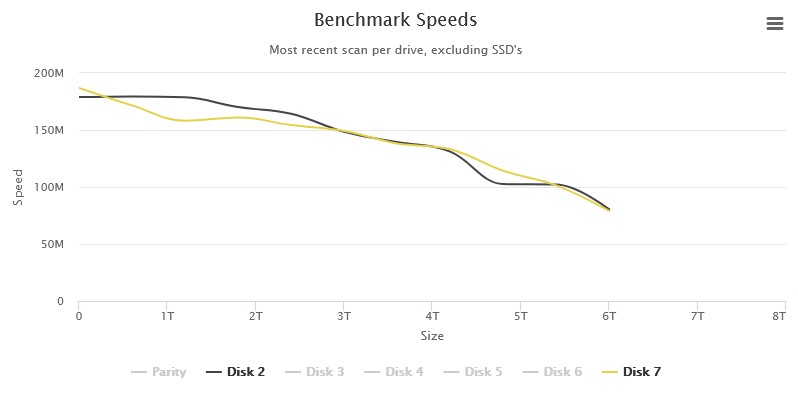
I've suspected that this is somehow connected with SMR. The weird HDD is only 44% full, but two other drives are 76% and 65% full respectively, so they produce normal graphs: So, are you saying that I can expect normal result if I fill my HDD over 50% or more? In this case DiskSpeed will need some tweaking, I suppose, because speed gap doesn't increase on retries and disabling it doesn't work either for some reason. First I thought that my HDD was faulty, but now I'm thinking that WD SMR technologies mess benchmarks up.
-
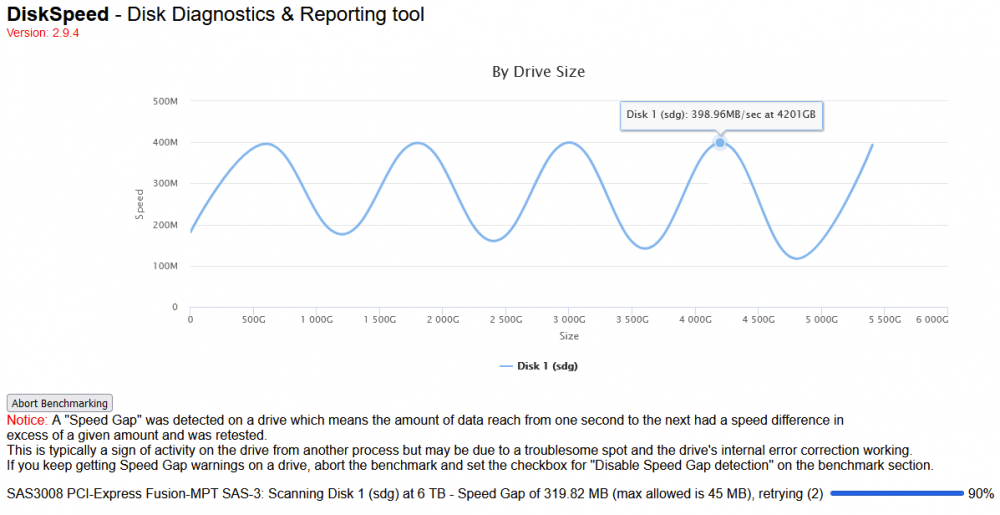
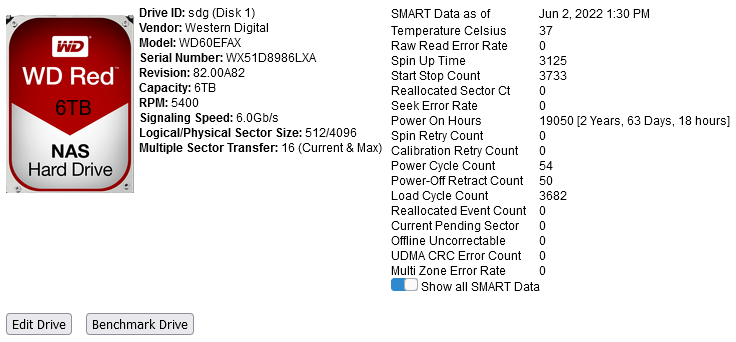
Thanks for this essential tool. I strongly feel that SMART is not (has never been?) reliable enough for reporting true HDD health status. I've benchmarked my HDDs and now I'm puzzled with this result: I didn't find similar results in this thread. How such high speeds are even possible? What does this 'sine' behavior say? Also, max allowed speed gap doesn't increase after 25+ retries, so I had to just abort this benchmark. Benchmarks of two other similar HDDs don't report anything unusual. This is SMART of the weird one:
-
Why? One should only know what version to use. Otherwise it's manual editing which defeats the purpose of the tutorial. Thanks for this suggestion! BIOS settings do nothing (I've checked it earlier), but editing config.plist helped. At least 1920x1080 resolution works, not sure about some exotic ones though.
-
For everyone struggling with quoted issue: it's important that you use old version of Opencore Configurator. Tutorial was posted around December 2020, so I've downloaded Opencore Configurator 2.19.1.0 (December 23, 2020) and everything worked as it should have. No manual XML editing needed. When you use the latest Opencore Configurator, you get a warning about incompatibility with your Opencore, then it breaks something and you get stuck as described in quoted post. Also I have a question: how do I change resolution? I have the only option of 2560x1600 in settings which is too large for my 2560x1440 monitor.
-
I'm having the same bug.
-
Got this problem as well. I've updated from previous stable version. Noticed it after one of my old HDDs got hot. Edit: 1) spun down whole array; 2) spun up single HDD; 3) stopped Grafana-related docker containers (grafana, influxdb, nut-influxdb-exporter, telegraf, varken) Automatic spin down works again. Yet it worked fine on previous stable version, so I think this should be considered as a bug.
-
Is there a straightforward way to make Telegraf read data from NUT plugin instead of APC UPS daemon? I can't find info on this anywhere.
-
I'm so glad I've found this guide. My Docker image was filling up when users tried to download a large folder (>50gb), creating volumes solved this problem.
-
This. Also MS SQL 2019 supports UTF8, but these new collations are tricky, I've found a list of collation examples, that helped me a lot.

