Greyberry
Members
-
Joined
-
Last visited
Everything posted by Greyberry
-
Hi, I am in the process of upgrading my single cache drive (xfs) to a newer cache setup, and therefore i wanted to offload all data to my main array. Unfortuantelly this process can't be finished because the mover is not able to move files any more and always stops after some files. (System is running in safe mode already, docker and vm manager is turned off in settings) Starting the Mover root@SERVER:~# mover start mover: started file: /mnt/cache/system/docker/overlay2/b7af2bdb97b6d4b9a60b7b4a31d442635bd4d7efd100c1ced5287a956f6d1aa6/diff/run/s6/basedir/run-image/service/s6-linux-init-shutdownd/fifo move_object: /mnt/cache/system/docker/overlay2/b7af2bdb97b6d4b9a60b7b4a31d442635bd4d7efd100c1ced5287a956f6d1aa6/diff/run/s6/basedir/run-image/service/s6-linux-init-shutdownd/fifo File exists file: /mnt/cache/system/docker/overlay2/b7af2bdb97b6d4b9a60b7b4a31d442635bd4d7efd100c1ced5287a956f6d1aa6/diff/run/service/.s6-svscan/control move_object: /mnt/cache/system/docker/overlay2/b7af2bdb97b6d4b9a60b7b4a31d442635bd4d7efd100c1ced5287a956f6d1aa6/diff/run/service/.s6-svscan/control File exists file: /mnt/cache/system/docker/overlay2/b7af2bdb97b6d4b9a60b7b4a31d442635bd4d7efd100c1ced5287a956f6d1aa6/diff/run/service/s6-linux-init-shutdownd/fifo 2nd attempt after "mover stop" in a 2nd window: root@SERVER:~# mover start mover: started file: /mnt/cache/system/docker/overlay2/b7af2bdb97b6d4b9a60b7b4a31d442635bd4d7efd100c1ced5287a956f6d1aa6/diff/run/s6/basedir/run-image/service/s6-linux-init-shutdownd/fifo move_object: /mnt/cache/system/docker/overlay2/b7af2bdb97b6d4b9a60b7b4a31d442635bd4d7efd100c1ced5287a956f6d1aa6/diff/run/s6/basedir/run-image/service/s6-linux-init-shutdownd/fifo File exists file: /mnt/cache/system/docker/overlay2/b7af2bdb97b6d4b9a60b7b4a31d442635bd4d7efd100c1ced5287a956f6d1aa6/diff/run/service/.s6-svscan/control move_object: /mnt/cache/system/docker/overlay2/b7af2bdb97b6d4b9a60b7b4a31d442635bd4d7efd100c1ced5287a956f6d1aa6/diff/run/service/.s6-svscan/control File exists file: /mnt/cache/system/docker/overlay2/b7af2bdb97b6d4b9a60b7b4a31d442635bd4d7efd100c1ced5287a956f6d1aa6/diff/run/service/s6-linux-init-shutdownd/fifo move_object: /mnt/cache/system/docker/overlay2/b7af2bdb97b6d4b9a60b7b4a31d442635bd4d7efd100c1ced5287a956f6d1aa6/diff/run/service/s6-linux-init-shutdownd/fifo File exists file: /mnt/cache/system/docker/overlay2/b7af2bdb97b6d4b9a60b7b4a31d442635bd4d7efd100c1ced5287a956f6d1aa6/diff/run/service/s6-linux-init-shutdownd/run file: /mnt/cache/system/docker/overlay2/b7af2bdb97b6d4b9a60b7b4a31d442635bd4d7efd100c1ced5287a956f6d1aa6/diff/run/service/s6-linux-init-shutdownd/supervise/lock file: /mnt/cache/system/docker/overlay2/b7af2bdb97b6d4b9a60b7b4a31d442635bd4d7efd100c1ced5287a956f6d1aa6/diff/run/service/s6-linux-init-shutdownd/supervise/control I am on version 6.12.3 is there anything i can do to complete the process? Also note, that a lot of the data did move, but the docker folder remains unmoved. server-diagnostics-20230816-2254.zip
-
Thank you! 🙂 Now I know. Sometimes it is faster to do it via terminal or look into the diagnostics when you have that opened anyway.
-
You couldn't do that on my machine, could you? I wanted to know how you knew FROM THE LOGS the errors were from disk1. yeah disk1 (data-disk) is corrupt, so I think it is better to rebuild the data from parity.
-
You saw the ATA errors in the syslog. What i wanted to know is, how do you know that these are related to disk1? (and not parity disk?) Apr 3 19:21:28 SERVER kernel: ata3.00: failed command: READ FPDMA QUEUED Apr 3 19:21:28 SERVER kernel: ata3.00: cmd 60/28:58:10:12:1e/02:00:e3:00:00/40 tag 11 ncq dma 282624 in Apr 3 19:21:28 SERVER kernel: res 40/00:60:38:14:1e/00:00:e3:00:00/40 Emask 0x10 (ATA bus error) Apr 3 19:21:28 SERVER kernel: ata3.00: status: { DRDY } Apr 3 19:21:28 SERVER kernel: ata3.00: failed command: READ FPDMA QUEUED Apr 3 19:21:28 SERVER kernel: ata3.00: cmd 60/d0:60:38:14:1e/02:00:e3:00:00/40 tag 12 ncq dma 368640 in Apr 3 19:21:28 SERVER kernel: res 40/00:60:38:14:1e/00:00:e3:00:00/40 Emask 0x10 (ATA bus error) Apr 3 19:21:28 SERVER kernel: ata3.00: status: { DRDY } Apr 3 19:21:28 SERVER kernel: ata3: hard resetting link Apr 3 19:21:29 SERVER kernel: ata3: SATA link down (SStatus 0 SControl 300) Apr 3 19:21:34 SERVER kernel: ata3: hard resetting link Apr 3 19:21:39 SERVER kernel: ata3: link is slow to respond, please be patient (ready=0) Apr 3 19:21:42 SERVER kernel: ata3: SATA link up 6.0 Gbps (SStatus 133 SControl 300) Apr 3 19:21:42 SERVER kernel: ata3.00: ACPI cmd f5/00:00:00:00:00:00(SECURITY FREEZE LOCK) filtered out Apr 3 19:21:42 SERVER kernel: ata3.00: ACPI cmd b1/c1:00:00:00:00:00(DEVICE CONFIGURATION OVERLAY) filtered out Apr 3 19:21:42 SERVER kernel: ata3.00: ACPI cmd f5/00:00:00:00:00:00(SECURITY FREEZE LOCK) filtered out Apr 3 19:21:42 SERVER kernel: ata3.00: ACPI cmd b1/c1:00:00:00:00:00(DEVICE CONFIGURATION OVERLAY) filtered out Yes I know. But: Doesn't it make more sense to do a DISK-REBUILD (parity --> data) instead of a correcting parity-check? (data --> parity) Because in this case it is more likely that the data is corrupt and the parity is in tact.
-
Thank you for your reply. I also see them in the syslog, but how do I know that this is in fact disk1? (Not that I don't belive you, but so that i can debug it for myself in the future.) If disk1 (data-disk) is the problem, wouldn't it be better to remove disk1 from the array and start a new sync/repair process from parity once the issues are resolved? instead of doing a correcting parity check, which would write the corrupt data from the data-disk to parity.?
-
Hi. I had a failing drive a view days ago. 24 errors on the write collumn indicates that the disk went offline immediatly, so it had not a lot of time to corrupt the data fortunatelly. After seeing this i swaped the disk with a new one and rebuilt the data from parity. Note that i did use the array while this process was going on. There were no errors or what so ever in the syncing process, so i thought I am good but out of curiosity initiated a parity check. The parity check finished today, and throw 1024 errors. Now I don't know if the corrupt data is on my freshly inserted disk, or on the parity disk. What should I do now? Since I am using only two drives in the array (one data, one parity) it is therotically possible to see which files are effected. How can I see, which ones? server-diagnostics-20230404-1254.zip
-
How can I run a script when a certain peer connects / disconnects? I want to add a route to its LAN, but can't use the option "LAN <---> LAN" because it has no certain endpoint. i get the intention of an endpoing beeing mendatory in the GUI, but it should not be necessary as long as one peer can connect to another.
-
Hi volks, Is there a way to make a port of a server-socket of a docker container only available for another docker container? I have an application behind my reverse proxy, and do not want it to be exposed to my LAN, but only to the reverse proxy, which is also running on the same unraid-machine. I guess it involves a separate docker-network and fixed ips within it for the docker containers. Can we do this on unraid? Or is there an even easyer solution I do not think of? happy holidays
-
This would be a welcome addition and quality of life improvement. Would be cool if it could avoid portnumbers that are already taken by another docker-application.
-
My Unraidserver unfortunately has only 8GB of RAM not upgradeable and is always on 90+ usage. Half of it is gets eaten up by tmpfs (or /dev/shm) which is barely used if at all. So i wanted to reduce its size. How can I do that?
-
I want to have that back, too! Happy if someone has the answer to this question.
-
Hello, Sometimes when I have to do some maintenance on the server or a certain docker-service, it would be useful to see if there are any connections currently using the shares or docker-container. I do not want to interrupt someones work. Is there any way to do this? netstat or something? regards
-
Could you go into more detail on how you did it? I still can not get it to work. What do you mean with labels? Don't the containers show up automatically? I thought that is what its for?
-
regarding the Chromium docker-image: is there a way to use its webdriver like described here: https://github.com/dgtlmoon/changedetection.io/wiki/Fetching-pages-with-WebDriver ?
-
Best dashboard I used so far. How do i use the "docker API" feature with unraid? when i place my unraid IP in, the applications do not load. Do i have to enable the docker API somewhere in Unraid?
-
Is there a way to run a win installation on this, without fiddeling with extra comments in winPE?
-
confirmed. 🙂 working again. Thanks!
-
I am not able to visit the webinterface either, since the update. Unfortunatelly there is no obvious error in the log.
-
Hi, I have certification errors with my usenet-server: "TLS certificate verification failed for usenet.premium.to: certificate has expired. For more info visit http://nzbget.net/certificate-verification“ The support of my provider said i should replace the "cacert.pem" file. But there is no in my appdata folder. Can i do this somehow? Or can I turn off the cert-check? (not prefered) best wishes
-
ahh thanks for the hint! cool to see a fellow austrian in the unraid forums :))
-
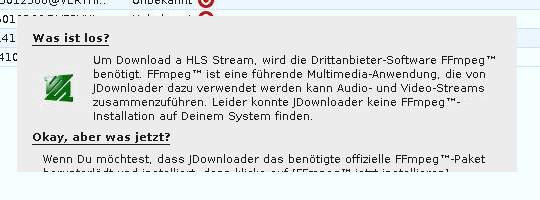
When a link from tvthek.orf.at is put into Jdownloader2, there shows up a Window about ffmpeg, which i can not close. 😛 (Sry, screenshot is in german)
-
docker: Error response from daemon: pull access denied for binhex/sabnzbd, repository does not exist or may require 'docker login': denied: requested access to the resource is denied. anybody else with this problem?
-
Hi, I am not able to get this template running: logs: 2021-01-08T20:07:01.846Z INFO Operator email {"Address": "censored"} 2021-01-08T20:07:01.846Z INFO Operator wallet {"Address": "censored"} Error: Error starting master database on storagenode: group: --- stat config/storage/blobs: no such file or directory --- stat config/storage/temp: no such file or directory --- stat config/storage/garbage: no such file or directory --- stat config/storage/trash: no such file or directory this is my xml: <Networking> <Mode>bridge</Mode> <Publish> <Port> <HostPort>28967</HostPort> <ContainerPort>28967</ContainerPort> <Protocol>tcp</Protocol> </Port> <Port> <HostPort>14002</HostPort> <ContainerPort>14002</ContainerPort> <Protocol>tcp</Protocol> </Port> </Publish> </Networking> <Data/> <Environment> <Variable> <Value>**censored**</Value> <Name>WALLET</Name> <Mode/> </Variable> <Variable> <Value>**censored**</Value> <Name>EMAIL</Name> <Mode/> </Variable> <Variable> <Value>**censored**:28967</Value> <Name>ADDRESS</Name> <Mode/> </Variable> <Variable> <Value>2TB</Value> <Name>STORAGE</Name> <Mode/> </Variable> <Variable> <Value/> <Name>BANDWIDTH</Name> <Mode/> </Variable> </Environment> <Labels/> <Config Name="TCP Port" Target="28967" Default="28967" Mode="tcp" Description="Default Storj V3 node port." Type="Port" Display="always" Required="true" Mask="false">28967</Config> <Config Name="Wallet Address" Target="WALLET" Default="" Mode="" Description="Your Payout address here." Type="Variable" Display="always" Required="true" Mask="false">**censored**</Config> <Config Name="Email address" Target="EMAIL" Default="" Mode="" Description="Email address used to sign Storj V3 node. (recommended)" Type="Variable" Display="always" Required="true" Mask="false">**censored**</Config> <Config Name="Internet Address" Target="ADDRESS" Default="domain.ddns.net:28967" Mode="" Description="Your ISP IP address:28967 (static IP) or dynamic DNS address here." Type="Variable" Display="always" Required="true" Mask="false">**censored**:28967</Config> <Config Name="Allocated Storage" Target="STORAGE" Default="2TB" Mode="" Description="A minimum of 500GB with no maximum of available space per node. Preferred minimum of 8TB and maximum of 24TB of available space per node." Type="Variable" Display="always" Required="true" Mask="false">2TB</Config> <Config Name="Dashboard Port" Target="14002" Default="14002" Mode="tcp" Description="The port to access web dashboard" Type="Port" Display="always" Required="true" Mask="false">14002</Config> <Config Name="Bandwidth" Target="BANDWIDTH" Default="" Mode="" Description="(OPTIONAL) Amount of bandwidth used, per month, to Storj network. According to Storj documentation, minimum is 2TB, recommended is 16+ TB, preferred is unlimited (e.g. 100000TB)." Type="Variable" Display="advanced" Required="false" Mask="false"/> what am I doing wrong? //edit: these are my "extra parameters" --mount type=bind,source="/mnt/user/appdata/storj/identity/storagenode/",destination=/app/identity --mount type=bind,source="/mnt/user/storj/",destination=/app/config I created the identitiy on Windows and copied the files over into the appdata folder. I also created the "storj" share.
-
lol, not gonna happen. I consider renaming hundreds of files manually a bad idea. 😅 I wrote a shell-script for that purpose that renames unsupported windows-characters to underscores. it served me well. #!/bin/sh # -------------------------------------------------------- # User: Greyberry (https://forums.unraid.net/profile/105908-greyberry/) # Date: 01.04.2021 # -------------------------------------------------------- # This Script was written for UNRAID, to guarantee # filename-compatibility with Windows and MacOS Systems. # It changes unsupported chars to an underscore '_' . # # DISCLAIMER # The code within this post comes with no guarantee, # the use of this code is your responsibility. # I take NO responsibility and/or liability for how you choose to use any of the code available here. # By using any of this code, you understand that you are AGREEING TO USE AT YOUR OWN RISK. # ALL code is for EDUCATION and/or RESEARCH purposes ONLY. # --------------------------------------------------------- processDir(){ for file in "$1"/*; do # skip nonexisting files, just in case if [[ ! -e "$file" ]]; then continue fi # rename SPECIAL_CHARS if [[ "$file" == *[$SPECIAL_CHARS]* ]]; then # Preview if [[ "$OPERATION_MODE" == "PREVIEW" ]] && [[ $(basename "$file") == *[$SPECIAL_CHARS]* ]]; then echo "PREVIEW: $file ----> ${file//[$SPECIAL_CHARS]/$REPLACEMENT_CHAR}" fi # Commit if [[ "$OPERATION_MODE" == "COMMIT" ]]; then echo "RENAMING: $file ----> ${file//[$SPECIAL_CHARS]/$REPLACEMENT_CHAR}" mv "$file" "${file//[$SPECIAL_CHARS]/$REPLACEMENT_CHAR}" file="${file//[$SPECIAL_CHARS]/$REPLACEMENT_CHAR}" fi fi # visit directory if [ -d "$file" ]; then processDir "$file" fi done } # check arguments if [ "$#" -ne 2 ] || ! [ -d "$1" ] || [[ "$2" != "PREVIEW" && "$2" != "COMMIT" ]]; then echo "Usage: $0 <DIRECTORY> PREVIEW|COMMIT" >&2 exit 1 fi # vars SEARCH_DIR=$1 OPERATION_MODE=$2 SPECIAL_CHARS='\:\"\?\<\>\\' REPLACEMENT_CHAR='_' # start processDir "$SEARCH_DIR"
-
Is there a way to easily fix all filenames containing illegal characters? the plugin found a lot doing the extended test.