





ionred
Members
-
Joined
-
Last visited
Everything posted by ionred
-
Hey @Hoopster I followed your progress on the original server build and bought the same combo from imc. Did you ever end up replacing your build? I didn’t see another thread from you since this one. I’m still rocking the same build as you originally listed, 6 years later. The only thing that’s changed is different drives and more RAM. At this point I don’t have a great reason to upgrade since everything is working well, but I am in the market for something in the mini itx form to fit into a new 10 inch rack I’m 3d printing. Those standard mATX board are just a smudge too big at 244x244. Your guidance back in 2020 as invaluable, hoping you have new suggestions!
-
I'm in a similar boat--my numbers look very close to yours-- but I also have an open post from Monday that I haven't heard back on yet for what I'd define as excessive CPU usage for an application that should be using almost no CPU most of the time (in my opinion).

-
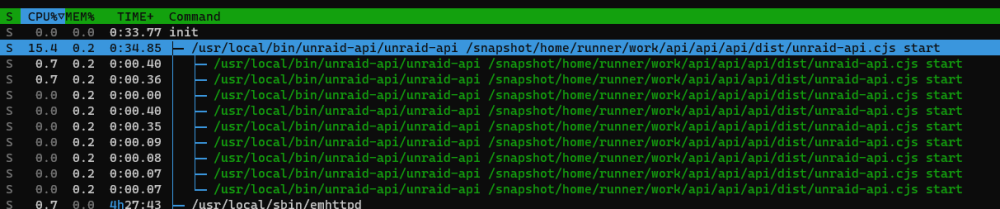
The unraid api consistently is using between 7 and 15% CPU. Rarely will I see it spike out of that range (above or below) but it does occur. It's consistently near the top of the list on CPU usage when I look at running processes. Is this expected? I can't imagine this plugin should be doing *that* much to merit constant work. Happy to post diagnostics or logs as needed, wasn't sure what might be needed here. Of note, I did attempt a unraid-api restart, but that didn't seem to affect much. API Version: Connect Plugin Version: CPU Usage (slightly higher than the range I posted above, but that was just a chance happening).

-
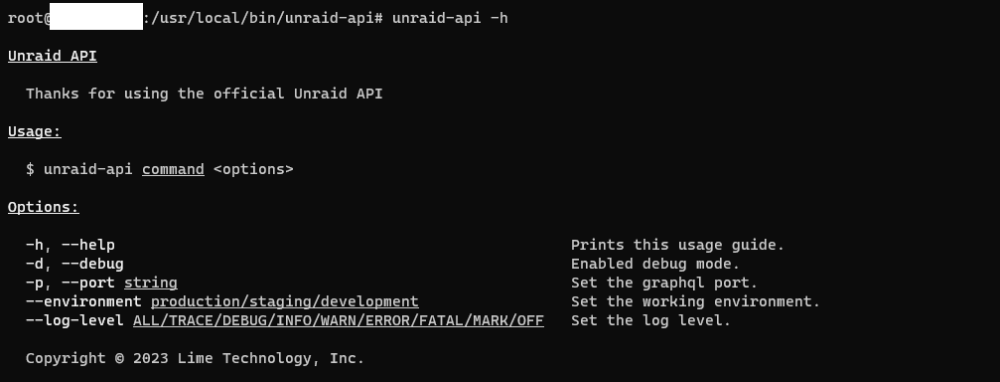
running the unraid-api -h command gives some help, but doesn't seem to document any of the actual commands to use. I realize this exists in the README.MD file, but it would be good practice to 1) include these commands in the output of the --help option, and 2) provide a description of each command (some are less clear like report).
-
Yes this can be accomplished from the unraid terminal, either via web or via ssh to unraid. Fortunately I did not have to do it from a remote machine like Hoopster, it just “worked”. The BMC takes a couple minutes to fully start back up. By rough memory I’d say it was another 4-5 minutes before I could get to the login screen, but it let me login immediately afterwards without any ugly loops. The unraid system (and ssh session) stayed up the entire time.
-
If this happens, you can cold reset the BMC from the command line from your machine. I'm pretty sure it's ipmitool mc reset cold but I could be wrong on that. I've had hte same issue you described with this board before with the BMC login loop and the BMC just needed a reset. Never lost any uptime on the machine itself.
-
Can confirm, seeing the same on 6.10.0rc1
-
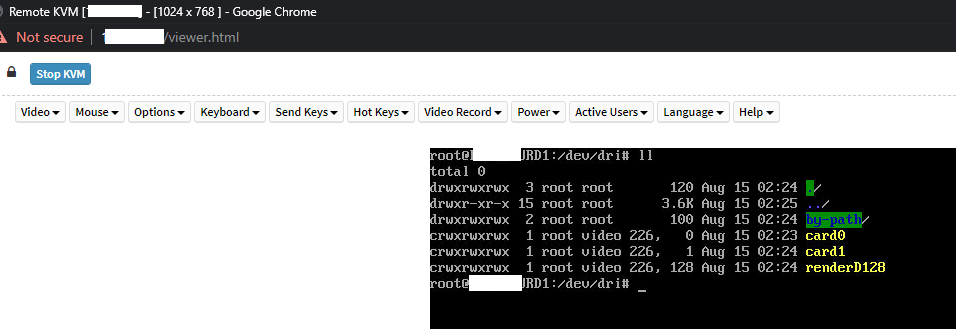
For those interested, it seems like the changes in Version: 6.10.0-rc1 have fixed the issues with losing the KVM/local monitor on the ASRockRack E3C246D4U board (BIOS L2.21A) when the on board GPU is enabled for hardware encoding. Just was watching the bootup in the KVM on the upgrade reboot and my jaw dropped when I saw a login prompt rather than the screen go black at the end of the boot process!
-
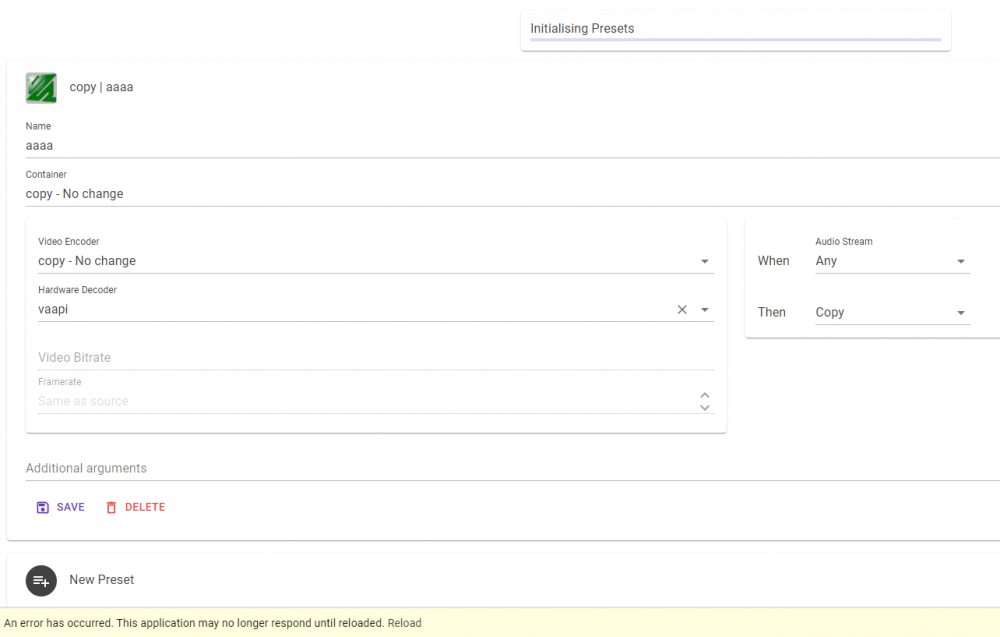
Keep getting "Initializing Presets" at the top and can't save a job to start. (see screenshot) Also getting a debug error when trying to save even a basic ffmpeg profile for testing. For reference, I have an intel setup, not nvdia, which is why i'm choosing to use vaapi. 2021-05-29T01:14:09.4573812-05:00 0HM92D2TDTQSF:00000002 [ERR] {SourceContext: "Microsoft.AspNetCore.Components.Server.Circuits.CircuitHost", TransportConnectionId: "cVEIOsITmh9f-_HHvm0VWg", RequestPath: "/_blazor", ConnectionId: "0HM92D2TDTQSF"} Unhandled exception in circuit '"9zBxGwnM4yDP_f5erFPpb29zF55XM0AxZbF9Gdr8CDQ"'. (47be2d5d) System.ArgumentNullException: Value cannot be null. (Parameter 'source') at System.Linq.ThrowHelper.ThrowArgumentNullException(ExceptionArgument argument) at System.Linq.Enumerable.Select[TSource,TResult](IEnumerable`1 source, Func`2 selector) at Compressarr.Settings.FFmpegFactory.FFmpegPresetBase..ctor(FFmpegPreset preset) in /src/Compressarr/Settings/FFmpegFactory/FFmpegPresetBase.cs:line 22 at Compressarr.Application.ApplicationService.<>c.<SaveAppSetting>b__94_0(FFmpegPreset x) in /src/Compressarr/Application/ApplicationService.cs:line 99 at System.Linq.Enumerable.SelectEnumerableIterator`2.MoveNext() at Newtonsoft.Json.Serialization.JsonSerializerInternalWriter.SerializeList(JsonWriter writer, IEnumerable values, JsonArrayContract contract, JsonProperty member, JsonContainerContract collectionContract, JsonProperty containerProperty) at Newtonsoft.Json.Serialization.JsonSerializerInternalWriter.Serialize(JsonWriter jsonWriter, Object value, Type objectType) at Newtonsoft.Json.JsonSerializer.SerializeInternal(JsonWriter jsonWriter, Object value, Type objectType) at Newtonsoft.Json.JsonSerializer.Serialize(JsonWriter jsonWriter, Object value) at Newtonsoft.Json.Linq.JToken.FromObjectInternal(Object o, JsonSerializer jsonSerializer) at Newtonsoft.Json.Linq.JToken.FromObject(Object o) at Compressarr.Application.ApplicationService.SaveAppSetting() in /src/Compressarr/Application/ApplicationService.cs:line 99 at Compressarr.Presets.PresetManager.AddPresetAsync(FFmpegPreset newPreset) in /src/Compressarr/Presets/PresetManager.cs:line 630 at Compressarr.Shared.PresetView.savePreset() in /src/Compressarr/Shared/PresetView.razor:line 217 at System.Threading.Tasks.Task.<>c.<ThrowAsync>b__140_0(Object state) at Microsoft.AspNetCore.Components.Rendering.RendererSynchronizationContext.ExecuteSynchronously(TaskCompletionSource`1 completion, SendOrPostCallback d, Object state) at System.Threading.ExecutionContext.RunInternal(ExecutionContext executionContext, ContextCallback callback, Object state) --- End of stack trace from previous location --- at Microsoft.AspNetCore.Components.Rendering.RendererSynchronizationContext.ExecuteBackground(WorkItem item)
-
@jonp were you able to find anything on this?
-
Here's a quick paste from my console. the first half is after a hard reboot, then I shut down docker and restarted it from the settings menu in unraid. Afterwards (I made a comment in the middle), there are new routes (the docker generated shims 10.0.0.0/25 and 10.0.0.128/25 to link the host and docker networks) and the network works properly again. Relevant new ip routes added: 10.0.0.0/25 dev shim-br0 scope link 10.0.0.128/25 dev shim-br0 scope link root@FC-PS-URD1:~# ip link 1: lo: <LOOPBACK,UP,LOWER_UP> mtu 65536 qdisc noqueue state UNKNOWN mode DEFAULT group default qlen 1000 link/loopback 00:00:00:00:00:00 brd 00:00:00:00:00:00 2: tunl0@NONE: <NOARP> mtu 1480 qdisc noop state DOWN mode DEFAULT group default qlen 1000 link/ipip 0.0.0.0 brd 0.0.0.0 3: gre0@NONE: <NOARP> mtu 1476 qdisc noop state DOWN mode DEFAULT group default qlen 1000 link/gre 0.0.0.0 brd 0.0.0.0 4: gretap0@NONE: <BROADCAST,MULTICAST> mtu 1476 qdisc noop state DOWN mode DEFAULT group default qlen 1000 link/ether 00:00:00:00:00:00 brd ff:ff:ff:ff:ff:ff 5: erspan0@NONE: <BROADCAST,MULTICAST> mtu 1464 qdisc noop state DOWN mode DEFAULT group default qlen 1000 link/ether 00:00:00:00:00:00 brd ff:ff:ff:ff:ff:ff 6: ip_vti0@NONE: <NOARP> mtu 1480 qdisc noop state DOWN mode DEFAULT group default qlen 1000 link/ipip 0.0.0.0 brd 0.0.0.0 7: sit0@NONE: <NOARP> mtu 1480 qdisc noop state DOWN mode DEFAULT group default qlen 1000 link/sit 0.0.0.0 brd 0.0.0.0 10: eth0: <BROADCAST,MULTICAST,SLAVE,UP,LOWER_UP> mtu 1500 qdisc mq master bond0 state UP mode DEFAULT group default qlen 1000 link/ether d0:50:99:d5:cf:26 brd ff:ff:ff:ff:ff:ff 11: eth1: <NO-CARRIER,BROADCAST,MULTICAST,SLAVE,UP> mtu 1500 qdisc mq master bond0 state DOWN mode DEFAULT group default qlen 1000 link/ether d0:50:99:d5:cf:26 brd ff:ff:ff:ff:ff:ff permaddr d0:50:99:d5:cf:27 12: bond0: <BROADCAST,MULTICAST,PROMISC,MASTER,UP,LOWER_UP> mtu 1500 qdisc noqueue master br0 state UP mode DEFAULT group default qlen 1000 link/ether d0:50:99:d5:cf:26 brd ff:ff:ff:ff:ff:ff 13: br0: <BROADCAST,MULTICAST,UP,LOWER_UP> mtu 1500 qdisc noqueue state UP mode DEFAULT group default qlen 1000 link/ether d0:50:99:d5:cf:26 brd ff:ff:ff:ff:ff:ff 14: wg0: <POINTOPOINT,NOARP,UP,LOWER_UP> mtu 1420 qdisc noqueue state UNKNOWN mode DEFAULT group default qlen 1000 link/none 15: br-c31dbeb7d5c2: <NO-CARRIER,BROADCAST,MULTICAST,UP> mtu 1500 qdisc noqueue state DOWN mode DEFAULT group default link/ether 02:42:43:73:59:a7 brd ff:ff:ff:ff:ff:ff 16: docker0: <BROADCAST,MULTICAST,UP,LOWER_UP> mtu 1500 qdisc noqueue state UP mode DEFAULT group default link/ether 02:42:f6:f6:69:75 brd ff:ff:ff:ff:ff:ff 18: veth58ec1ca@if17: <BROADCAST,MULTICAST,UP,LOWER_UP> mtu 1500 qdisc noqueue master docker0 state UP mode DEFAULT group default link/ether a6:76:5d:44:40:7c brd ff:ff:ff:ff:ff:ff link-netnsid 0 34: veth7c64111@if33: <BROADCAST,MULTICAST,UP,LOWER_UP> mtu 1500 qdisc noqueue master docker0 state UP mode DEFAULT group default link/ether e6:22:25:f9:dd:04 brd ff:ff:ff:ff:ff:ff link-netnsid 14 root@FC-PS-URD1:~# ip route default via 10.0.0.1 dev br0 10.0.0.0/24 dev br0 proto kernel scope link src 10.0.0.246 172.17.0.0/16 dev docker0 proto kernel scope link src 172.17.0.1 172.18.0.0/16 dev br-c31dbeb7d5c2 proto kernel scope link src 172.18.0.1 linkdown root@FC-PS-URD1:~# ping 10.0.0.187 PING 10.0.0.187 (10.0.0.187) 56(84) bytes of data. From 10.0.0.246 icmp_seq=1 Destination Host Unreachable From 10.0.0.246 icmp_seq=2 Destination Host Unreachable From 10.0.0.246 icmp_seq=3 Destination Host Unreachable ^C --- 10.0.0.187 ping statistics --- 4 packets transmitted, 0 received, +3 errors, 100% packet loss, time 3066ms pipe 4 root@FC-PS-URD1:~# ## SHUTDOWN DOCKER, RESTARTED DOCKER root@FC-PS-URD1:~# ## NO OTHER CHANGES root@FC-PS-URD1:~# ping 10.0.0.187 PING 10.0.0.187 (10.0.0.187) 56(84) bytes of data. 64 bytes from 10.0.0.187: icmp_seq=1 ttl=64 time=0.024 ms 64 bytes from 10.0.0.187: icmp_seq=2 ttl=64 time=0.020 ms ^C --- 10.0.0.187 ping statistics --- 2 packets transmitted, 2 received, 0% packet loss, time 1014ms rtt min/avg/max/mdev = 0.020/0.022/0.024/0.002 ms root@FC-PS-URD1:~# ip route default via 10.0.0.1 dev br0 10.0.0.0/25 dev shim-br0 scope link 10.0.0.0/24 dev br0 proto kernel scope link src 10.0.0.246 10.0.0.128/25 dev shim-br0 scope link 172.17.0.0/16 dev docker0 proto kernel scope link src 172.17.0.1 172.18.0.0/16 dev br-c31dbeb7d5c2 proto kernel scope link src 172.18.0.1 linkdown root@FC-PS-URD1:~# root@FC-PS-URD1:~# root@FC-PS-URD1:~# ip link 1: lo: <LOOPBACK,UP,LOWER_UP> mtu 65536 qdisc noqueue state UNKNOWN mode DEFAULT group default qlen 1000 link/loopback 00:00:00:00:00:00 brd 00:00:00:00:00:00 2: tunl0@NONE: <NOARP> mtu 1480 qdisc noop state DOWN mode DEFAULT group default qlen 1000 link/ipip 0.0.0.0 brd 0.0.0.0 3: gre0@NONE: <NOARP> mtu 1476 qdisc noop state DOWN mode DEFAULT group default qlen 1000 link/gre 0.0.0.0 brd 0.0.0.0 4: gretap0@NONE: <BROADCAST,MULTICAST> mtu 1476 qdisc noop state DOWN mode DEFAULT group default qlen 1000 link/ether 00:00:00:00:00:00 brd ff:ff:ff:ff:ff:ff 5: erspan0@NONE: <BROADCAST,MULTICAST> mtu 1464 qdisc noop state DOWN mode DEFAULT group default qlen 1000 link/ether 00:00:00:00:00:00 brd ff:ff:ff:ff:ff:ff 6: ip_vti0@NONE: <NOARP> mtu 1480 qdisc noop state DOWN mode DEFAULT group default qlen 1000 link/ipip 0.0.0.0 brd 0.0.0.0 7: sit0@NONE: <NOARP> mtu 1480 qdisc noop state DOWN mode DEFAULT group default qlen 1000 link/sit 0.0.0.0 brd 0.0.0.0 10: eth0: <BROADCAST,MULTICAST,SLAVE,UP,LOWER_UP> mtu 1500 qdisc mq master bond0 state UP mode DEFAULT group default qlen 1000 link/ether d0:50:99:d5:cf:26 brd ff:ff:ff:ff:ff:ff 11: eth1: <NO-CARRIER,BROADCAST,MULTICAST,SLAVE,UP> mtu 1500 qdisc mq master bond0 state DOWN mode DEFAULT group default qlen 1000 link/ether d0:50:99:d5:cf:26 brd ff:ff:ff:ff:ff:ff permaddr d0:50:99:d5:cf:27 12: bond0: <BROADCAST,MULTICAST,PROMISC,MASTER,UP,LOWER_UP> mtu 1500 qdisc noqueue master br0 state UP mode DEFAULT group default qlen 1000 link/ether d0:50:99:d5:cf:26 brd ff:ff:ff:ff:ff:ff 13: br0: <BROADCAST,MULTICAST,UP,LOWER_UP> mtu 1500 qdisc noqueue state UP mode DEFAULT group default qlen 1000 link/ether d0:50:99:d5:cf:26 brd ff:ff:ff:ff:ff:ff 14: wg0: <POINTOPOINT,NOARP,UP,LOWER_UP> mtu 1420 qdisc noqueue state UNKNOWN mode DEFAULT group default qlen 1000 link/none 15: br-c31dbeb7d5c2: <NO-CARRIER,BROADCAST,MULTICAST,UP> mtu 1500 qdisc noqueue state DOWN mode DEFAULT group default link/ether 02:42:43:73:59:a7 brd ff:ff:ff:ff:ff:ff 59: docker0: <BROADCAST,MULTICAST,UP,LOWER_UP> mtu 1500 qdisc noqueue state UP mode DEFAULT group default link/ether 02:42:b9:5f:64:4d brd ff:ff:ff:ff:ff:ff 60: shim-br0@br0: <BROADCAST,MULTICAST,UP,LOWER_UP> mtu 1500 qdisc noqueue state UP mode DEFAULT group default qlen 1000 link/ether 62:a9:9c:7c:8c:ec brd ff:ff:ff:ff:ff:ff 62: vethfbb91df@if61: <BROADCAST,MULTICAST,UP,LOWER_UP> mtu 1500 qdisc noqueue master docker0 state UP mode DEFAULT group default link/ether 82:aa:df:a5:64:6f brd ff:ff:ff:ff:ff:ff link-netnsid 0 64: veth7d3b0b2@if63: <BROADCAST,MULTICAST,UP,LOWER_UP> mtu 1500 qdisc noqueue master docker0 state UP mode DEFAULT group default link/ether de:80:0a:a4:85:de brd ff:ff:ff:ff:ff:ff link-netnsid 1
-
@jonp, What @tjb_altf4 said. Unraid creates a shim network when “host access to custom networks” is enabled.
-
Bump, Limetech (or other friendly folks here in the forums) are you able to assist?
-
After a graceful reboot, no issue, but after a hard reboot from watchdog or powerloss, the system will not start up with the docker shim in place resulting in no network connection between the unraid server and custom docker IP's. As soon as I shut down and re-start the docker service from the settings menu, the shim is generated and everything works as expected. Confirmed that access to custom networks is in place. I've seen a few other mentions on the forums but nobody ever seemed to have a resolution (nor did they mention in the post they realized the shim wasn't generated). Additionally, this is not new to 6.9.2. Pretty certain it's been going on since pre 6.9 but can't be certain. fc-ps-urd1-diagnostics-20210512-2016.zip
-
Yes, it may be something related to this chipset I'm using. It's an ASRockRack E3C246D4U. I'm not using a separate GPU.... just the on board video because it supports Intel QuickSync Video which meets all my needs for transcoding multiple streams at once. Hoopster on the forums has had similar issues with the same board/proc combo, wasn't sure if this might help. That's a pity but oh well, thanks for getting back with me on it!
-
That's fantastic (if it works!). Getting Intel QuickSync to pass through to the dockers in the past has always been a huge issue. @Hoopster I know you also had similar problems with modprobe i915 for quicksync/QSV. Did this work out for you on 6.9.1+?
-
Both good points. I've removed the plugin along with 7 or 8 others that I know for sure I don't use. Unfortunately, I'm currently running a preclear on a new disk so I won't be able to check until tomorrow, but crossing my fingers this is it!
-
I've got a Xeon E-2288G that I have to use modprobe i915 chmod -R 777 /dev/dri to be able to get the quicksync video to encode properly inside plex and transcoding containers. Unfortunately as soon as I launch those two commands, it kills video out of the VGA port (and IPMI Remote video). Would GVT-g being enabled solve this so that I could keep video out of the VGA port too?
-
fc-ps-urd1-diagnostics-20210427-2146.zip Here you go. In the meantime, I added it back to my go file. Hopefully it doesn't just start working and then fill up my authorized keys file
-
No worries, thanks for trying for us.
-
root@FC-PS-URD1:/boot/config/ssh/root# ls -al /root/.ssh /boot/config/ssh /boot/config/ssh/root lrwxrwxrwx 1 root root 21 Apr 7 13:48 /root/.ssh -> /boot/config/ssh/root/ /boot/config/ssh: total 192 drwx------ 3 root root 16384 Jul 26 2020 ./ drwx------ 12 root root 16384 Apr 27 08:24 ../ drwx------ 2 root root 16384 Apr 27 08:54 root/ -rw------- 1 root root 1381 May 2 2020 ssh_host_dsa_key -rw------- 1 root root 605 May 2 2020 ssh_host_dsa_key.pub -rw------- 1 root root 505 May 2 2020 ssh_host_ecdsa_key -rw------- 1 root root 177 May 2 2020 ssh_host_ecdsa_key.pub -rw------- 1 root root 411 May 2 2020 ssh_host_ed25519_key -rw------- 1 root root 97 May 2 2020 ssh_host_ed25519_key.pub -rw------- 1 root root 2602 May 2 2020 ssh_host_rsa_key -rw------- 1 root root 569 May 2 2020 ssh_host_rsa_key.pub -rw------- 1 root root 3245 Apr 27 08:24 sshd_config /boot/config/ssh/root: total 128 drwx------ 2 root root 16384 Apr 27 08:54 ./ drwx------ 3 root root 16384 Jul 26 2020 ../ -rw------- 1 root root 2602 Jun 30 2020 authorized_keys -rw------- 1 root root 86 Apr 23 00:37 config -rw------- 1 root root 1823 Feb 9 20:58 id_rsa -rw------- 1 root root 535 Apr 23 00:37 known_hosts -rw------- 1 root root 387 Apr 23 00:37 unraidbackup_id_ed25519 -rw------- 1 root root 82 Apr 23 00:37 unraidbackup_id_ed25519.pub
-
Just confirmed crontab is only running the default things that kick off from the webgui and userscripts. My only user scripts that run right now are all unrelated to anything ssh. One is a file mover between two explicit folders (not ssh folders), one creates a ramdisk folder for tdarr, and one pauses parity until overnight if the server reboots during the day. Deleted and it came back with the same date of Jun 30. It's like the folder isn't persistent at all?
-
reverted the gui search page back to plugin default, installed new js library, still autofilling on main when using unassigned devices plugins
-
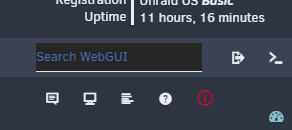
Well, that didn't do it..... still happening. But the one place I know I can always replicate it is the main page. I did some reading and Chrome does some type of guessing based on the page you're on for the forms (new Edge doesn't do this). That got me thinking that there's no username or password fields anywhere on the primary Dashboard, Shares, Settings, etc. pages (you have to click to another link to get a username field). However, the main page, when combined with the unassigned devices/unassigned devices plus plugins does have an in page username/password field. That was what was kicking the autofill off. As soon as I removed the plugins, this behavior stopped. At this point I'm stumped on what to do to make it not think that's a username field. Edit: some folks tried to wrap the field in it's own form and putting an autocomplete=off attribute on that and had luck. https://datatables.net/forums/discussion/comment/147347/#Comment_147347 Edit 2: Wrapping in a form did work $("#nav-right").prepend("<form autocomplete='off'><span style='float:left'><input autocomplete='new-password' id='guiSearchBox' class='narrow' placeholder='Search WebGUI' type='text'></input></span></form>"); , however.... that messed up the icons on the right. Edit 3: Solved? I set a min width of 475px on the nav right div and that has kept it from overflowing. <div id="nav-right" style="min-width: 475px;"> @Squid I submitted a PR for this fix: https://github.com/Squidly271/gui.search/pull/1
-
Running into an issue on 6.9.2 and the changes for authorized_keys. I have nothing in my go file (anymore) that will modify the authorized keys or ssh folders. Everytime I reboot, the authorized_keys file in /boot/config/ssh/root reverts to Jun 30 2020. I've confirmed that it's symlinked as /root/.ssh to that /boot.... folder above. After I've made the changes, I've also confirmed that the file inside /boot.... updated. Just doesn't persist through reboot. Any ideas?





