DivideBy0
Members
-
Joined
-
Last visited
Everything posted by DivideBy0
-
Hey thanks much for taking the time Sir. I will keep googling and see if any fixes works. No rush on my end as is not critical. Thanks again mate
-
I did google it and found some similar errors but not a real clear fix. I already moved on but I guess this is free support right I am glad it works for others
-
Well I guess I uninstalled and moved on to something else. This place is pretty DEAD
-
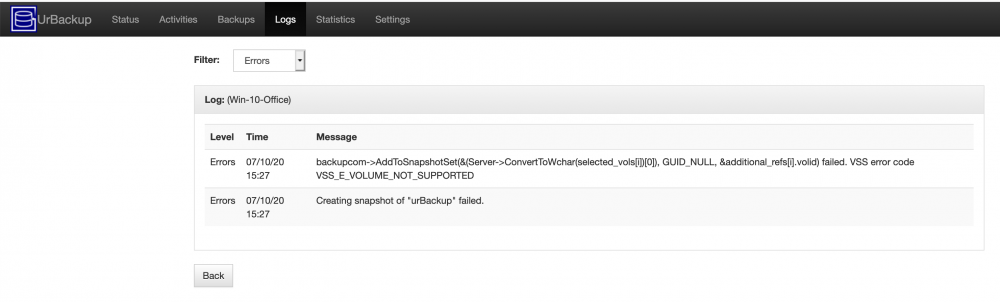
Thanks for putting this together mate. I got it all configure but I get some errors during the backup. See attached pic. Couldn't find anything related so I posted here. Any ideas?
-
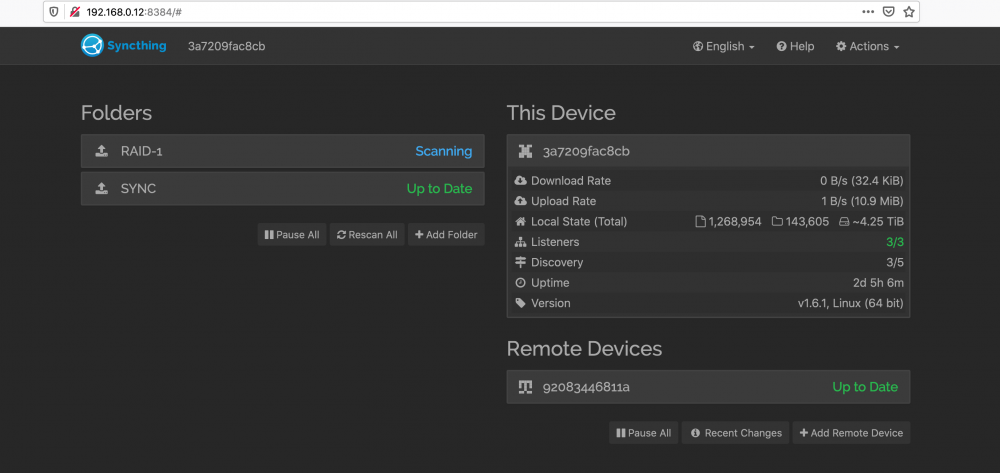
This place id DEAD This stuff ain't working It scaned for 2 freaking days and now is STUCK. Any ideas? It won't move or transfer anything
-
SanDisk 64GB Cruzer Fit USB Flash Drive - SDCZ33-064G-G35 This is a 2.0 and runs fine and at a very low temperatures. Read the reviews on them. I use them on my PBX and they've been running fine for years. I think you're over engineering this one
-
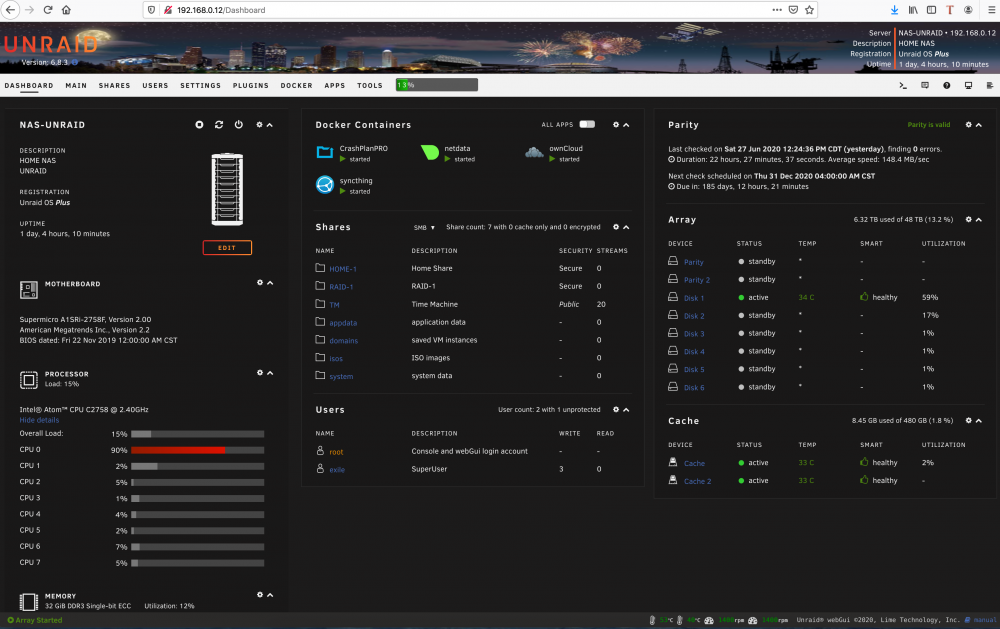
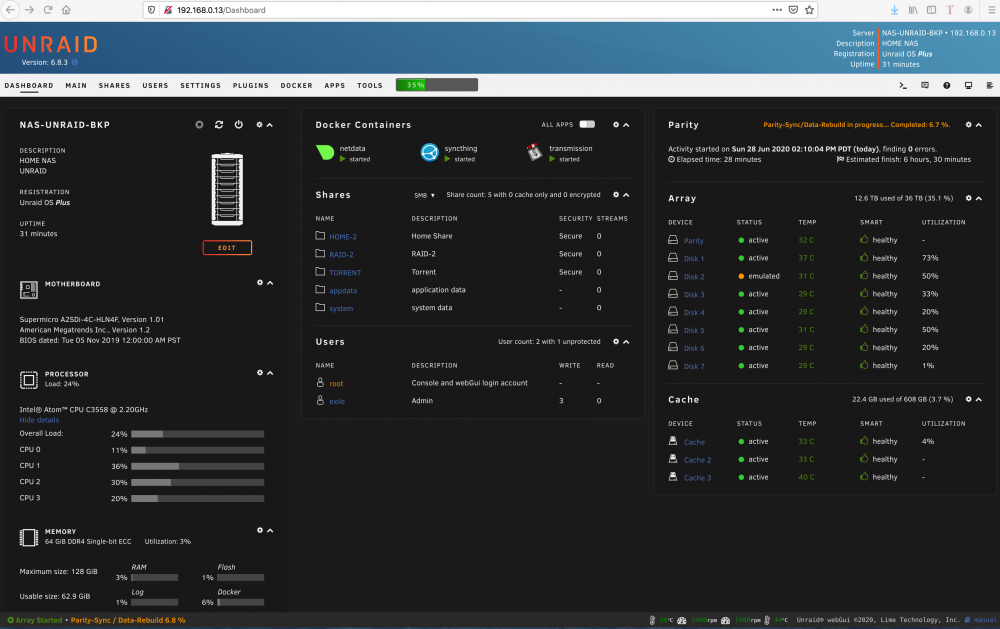
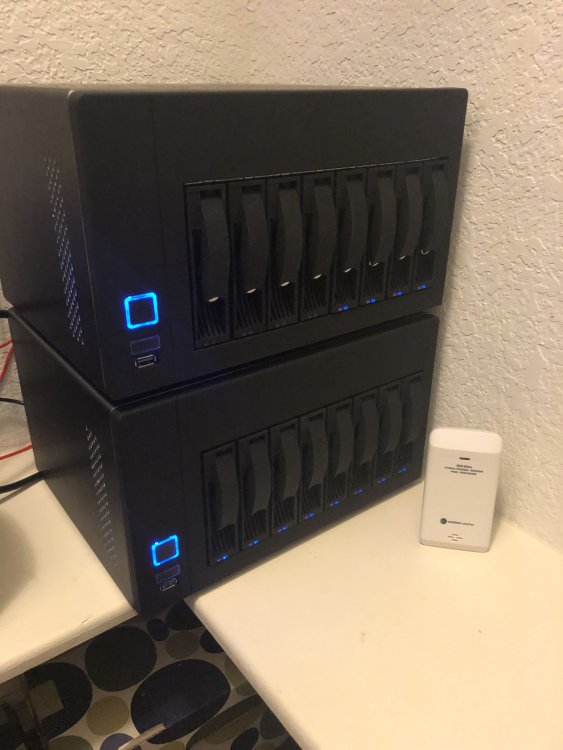
Absolutely Sir. Here it is for both unraids: UNRAID -1 - Case: U-NAS NSC-800 Server Chassis - Power: Model: KW-3011F-1M1 - Mobo: Supermicro A1SRi-2758F - Mini ITX - Intel Atom C2758 - CPU: Intel Atom C2758 4 cores / 8 threads - built in motherboard - 4 Ethernet ports + IPMI Management Port with license - RAM: Samsung 32GB ECC (2 x 16) - USB Drive Sandisk 64G - on the motherboard - 2 X SSD Drives - Kingston 480GB - cache drives - SATA: LSI 9220-8i IBM M1015 SAS P20 IT Mode For ZFS FreeNAS unRAID 6Gbps SAS HBA US - Pcie Riser Cable PCI-e PCI Express 8X Extension pci-e 8X Card - 8 X 8 TB SATA Segate drives 5200 RPM UNRAID -2 - Case: U-NAS NSC-800 Server Chassis - Power: Model: KW-3011F-1M1 - Mobo: Supermicro A2SDi-4C-HLN4F - Mini ITX - Intel Atom C3558 - CPU: Intel Atom C3558 4 cores / 4 threads - built in motherboard - 4 Ethernet ports + IPMI Management Port with license - RAM: Supermicro 64GB ECC (2 x 32) - USB Drive Sandisk 64G - on the motherboard - 2 X SSD Drives - Kingston 480GB - cache drives - 1 X NVME Drive - Samsung 960 - 256 GB - FreeNAS dual boot or cache drive - SATA: LSI 9220-8i IBM M1015 SAS P20 IT Mode For ZFS FreeNAS unRAID 6Gbps SAS HBA US - Pcie Riser Cable PCI-e PCI Express 8X Extension pci-e 8X Card - 4 X 5TB SATA Segate drives 5400 RPM - 4 X 4TB SATA Segate drives 5400 RPM
-
Thanks partner. So reading up on the deduplication matters I don't think this will make a difference in my case honestly. All I am backing up is pretty much pictures and videos which are very static and metadata does not change at all. I add more pictures or videos after a photoshoot job but everything else stays the same. Am I understanding your point and this write up correctly Sir? https://support.code42.com/CrashPlan/4/Configuring/Unsupported_changes_to_CrashPlan_de-duplication_settings Thanks again for making the time to comment and guide
-
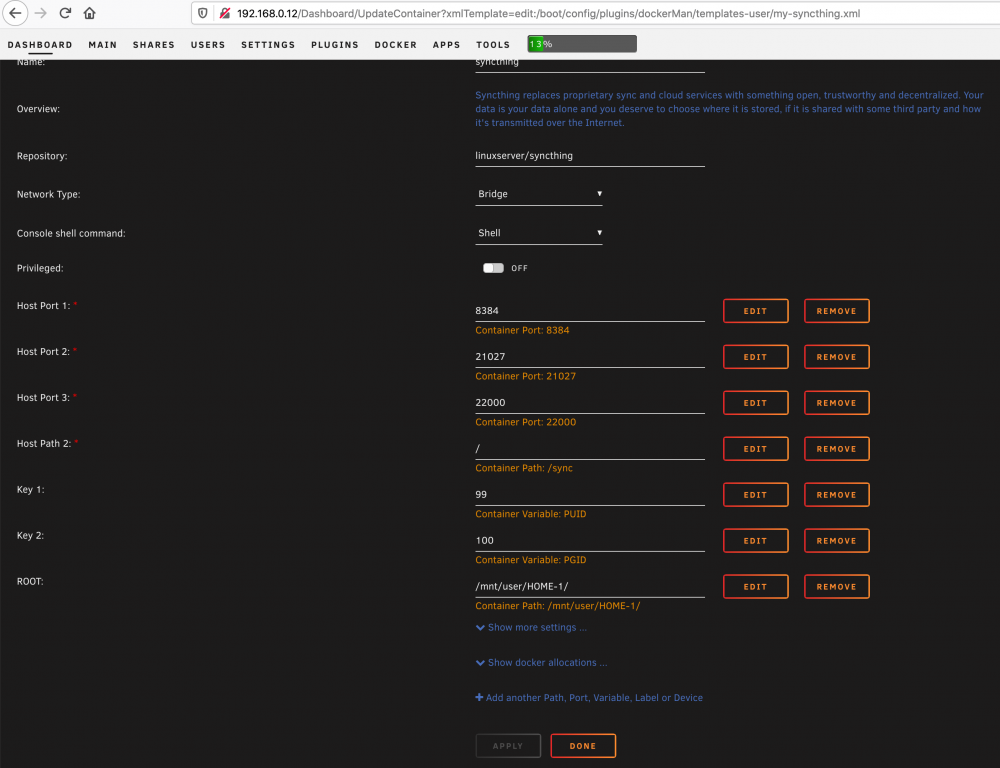
Well found the solution to my own problem You'd could just add extra Host Paths as required, in my case / ROOT and be done with it Work perfect now.
-
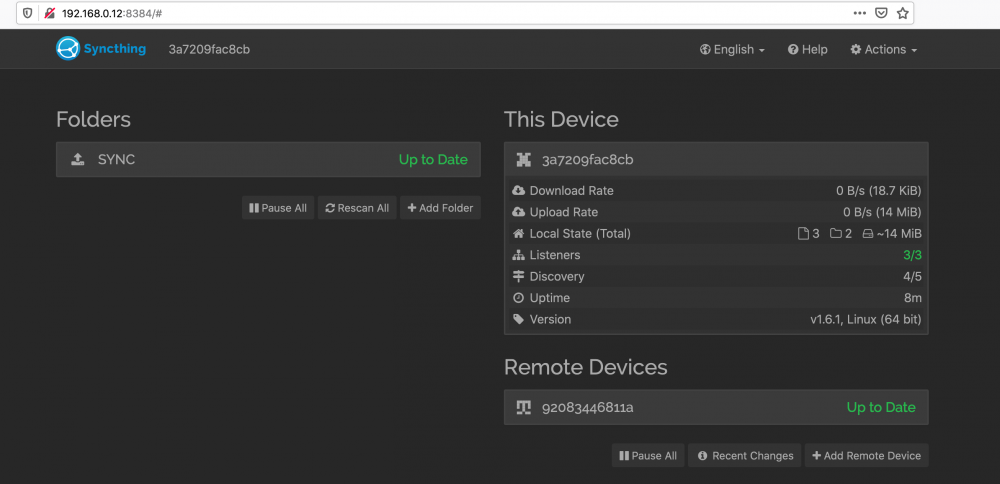
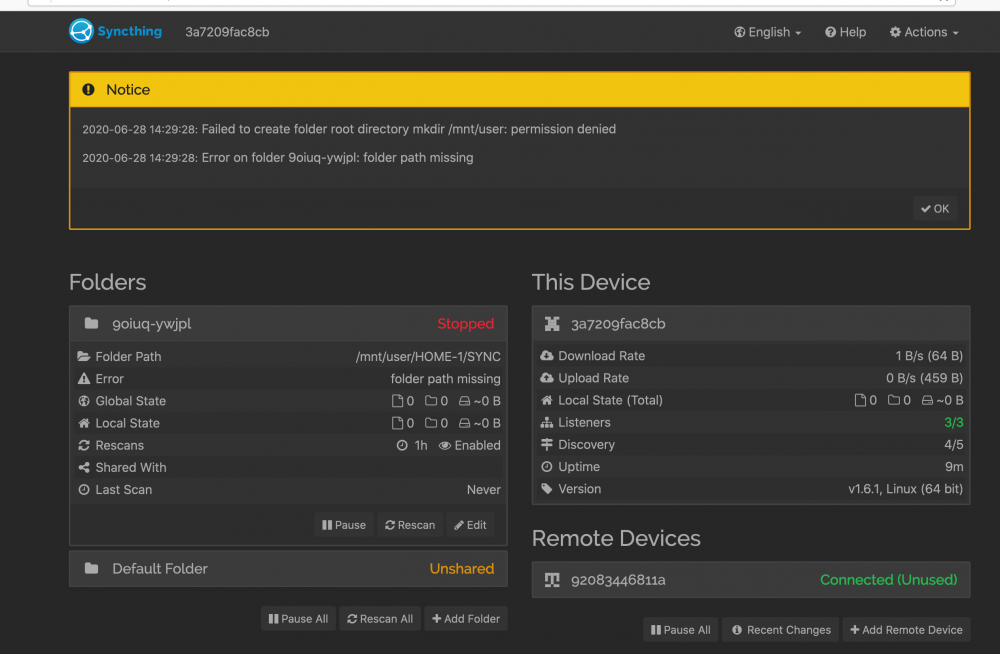
I think it has been asked here but I see no answer or guidance. I managed to setup Syncthing in 2 Unraid servers and they're talking to each other. Now this is not very clear. How do I point Unraid 1 to an existing folder/share to sync it across to the Unraid 2? Looks like permission issue to me?
-
Why build one when you can build 2
-
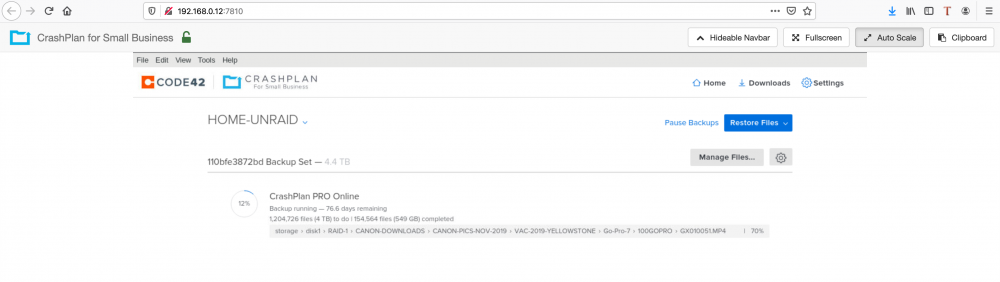
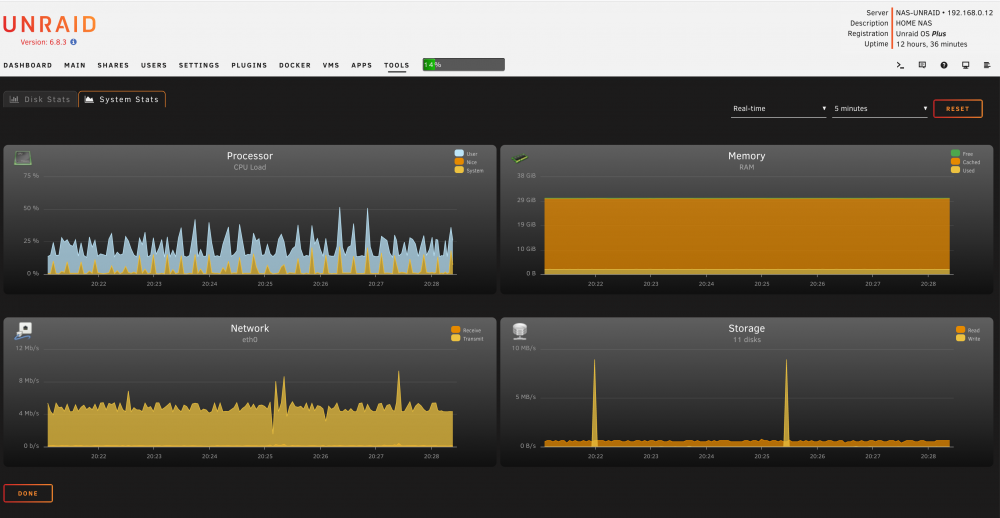
CrashPlan Performance Question & Guidance Am I doing something wrong? I have gigabit ISP and yet I am pushing just 4 megs up I will be at this for 70 some days Is this common? Any tweaking I can do? Anything I should know? Best practices?
-
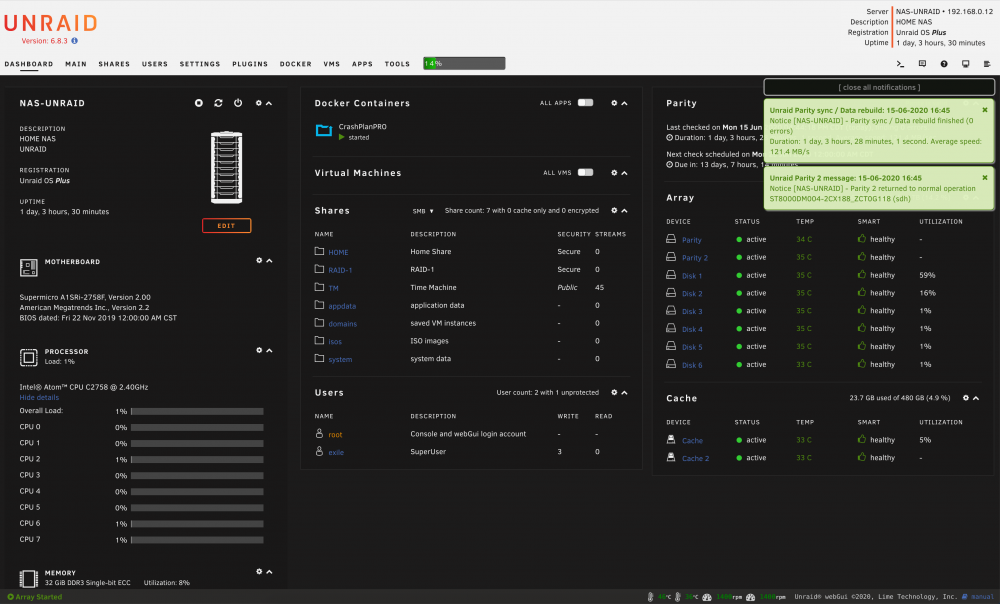
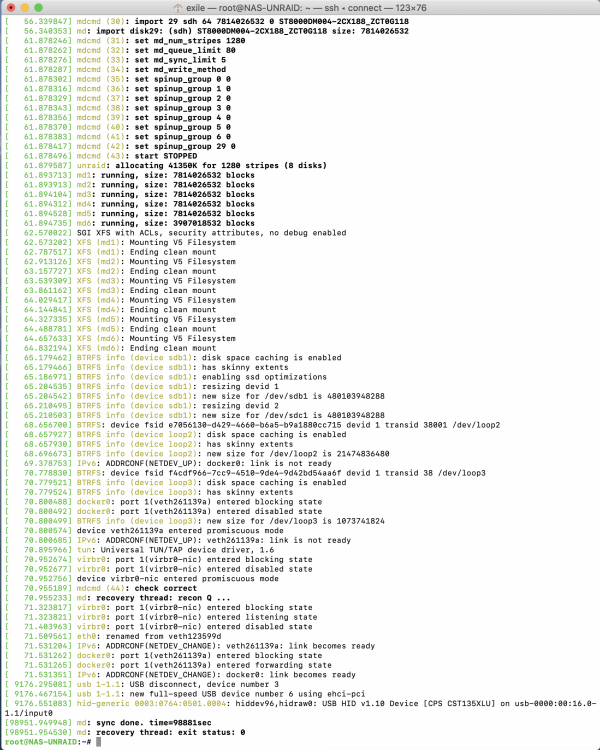
I am happy to inform you that I have a STABLE system with all parity done and no drive errors anymore. Is not just about keeping it healthy. THANKS Johnnie for all the help and guidance Sir. The firmware advise did the trick for sure. I redid all my cables as well just in case
-
Thank you Sir. I am now the proud owner of 20.00.07.00 firmware as suggested. I just stared the parity for the second drive. Let's see if I still get the errors. root@NAS-UNRAID:~# dmesg |grep SAS [ 27.949443] mpt2sas_cm0: LSISAS2008: FWVersion(20.00.07.00), ChipRevision(0x03), BiosVersion(07.39.02.00) [ 27.949562] scsi host7: Fusion MPT SAS Host
-
Great help as always Sir. I will do that ASAP. Can you kindly point me to the 20.00.07.00 firmware and I will do the rest. Is this one? Update on 17.04.2017, v4 <--- this is the latest, use this one! Firmware is still P20.00.07.00 Corrections for EFI environment. Untested due to missing hardware. Post your experience in the forum. https://www.mediafire.com/?py9c1w5u56xytw2 To be hones Johnie I don't even know where to start and flash this card I am not even sure what I got. I got this card on eBay at https://www.ebay.com/itm/324130098891?ViewItem=&item=324130098891 Product Details: IBM ServeRAID SAS 9200-8i SAS / 6G/bs RAID Controlador PCI-E / IBM 6 Gigabit Performance Optimized HBA IBM Option : 46M0912 IBM FRU: 46C8937 LSI p/n: SAS9200-8i
-
Well as of today I am an Unraid paid member Something feels off. This is brand new setup and doing the parity sync now after I moved about 8TB to my data drives. Are those "errors" normal? This is all brand new hardware with quality products and I know my way around computers. I am being very nervous about my data on this NAS to be honest. Is there a way to stress test the hardware before I fully trust this setup? [39083.429168] sd 7:0:1:0: attempting task abort! scmd(00000000d0d237f7) [39083.429176] sd 7:0:1:0: [sde] tag#1798 CDB: opcode=0x12 12 00 00 00 24 00 [39083.429180] scsi target7:0:1: handle(0x0009), sas_address(0x4433221100000000), phy(0) [39083.429184] scsi target7:0:1: enclosure logical id(0x500605b0065ba270), slot(3) [39083.620948] sd 7:0:1:0: task abort: SUCCESS scmd(00000000d0d237f7) [39083.621033] program smartctl is using a deprecated SCSI ioctl, please convert it to SG_IO [39083.813017] sd 7:0:1:0**: Power-on or device reset occurred** [39083.907951] program smartctl is using a deprecated SCSI ioctl, please convert it to SG_IO [39083.933041] program smartctl is using a deprecated SCSI ioctl, please convert it to SG_IO [39083.933233] program smartctl is using a deprecated SCSI ioctl, please convert it to SG_IO [39083.969676] program smartctl is using a deprecated SCSI ioctl, please convert it to SG_IO [39083.977305] program smartctl is using a deprecated SCSI ioctl, please convert it to SG_IO [39084.616935] sd 7:0:1:0**: Power-on or device reset occurred** [39129.380895] sd 7:0:1:0: attempting task abort! scmd(00000000abf4a92a) [39129.380903] sd 7:0:1:0: tag#345 CDB: opcode=0x0 00 00 00 00 00 00 [39129.380908] scsi target7:0:1: handle(0x0009), sas_address(0x4433221100000000), phy(0) [39129.380911] scsi target7:0:1: enclosure logical id(0x500605b0065ba270), slot(3) [39129.536807] sd 7:0:1:0: task abort: SUCCESS scmd(00000000abf4a92a) [39129.563554] sd 7:0:1:0**: Power-on or device reset occurred** [39130.171400] sd 7:0:1:0**: Power-on or device reset occurred** [41043.162394] sd 7:0:1:0: attempting task abort! scmd(00000000b4adac81) [41043.162403] sd 7:0:1:0: tag#2776 CDB: opcode=0x0 00 00 00 00 00 00 [41043.162408] scsi target7:0:1: handle(0x0009), sas_address(0x4433221100000000), phy(0) [41043.162411] scsi target7:0:1: enclosure logical id(0x500605b0065ba270), slot(3) [41043.355188] sd 7:0:1:0: task abort: SUCCESS scmd(00000000b4adac81) [41043.584916] sd 7:0:1:0**: Power-on or device reset occurred** [41043.886424] sd 7:0:1:0**: Power-on or device reset occurred** [41073.690220] sd 7:0:1:0: attempting task abort! scmd(00000000b4adac81) [41073.690229] sd 7:0:1:0: [sde] tag#122 CDB: opcode=0x12 12 00 00 00 24 00 [41073.690234] scsi target7:0:1: handle(0x0009), sas_address(0x4433221100000000), phy(0) [41073.690237] scsi target7:0:1: enclosure logical id(0x500605b0065ba270), slot(3) [41073.845401] sd 7:0:1:0: task abort: SUCCESS scmd(00000000b4adac81) [41074.085260] sd 7:0:1:0**: Power-on or device reset occurred** [41074.338995] sd 7:0:1:0**: Power-on or device reset occurred** [41198.361460] sd 7:0:1:0: attempting task abort! scmd(0000000045a9d654) [41198.361468] sd 7:0:1:0: [sde] tag#2181 CDB: opcode=0x12 12 00 00 00 24 00 [41198.361473] scsi target7:0:1: handle(0x0009), sas_address(0x4433221100000000), phy(0) [41198.361476] scsi target7:0:1: enclosure logical id(0x500605b0065ba270), slot(3) [41198.550022] sd 7:0:1:0: task abort: SUCCESS scmd(0000000045a9d654) [41198.550102] program smartctl is using a deprecated SCSI ioctl, please convert it to SG_IO [41198.586657] sd 7:0:1:0**: Power-on or device reset occurred** [41198.730714] program smartctl is using a deprecated SCSI ioctl, please convert it to SG_IO [41198.746028] program smartctl is using a deprecated SCSI ioctl, please convert it to SG_IO [41198.757853] program smartctl is using a deprecated SCSI ioctl, please convert it to SG_IO [41198.787544] program smartctl is using a deprecated SCSI ioctl, please convert it to SG_IO [41198.821420] program smartctl is using a deprecated SCSI ioctl, please convert it to SG_IO [41199.113144] sd 7:0:1:0**: Power-on or device reset occurred** [41343.256600] sd 7:0:1:0: attempting task abort! scmd(00000000d1bf3ef7) [41343.256608] sd 7:0:1:0: tag#447 CDB: opcode=0x0 00 00 00 00 00 00 [41343.256613] scsi target7:0:1: handle(0x0009), sas_address(0x4433221100000000), phy(0) [41343.256616] scsi target7:0:1: enclosure logical id(0x500605b0065ba270), slot(3) [41343.431193] sd 7:0:1:0: task abort: SUCCESS scmd(00000000d1bf3ef7) [41343.588280] sd 7:0:1:0**: Power-on or device reset occurred** [41344.141831] sd 7:0:1:0**: Power-on or device reset occurred** [41441.368053] sd 7:0:1:0: attempting task abort! scmd(00000000197c88fc) [41441.368062] sd 7:0:1:0: [sde] tag#3100 CDB: opcode=0x12 12 00 00 00 24 00 [41441.368067] scsi target7:0:1: handle(0x0009), sas_address(0x4433221100000000), phy(0) [41441.368070] scsi target7:0:1: enclosure logical id(0x500605b0065ba270), slot(3) [41441.539333] sd 7:0:1:0: task abort: SUCCESS scmd(00000000197c88fc) [41441.539395] program smartctl is using a deprecated SCSI ioctl, please convert it to SG_IO [41441.589366] sd 7:0:1:0**: Power-on or device reset occurred** [41441.752001] program smartctl is using a deprecated SCSI ioctl, please convert it to SG_IO [41441.752919] program smartctl is using a deprecated SCSI ioctl, please convert it to SG_IO [41441.753022] program smartctl is using a deprecated SCSI ioctl, please convert it to SG_IO [41441.775572] program smartctl is using a deprecated SCSI ioctl, please convert it to SG_IO [41441.779643] program smartctl is using a deprecated SCSI ioctl, please convert it to SG_IO [41442.104910] sd 7:0:1:0**: Power-on or device reset occurred** [41943.829358] sd 7:0:1:0: attempting task abort! scmd(00000000e835d7a5) [41943.829366] sd 7:0:1:0: tag#175 CDB: opcode=0x0 00 00 00 00 00 00 [41943.829371] scsi target7:0:1: handle(0x0009), sas_address(0x4433221100000000), phy(0) [41943.829374] scsi target7:0:1: enclosure logical id(0x500605b0065ba270), slot(3) [41944.024358] sd 7:0:1:0: task abort: SUCCESS scmd(00000000e835d7a5) [41944.095001] sd 7:0:1:0**: Power-on or device reset occurred** [41944.671726] sd 7:0:1:0**: Power-on or device reset occurred** [41974.805191] sd 7:0:1:0: attempting task abort! scmd(0000000020d4190b) [41974.805199] sd 7:0:1:0: tag#1498 CDB: opcode=0x0 00 00 00 00 00 00 [41974.805204] scsi target7:0:1: handle(0x0009), sas_address(0x4433221100000000), phy(0) [41974.805207] scsi target7:0:1: enclosure logical id(0x500605b0065ba270), slot(3) [41974.962878] sd 7:0:1:0: task abort: SUCCESS scmd(0000000020d4190b) [41975.095342] sd 7:0:1:0**: Power-on or device reset occurred** [41975.639977] sd 7:0:1:0**: Power-on or device reset occurred** [45098.437624] sd 7:0:6:0: attempting task abort! scmd(00000000280332b1) [45098.437633] sd 7:0:6:0: [sdj] tag#13 CDB: opcode=0x12 12 00 00 00 24 00 [45098.437638] scsi target7:0:6: handle(0x000c), sas_address(0x4433221105000000), phy(5) [45098.437641] scsi target7:0:6: enclosure logical id(0x500605b0065ba270), slot(6) [45099.157555] sd 7:0:6:0: task abort: SUCCESS scmd(00000000280332b1) [45099.157665] program smartctl is using a deprecated SCSI ioctl, please convert it to SG_IO [45101.380980] sd 7:0:6:0**: Power-on or device reset occurred** [45101.384004] program smartctl is using a deprecated SCSI ioctl, please convert it to SG_IO [45101.445111] program smartctl is using a deprecated SCSI ioctl, please convert it to SG_IO [45101.449351] program smartctl is using a deprecated SCSI ioctl, please convert it to SG_IO [45101.538129] program smartctl is using a deprecated SCSI ioctl, please convert it to SG_IO [45101.638056] program smartctl is using a deprecated SCSI ioctl, please convert it to SG_IO root@NAS-UNRAID:~# root@NAS-UNRAID:~# nas-unraid-diagnostics-20200613-1031.zip