DivideBy0
Members
-
Joined
-
Last visited
Everything posted by DivideBy0
-
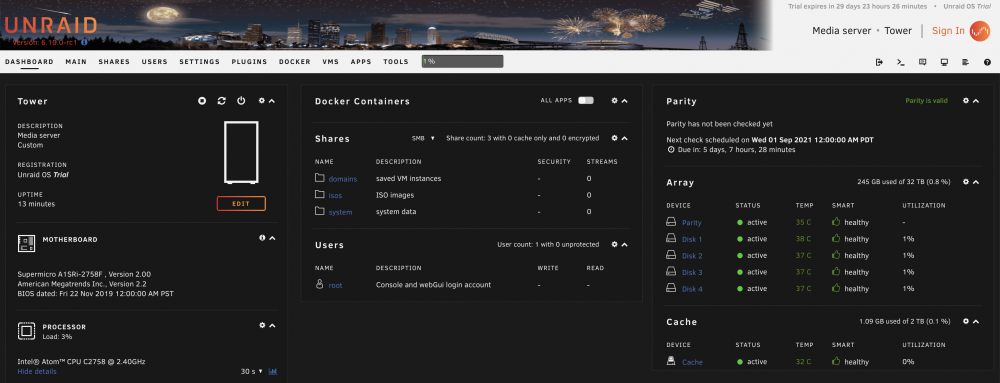
I don't really care for the "UPC and My Servers Plugin" VISIBLE and UGLY new feature that is located in the upper right of the webGUI header. I don't care to associate my server to cloud nor use the login. It looks huge and ugly. Can we disable it? I just don't wanna see it or deal with it. UPC and My Servers Plugin The most visible new feature is located in the upper right of the webGUI header. We call this the User Profile Component, or UPC. The UPC allows a user to associate their server(s) and license key(s) with their Unraid Community forum account. Starting with this release, it will be necessary for a new user to either sign-in with existing forum credentials or sign-up, creating a new account via the UPC in order to download a Trial key. All key purchases and upgrades are also handled exclusively via the UPC.
-
Run the memtest from the boot menu?
-
Copy that Sir and thank you.
-
Should I do a parity check after re-build is done, just in case?
-
Thank you Sir and I will proceed. Sounds pretty straight forward
-
Map out to the unraid TM share via the network explorer and you may have re-authenticate? If the TM share mounts manually then start the time machine backup and it should work. Or you may have to turn time machine off and on again to restart a new / fresh backup? I had to do that sometime after similar behavior as yours.
-
Well, my parity drive in my second UnRaid system is dead / kaput. My setup had only one parity drive. It was a 10TB drive and I plan to replace it with 8 TB as I can't buy another 10TB. What is the process? I read that replacing the 10 with a 8 is not possible, from bigger parity drive to smaller drive? My biggest data drive in the array is also an 8TB if it matters. Even with a new re-config and preserving the data won't work? There is gotta be a way right? What are the exact steps?
-
Building my 3rd unbraid box on a monster 16 cores Xeon Gold 2nd generation and Supermicro X11SPM-F board. I installed 6.10 and seems to run fine. Before I close this box and set it, is the MegaRAID SAS 9361-16i SAS controller good for UnRaid. I pulled this from a Sun box and flashed with the Broadcom firmware. I run the SAS/SATA drives in JBOD mode (similar with IT) and I can detect the SAS/SATA drives just fine with no errors. Built an array and no errors, all look clean. I will attach the diagnostic file if you can spot any issues before I proceed with this setup. Thanks in advance tower-diagnostics-20210905-1302.zip
-
I truly HOPE that for some of us against the cloud option we can upgrade and still maintain our privacy and independence as well as removing the login button option which is also pretty ugly if you ask me Look at it
-
Unfortunately I only have one PCIe slot on this mini-itx board I installed Debian 11 and get the same error I have the latest firmware and is in IT mode. Not sure what else I can do Looks like suppressing the error from messages is the way to go as long is not really a hardware issue I guess? [ 9.324468] igb 0000:00:14.0 enp0s20f0: igb: enp0s20f0 NIC Link is Up 1000 Mbps Full Duplex, Flow Control: RX [ 9.364463] igb 0000:00:14.1 enp0s20f1: igb: enp0s20f1 NIC Link is Up 1000 Mbps Full Duplex, Flow Control: RX [ 9.540181] IPv6: ADDRCONF(NETDEV_CHANGE): enp0s20f0: link becomes ready [ 9.580187] IPv6: ADDRCONF(NETDEV_CHANGE): enp0s20f1: link becomes ready [ 9.940463] rfkill: input handler disabled [ 50.983598] rfkill: input handler enabled [ 54.895148] rfkill: input handler disabled [ 85.178157] pcieport 0000:00:03.0: AER: Corrected error received: 0000:04:00.0 [ 85.178166] mpt3sas 0000:04:00.0: PCIe Bus Error: severity=Corrected, type=Data Link Layer, (Transmitter ID) [ 85.178170] mpt3sas 0000:04:00.0: device [1000:0072] error status/mask=00001000/00002000 [ 85.178173] mpt3sas 0000:04:00.0: [12] Timeout [ 85.245303] pcieport 0000:00:03.0: AER: Corrected error received: 0000:04:00.0 [ 85.245313] mpt3sas 0000:04:00.0: PCIe Bus Error: severity=Corrected, type=Data Link Layer, (Transmitter ID) [ 85.245316] mpt3sas 0000:04:00.0: device [1000:0072] error status/mask=00001000/00002000 [ 85.245319] mpt3sas 0000:04:00.0: [12] Timeout [ 85.248430] pcieport 0000:00:03.0: AER: Corrected error received: 0000:04:00.0 [ 85.248436] mpt3sas 0000:04:00.0: PCIe Bus Error: severity=Corrected, type=Data Link Layer, (Transmitter ID) [ 85.248439] mpt3sas 0000:04:00.0: device [1000:0072] error status/mask=00001000/00002000 [ 85.248442] mpt3sas 0000:04:00.0: [12] Timeout [ 85.322659] pcieport 0000:00:03.0: AER: Corrected error received: 0000:04:00.0 [ 85.322684] mpt3sas 0000:04:00.0: PCIe Bus Error: severity=Corrected, type=Data Link Layer, (Transmitter ID) [ 85.322688] mpt3sas 0000:04:00.0: device [1000:0072] error status/mask=00001000/00002000 [ 85.322691] mpt3sas 0000:04:00.0: [12] Timeout [ 100.561345] pcieport 0000:00:03.0: AER: Corrected error received: 0000:04:00.0 [ 100.561397] mpt3sas 0000:04:00.0: PCIe Bus Error: severity=Corrected, type=Data Link Layer, (Transmitter ID) [ 100.561400] mpt3sas 0000:04:00.0: device [1000:0072] error status/mask=00001000/00002000 [ 100.561403] mpt3sas 0000:04:00.0: [12] Timeout [ 119.726496] EXT4-fs (sda1): mounted filesystem with ordered data mode. Opts: (null) [ 145.548023] EXT4-fs (sda1): mounted filesystem with ordered data mode. Opts: (null) root@smicro:~# root@smicro:~# root@smicro:~# root@smicro:~# dd if=/dev/zero of=/media/exile/DISK-1/test1.img bs=10G count=1 oflag=dsync 0+1 records in 0+1 records out 2147479552 bytes (2.1 GB, 2.0 GiB) copied, 17.2788 s, 124 MB/s root@smicro:~# root@smicro:~#
-
Building a 3rd unRaid server and I have 5 SAS drives for the array. I am using 8TB HUH728080AL5200 Hitachi Ultrastar As I started the array and going through the parity sync I get these errors in my console: [ 2787.398201] pcieport 0000:00:03.0: AER: Corrected error received: 0000:04:00.0 [ 2787.398207] mpt3sas 0000:04:00.0: PCIe Bus Error: severity=Corrected, type=Data Link Layer, (Transmitter ID) [ 2787.398211] mpt3sas 0000:04:00.0: device [1000:0072] error status/mask=00001000/00002000 [ 2787.398214] mpt3sas 0000:04:00.0: [12] Timeout [ 2787.508714] pcieport 0000:00:03.0: AER: Corrected error received: 0000:04:00.0 [ 2787.508724] mpt3sas 0000:04:00.0: PCIe Bus Error: severity=Corrected, type=Data Link Layer, (Transmitter ID) [ 2787.508729] mpt3sas 0000:04:00.0: device [1000:0072] error status/mask=00001000/00002000 [ 2787.508732] mpt3sas 0000:04:00.0: [12] Timeout [ 2787.655567] pcieport 0000:00:03.0: AER: Corrected error received: 0000:04:00.0 [ 2787.655577] mpt3sas 0000:04:00.0: PCIe Bus Error: severity=Corrected, type=Data Link Layer, (Transmitter ID) [ 2787.655581] mpt3sas 0000:04:00.0: device [1000:0072] error status/mask=00001000/00002000 [ 2787.655585] mpt3sas 0000:04:00.0: [12] Timeout root@Tower:/boot/config# tower-diagnostics-20210821-1704.zip
-
I agree with the guidance here. If you don't know, stop and ASK. I am impressed with the answers and timing on this forum and a BIG THANK you "trurl" as you keep helping us.
-
Copy that and thank you Sir
-
Thank you Sir. I will kick it off right now. I schedule parity check every 3 months. Should I do it more often?
-
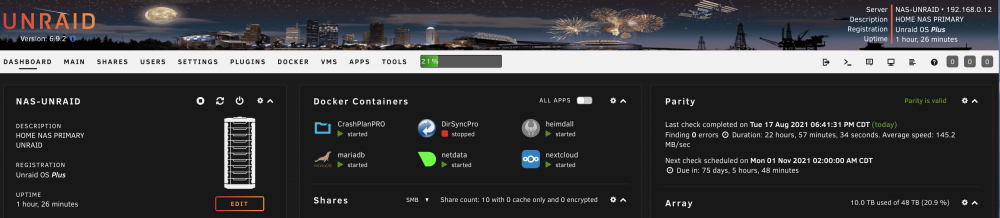
I recently replaced a failed data drive and swapped with a new one and already rebuilt. Quick question. I was due for a scheduled parity check next week. Do I still need to do a parity check after the drive rebuilt? My dashboard shows as parity check completed. Was the parity check part of the drive rebuild process? Is this an accurate assumption? Or I need to start a parity check manually?
-
Copy that Sir. Thanks
-
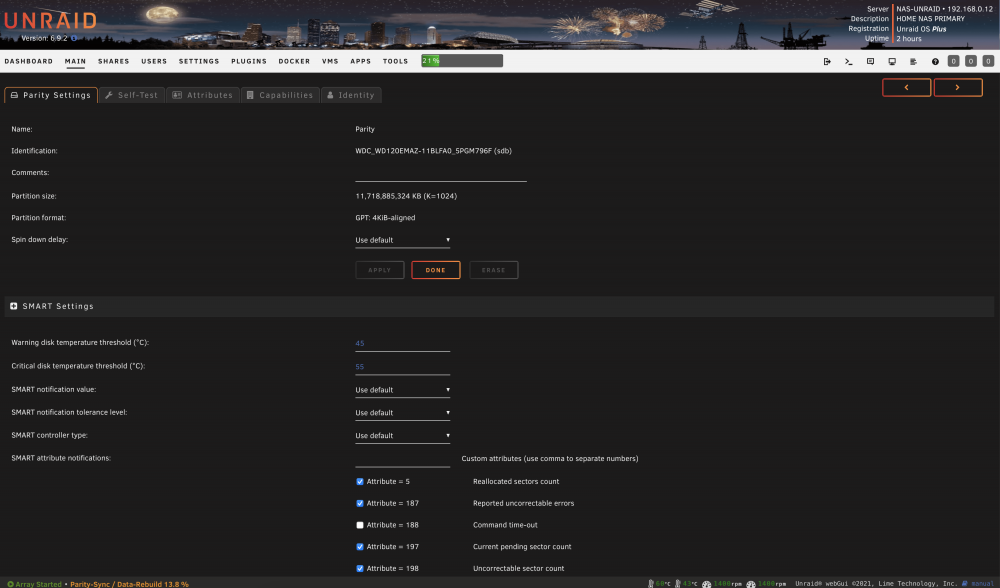
Whatever the default install gives me? Where do I check the SMART notification settings? I will check and report back. Thanks Sir I looked under Main and I have "Use Default"
-
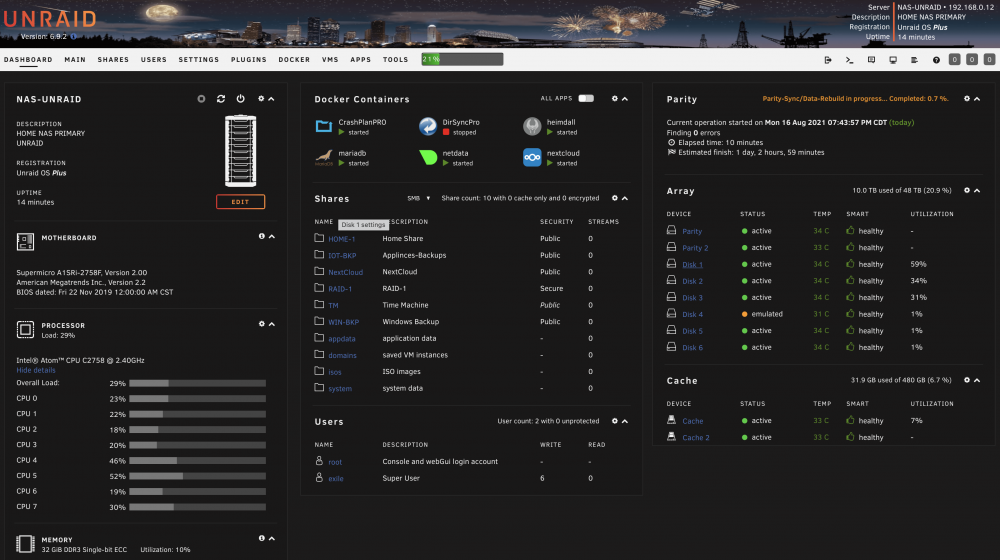
The disk is completely DEAD. I pulled it out and try it in a different system and it tries to starts, clanking noises and it dies. Is DEAD So the Array didn't throw any errors? Is that normal? I didn't have any data on that disk looks like. This is my first disk failure so still learning I robbed a disk from my spare / backup uNraid server and my array in this one is rebuilding as we speak.
-
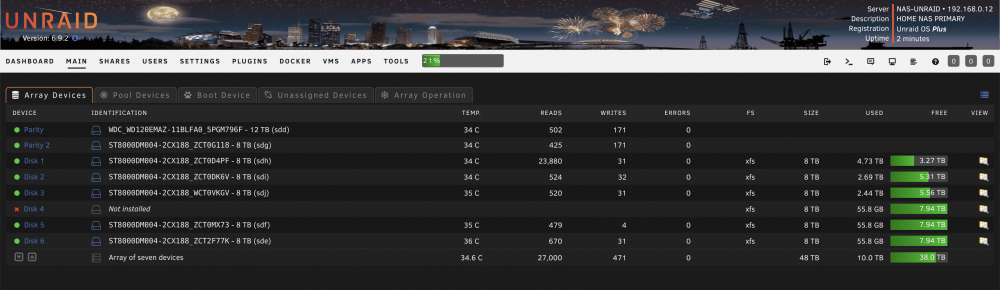
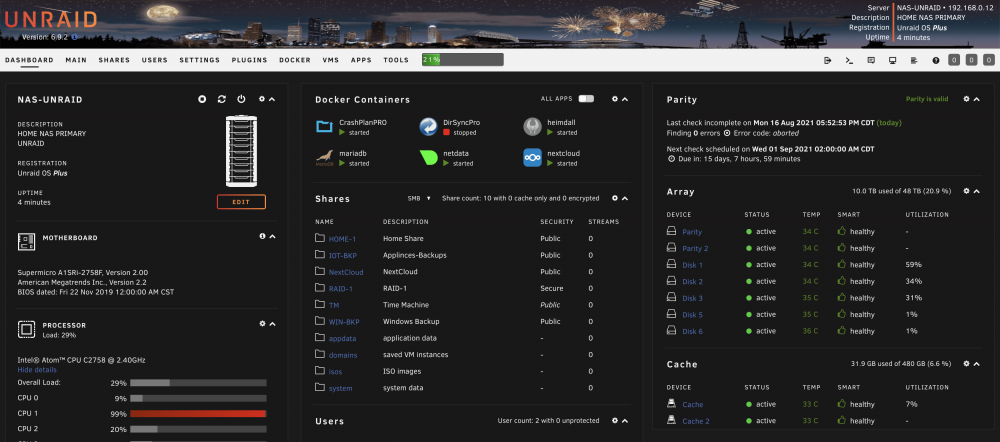
Very strange. Rebooted and DISK4 is completely gone from the device list and from "array" menu? But I see no errors that the disk is not longer available? I did check the connections. Perhaps need to pull the disk out and see if is dead? There is no light on. See attached diagnostic... nas-unraid-diagnostics-20210816-1800.zip
-
Thank you Sir. Attached now... nas-unraid-diagnostics-20210816-1715.zip
-
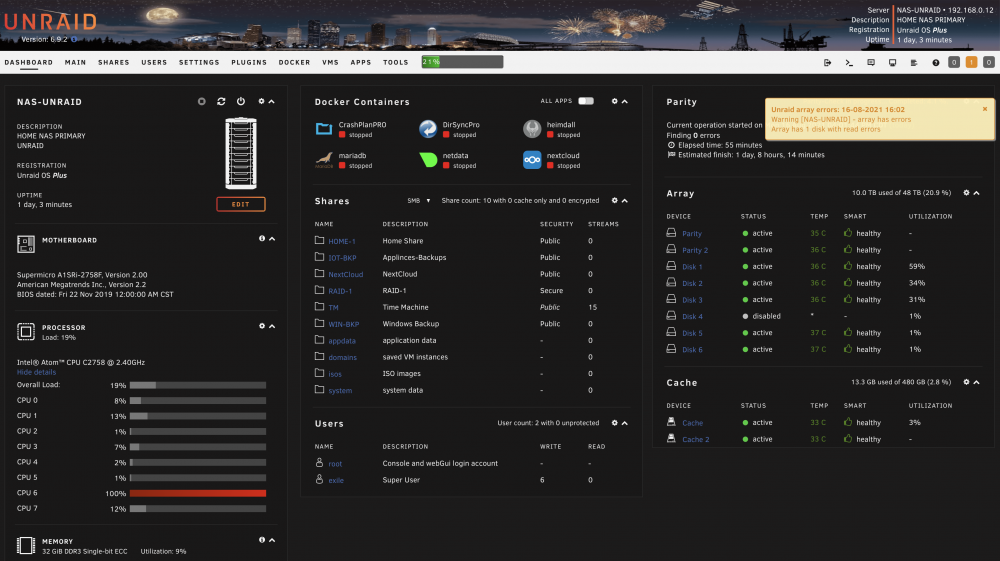
Dead Disk - In a weird and coincidental way it died right after I manually started a parity check I just manually started my parity check with "Write corrections to parity" disabled. As it was running parity check, one of my Disk went in disabled state and I get "Array Disk Have Errors" See attached screenshot. In the syslog I get a lot of these: [83311.219240] md: disk4 write error, sector=307985352 [83311.219244] md: disk4 write error, sector=307985360 [83311.219247] md: disk4 write error, sector=307985368 Should I stop the parity check or let it continue? And how do I fix this the right way? What are the next steps please? This is my first rodeo to this. System was stable and rock solid for almost a year. Many thanks
-
Yeap
-
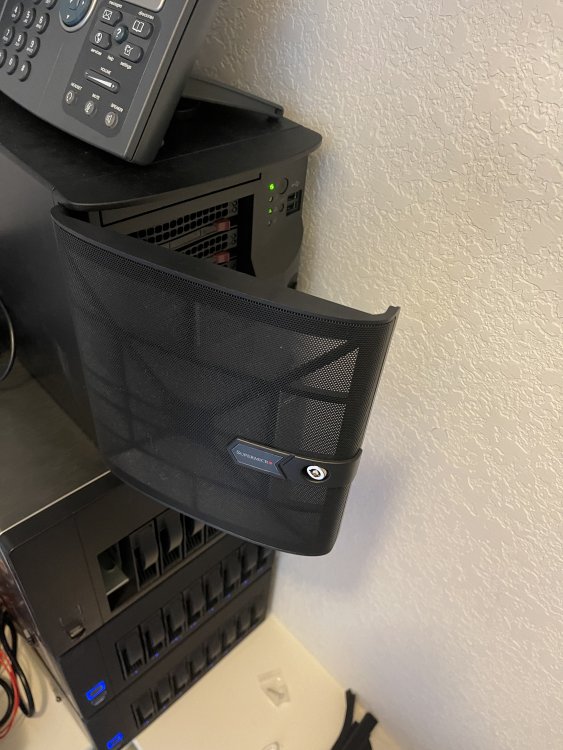
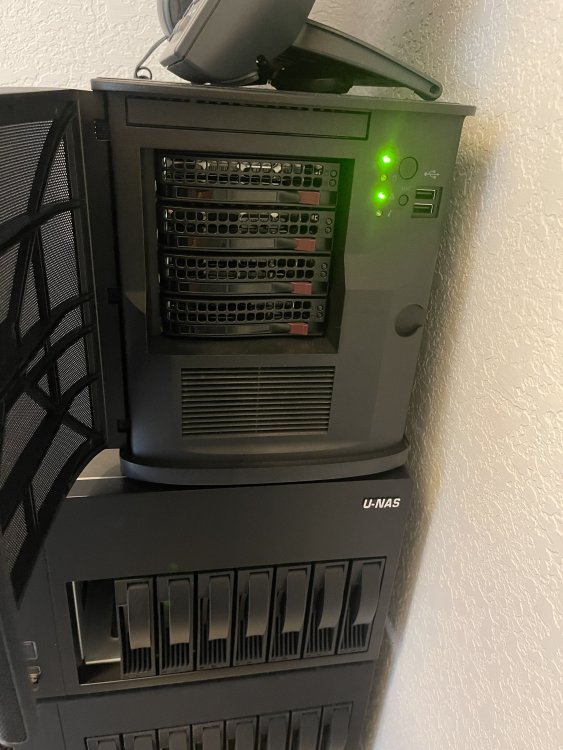
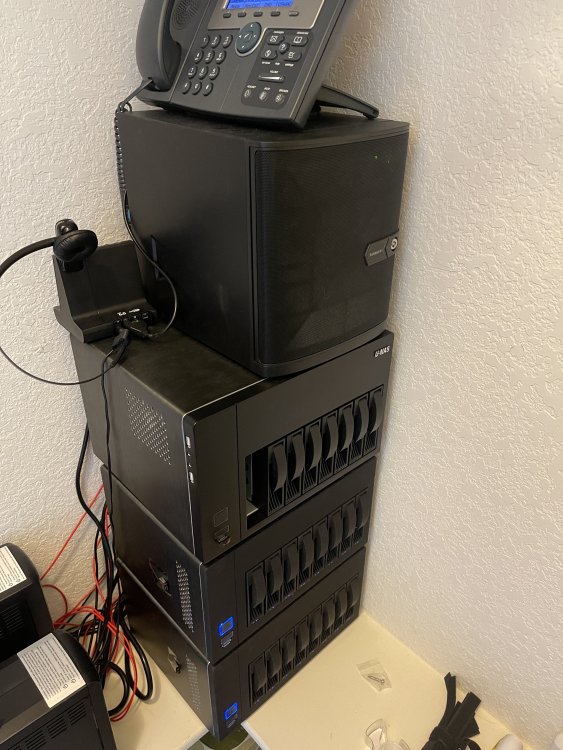
Curious on what I should price this setup for here, eBay or /u/homelabsales Also gaging if any interested parties? System is less than a year old and it runs unRaid 6.9.2 no license as is not allowed for sale / transfer: CASE - SUPERMICRO CSE-721TQ-250B Black Mini-Tower Server Case with 250W Flex ATX Multi-output Bronze Power Supply https://www.supermicro.com/en/products/chassis/tower/721/SC721TQ-250B Supermicro MBD-X11SCV-Q-O - Mini-ITX Motherboard https://www.supermicro.com/en/products/motherboard/X11SCV-Q CPUs x Intel(R) Core(TM) i7-8700 CPU @ 3.20GHz - 6 Cores / 12 Threads with vPRO-Support for Remote Access Heatsink: Supermicro - SNK-P0073A4 - 1u Enhanced Performance Active Cpu Hs For Socket H Series Memory - 64GB Hynix 2 X 32GB 260-Pin DDR4 SO-DIMM DDR4 2666 2 X SSD SandDisk 950GB Drives
-
Yeap time to get a new house mate
-
Not sure where to post this but man this unRaid stuff just WORKS, rock solid. Almost a year now with two installs and they're both absolutely ROCK SOLID. Love the simplicity and stability of this setup. I would say money well spent. Keep up the good work gents.