DivideBy0
Members
-
Joined
-
Last visited
Everything posted by DivideBy0
-
I have the SanDisk 64GB Cruzer Fit USB 2.0 Flash Drive - SDCZ33-064G-G35 in both of my unRaids and they run rock solid. Are you saying I should switch to something else?
-
Yes this procedure and adding the second parity drive in step 7 worked brilliantly. Just got done with it THANKS again
-
Crickets, and boom goes the dynamite
-
This week is pretty much gone with US holidays. But these are some hard questions / topics to tackle and I will be very curious with the level of openness and fairness coming from limetech. I think this may be a "make it or break it" type of deal for me and perhaps others. But at least we can have a conversation about it which is a good start.
-
Respectfully mate, this is not our "choice" . We're being FORCED into this new options and we do not have a choice , so yes you're forcing us "to be missing out on new features, security enhancements etc". Is funny how you put it back on end users because is that much easier than listening and making such simple adjustments.
-
The Amazon analogy is poor at best. unRaid is nothing like Amazon mate, c'mon you know that. As I said, many will argue and try to downplay this but reality that this is a bad design choice and I wish some of us can opt out without being told "you need to be signed in. Sign out afterward"
-
Is probably because of this community does not fully understand the implication of this substantial change or they just simply don't care for their privacy. And most of the limetch folks will just downplay it. And I am sure we will hear all kinds of arguments, pro & cons arguments on the privacy and security aspects. I for one would like to stay off the grid and it will be nice to have a setting where you can toggle off the UPC from the webUI, so esthetically will look cleaner. I truly doubt that limtech will ever give us these options and probably this "strategic" move is paving the way for a subscription model. Let's not beat around the bushes here And yes I am very very bitter about this entire move. One of my purchase decision a year ago was around the ability to run and stay off the grid behind my firewalls /IPS/ IDS. Great product but not anymore.
-
Copy that Sir and thanks. Just making sure 🙂
-
Currently have 8 disk in my NAS, 1 parity and 7 in the data array and of course few cache drives. I would like to 1. shrink my array (remove a 5TB) and 2. use the empty spot to add a second 8TB to my existing 8TB parity drive (basically 2 parity drive setup) I see there is a good procedure for shrinking the array and I was wondering if I can combine with adding the second parity drive into that procedure. Any ideas, anyone done it before? I am thinking at step 7 just assign the new 8TB as secondary parity drive into the slot of the 5TB that I just removed from the array? Would that work? https://wiki.unraid.net/Shrink_array
-
As I stated before I simply do not care for the cloud account nor the UPC options. Simply put I care too much for my security and my privacy. I feel that is being forced on us without any options or consideration for best practice security principles. I don't want to see it in my webGIU and I don't care to use it. Can you please have a switch to toggle it off the webGUI so we don't have to deal with it every time we look at our dashboard? "UPC and My Servers Plugin - [rc2] reworded The most visible new feature is located in the upper right of the webGUI header. We call this the User Profile Component, or UPC. The UPC allows a user to associate their server(s) and license key(s) with their Unraid Community forum account, also known as an Unraid.net account. Starting with this release, it will be necessary for a new user to either sign-in with existing forum credentials or sign-up, creating a new account via the UPC in order to download a Trial key. All key purchases and upgrades are also handled exclusively via the UPC. Signing-in provides these benefits: My Servers Dashboard - when logged into the forum a new My Servers menu item appears. Clicking this brings up a Dashboard which displays a set of tiles representing servers associated with this account. Each tile includes a link to bring up the servers webGUI on your LAN. Install the My Servers plugin to provide real-time status and other advanced features (see below). Notification of critical security-related updates. In the event a serious security vulnerability has been discovered and patched, we will send out a notification to all email addresses associated with registered servers. Posting privilege in a new set of My Servers forum boards. No more reliance on email and having to copy/paste key file URLs in order to install a license key - keys are delivered and installed automatically to your server.?:
-
You could always cook same eggs Kidding
-
-
Hmm, SNAP. I think it was like this the entire time and it worked ok. I will change it right now Thanks much
-
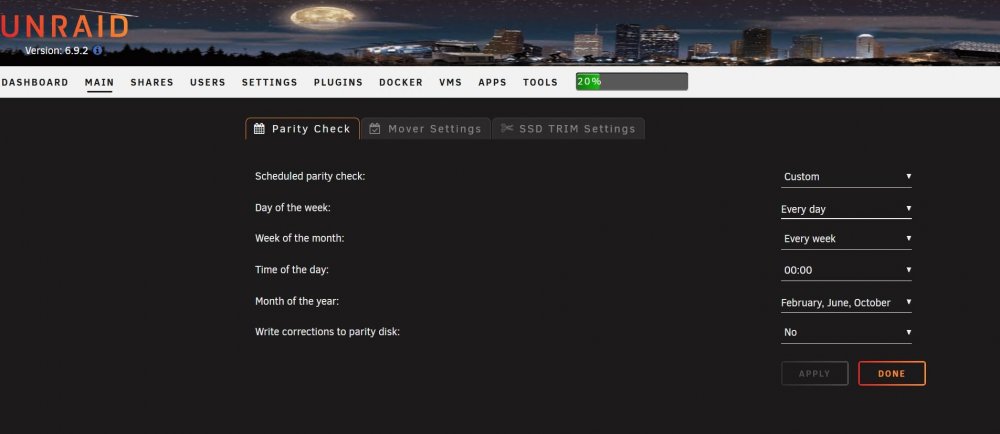
Correct, is custom and is every 3 months or so.
-
Attached Sir
-
Kidding root@NAS-UNRAID:~# cat /etc/cron.d/root # Generated system monitoring schedule: */1 * * * * /usr/local/emhttp/plugins/dynamix/scripts/monitor &> /dev/null # Generated mover schedule: 40 3 * * * /usr/local/sbin/mover &> /dev/null # Generated parity check schedule: 0 0 * 2,6,10 * /usr/local/sbin/mdcmd check NOCORRECT &> /dev/null || : # Generated array status check schedule: 20 0 * * * /usr/local/emhttp/plugins/dynamix/scripts/statuscheck &> /dev/null # Generated Unraid OS update check schedule: 11 0 * * * /usr/local/emhttp/plugins/dynamix.plugin.manager/scripts/unraidcheck &> /dev/null # Generated cron settings for docker autoupdates 0 11 * * * /usr/local/emhttp/plugins/ca.update.applications/scripts/updateDocker.php >/dev/null 2>&1 # Generated cron settings for plugin autoupdates 0 2 * * * /usr/local/emhttp/plugins/ca.update.applications/scripts/updateApplications.php >/dev/null 2>&1 # CRON for CA background scanning of applications 33 * * * * php /usr/local/emhttp/plugins/community.applications/scripts/notices.php > /dev/null 2>&1 # Generated file integrity check schedule: 0 0 * * 0 bash /boot/config/plugins/dynamix.file.integrity/integrity-check.sh &> /dev/null # Generated ssd trim schedule: 0 0 * * * /sbin/fstrim -a -v | logger &> /dev/null # Generated system data collection schedule: */1 * * * * /usr/local/emhttp/plugins/dynamix.system.stats/scripts/sa1 1 1 &> /dev/null And same on my second unraid box: oot@NAS-UNRAID-BKP:~# cat /etc/cron.d/root # Generated system monitoring schedule: */1 * * * * /usr/local/emhttp/plugins/dynamix/scripts/monitor &> /dev/null # Generated mover schedule: 30 3 * * * /usr/local/sbin/mover &> /dev/null # Generated parity check schedule: 0 0 * 2,6,10 * /usr/local/sbin/mdcmd check NOCORRECT &> /dev/null || : # Generated array status check schedule: 20 0 * * * /usr/local/emhttp/plugins/dynamix/scripts/statuscheck &> /dev/null # Generated Unraid OS update check schedule: 11 0 * * * /usr/local/emhttp/plugins/dynamix.plugin.manager/scripts/unraidcheck &> /dev/null # Generated cron settings for docker autoupdates 0 11 * * * /usr/local/emhttp/plugins/ca.update.applications/scripts/updateDocker.php >/dev/null 2>&1 # Generated cron settings for plugin autoupdates 0 0 * * * /usr/local/emhttp/plugins/ca.update.applications/scripts/updateApplications.php >/dev/null 2>&1 # CRON for CA background scanning of applications 35 * * * * php /usr/local/emhttp/plugins/community.applications/scripts/notices.php > /dev/null 2>&1 # Generated file integrity check schedule: 0 0 * * 0 bash /boot/config/plugins/dynamix.file.integrity/integrity-check.sh &> /dev/null # Generated ssd trim schedule: 0 0 * * * /sbin/fstrim -a -v | logger &> /dev/null # Generated system data collection schedule: */1 * * * * /usr/local/emhttp/plugins/dynamix.system.stats/scripts/sa1 1 1 &> /dev/null
-
I got this? ,_ _ |\\_,-~/ / _ _ | ,--. ( @ @ ) / ,-' \ _T_/-._( ( / `. \ | _ \ | \ \ , / | || |-_\__ / ((_/`(____,-'
-
Revert back to your previous urnarid version and see if issues persists. If not then is clearly a bad reading in the kernel somewhere.
-
Doooh So what was it then? The strangest thing and it happened on both of my unraids which have same schedule.
-
84C? That's a big difference, more than double. It may be a bad sensor reading? I can't explain why RC2 will make it jump like that
-
Yes indeed, that could be it. It ended first Sunday of Nov for CST
-
I have a heatsink on mine and it makes a HUGE difference
-
Thank you Sir. How do I check that please? It could I guess
-
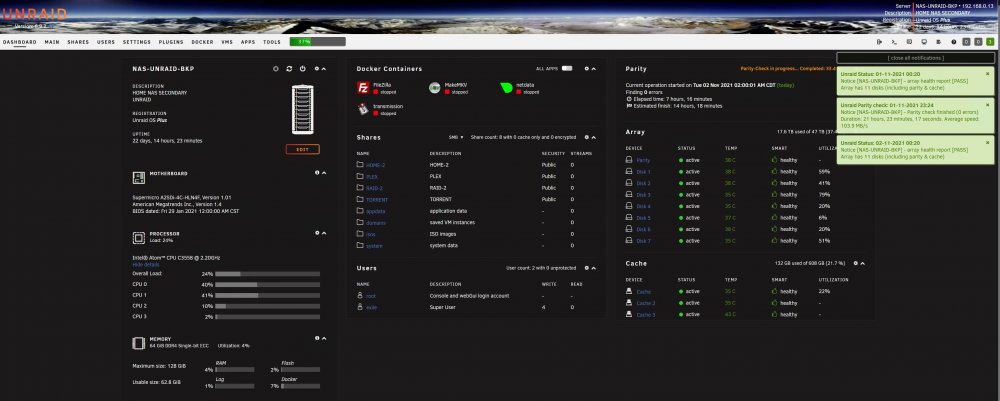
So both of unraids performed the same way which is strange. I have a schedule setup for every 3 months. The November one kicked normally and as per my initial post the second unraid started a second parity check out of nowhere. As I was monitoring the first unraid to finish the scheduled parity check and I noticed after it finished, the schedule show to start another scheduled parity check in 2 hours. That's very strange. So something messed up with the schedule? I disabled and redone the schedule again and hope this won't happen again? Anyone seen this strange parity schedule behavior?
-
I have a parity check scheduled every 3 months. It started normal and finished without any errors but to find out the next day that parity check is running again. I didn't manually start the second one, nor the system rebooted. Could it be a bug or something else? See attached diagnostic file nas-unraid-bkp-diagnostics-20211102-0920.zip