DivideBy0
Members
-
Joined
-
Last visited
Everything posted by DivideBy0
-
@trurl Well the non-correcting check was finished and no errors found. That means I am good? The correcting check found and fixed 2 sync errors as per above post. Anything I need to worry about it? I am in process of replacing my UPS batteries so I should be covered for the next power hick up.
-
Ok I will save the syslogs for correcting and none-correcting. I will do the full diagnostic as well just in case. So far is 100% into correcting parity check and I only have 2 errors as per below. Saved the syslog and diagnostic, rebooted and started a non-correcting parity check. Will keep you updated. From #dmesg I get this [104634.736525] md: recovery thread: P corrected, sector=4362239800 [119130.066796] md: recovery thread: P corrected, sector=6442670392 And from cat /var/log/syslog.1 I get this Jan 18 00:07:47 NAS-UNRAID-1 kernel: md: recovery thread: P corrected, sector=4362239800 Jan 18 04:09:23 NAS-UNRAID-1 kernel: md: recovery thread: P corrected, sector=6442670392
-
Well funny you say that. I think when my second power snag hit, the UnRaid was in middle of the automated parity check after the first power failure forced reboot. How is that into the mix now? Should I stop this correcting parity check and do a diagnostic first? Or let this one finish, do a non-correcting one after and if I don't have any more errors then I am good to go? I hate when this happens and you think your UPC will cover your butt
-
So I am in a similar situation with the OP. My power went off 2 or 3 times yesterday and I learned the hard way that my UPS batteries are kaput, done. I am getting new batteries as we speak. Because of that my UnRaid kept bouncing with dirty shutdowns and it came back with an automated parity check. It was about 40% done and I noticed 2 errors I think sync and is perhaps due to the unclean shutdowns. U stooped the parity check and manually start another one with "Write corrections to parity" enabled. That's the right procedure, correct? Anything else I should do? I hope there won't be many errors, but who knows. Otherwise the disks are healthy and no other damage that I can see in logs from these hard / unclean reboots.
-
I've been fighting this issue since my upgrade from 6.9.2 to 6.11.1. My Ventura OSX stoped backing up to my TimeMachine share. I tried absolutely EVERYTHING on this earth available here on this forum or reddit, but no luck. Even tried the TimeMachine docker and still no luck. It works for a while and then it stops working. I even redone may backups from scratch several times, even moved my TimeMachine to a second UnRaid, but I have with the same disappointing results. All other Mac versions work fine except the Ventura OSX. I am so pissed off with the amount of time I've spent on this. Absolutely ridiculous I am officially giving up on UnRaid to backup my 8 Macs and moving back to my Mac Mini with a thunderbolt enclosure and raid. s just reliable and it works.
-
And b00m goes to dynamite
-
Never mind. I just blew the docker.img file, recreate it and reinstall all the apps. That fixed and all back to normal now.
-
This
-
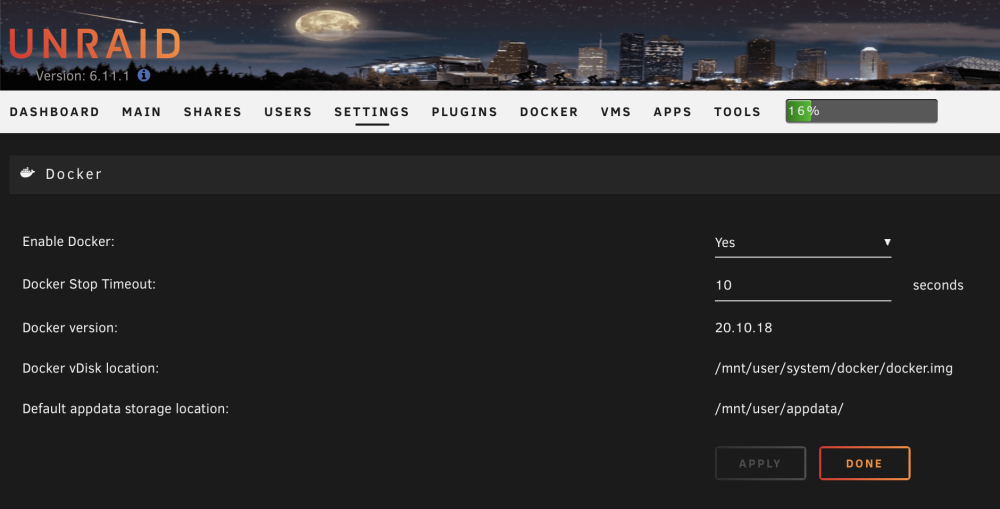
Despite my "System Data" share setup as Prefer : Cache for some reason when the dockers starts, the docker.img always ends up on the array disk 2 rather than the cache / pool ssd drive. I have 2 perfectly identical UnRaid boxes and one works and the other doesn't. How do I prevent the docker.img to start and stay on the array drive? I tried everything, stop dockers, kick off mover, done a full parity check, you name it. No matter what I do it just stays on the array disk


-
Never mind, I actually had an extra SATA port and added the 4TB as an extra cache pool, so nothing to undo or redo
-
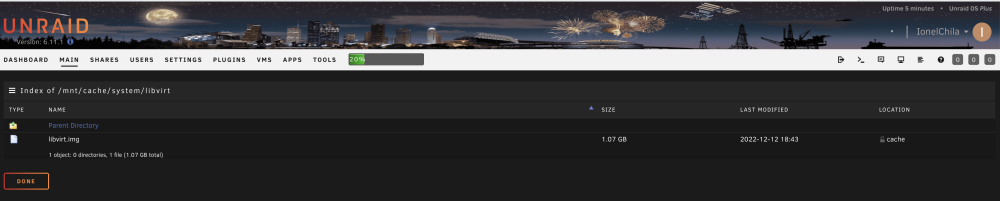
So I still have appdata and system folders on the cache drive. The appdata have some empty folders which I think is ok but the system folder I still have libvirt.img in the /mnt/cache/system/libvirt folder. Mover didn't move that. Should I still proceed with stoping array and unasign the old cache drive to make room for the new cache drive? I don't wanna scare this simple hardware swap up LOL
-
I have a 4TB SSD single drive I want to use for cache. Can I use one drive only for cache? And if yes what is the procedures to replace my existing 2 x 500GB with the single 4TB SSD ? Thanks in advance
-
I feel the same way I usually allow 6-12 months for all the bugs to iron out and beta test to continue
-
Yeap that's the link I used
-
Any file integrity checks during transfer? Making sure nothing gets corrupted?
-
This is my home spare cold standby, never used in production, still in the original box, unsealed as I had to make sure it works and not DOA. Purchased 3 months ago from UI so still under warranty.I will throw a 5TB in there. I prefer a local pickup at Houston / 77002 but I will ship as well. $350 + Shipping & Insurance via PayPal
-
Runs Unraid 6.11.5 - Priced to sell $750 + shipping. PayPal or local pickup in Houston / 77002 I would prefer a local pickup and would also consider discount for local pickup. I'm willing to ship as well but shipping cost will be extra depending on your zip code. Thanks for your time and consideration. Pictures: https://imgur.com/a/n6srqZC Case - SUPERMICRO CSE-721TQ-250B Black Mini-Tower Server Case with 250W Flex ATX Multi-output Bronze Power Supply - 4 HD Bays https://www.supermicro.com/en/products/chassis/tower/721/SC721TQ-250B - Supermicro MBD-X11SCV-Q-O - Mini-ITX Motherboard https://www.supermicro.com/en/products/motherboard/X11SCV-Q - CPUs x Intel(R) Core(TM) i7-8700 CPU @ 3.20GHz - 6 Cores / 12 Threads with vPRO-Support for Remote Access (similar with IPMI) - Heatsink: Supermicro - SNK-P0073A4 - 1u Enhanced Performance Active Cpu Hs For Socket H Series - Memory - 64GB Hynix - 2 X 32GB 260-Pin DDR4 SO-DIMM DDR4 2666 - 2 x SanDisk 1TB drives (used for cache and OS)
-
I won't bite. It took me a while to upgrade from 6.9.2 to 6.11.1 and that didn't go very well, as I had to redo and fight a lot of problems. I guess see you at 6.12.X branch
-
I had the same issue with a Suprmicro mobo and downgrading bios was also the solution. Strange. The mobo will boot just fine with many Linux distort including Ubuntu 22 but UnRaid no go.
-
Agreed and the QA is lacking at best. I will be holding off to any other upgrades. My 6.9.2 to 6.11.1 was a bit shaky and it broke some stuff. I will let you guys jump in front of it and test and iron all the bugs for me
-
Glad it worked. It took a lot of trial and error on my end but it was worth. Lest hope the next major upgrade don't break it I have like 6 or 7 Mac's backing up. Just as an FYI I did a full restore in 2 machines make sure the backups are reliable And they were reliable
-
cp /etc/samba/smb-fruit.conf /boot/config Edit your /boot/config/smb-fruit.conf and make sure you only have these 6 lines: # global parameters are defined in /etc/samba/smb.conf # current per-share Unraid OS defaults fruit:metadata = stream vfs objects = catia fruit streams_xattr fruit:encoding = native fruit:posix_rename = yes samba restart
-
I will make a separate post but I got to the bottom of my Time Machine issues with 6.11.1. And I have all flavors of MacOS backing up properly but I had to redo everything and start all backups from scratch. The trick is to do one by one, not all at the same time. I am backing up 6 different Macs to the same file share. Edit your /boot/config/smb-fruit.conf and make sure you only have these 6 lines: # global parameters are defined in /etc/samba/smb.conf # current per-share Unraid OS defaults fruit:metadata = stream vfs objects = catia fruit streams_xattr fruit:encoding = native fruit:posix_rename = yes
-
Battery on the UPS, yes that could be one issue, perhaps will cause a sudden shutdown without giving the UnRaid time to shutdown graciously. Good call on that and I will check them as soon as this parity check is over. I like the 30 seconds rule, might as well go for it. Really appreciated it mate...
-
I have 2 identical UnRaid boxes, everything the same including the UPS's, the UnRaid version, the settings, everything. I had a power failure yesterday for like 1 hour but one of the UnRaids didn't behave as expected. When power came back that UnRaid booted and started a parity check which tells me it didn't shutdown clean as the UPS should do it. The other UnRaid did shutdown properly as per the UPS settings. What am I missing here? See my diagnostic file. nas-unraid-2-diagnostics-20221104-1410.zip