





BRiT
Members
-
Joined
Everything posted by BRiT
-
Have you tried embeding the contents of the User Manual page inside a div in the current page using javascript?
-
Smells like a process for Cache Dirs. Maybe push that into excludes list setting for the cachedirs plugin?
-
I thought the process was you simply download the software and boot up the system. If it doesn't find a key license on the USB then it assumes it's a trial.
-
Incorrect.
-
I think you want to run this on the unraid device such as /dev/md# so you're doing it on the drives inside the parity protected array. If you run it on /dev/sdx#/ then you are invalidating the parity since you are writing below the devicemapper. Also, you need to run it on a partition, such as /dev/sdc1 (first partition). Specifying /dev/sdc is for the entire drive. That is why it can't find any valid filesystems.. The /dev/md# syntax may have changed on 6.12 unraid versions for ZFS tomfoolery, so check what the right device name is. I'm still on 6.11 where it's /dev/md1 for first partition of the first drive in the array. Only use /dev/sdX1 if you are recovering to another drive.
-
Perhaps start at the end, like this post seems like it may be useful:
-
There is a lot of posts in this thread:
-
So, what happened earlier today, where the forums were completely broken? Was it another "nothing was changed" event? 🤣
-
Isn't that for "Re-add" as in add back in?
-
Search using Community Apps for "wazuh" and it should find their dockers that are listed at https://hub.docker.com/r/wazuh/wazuh
-
Looks like you need to install the development tools like GCC (gnu c compiler) and possibly others in that Ubuntu vm.
-
That should be 2 separate commands: unzip unRAIDServer-6.12.2-x86_64.zip -d unRAIDServer cd unRAIDServer
-
Slackware does not have one.
-
Or incorrect parameters set in BIOS for the ram.
-
And amazingly they're not all "Have you tried turning it off and on again?". Truly a great resource and help for the community.
-
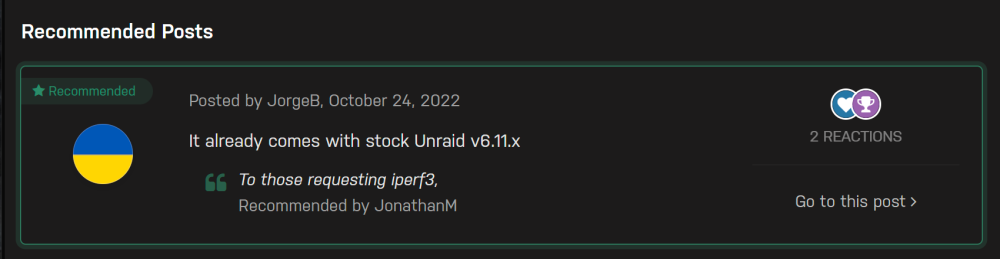
No. It's built in. See the recommended posts at the top of every page of this thread:
-
Was it specifically on 6.12.2 or any 6.12.x build?
-
The 7z file format does NOT store file permissions. You will always need to use a post process script to set permissions to what you want them to be. You may be able to adjust the behavior somewhat by setting "umask". From Wiki:
-
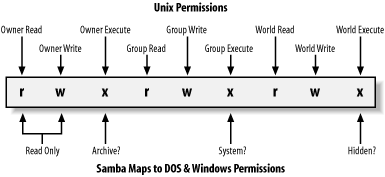
Taken from here: https://www.samba.org/samba/docs/using_samba/ch08.html Three Samba options decide whether the bits are mapped: map archive, map system , and map hidden. These options map the archive, system, and hidden attributes to the owner, group, and world execute bits of the file, respectively. You can add these options to the [data] share, setting each of their values as follows: [data] map archive = yes map system = yes Map hidden = yes After that, try creating a file in the share under Unix—such as hello.java—and change the permissions of the file to 755. With these Samba options set, you should be able to check the permissions on the Windows side and see that each of the three values has been checked in the Properties dialog box. What about the read-only attribute? By default, Samba sets this whenever a file does not have the Unix owner write permission bit set. In other words, you can set this bit by changing the permissions of the file to 555. The default value of the map archive option is yes, while the other two options have a default value of no. This is because many programs do not work properly if the archive bit is not stored correctly for DOS and Windows files. The system and hidden attributes, however, are not critical for a program's operation and are left to the discretion of the administrator.
-
Your syslog shows errors of sorts with commands to SDD and SDH. You probably should wait for someone else to chime in, but I wouldn't do anything at all just yet.
-
Afaik, disks are only marked as disabled (red x) when a write to them fails.
-
That or switch over. I switched over to the other one mentioned. In CA, searching for "speedtest tracker" produces 2 results. The other one being from "ZappyZaps" repository. Their forum thread is at:
-
The docker is setup to use version 1.0.0 and the current version is 1.2.0 The version of the file needed is https://install.speedtest.net/app/cli/ookla-speedtest-1.2.0-linux-x86_64.tgz The /etc/cont-init.d/50-speedtest/ is coded to use a really old one at: https://install.speedtest.net/app/cli/ookla-speedtest-1.0.0-$arch-linux.tgz
-
-
It's not needed, but if you want to test the drive to make sure it's trustworthy and not faulty, it is a good idea to run through preclear or smart long test or other extensive workouts.






