





switchman
Members
-
Joined
-
Last visited
Everything posted by switchman
-
I'm not aware of an option for rsync to delete empty folders. If there is a flag to delete empty folders, I would like to know wha6t it is.
-
OK, this appears to be operator error. The stream stays in the displayed till close to the end. It appears to finish the download and then message goes away, The balance of the video is in the pc buffer which completes playing normally.
-
Ok, Ill test it again. It is possible that the stream had completed and had downloaded the entire file and it was sitting in the buffer on my pc to to complete playing. What about the Dashboard Shares list? Should it also indicate a stream is going. I have it set to SMB which is what my shares are. Never mind figured it out. I'm playing back from plex which transcodes to my cache, which is not in the list. If I just stream a video direct with VLC, it shows the stream going in the list. But whats strange is my transcode location is at \\TOWER\cache\apps\tmp\plex and apps shows in the share list, but there is no indication anything is being streamed. The count is still at 0.
-
I’m currently on v6.1.9. When I initially start a show, Active Streams reflects the flow. I then navigate away from the Active Stream page then navigate back and the data is still shown. Navigate away and wait a few minutes then go back to active streams and it no longer shows anything being streamed. Any thoughts? Also, under the dashboard, in the shares list section there is a column titled Streams. The assumption is that any streaming data flows would be registered here by setting the value appropriately. Mine never change from a zero when I have a video stream going.
-
Here you go. Change as appropriate. http://permissions-calculator.org/decode/0755/
-
I've also found that times you just have to say screw it. Its my utility and this is the way I'm going to do it. If you want it done differently go write your own. Politely of course
-
If your clearing 12 drives simultaneously, then that does not surprise me that it is slow.
-
@jbrodriguez, Ive seen in the past, you can quote the end directory, but when you nest it deeper, it would not create the path. For example /Dir1/Dir2/"Dir 3" would create the entire path, but /Dir1/"Dir2/Dir 3" would not. If /Dir1/Dir2 already existed, it would work. Not sure if it was just the command string I was using or not.
-
Spaces in the directory structure can cause issues if you have not accounted for them in your code. What is the path structure it want build?
-
@huladaddy, The excel sheet I put together may help you. Basically, it read your drives, builds a grid showing drives where the various directories are located. You can elect to "move" a single directory from say disk2 to disk1 or you can move the directories from say disk2, disk3 and disk7 to disk1. In this case you use the stacked rsync command. Based on the selections you make, it builds a rsync command you copy and paste into a telnet session you you open to your Unraid server. Every time you run the data import scripts, it resets the rsync command to "dryrun". You have to change it in the drop-down. You really want to read through the entire thread, but at least these two links. http://lime-technology.com/forum/index.php?topic=33689.msg310759#msg310759 http://lime-technology.com/forum/index.php?topic=33689.msg415201#msg415201 Also, unraid allocations are not involved, you make the decision on the file locations and how to get them there.
-
NewEgg has the iStarUSA BPN-DE340SS-BLACK 4in3 on shell shocker now for $39.99 with $20 rebate. Limit 3. http://www.newegg.com/Product/Product.aspx?Item=N82E16816215244
-
I do not use them. I agree with garrycase. I do not want all of my drives in a share to spin up when I access a share. I go through and clean my system to so that any files in a subdirectory in a top level share are on the same disk. The more drives that spin up, the more heat I have in the room.
-
It depends, on what else the drive is doing. For example if you are using the cache drive as your temp storage and you have files being downloaded, multiple plex streams, mover running etch then you can get stuttering. If nothing else is going then you are correct that you want notice the difference. I would like to use ram but unfortunately do not have enough memory.
-
Thanks opentoe. Your post made me look and call in for my $5 credit. I ordered it Monday and it showed up today.
-
@opentoe Depending on where you are, Newegg just had the Antec 1200 on sale for US$124, plus a $20 rebate. I never count on rebates. I just checked and it is back up to $170. I currently have the 900 case and you can put in 3 3x5 cages. There is no extra room though. Depending on the motherboard, it can be a tight squeeze to get sata cables installed. I ordered one of the 1200s as I have come to the opinion large towers that can accommodate 4 3x5 cages are getting scarce and expensive. If you have the room and have not purchased your cages, then a Norco 4220 is the best bang for the buck in my opinion. You could always build a wood platform with 2x4's and turn it sideways. Also there is a Ikea unit for ~$20 I think that some people are using as a rack. http://www.newegg.com/Product/Product.aspx?Item=9SIA24G28N3956&cm_re=antec_hundred-_-11-129-100-_-Product 4220 - http://www.newegg.com/Product/Product.aspx?Item=N82E16811219033 4224 - http://www.newegg.com/Product/Product.aspx?Item=N82E16811219038 - With a 15% of discount code, SERV15FFPRMO, you can get this case for 354.44 shipped. This is a great deal. I think this is the IKEA stand http://www.ikea.com/ca/en/catalog/products/44361109/ To bend the tabs, use a Deep throat C-clamp. One like this. http://www.harborfreight.com/8-inch-deep-throat-c-clamp-45917.html. They are worth it.
-
I have not looked up the switches, but you could probably do this in two steps. I would only do this for full drive moves. This will probably be needed pretty soon. Always move between two equal size drives or from a smaller to larger size. Step 1 Use Rsync to mirror The Source drive to the Destination drive. You now have two copies of the files on your system. Other flags as appropriate will need to be set. Step 2 Use Rsync with the checksum compare flag set. After you verify all of the files moved correctly, you can format the source drive and proceed to the next. It will take a while, but it would probably be the safest way to go. EDIT: I just had a second thought. For step 1, you could use the standard copy command to initially get the files mirrored. Then use rsync to do the compare in step 2. This would probably speed up the entire process
-
@Freddie, I had a little bit of time to test the scripts. Over all, they seem to work great. A couple of observations" consld8 does not like a paren "(" in the subdirectory name. It returns the following error: -bash: syntax error near unexpected token `(' To get around it, I just escaped the entire sub-directory like this. consld8 -f -q /mnt/user/Test_Shows/"Archer (2009)" disk3 if you issue the quite "-q" flag to consld8, it does not pass it diskmv when it is called. This is all I have noticed with the quick testing I was able to do.
-
These appear to be great utilities. I was trying to follow your code, I am not a coder, and was trying to understand how you use "user, as in "consld8 /mnt/user/video/tv/Wonderfalls disk3". I am assuming you tear it apart and use the actual disk(n) values so that the data is not lost by using the /user paths. With one more script to look through all of the subdirectories to parse to feed "consld8" this could be a totally automated solution that could be scheduled from cron. Attached is a hi-level flow chart that I cobbled together for how I would envision such a program would step through. I had thought about trying to cobble something together, or better yet hoping someone who actually knows how to code would develop. Any thoughts about the flowchart?
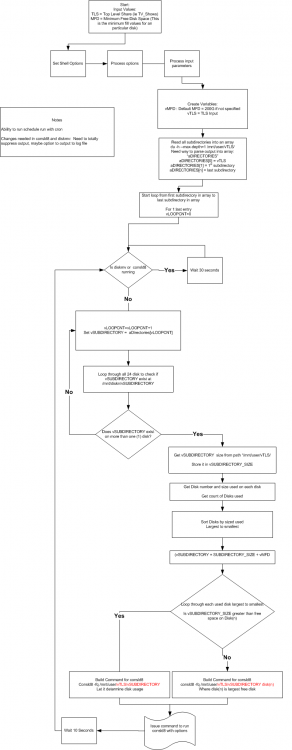
-
Another data point, playing a movie with a Fire TV. The Fire TV is setup to Direct Stream the video while transcoding the audio to AAC. The 4.3Gig directory is the movie in question and is ~ halfway through. It appears PMC is transcoding the audio, combining it with the video and chopping it into blocks of about ~15MB for streaming to the player. Since PMC does not delete the transcoded files until the show is stopped, I am on track to have ~8GB of files for this one stream which is correct as the source file is ~8GB. When I go to R6, I could probably get away with one stream, but not two going. This tells me that if you are not transcoding, i.e. direct streaming the video, the space needed in your /tmp directory, ie free ram is approximately the same as your source file size. I will have to keep using my cache drive as I prefer the higher quality. root@Tower:/mnt/cache/apps/tmp/plex# du -ch 63M ./plex-transcode-316y29v9633anhfr-a465c997-0568-4b23-8d75-db045b2ba3cc 4.3G ./plex-transcode-ee2df7a09472f15f-com-plexapp-android-8c544d57-f210-4b06-8910-88fd64654c94 4.4G . 4.4G total root@Tower:/mnt/cache/apps/tmp/plex#
-
Please keep the following settable options. -w size = write block size in bytes. If not specified, default is 2048k. -r size = read block size in bytes, default is one cylinder at a time ( heads * sectors * 512)) -b count = number of blocks to read at a time. If not specified, default is 200 blocks at a time. I have found on my system that if I don't run it with these settings, "preclear_disk.sh -c 1 -w 32768 -r 32768 -b 1000 /dev/sdx", when it starts writing zeros it consumes all of the CPU cycles and lags my system terribly.
-
Paint.net is also a good free utility for windows. http://www.getpaint.net/index.html
-
@ lboregard I like it, but would think an rsync move would be safer than the base linux move command. It has the benefit of verifying the moved file. GUI's are good.
-
I would verify how the old radio chassis mounds then drill a pass through hole that does not interfere wit the original mounting. You have already stripped the top an are replacing it with new veneer so it is no longer original.
-
When you get them, set them side by side just like they will install in your system. Look at the hole pattern on the side where you attache them to your case. They are not always assembled the same way. You can easily change them so they are all the same. Quality control is not the the best on these. As far as the fan goes, the more air you can move through them the better. I have the Coolink SWiF2-800 Fan and really which I had purchased the 801.
-
Newegg shell shocker deal $69.99 plus an additional $20 rebate plus free shipping. Today 8-9-13 only. SeaSonic M12II 750 SS-750AM 750W ATX12V / EPS12V SLI Ready 80 PLUS BRONZE Certified Modular Active PFC Semi-modular Power Supply New 4th Gen CPU Certified Haswell Ready I am not sure if this is a single 12vdc rail or not. http://www.newegg.com/Special/ShellShocker.aspx?cm_sp=ShellShocker-_-17-151-107-_-08092013_2
