





Rysz
Community Developer
-
Joined
Everything posted by Rysz
-
You shouldn't use this command for testing, it's called from within the OS shutdown routine and it only works when the driver is not currently running (because it needs to re-start the driver with special permissions to be able to kill the UPS power). Also it does not do a graceful shutdown but kill the power immediately, it's the last step before the OS turns off and if you are doing this with disks mounted you'll have a parity check on next boot. You should only use this command for testing the UPS shutdown (with NUT running): upsmon -c fsd
-
My sincere congratulations, thanks for everyone's effort and hard work that has resulted in us being able to be a part of this great community and getting to enjoy the product we all love. 🙂
-
Thanks a lot Simon!! 🙂
-
It's just another tool for the job, it has multiple algorithms (DOD Short, DOD Long, Gutmann,...) for safe erasure and respective verification mechanisms. It's more oriented at secure erasing rather than zeroing the drive for practical reasons. No, it can wipe any connected device and has nothing to do with UD and/or destructive mode. But it probably shouldn't be used on drives which are still part of the array, so in that sense best to use it on "unassigned" and unmounted drives.
-
None at all, you will see it as status in the dashboard but won't get a notification. If set to yes, every 12 hours by default.
-
Great, glad you got it working. If it fails again, please don't uninstall the plugin, but download the "NUT Debug Package" from "NUT Settings" and post here again before doing anything else. 🙂
-
Probably best to reboot your server as it seems something got messed up installing the many versions.
-
This is normal, it just means some packages that are not meant for your OS version are skipped. Install my version again (the other versions are all deprecated). First click "Reset Config", then configure NUT. Afterwards try starting the NUT service and if it fails, post the NUT Debug Package that is found in NUT Settings.
-
There is already a bug report open for this (what seems to be a kernel issue, rather than Unraid):
-
Thanks for the new release! 🙂
-
I can recommend any Eaton devices, they've supported open source and participated in the NUT project for a long time (and it shows compatibility wise). Many other people seem to have good results with CyberPower too, but I have never used any of their devices myself. I'd always pick Eaton personally, also for their great customer service. 🙂
-
If the UPS supports it (can be checked with upscmd -l ups terminal command), via terminal command: upscmd -u admin -p adminpass ups beeper.disable The username and password are the defaults and don't need to be modified in that command.
-
Did you try reinstalling the plugin, perhaps the database or some configuration file got corrupted?
-
Did you perhaps stop the Docker containers or the Docker service in general? Unless you have some advanced networking configured for your Docker containers, by default the virtual interfaces last only while the container is running and each container is assigned a new virtual interface on the next start.
-
Yes, anything that persists longer than 3 seconds is reported (to filter out the bogus statuses). A real problem situation will always persist longer than 3 seconds.
-
Yes, of course, you can test this by pulling the breaker or shortly unplugging your UPS (although the breaker method is better). I recommend everyone test a battery scenario at least once before relying on it in production.
-
These are minor connection interrupts and can be ignored if everything else works. 🙂
-
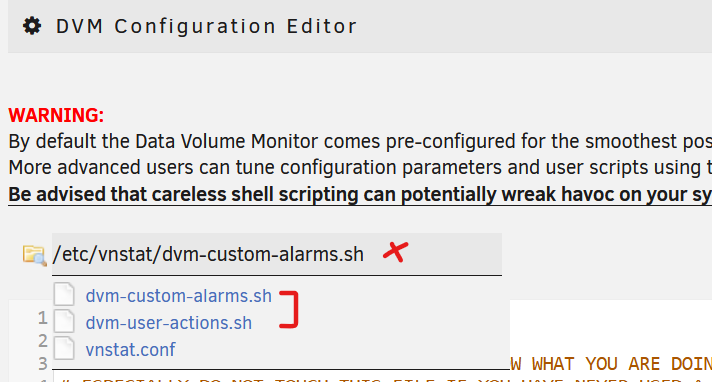
You can either use dvm-user-actions.sh or the more advanced dvm-custom-alarms.sh to set up custom commands/filtering. Accessing these files is possible through the DVM Configuration Editor (click into the file-name text field, where the red X is). The scripts have respective documentations inside them as comments, hope that is enough to get you started. 🙂
-
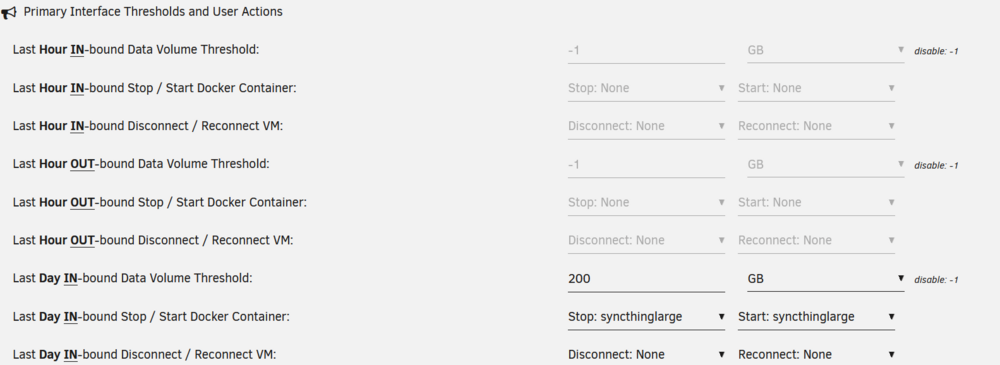
If you have "bond0" configured as primary interface, you should use this section for the "bond0" limits/actions: And this section for any additional interfaces, such as the "bond0.52", limits/actions: I agree with your point about multiple interfaces should be shown on the front-page dashboard as well. It'll require a bit of effort to adapt the code, so I'll put this on the TO-DO list for a future update (but can't promise a timeline).

-
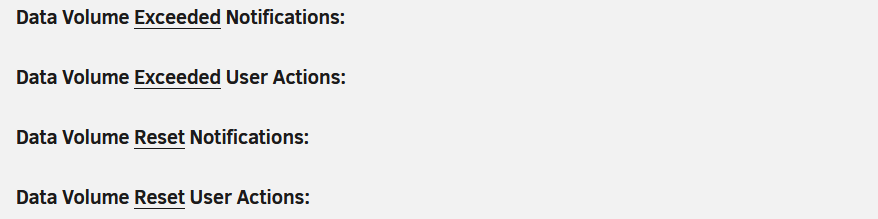
The front-page dashboard and footer only shows the primary network interface at the moment. But you can already set limits and notifications for up to 6 other network interfaces in this section of DVM settings (see example): In this case you will get notifications for each defined interface when the respective limit is exceeded/returned to normal. Be aware these settings also control receiving notifications or executing user actions on the defined "secondary interfaces":

-
Can you post the logs from when this event happens?
-
Hey, thanks for getting back to me. I've actually had it on "Default" (and PHP errors not set to display) when encountering this, hence CA also showed no such banner, but this later led me to the discovery of a bug or inconsistency between the OS defaults and the GUI's "Default" setting for the PHP error reporting level: https://github.com/unraid/webgui/pull/1829. 🙂
-
Thanks a lot, your reports have been extremely helpful and we have now merged the patches into NUT master. Since "pollonly" seems to fix the problems for you completely, best to put it back in now and enjoy it working. 🙂
-
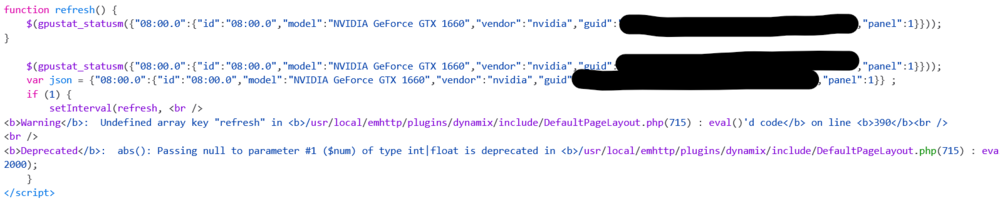
Any news on this? 🙂 The GPU dashboard is broken for me right now because of PHP warnings: It only works when setting the PHP error reporting level to "All Categories" so PHP errors are not shown on the screen, as opposed to the default PHP error reporting level where it displays them on the screen.

-
Thanks a lot for the information, did you try adding the additional option: pollonly at the end of the UPS.CONF file, to see if that stabilizes the situation on your UPS (as for the user below)? Thanks a lot for reporting back here, I'm glad you could stabilize things on your UPS with "pollonly". 🙂 Thanks a lot, it seems to work except for events which are longer lasting than 3 seconds. So we can see an improvement on the new backend, but please do post again your debug file if there is anything new on level 2. 🙂





