





pbear
Members
-
Joined
-
Last visited
Everything posted by pbear
-
Deemix doesn't work anymore since a long time. I had to switch to DeemixFix (app). You could unlist it.
-
Yes thanks, this addition to the go could be a solution. Afterwards, as I said, I don't reboot the server often, I now know the problem and am always forcibly present when I update or upgrade the hardware, so it's not really blocking. But if there's a bug with the interfaces like you suggest, or something else, it would be cool if someone looked into it and solved the problem. It looks like ipv6 isn't very popular :D (I'm thinking of Unifi, which still doesn't support ipv6 in vpn connections in 2025, grrrr).
-
Same problem with v7.1.4: # ss -tulpn | grep ssh tcp LISTEN 0 128 10.0.2.2:22 0.0.0.0:* users:(("sshd",pid=1979,fd=6)) # /etc/rc.d/rc.sshd restart rc.sshd: SSH server daemon... Started. # ss -tulpn | grep ssh tcp LISTEN 0 128 10.0.2.2:22 0.0.0.0:* users:(("sshd",pid=3493488,fd=7)) tcp LISTEN 0 128 [2a01:xxxx:yyyy::2]:22 [::]:* users:(("sshd",pid=3493488,fd=6)) Why on earth doesn't the ssh server listen on ipv6 as soon as the server starts up?! @ljm42 As you helped me last time, and had tracked down an issue with fixed ipv6s, I'd like to ask you if you might have an idea about my rather similar problem. Thank you in advance.
-
I had the same problem after upgrading to v7.1.2 : The ssh server does not listen on ipv6 by default. I have to do a manual restart of the ssh deamon to solve the problem. Fortunately, I don't reboot the server every week, but it's still not normal. Am I the only one with this problem?
-
Hello, Since I upgraded, my server no longer listens on its ipv6 address. I'd already had this problem with a previous update: This time it was a bug and was corrected with the next minor version. But here the symptoms aren't exactly the same, so I don't know. The network interface has its own ipv6 and it's up and running: # ip addr show br0 6: br0: <BROADCAST,MULTICAST,UP,LOWER_UP> mtu 1500 qdisc noqueue state UP group default qlen 1000 link/ether c8:7f:54:a9:c2:1b brd ff:ff:ff:ff:ff:ff inet 10.0.2.2/24 metric 1 scope global br0 valid_lft forever preferred_lft forever inet6 2a01:xxxx:yyyy::2/64 metric 1 scope global valid_lft forever preferred_lft forever # ping google.fr PING google.fr (2a00:1450:4007:810::2003) 56 data bytes 64 bytes from par21s03-in-x03.1e100.net (2a00:1450:4007:810::2003): icmp_seq=1 ttl=112 time=13.0 ms 64 bytes from par21s03-in-x03.1e100.net (2a00:1450:4007:810::2003): icmp_seq=2 ttl=112 time=7.46 ms This time, unlike the previous case, my ssh config file is populated with my ipv6 address: # grep Listen /etc/ssh/sshd_config ListenAddress 10.0.2.2 # br0 ListenAddress inet6 2a01:xxxx:yyyy::2/64 # br0 But the ssh server doesn't listen on it: # ss -tulpn -4 | grep ssh tcp LISTEN 0 128 10.0.2.2:22 0.0.0.0:* users:(("sshd",pid=1943,fd=6)) # ss -tulpn -6 | grep ssh # When I restart the ssh service I get no error. EDIT: I just noticed that after I did the /etc/rc.d/rc.sshd restart, as I said I got no error and .. it now is listening on the ipv6: # ss -tulpn -6 | grep ssh tcp LISTEN 0 128 [2a01:xxxx:yyyy::2]:22 [::]:* users:(("sshd",pid=134056,fd=6))So I don't know what happened, or if I'll have the problem on the next reboot (in which case I now know how to solve it) but it's solved. Moderators: you can delete my thread if you think it's no longer of interest. Thank you.
-
Hello, When I installed I get these errors: plugin: skipping: python3-3.13.0-x86_64-1dwl_slack15.0.txz - Unraid version too high, requires at most version 6.12.99 plugin: skipping: python-pip-24.2-x86_64-2dwl_slack15.0.txz - Unraid version too high, requires at most version 6.12.99 plugin: skipping: python-setuptools-75.1.0-x86_64-2dwl_slack15.0.txz - Unraid version too high, requires at most version 6.12.99 plugin: skipping: python3-3.12.7-x86_64-1dwl_slack15.0.txz - Unraid version too high, requires at most version 6.12.99 plugin: skipping: python-pip-24.2-x86_64-1dwl_slack15.0.txz - Unraid version too high, requires at most version 6.12.99 plugin: skipping: python-setuptools-75.1.0-x86_64-1dwl_slack15.0.txz - Unraid version too high, requires at most version 6.12.99 plugin: skipping: python3-3.11.10-x86_64-1dw_slack15.0.txz - Unraid version too high, requires at most version 6.12.99 plugin: skipping: python-pip-24.2-x86_64-1dw_slack15.0.txz - Unraid version too high, requires at most version 6.12.99 plugin: skipping: python-setuptools-75.1.0-x86_64-1dw_slack15.0.txz - Unraid version too high, requires at most version 6.12.99 How to fix it ?
-
Hello, Right, it's https://github.com/KatyPurry/unraid who created the template I believe. Although he seems to be still active (on GitHub at least), he didn't notice that you suddenly deleted https://raw.githubusercontent.com/alexta69/metube/master/favicon/android-chrome-384x384.png Or he does not care. Maybe it would be easier to ask you to put it back ?
-
Indeed it works with bridge. Thanks. Is this template unique? I mean usually I can change the port with a dedicated ip. How to know when the web env variable is only for bridge ?
-
Hello, I just installed Privatebin I've setup a WebUI port but it still listen to the default 8080 only 🤷♂️ I tried with dedicated ip or host network config.

-
Hello, I just installed Yacy but it does not start: could not copy yacy.logging: /opt/yacy_search_server/DATA/LOG/yacy.logging (No such file or directory) STARTUP: Trying to load logging configuration from file /opt/yacy_search_server/DATA/LOG/yacy.logging could not find logging properties in homePath=/opt/yacy_search_server Any idea ? EDIT: I had to do chmod -R 777 /mnt/user/appdata/yacy It fixed the problem.
-
@JorgeB Hello, I discovered and activated this option just yesterday. I had the same questions than @casperse and this thread has answered it. > exclusive shares makes /mnt/user/share the same as /mnt/disk/share, with the performance advantages that come from doing that So if there is no counterpart, why isn't it 'by default' ? Why is there still a fuse layout ? Thks
-
Hello, Thks for the script. Just a remark: In your doc you should modify this: by the raw link that you've mentioned above ^^

-
Hello, About the docker Dozzle, Even when we change the env variable WebUI for another value, the daemon still listens to 8080. This env. variable is by default in the template.
-
Problem solved with the new v6.12.6 indeed 👍 Thanks for your work.
-
I confirm this v6.12.6 solved the ipv6 problem I had since v6.12.4 , the sshd now listen well on every ip \o/ Thank you for this release, have a nice day everybody.
-
Hello, Well, I already did send my diagnostics file to the support by email, had opened a thread and even opened a thread on discord. The only answer I got was from the support (email) who adviced me to wait for the next release. Anyway I updated my thread with extra infos and a new diganostic file. Thanks,
-
So I had downgraded to 6.12.3. But now that the v6.12.5 is out I tried it: the ipv6 works with the docker. But I still can't connect to the server itself, the ssd still does not listen to ipv6. ⚡ root@unraid:~# netstat -tulpn | grep 22 LISTEN 0 128 0.0.0.0:22 0.0.0.0:* users:(("sshd",pid=31080,fd=3)) I tried restarting the /rc.sshd script and it populates my ssh_config like that: ListenAddress 10.0.2.2 # br0 ListenAddress 192.168.12.2 # br1 ListenAddress 0 # which is wierd , IMHO. I don't know this "0" And there should be one line "ListenAdress ::" I believe. The script gives a error message when restarting: "/etc/rc.d/rc.library.source: line 74: printf: 0xmetric: invalid hex number" ⚡ root@unraid:~# sed -n '73,74p' /etc/rc.d/rc.library.source [[ -n $b ]] && d= a=${a%$f*}${f}$(for q in ${b//./ }; do printf "$d%03x" "0x$q"; d=.; done) [[ -z $m ]] && echo $a || echo $a/$m Could be a syntax error in this other script ? unraid-diagnostics-20231129-1955.zip
-
As I already had with 6.12.4, I cannot connect to my unraid server through his ipv6. I had downgraded to 6.12.3 until now for this reason (among others). ⚡ root@unraid # ss -tlpn | grep :22 tcp LISTEN 0 128 0.0.0.0:22 0.0.0.0:* users:(("sshd",pid=24054,fd=3)) I don't know why it doesn't listen on [::]:22 Any idea ? (But with this version, unlike v6.12.4, the ipv6 works with my docker containers.)
-
@aglyons I did a rollback because my ipv6 didn't work at all since I upgraded to 6.12.4. I contacted the support and their answer is to wait another release, indeed. But when I came back to 6.12.3 I also had to switch back to macvlan because with IPVLan all my containers have the same Mac address and my ubiquiti UDM isn't able to detect them as "separate clients". So I couldn't route them individually anymore (because they don't appear in the drop menu in the interface of the UDM). Did you find a solution ?
-
Hello, As I got no answer, I ended up contacting the support. But as I said I also have trouble with ipv6 on the unraid itself (with the sshd not listening anymore on the ipv6).
-
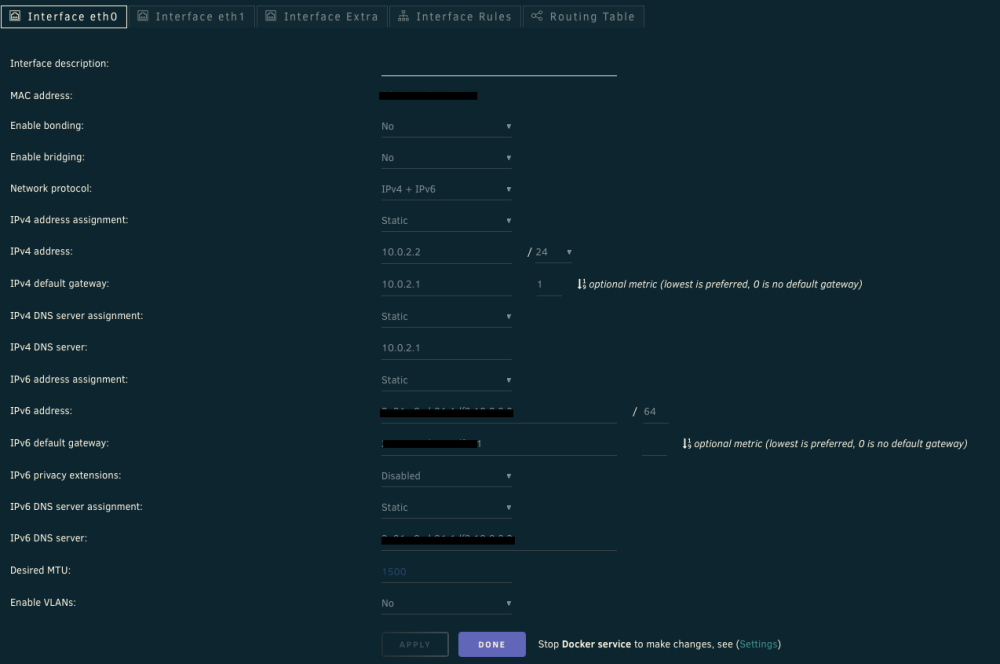
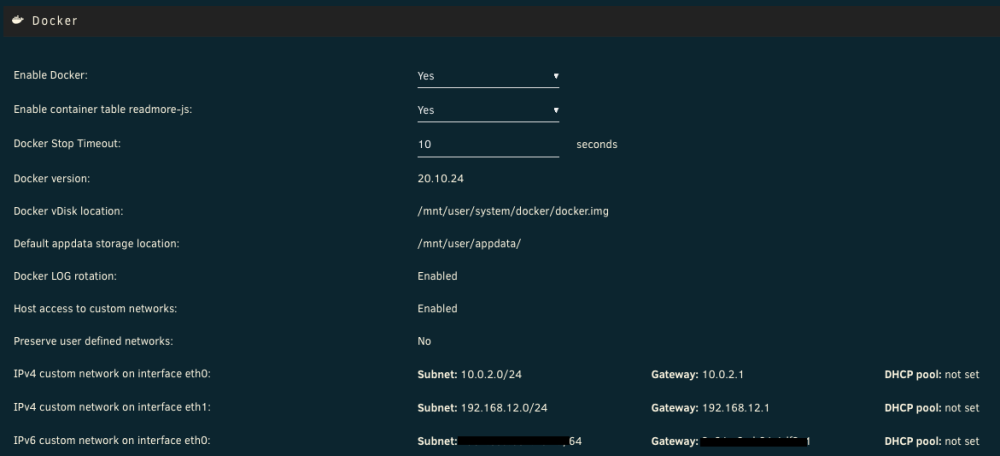
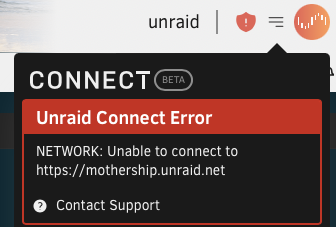
Hello, After I upgraded to v6.12.4, it looks like my ipv6 does not work correctly anymore. First I couldn't ssh my server because the ssh doesn't listen to ipv6 anymore, only ipv4: root@unraid:~# netstat -tulpn | grep 22 tcp 0 0 0.0.0.0:22 0.0.0.0:* LISTEN 7411/sshd: /usr/sbi Second, the ipv6 is not available for docker containers. The ipv6 subnet doesn't appear in the EDIT view of the containers. So I had to remove it from each of them to be able to start them. My docker network type is ipvlan. My config is the following: Also, I have a error message: I believe it's not related to ipv6 but it also appeared with the last update. What can I do ? KR,
-
I see that the template already set a limit to 12G. Isn't it another container that gobbles up all the RAM ?
-
Hello, I got the alert message again. **Out Of Memory errors detected on your server** I have 4 VM running, using a total of 20G on the 64G available. I have around 32 docker containers running, is it too much ? I join the diagnostic file form today. Could it be analysed ? Thanks, unraid-diagnostics-20230820-0944.zip
-
Ok, nothing special on the diagnostic file ? I'll update this thread if this happens again.
-
Did something change with a recent update ? I cannot connect to the web interface anymore. I checked through the console, and no deamon are listening on 8080 (or 9090) anymore: Do I have to do something ? KR,






