





Rick Sanchez
Members
-
Joined
-
Last visited
Everything posted by Rick Sanchez
-
I have the plugin by ich777 and I still have these issues
-
Did you get any further with your Node 304 project?
-
Hi, I'm hoping you can help 🙏 I am searching for a new Graphics Card for my Windows 11 VM that can hibernate/sleep without any issues. My current hybrid server uses a Sapphire Pulse 5700XT. It's a great graphics card, but the constant AMD bug reset issues are making me insane! Please can you recommend any graphics cards that UnRAID can put into a P0 sleep state and successfully wake up from using my mouse or keyboard? The max card length is 255mm due to my Icy Dock MB155SP-B. Any suggestions are greatly appreciated! I've read the RTX 3080 can do it but it's too long for my case setup unfortunately! Thanks for help 👍
-
Hi, Is there a way to shutdown the server remotely through a mobile phone app, or shortcut? Thanks, Jon
-
Great work! My Node 304 has sat empty for almost a decade because of the lack of SATA ports on motherboards... It looks like it's time to clean it up and build a new backup/HA etc system If you were going down the m2 route, what hardware would you choose today?
-
This looks great and it's similar to what I want to do. I currently have a node 304 case, but, might sell it for something smaller Sent from my Pixel 6 using Tapatalk
-
This is the board that I was looking at getting for my Node 304. It's concerning that you're having these issues Sent from my Pixel 6 using Tapatalk
-
My Xeon setup uses 120w in use and idle! I wish I could drop its usage massively! Can this help?
-
I'm thinking of buying this case at a later date for a super low powered backup NAS. Are you using this case yet?
-
Try Discord, you'll get more active help! I
-
Has anyone got a solution to my problems? Thanks for your help!
-
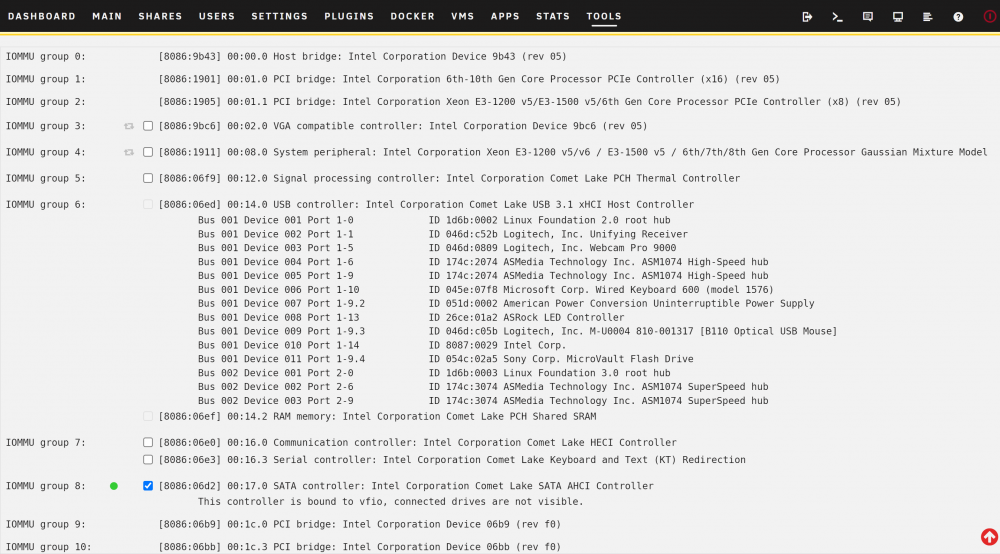
IOMMU Groups Attached...
.thumb.png.7ab554d8ed007da048379521fa273a02.png)
.thumb.png.1fad5ffe34dc31952fa885ac8da1ca5e.png)
-
This is what loads on screen since my reboot: Sent from my TA-1012 using Tapatalk
-
Hi everyone, I am loosing the will to live with UnRAID VMs as I have run out of ideas! Created a new Windows 11 VM and everything worked fine, until I needed to reboot and now I cannot get it to boot at all! What am I doing wrong? VM XML: VM Error In UnRAID: See images and diagnostics attached. I've tried to split my IOMMU groups, by following @SpaceInvaderOne's guide, but after the reboot, they are all still grouped together? Any ideas? Have I selected the wrong things, causing it to crash? ###-diagnostics-20220116-2341.zip
-
Personally, I would use a web host, such as fusionhost.co.uk - That's who I use.
-
Update, rebooted the server today and the loaded on screen. Another step closer!! [emoji120] What am I missing? Corrupt Windows OS? Thanks for your help [emoji846] Sent from my TA-1012 using Tapatalk
-
Still can't get a picture on my monitor and I have no errors. Any ideas?
-
@SpaceInvaderOne - Do you have any ideas that I can try?
-
So, the VM has started, but I have no picture on my monitor? VM Log: [quote] ErrorWarningSystemArrayLogin -smp 6,sockets=1,dies=1,cores=3,threads=2 \ -uuid df5c1f38-a6f0-9667-757e-0c4b4cc9c912 \ -display none \ -no-user-config \ -nodefaults \ -chardev socket,id=charmonitor,fd=31,server,nowait \ -mon chardev=charmonitor,id=monitor,mode=control \ -rtc base=localtime \ -no-hpet \ -no-shutdown \ -boot strict=on \ -device ich9-usb-ehci1,id=usb,bus=pci.0,addr=0x7.0x7 \ -device ich9-usb-uhci1,masterbus=usb.0,firstport=0,bus=pci.0,multifunction=on,addr=0x7 \ -device ich9-usb-uhci2,masterbus=usb.0,firstport=2,bus=pci.0,addr=0x7.0x1 \ -device ich9-usb-uhci3,masterbus=usb.0,firstport=4,bus=pci.0,addr=0x7.0x2 \ -device ahci,id=sata0,bus=pci.0,addr=0x3 \ -device virtio-serial-pci,id=virtio-serial0,bus=pci.0,addr=0x4 \ -blockdev '{"driver":"file","filename":"/mnt/user/domains/Windows 10/vdisk1.img","node-name":"libvirt-3-storage","cache":{"direct":false,"no-flush":false},"auto-read-only":true,"discard":"unmap"}' \ -blockdev '{"node-name":"libvirt-3-format","read-only":false,"cache":{"direct":false,"no-flush":false},"driver":"raw","file":"libvirt-3-storage"}' \ -device virtio-blk-pci,bus=pci.0,addr=0x5,drive=libvirt-3-format,id=virtio-disk2,bootindex=1,write-cache=on \ -blockdev '{"driver":"file","filename":"/mnt/user/isos/Windows/Window11_Insiders.iso","node-name":"libvirt-2-storage","auto-read-only":true,"discard":"unmap"}' \ -blockdev '{"node-name":"libvirt-2-format","read-only":true,"driver":"raw","file":"libvirt-2-storage"}' \ -device ide-cd,bus=sata0.0,drive=libvirt-2-format,id=sata0-0-0,bootindex=2 \ -blockdev '{"driver":"file","filename":"/mnt/user/isos/virtio-win-0.1.190-1.iso","node-name":"libvirt-1-storage","auto-read-only":true,"discard":"unmap"}' \ -blockdev '{"node-name":"libvirt-1-format","read-only":true,"driver":"raw","file":"libvirt-1-storage"}' \ -device ide-cd,bus=ide.0,unit=1,drive=libvirt-1-format,id=ide0-0-1 \ -netdev tap,fd=33,id=hostnet0 \ -device virtio-net,netdev=hostnet0,id=net0,mac=52:54:00:9c:03:84,bus=pci.0,addr=0x2 \ -chardev pty,id=charserial0 \ -device isa-serial,chardev=charserial0,id=serial0 \ -chardev socket,id=charchannel0,fd=34,server,nowait \ -device virtserialport,bus=virtio-serial0.0,nr=1,chardev=charchannel0,id=channel0,name=org.qemu.guest_agent.0 \ -device usb-tablet,id=input0,bus=usb.0,port=1 \ -device vfio-pci,host=0000:03:00.0,id=hostdev0,bus=pci.0,multifunction=on,addr=0x6 \ -device vfio-pci,host=0000:03:00.1,id=hostdev1,bus=pci.0,addr=0x6.0x1 \ -sandbox on,obsolete=deny,elevateprivileges=deny,spawn=deny,resourcecontrol=deny \ -msg timestamp=on 2021-12-16 17:56:27.456+0000: Domain id=6 is tainted: high-privileges 2021-12-16 17:56:27.456+0000: Domain id=6 is tainted: host-cpu char device redirected to /dev/pts/0 (label charserial0) [/quote] So close, but, not close enough!! Anymore suggestions/ideas? Thanks for your help, @ghost82 and @Squid
-
Researching this error brings me to info about a Mac VM - I've never had one... /mnt/user/system/custom_ovmf What am I missing, @Squid?
-
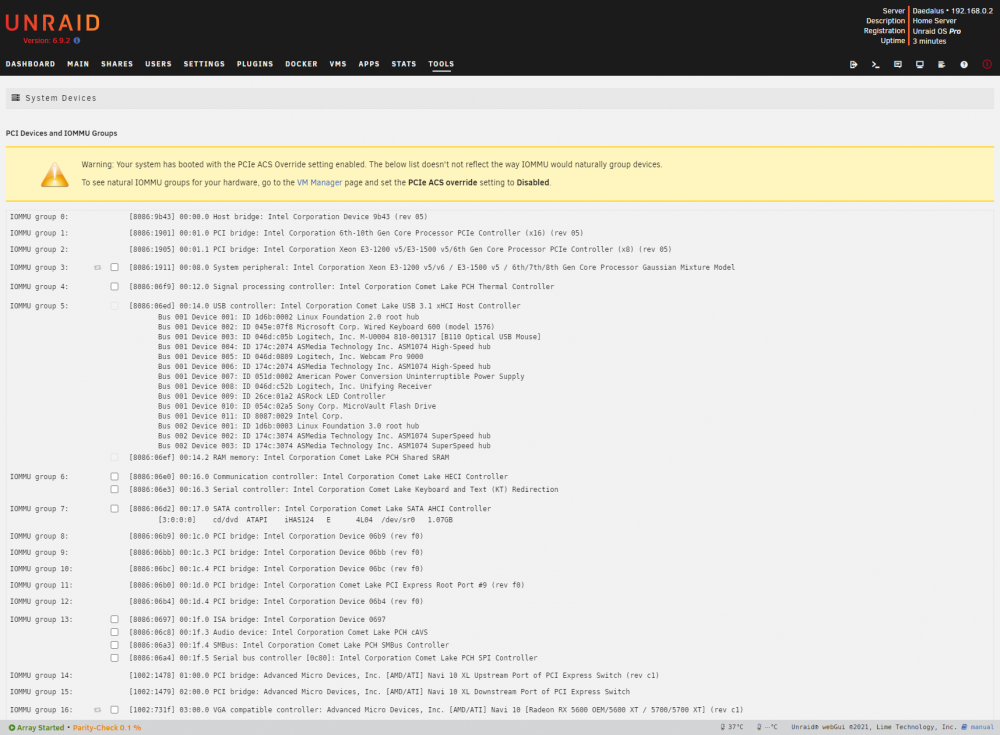
I have done as instructed and I selected both and restarted. Now I see - attached screenshot: And the 'Execution Error' is: operation failed: unable to find any master var store for loader: /usr/share/qemu/ovmf-x64/OVMF_CODE-pure-efi.fd Thank you for your help!
-
The stuff before just forced the server to boot in BIOS and it wasn't clear why. I had to format the flash drive to get it to boot... So, what did I miss? Do I just tick the box by the graphics card text? I don't understand
-
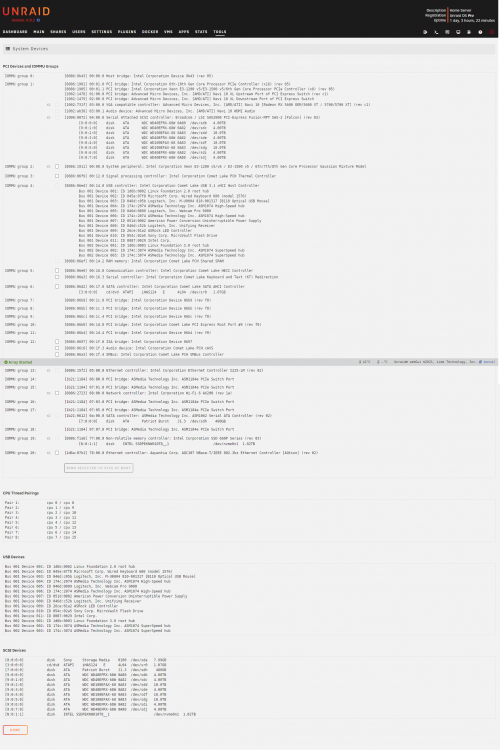
Which ones should I enable? IOMMU group 1?
-
[quote]Execution error operation failed: unable to find any master var store for loader: /usr/share/qemu/ovmf-x64/OVMF_CODE-pure-efi.fd0[/quote] Any ideas why this still isn't working? ###-diagnostics-20211213-0012.zip
-
I bought the SanDisk Cruiser Fit 2.0 16GB

.png.e6a7578585fffdba4ffc0e90f6a5beeb.png)
.png.0605ee6d733c1917112c51c9fa5a0172.png)


