





Rick Sanchez
Members
-
Joined
-
Last visited
Everything posted by Rick Sanchez
-
Thank you for posting your feedback on this case. I'm thinking of merging two computers (see link) and this case fits the bill as I'm looking to retain a DVD drive.
-
Thanks for this. Do you know if it is possible to add multiple source folders, without error?
-
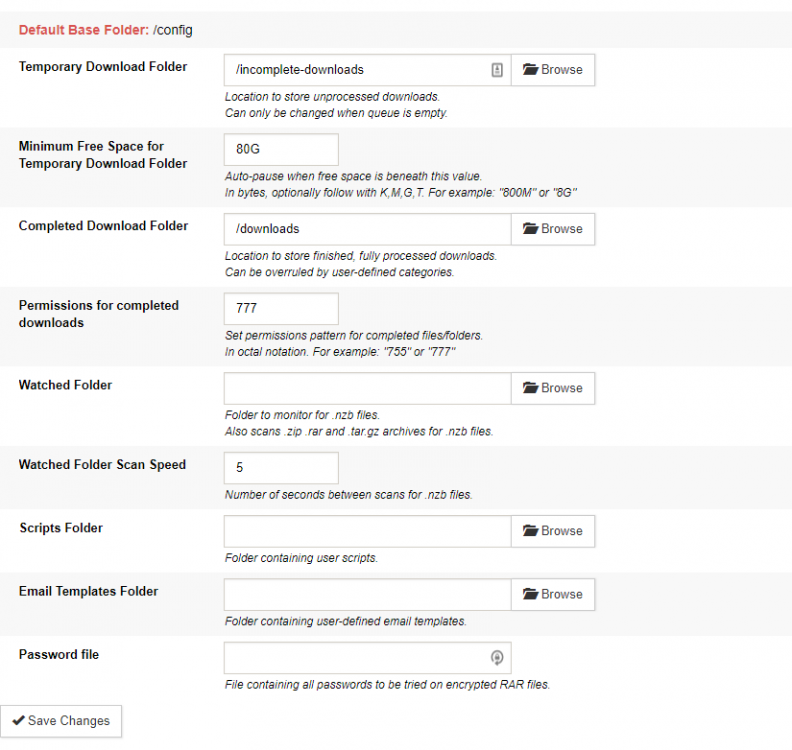
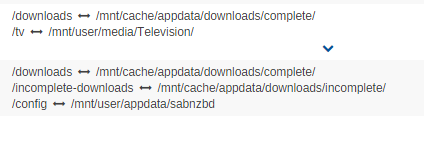
/downloads It is not a continuous error. It seems to appear randomly and states it is not accessible.
-
Sonarr Radarr

-
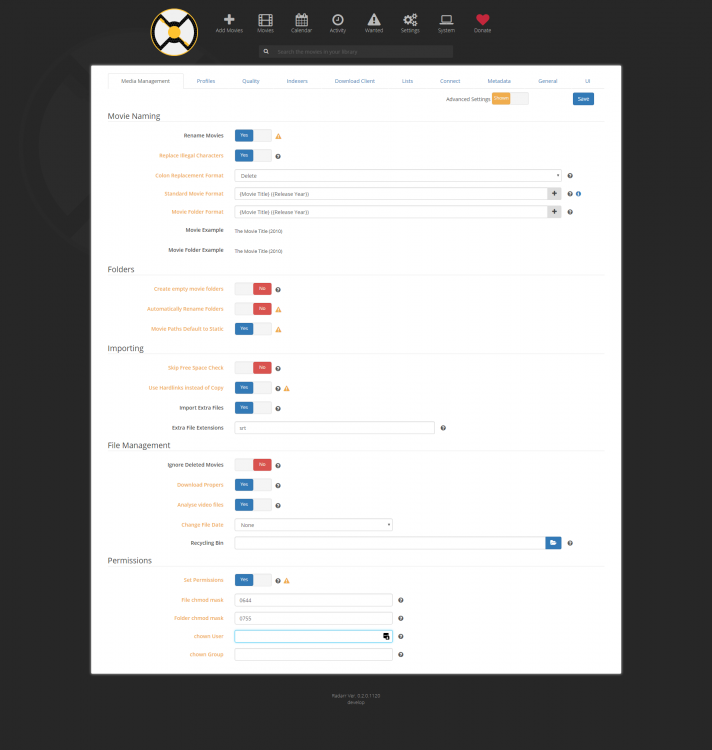
Worked for about an hour and now I'm getting the same error, on your recommend settings... Import failed, path does not exist or is not accessible by Radarr:
-
Fair enough. Thanks
-
Its worked for months without change. I've never had everything like: SAB: /mnt/cache/appdata/downloads/complete/ Radarr: /mnt/cache/appdata/downloads/complete/ It's always been: SAB: /mnt/cache/appdata/downloads/complete/ Radarr: /mnt/cache/appdata/downloads/complete/movies
-
It's not that. It has to be that to function correctly. This error has returned: Task Error: database is locked Sonarr reports: Error occurred while executing task CheckForFinishedDownload: database is locked database is locked
-
/downloads = /mnt/cache/appdata/Downloads/complete/
-
Finally, have a 'proper' error: Import failed, path does not exist or is not accessible by Radarr: /downloads/movies/ But it is accessible? /downloads = /mnt/cache/appdata/Downloads/complete/movies/
-
Hosted? It's a brand new install.
-
Ah!
-
It's displaying the Radarr folder files, nothing else?
-
Which file is needed? Thanks
-
1. How would I find this? Latest errors: SignalR exception thrown by Task: System.AggregateException: One or more errors occurred. ---> System.IO.IOException: Unable to write data to the transport connection: Connection reset by peer. ---> System.Net.Sockets.SocketException: Connection reset by peer at System.Net.Sockets.Socket.Send (System.Byte[] buffer, System.Int32 offset, System.Int32 size, System.Net.Sockets.SocketFlags socketFlags) [0x00016] in <fc308f916aec4e4283e0c1d4b761760a>:0 at System.Net.Sockets.NetworkStream.Write (System.Byte[] buffer, System.Int32 offset, System.Int32 size) [0x0009b] in <fc308f916aec4e4283e0c1d4b761760a>:0 --- End of inner exception stack trace --- at System.Net.Sockets.NetworkStream.Write (System.Byte[] buffer, System.Int32 offset, System.Int32 size) [0x000e2] in <fc308f916aec4e4283e0c1d4b761760a>:0 at System.Net.ResponseStream.InternalWrite (System.Byte[] buffer, System.Int32 offset, System.Int32 count) [0x0001b] in <fc308f916aec4e4283e0c1d4b761760a>:0 at System.Net.ResponseStream.Write (System.Byte[] buffer, System.Int32 offset, System.Int32 count) [0x0009c] in <fc308f916aec4e4283e0c1d4b761760a>:0 at Microsoft.Owin.Host.HttpListener.RequestProcessing.ExceptionFilterStream.Write (System.Byte[] buffer, System.Int32 offset, System.Int32 count) [0x00024] in <208c8ef8a4ba4b878f0e4420d5960bea>:0 at Microsoft.AspNet.SignalR.Owin.ServerResponse.Write (System.ArraySegment`1[T] data) [0x00000] in C:\projects\radarr-usby1\src\Microsoft.AspNet.SignalR.Owin\ServerResponse.cs:50 at Microsoft.AspNet.SignalR.Infrastructure.BinaryTextWriter+<>c.<.ctor>b__0_0 (System.ArraySegment`1[T] data, System.Object state) [0x00000] in C:\projects\radarr-usby1\src\Microsoft.AspNet.SignalR.Core\Infrastructure\BinaryTextWriter.cs:12 at Microsoft.AspNet.SignalR.Infrastructure.BufferTextWriter+ChunkedWriter.Flush (System.Byte[] byteBuffer, System.Boolean flushEncoder) [0x00027] in C:\projects\radarr-usby1\src\Microsoft.AspNet.SignalR.Core\Infrastructure\BufferTextWriter.cs:182 at Microsoft.AspNet.SignalR.Infrastructure.BufferTextWriter+ChunkedWriter.Flush (System.Boolean flushEncoder) [0x00008] in C:\projects\radarr-usby1\src\Microsoft.AspNet.SignalR.Core\Infrastructure\BufferTextWriter.cs:163 at Microsoft.AspNet.SignalR.Infrastructure.BufferTextWriter+ChunkedWriter.Flush () [0x00000] in C:\projects\radarr-usby1\src\Microsoft.AspNet.SignalR.Core\Infrastructure\BufferTextWriter.cs:155 at Microsoft.AspNet.SignalR.Infrastructure.BufferTextWriter+ChunkedWriter.Write (System.ArraySegment`1[T] data) [0x00000] in C:\projects\radarr-usby1\src\Microsoft.AspNet.SignalR.Core\Infrastructure\BufferTextWriter.cs:149 at Microsoft.AspNet.SignalR.Infrastructure.BinaryTextWriter.Write (System.ArraySegment`1[T] data) [0x00000] in C:\projects\radarr-usby1\src\Microsoft.AspNet.SignalR.Core\Infrastructure\BinaryTextWriter.cs:31 at Microsoft.AspNet.SignalR.Transports.PersistentResponse.WriteMessages (System.IO.TextWriter writer, Newtonsoft.Json.JsonTextWriter jsonWriter) [0x00063] in C:\projects\radarr-usby1\src\Microsoft.AspNet.SignalR.Core\Transports\PersistentResponse.cs:167 at Microsoft.AspNet.SignalR.Transports.PersistentResponse.Microsoft.AspNet.SignalR.Json.IJsonWritable.WriteJson (System.IO.TextWriter writer) [0x000f5] in C:\projects\radarr-usby1\src\Microsoft.AspNet.SignalR.Core\Transports\PersistentResponse.cs:131 at Microsoft.AspNet.SignalR.Json.JsonNetSerializer.Serialize (System.Object value, System.IO.TextWriter writer) [0x0000a] in C:\projects\radarr-usby1\src\Microsoft.AspNet.SignalR.Core\Json\JsonNetSerializer.cs:61 at NzbDrone.SignalR.Serializer.Serialize (System.Object value, System.IO.TextWriter writer) [0x0001f] in C:\projects\radarr-usby1\src\NzbDrone.SignalR\Serializer.cs:20 at Microsoft.AspNet.SignalR.Transports.LongPollingTransport.PerformSend (System.Object state) [0x00085] in C:\projects\radarr-usby1\src\Microsoft.AspNet.SignalR.Core\Transports\LongPollingTransport.cs:315 at Microsoft.AspNet.SignalR.Transports.LongPollingTransport+<>c.<Send>b__43_0 (System.Object state) [0x00000] in C:\projects\radarr-usby1\src\Microsoft.AspNet.SignalR.Core\Transports\LongPollingTransport.cs:157 at Microsoft.AspNet.SignalR.Infrastructure.TaskQueue.<Enqueue>b__14_0 (System.Func`2[T,TResult] next, System.Object nextState) [0x00000] in C:\projects\radarr-usby1\src\Microsoft.AspNet.SignalR.Core\Infrastructure\TaskQueue.cs:85 at Microsoft.AspNet.SignalR.TaskAsyncHelper.FromMethod[T1,T2] (System.Func`3[T1,T2,TResult] func, T1 arg1, T2 arg2) [0x00000] in C:\projects\radarr-usby1\src\Microsoft.AspNet.SignalR.Core\TaskAsyncHelper.cs:764 --- End of inner exception stack trace --- ---> (Inner Exception #0) System.IO.IOException: Unable to write data to the transport connection: Connection reset by peer. ---> System.Net.Sockets.SocketException: Connection reset by peer at System.Net.Sockets.Socket.Send (System.Byte[] buffer, System.Int32 offset, System.Int32 size, System.Net.Sockets.SocketFlags socketFlags) [0x00016] in <fc308f916aec4e4283e0c1d4b761760a>:0 at System.Net.Sockets.NetworkStream.Write (System.Byte[] buffer, System.Int32 offset, System.Int32 size) [0x0009b] in <fc308f916aec4e4283e0c1d4b761760a>:0 --- End of inner exception stack trace --- at System.Net.Sockets.NetworkStream.Write (System.Byte[] buffer, System.Int32 offset, System.Int32 size) [0x000e2] in <fc308f916aec4e4283e0c1d4b761760a>:0 at System.Net.ResponseStream.InternalWrite (System.Byte[] buffer, System.Int32 offset, System.Int32 count) [0x0001b] in <fc308f916aec4e4283e0c1d4b761760a>:0 at System.Net.ResponseStream.Write (System.Byte[] buffer, System.Int32 offset, System.Int32 count) [0x0009c] in <fc308f916aec4e4283e0c1d4b761760a>:0 at Microsoft.Owin.Host.HttpListener.RequestProcessing.ExceptionFilterStream.Write (System.Byte[] buffer, System.Int32 offset, System.Int32 count) [0x00024] in <208c8ef8a4ba4b878f0e4420d5960bea>:0 at Microsoft.AspNet.SignalR.Owin.ServerResponse.Write (System.ArraySegment`1[T] data) [0x00000] in C:\projects\radarr-usby1\src\Microsoft.AspNet.SignalR.Owin\ServerResponse.cs:50 at Microsoft.AspNet.SignalR.Infrastructure.BinaryTextWriter+<>c.<.ctor>b__0_0 (System.ArraySegment`1[T] data, System.Object state) [0x00000] in C:\projects\radarr-usby1\src\Microsoft.AspNet.SignalR.Core\Infrastructure\BinaryTextWriter.cs:12 at Microsoft.AspNet.SignalR.Infrastructure.BufferTextWriter+ChunkedWriter.Flush (System.Byte[] byteBuffer, System.Boolean flushEncoder) [0x00027] in C:\projects\radarr-usby1\src\Microsoft.AspNet.SignalR.Core\Infrastructure\BufferTextWriter.cs:182 at Microsoft.AspNet.SignalR.Infrastructure.BufferTextWriter+ChunkedWriter.Flush (System.Boolean flushEncoder) [0x00008] in C:\projects\radarr-usby1\src\Microsoft.AspNet.SignalR.Core\Infrastructure\BufferTextWriter.cs:163 at Microsoft.AspNet.SignalR.Infrastructure.BufferTextWriter+ChunkedWriter.Flush () [0x00000] in C:\projects\radarr-usby1\src\Microsoft.AspNet.SignalR.Core\Infrastructure\BufferTextWriter.cs:155 at Microsoft.AspNet.SignalR.Infrastructure.BufferTextWriter+ChunkedWriter.Write (System.ArraySegment`1[T] data) [0x00000] in C:\projects\radarr-usby1\src\Microsoft.AspNet.SignalR.Core\Infrastructure\BufferTextWriter.cs:149 at Microsoft.AspNet.SignalR.Infrastructure.BinaryTextWriter.Write (System.ArraySegment`1[T] data) [0x00000] in C:\projects\radarr-usby1\src\Microsoft.AspNet.SignalR.Core\Infrastructure\BinaryTextWriter.cs:31 at Microsoft.AspNet.SignalR.Transports.PersistentResponse.WriteMessages (System.IO.TextWriter writer, Newtonsoft.Json.JsonTextWriter jsonWriter) [0x00063] in C:\projects\radarr-usby1\src\Microsoft.AspNet.SignalR.Core\Transports\PersistentResponse.cs:167 at Microsoft.AspNet.SignalR.Transports.PersistentResponse.Microsoft.AspNet.SignalR.Json.IJsonWritable.WriteJson (System.IO.TextWriter writer) [0x000f5] in C:\projects\radarr-usby1\src\Microsoft.AspNet.SignalR.Core\Transports\PersistentResponse.cs:131 at Microsoft.AspNet.SignalR.Json.JsonNetSerializer.Serialize (System.Object value, System.IO.TextWriter writer) [0x0000a] in C:\projects\radarr-usby1\src\Microsoft.AspNet.SignalR.Core\Json\JsonNetSerializer.cs:61 at NzbDrone.SignalR.Serializer.Serialize (System.Object value, System.IO.TextWriter writer) [0x0001f] in C:\projects\radarr-usby1\src\NzbDrone.SignalR\Serializer.cs:20 at Microsoft.AspNet.SignalR.Transports.LongPollingTransport.PerformSend (System.Object state) [0x00085] in C:\projects\radarr-usby1\src\Microsoft.AspNet.SignalR.Core\Transports\LongPollingTransport.cs:315 at Microsoft.AspNet.SignalR.Transports.LongPollingTransport+<>c.<Send>b__43_0 (System.Object state) [0x00000] in C:\projects\radarr-usby1\src\Microsoft.AspNet.SignalR.Core\Transports\LongPollingTransport.cs:157 at Microsoft.AspNet.SignalR.Infrastructure.TaskQueue.<Enqueue>b__14_0 (System.Func`2[T,TResult] next, System.Object nextState) [0x00000] in C:\projects\radarr-usby1\src\Microsoft.AspNet.SignalR.Core\Infrastructure\TaskQueue.cs:85 at Microsoft.AspNet.SignalR.TaskAsyncHelper.FromMethod[T1,T2] (System.Func`3[T1,T2,TResult] func, T1 arg1, T2 arg2) [0x00000] in C:\projects\radarr-usby1\src\Microsoft.AspNet.SignalR.Core\TaskAsyncHelper.cs:764 <--- Task Error: A Task's exception(s) were not observed either by Waiting on the Task or accessing its Exception property. As a result, the unobserved exception was rethrown by the finalizer thread.: A Task's exception(s) were not observed either by Waiting on the Task or accessing its Exception property. As a result, the unobserved exception was rethrown by the finalizer thread. System.AggregateException: A Task's exception(s) were not observed either by Waiting on the Task or accessing its Exception property. As a result, the unobserved exception was rethrown by the finalizer thread. ---> System.Net.WebException: The request was aborted: The request was canceled. at System.Net.HttpWebRequest+<MyGetResponseAsync>d__246.MoveNext () [0x003d5] in <fc308f916aec4e4283e0c1d4b761760a>:0 --- End of inner exception stack trace --- ---> (Inner Exception #0) System.Net.WebException: The request was aborted: The request was canceled. at System.Net.HttpWebRequest+<MyGetResponseAsync>d__246.MoveNext () [0x003d5] in <fc308f916aec4e4283e0c1d4b761760a>:0 <--- Close Task Error: database is locked database is locked System.Data.SQLite.SQLiteException (0x80004005): database is locked database is locked at System.Data.SQLite.SQLite3.Prepare (System.Data.SQLite.SQLiteConnection cnn, System.String strSql, System.Data.SQLite.SQLiteStatement previous, System.UInt32 timeoutMS, System.String& strRemain) [0x00300] in <61a20cde294d4a3eb43b9d9f6284613b>:0 at System.Data.SQLite.SQLiteCommand.BuildNextCommand () [0x000f6] in <61a20cde294d4a3eb43b9d9f6284613b>:0 at System.Data.SQLite.SQLiteCommand.GetStatement (System.Int32 index) [0x00008] in <61a20cde294d4a3eb43b9d9f6284613b>:0 at (wrapper remoting-invoke-with-check) System.Data.SQLite.SQLiteCommand.GetStatement(int) at System.Data.SQLite.SQLiteDataReader.NextResult () [0x0011e] in <61a20cde294d4a3eb43b9d9f6284613b>:0 at System.Data.SQLite.SQLiteDataReader..ctor (System.Data.SQLite.SQLiteCommand cmd, System.Data.CommandBehavior behave) [0x00090] in <61a20cde294d4a3eb43b9d9f6284613b>:0 at (wrapper remoting-invoke-with-check) System.Data.SQLite.SQLiteDataReader..ctor(System.Data.SQLite.SQLiteCommand,System.Data.CommandBehavior) at System.Data.SQLite.SQLiteCommand.ExecuteReader (System.Data.CommandBehavior behavior) [0x0000c] in <61a20cde294d4a3eb43b9d9f6284613b>:0 at System.Data.SQLite.SQLiteCommand.ExecuteNonQuery (System.Data.CommandBehavior behavior) [0x00006] in <61a20cde294d4a3eb43b9d9f6284613b>:0 at System.Data.SQLite.SQLiteCommand.ExecuteNonQuery () [0x00006] in <61a20cde294d4a3eb43b9d9f6284613b>:0 at System.Data.SQLite.SQLiteConnection.Open () [0x00959] in <61a20cde294d4a3eb43b9d9f6284613b>:0 at Marr.Data.DataMapper.OpenConnection () [0x00019] in C:\projects\radarr-usby1\src\Marr.Data\DataMapper.cs:847 at Marr.Data.DataMapper.Query[T] (System.String sql, System.Collections.Generic.ICollection`1[T] entityList, System.Boolean useAltName) [0x00065] in C:\projects\radarr-usby1\src\Marr.Data\DataMapper.cs:566 at Marr.Data.QGen.QueryBuilder`1[T].ToList () [0x00052] in C:\projects\radarr-usby1\src\Marr.Data\QGen\QueryBuilder.cs:279 at NzbDrone.Core.Datastore.BasicRepository`1[TModel].All () [0x00000] in C:\projects\radarr-usby1\src\NzbDrone.Core\Datastore\BasicRepository.cs:62 at NzbDrone.Core.Jobs.TaskManager.GetPending () [0x00000] in C:\projects\radarr-usby1\src\NzbDrone.Core\Jobs\TaskManager.cs:47 at NzbDrone.Core.Jobs.Scheduler.ExecuteCommands () [0x0000b] in C:\projects\radarr-usby1\src\NzbDrone.Core\Jobs\Scheduler.cs:36 at System.Threading.Tasks.Task.InnerInvoke () [0x0000f] in <71d8ad678db34313b7f718a414dfcb25>:0 at System.Threading.Tasks.Task.Execute () [0x00010] in <71d8ad678db34313b7f718a414dfcb25>:0 Close The latest errors
-
The latest update(s) (all your dockers) has caused me two major issues: 1. I know receive "Task Error: database is locked: database is locked" errors. How do I fix this? Just a heads up: Almost all of my DVD/Blue Ray rip backups (MakeMKV) have been deleted... - A waste of well over a year - Over 10tb of data has gone! I have checked for hard drive failures and there were none. The only bonus to this is, I can start afresh.
-
After a file is automatically moved and the other files are 'cleaned' up, the empty folder remains. - How can this folder be automatically removed?
-
No one?
-
Does anyone know or have a guide that details how to auto delete folders? Along with why I keep receiving the following error while trying to access the web GUI: I have reinstalled the software 8+ times in the past month, but after a day or two, the error returns...
-
Hi Sir, I am about to build a new system to merge my main computer and a backup server. Would you recommend this server?
-
28TB - 6TB free. - Media server and computer back. I will be build another server this/next month to build a computer/server in one. - Like in jonp's video. I'm currently searching for a case.
-
Thanks - All fixed.
-
They have always been like this and worked. Sonarr works absolutely fine. How would it work if they where both pointed at /Complete?
-
Just a heads up. I've updated both Sonarr and Radarr to the latest version and both now report the same error Worked fine before the update. But not any more Ideas? What have I missed?
-
Ah, that's a shame. I'm looking to encrypt all traffic to and from the server Sent from my Nexus 5X using Tapatalk


