





ConnerVT
Members
-
Joined
-
Last visited
Everything posted by ConnerVT
-
I know that many people whom I might give a ride in my car. But they wouldn't all fit at once. If you want to stream to 30 different users/clients simultaneously, you will be hard pressed to do so with consumer hardware. It is all about the bandwidth. On every subsystem. Drive access speeds. Throughput of your NIC. Internet upload speed. Throughput of the CPU. So put it in RAM, that's fast. But the data still needs to get there, and be managed. More overhead. More throughput.
-
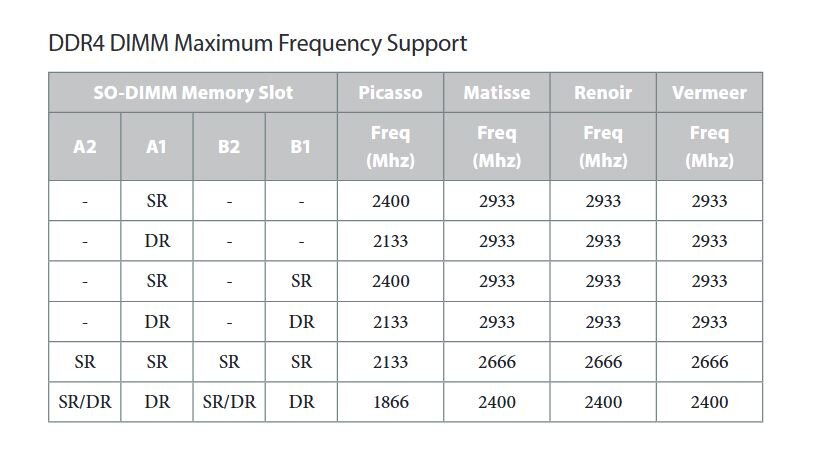
If you would post your systems diagnostics it would help. We've been guessing what you have for hardware. Other than the motherboard, I don't even know which Ryzen CPU you have. The early Ryzen CPUs do have lock up issues in Linux based systems. The later ones are much better, but there are infrequent reports from some of having issues. Power management was at the root of one of the issues. Memory speed was another. With power management, typically this is fixed by the "Typical Idle Current" setting in the BIOS. If your motherboard's BIOS has this setting, it will likely be under Advanced > AMD CBS. For memory speed, Ryzen is a bit finicky. The Infinity Fabric used to ties the Zen cores to cache to system RAM will have collisions or missing data if the RAM doesn't sync up with the CPU's timing. People get hung up on the marketing departments numbers printed in bold letters on the package and the advertisements. "3200" is not the speed that the RAM actually runs. That's the overclocked XMP value. It actually runs at 2666 (1333 MHz x 2). To make things more confusing, it matters if your RAM chips are Single Rank or Dual Rank on the earlier CPUs. Below is the Maximum Frequency RAM settings for your motherboard. What I would suggest is: - Remove whatever mitigations you have added - Confirm you are on the latest BIOS (2.50 or at lease 2.20) - See if you can locate the Typical Current Idle setting - Manually set your DRAM settings to be appropriate for your SO-DIMM *AND* no higher than the Maximum Frequency supported - Sanity check no other over clocking or over/under volting settings in BIOS - Disable/turn off any devices on the motherboard which you do not plan on using.
-
More than solid enough for most uses (there is always someone who wants to run a whole city with their server...). Only observation is that it's unfortunate that the 9900KF you have doesn't have an iGPU. Intel QuickSync is typically more than enough for transcoding Plex/Jellyfin streams. Two ideas to think of - Instead of dropping money on a 3070/3080 GPU (way overkill for only transcoding and a lot of wasted wattage), invest that $$ in a compatible CPU with an iGPU or get yourself a Quadro T400 GPU (less power, single slot, and transcodes as well as the gaming GPUs you spoke of).
-
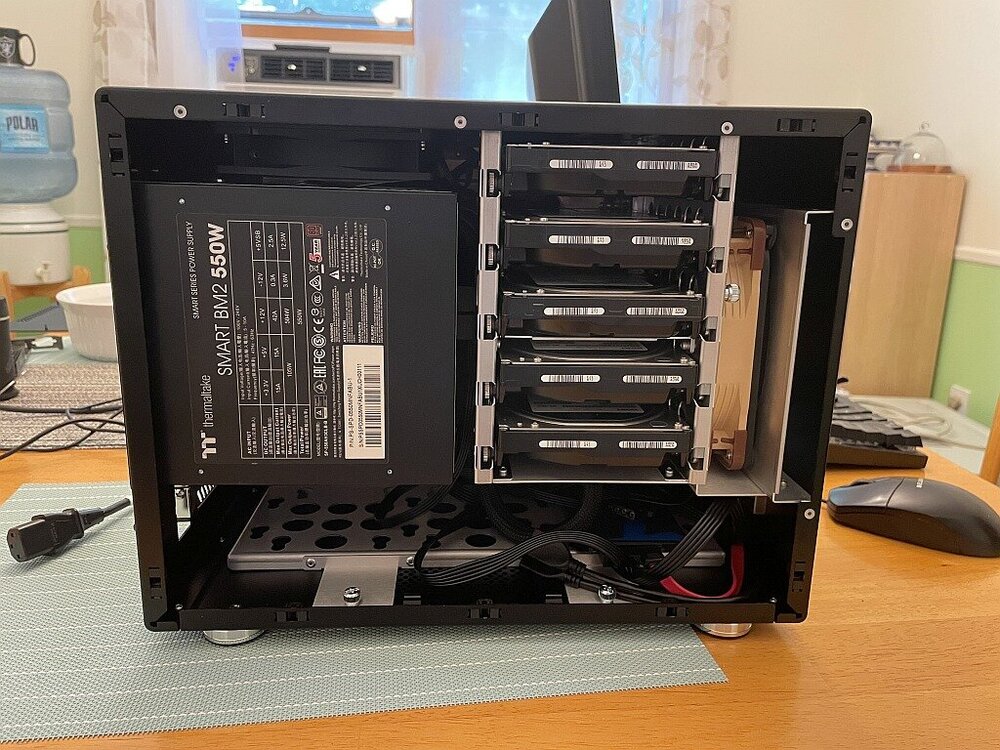
@a_n_d_y - Just a quick post to again say thank you. The case is a joy to build in. I had forgotten how well Lian Li cases are designed and built. After shuffling and upgrading hardware in two systems, it only cost me the price of 2 CPUs, a motherboard, 32GB of DRAM and two CPU coolers. I still think I got a good deal. (Yes, I obviously have a computer problem. One that would take a therapist to resolve, not Tech Support. 🙄 )
-
Power supply. Motherboard. Or just dumb luck. Could just be a coincidence. 10+ years of always on use from a flash drive is a solid run. That the second drive died in a couple of weeks could be a bad drive, a counterfeit drive, or something else.
-
I use both DuckDNS and Cloudflare with my server and network. I have two domains with Cloudflare (look at the non-.com domains, many are very reasonably priced). DuckDNS has had some issues the past month. Fortunately, I only have noncritical things associated with them. But still annoying. Cloudflare has been rock solid. I use both tunnels and DNS with them, and have never had an issue. They also have a few security related benefits, such as 2FA and Geoblocking, that are available for free users.
-
That would be great, if the only use case is always 30 people watching the same video file. Now flip it the other way - 30 people watching 30 different movies. Ain't easy caching it all to RAM. As they say, the Devil is in the details. 😫
-
^ This. Nearly all "commercial" streaming services do this, keeping files transcoded in the most likely demanded formats that are requested. For your use case, it will all come down to addressing the bottlenecks. 40 simultaneous streams - You will have a lot of them. Drive access speeds, network speed, transcoding, even bandwidth of moving data through the CPU/MB from drive through to NIC. This is before thinking of worst possible cases. Let's use this as an example - The latest episode of a popular show (think "GoT") just hit your server, and 30 users all sit down that Friday night to watch. Obviously, they don't all hit Play at the same time. So one drive is serving the same file, but reading different parts of it...
-
Unraid's primary use case is not to open it up to a WAN and the greater Internet. It is an appliance meant for one's local LAN network. It is designed and built for that purpose, and expectations that it is infallible to all off use implementations are not valid. Are some people stupid? Certainly. But you can't fix stupid. All you can try to do is protect people from themself, but that comes with a cost. you could lock down the system so tight that much of Unraid's usability is lost, hire someone who sole responsibility is to test and develop fixes for exploits (and pass that cost to the users) and pass patch after patch for us to update (then chase reports of "update broke my server..." we constantly see in the forum, many unrelated to Unraid software). But even making patches available, many people never update (and now the new business model will have even less people doing so). Unraid is not a plug-and-play NAS appliance. It is a highly configurable server platform. With the former, there is an expectation the vendor has a responsibility to fully protect you. Being stupid does not forgive you of your responsibility to protect yourself.
-
Why would you assume that? One would need to actively open their server's address and port to expose themself to the Internet.
-
You have a 4TB NVMe? Mine is only 2TB (less ~130GB of stuff that always lives there). I have never filled the cache up from Sabnzbd downloads. And I have grabbed some sizable things at times. I do leave my Sabnzbd limited to 80% (96MB/s) of my 1G internet speeds, just to not saturate the line so others have some bandwidth. (My wife will let me know if she can't stream her YouTube). Writes to my array are in the 60-80MB/s range.
-
Usenet = Never having to seed.
-
I just broke down why I do not cache my Media share in the post linked below. You have been given some good advice here. The only thing I will highlight is you certainly will want at least one solid state drive (NVMe or SSD) to run your applications from. I no longer torrent as I find Usenet a *much* better choice for several reasons. So how you may best configure transitioning what you seed to what you archive is beyond what I have good advice.
-
No, that would be a bit extreme. There are very many people who use Unraid for media streaming (as this was one of the primary reasons Unraid was original built). It just takes a little management on your part. How much data is there typically for the mover to handle? How long does it take to move the data? When are people typically streaming video? Are there other activities also taking place at this time (backups, downloads/torrents/etc)? Is the server healthy, without any inherent problems or issues? It should not be difficult to find a time to schedule the mover to run which does not interfere with other activities.
-
In Community Applications (CA) get the Appdata Backup plugin. It backs up appdata (and flash drive) on a schedule. Very configurable. Appdata and System shares are generally best kept on your fastest drive (NVMe/SSD). Appdata has the configuration files for your dockers. System is where all of the executable/binaries for your dockers and VMs.
-
Your system looks to be very similar to mine (without knowing what system hardware your platform is). I also run Sabnzbd and Arrs., with 1G/1G internet. This is how I have things configured, and have zero issues or complaints: appdata and system shares = cache only Download share = cache --> array Media share = array only Logic behind this choice is: All docker appdata and docker.img run on NVMe for speed. Sabnzbd downloads then unpacks the file. This is all done in the Download share in cache (NVMe), moving from one folder in Download to another fast. Sonarr/Radarr/Lidarr will move the unpacked file from Download/completed to the appropriate Media share folder once notified by the Arr. Doing any other writes to the array other than the last doesn't make sense, as it just does a lot of writing/moving data from one location in the array to another, at spinning rust speeds and with parity. I choose to have my Media share not to use cache, as almost all of the additions to my Media share come from Arrs. Having it cached would just add an additional set of writes to the NVMe [from Download/complete --> Media (cache) --> Media (array)].
-
With electrical engineering as my college major, but spending the majority of my life in the digital world (but playing a bit with amateur radio), my personal opinion of single vs multi-rail is that it is over hyped. Power loading is power loading. It really doesn't matter until you get close to the limit of what the PSU can supply. Multi-rail just basically splits the total output from one power supply into two (and reality, those two share some components, so not even two different supplies). As long as you spec a PSU that will comfortably handle expected peak demand, it should not matter (and actually be easier to manage). What "comfortably" means is subjective. You can likely choose less headroom with a high quality PSU, as it is less likely to do bad things when pushed close to its limits.
-
One man's opinion: I believe that folks generally overbuy when selecting a PSU. But then, some of the funkiest, most difficult problems I've ever troubleshot came down to a marginal PSU. For most people, I recommend buying from a reputable brand, and never buying their budget/discount line. Many of the PSU from different brands are made in the same factory, only differentiated by the components spec's by the brand/company. But then, I never have been asked about a system with 24 drives. What you can source in Sweden makes it more difficult to offer advice, other than see what Tier A power supplies in this list fit your requirements: https://cultists.network/140/psu-tier-list/
-
/etc/rc.d/rc.docker <command> Available commands: start stop restart status
-
Correct. Changes in 6.12 drove a respin of the old Unbalanced application.
-
https://docs.unraid.net/legacy/FAQ/console/#to-cleanly-stop-the-array-from-the-command-line
-
Thank You! Received the case today. Not only is the case in near new immaculate condition, it was shipped in its original box with all of the hardware and paperwork that a brand new one had. Adding what a pleasure it was doing this transaction with you, I can only say to anyone reading this - If you see @a_n_d_y offering something for sale, jump quickly and buy it, even if you don't need it!
-
Message sent. @Hoopster Why is it every time you show up, I end up buying something? You should be charging a commission. 🤑
-
I work in semiconductor manufacturing, since the mid 1990's. Before that, design and manufacture of some of the first graphics cards for the IBM PC, as well as working in computer retail stores (back when these actually existed). So I would need to be someone who works at NASA and believes we never landed on the moon. I am very well versed in semiconductor counterfeiting and supply chain control. In fact, I am required to be recertified annually in several inter-related aspects of this. So I just not making stuff up as I go along. I highly doubt anyone is making their own knock off chips. There is no need to. Everything you need to build a flash drive is readily available. It is really only 5 parts - Memory IC, controller IC, a circuit board, USB connector, and a shell/case. Okay, perhaps a few capacitors and resistors. Both ICs needed are readily available for purchase. And at wholesale are relatively dirt cheap, especially if buying old/outdated controllers and low binned (think "factory seconds") memory chips. There are suppliers making cheap flash drive circuit boards for the advertising/giveaway swag market, and smaller electronics assembly houses currently looking for work. Probably the most expensive part of the operation is the shell and packaging. But even that is likely less than $1 USD in volume quantities. It may not seem like a profitable way to make money, but the key is doing this in volume. Even a $2 profit on tens of thousands of units is still a decent profit. In fact, more than the typical computer retailer makes.
-
Thanks JorgeB. This is what I suspected.




