





ConnerVT
Members
-
Joined
-
Last visited
Everything posted by ConnerVT
-
Install the Nvidia Driver if you haven't already. Instructions for configuring Plex is in the second post of the Nvidia Driver support thread. Basically adding 2 Variables and an Extra Parameter to your Docker template.
-
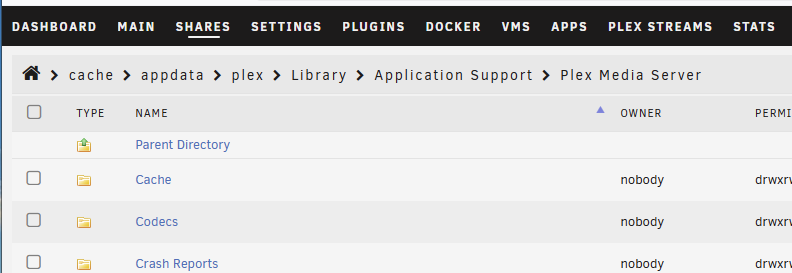
Plex via browser has always been a problem for many. Usual complaint is that it will force transcoding even if it isn't needed, and sometimes will have it CPU transcoded even when a hardware method is available. This happens on all versions of Plex. Doesn't matter if on Unraid or not, who's docker container, even when installed directly on a Windows machine. It is purely a Plex issue. One thing to try is deleting the contents of your codec folder from your Plex appdata. Stop Plex, delete the codecs, restart. Plex will pull down a fresh set of codecs. This sometimes resolves funky video playback errors.
-
Usenet quota? Did you put a value in config Servers > Quota? Also, is it possible that you have a quota (daily limit) for you Usenet hosting, which might be hit and reported by SABnzbd?
-
I had the same issue when I replaced the battery in my APC UPS. Need to connect to a Windows machine, use the APC software and reset the battery date.
-
Recovering a failed hard drive can sometimes be successful. But it has a cost in both parts (if available) and labor. But we aren't talking about an old disk drive sitting in someone's desk drawer. This was a commercial archiving firm with likely thousands of drives.
-
Not necessarily. A plugin or Docker/VM could be running and adding more stress to the system, enough to put a marginal component over the edge.
-
Ah, the old IBM PC X/T. When I got out of college, I had a PC X/T with an expansion chassis - Another full size IBM PC chassis, with a 20mm+ thick cable to connect the two via ISA expansion cards. Had a full height 5.25" 10MB hard drive in it. We (Vermont Microsystems) designed and built the Professional Graphics Controller for IBM, and I had one for testing in that expansion chassis. All very high end hardware for the mid-1980's. My boss had a pre-release engineering model of the IBM PC A/T. 8MHz 80286 and a 40MB half height HD. A config IBM never offered. We were all amazed how much storage space that was. Fast forward a decade, and no one expected a HD to last more than 10 years, even if kept in cold storage. Hard disk drives are not an archive medium.
-
0.14.1 was a maintenance release, basically bug fixes - "This is a maintenance release for Frigate 0.14 that includes bugfixes as well as performance and stability improvements." 0.14.0 had some major breaking changes. Changelog can be found here: https://github.com/blakeblackshear/frigate/releases
-
Unraid is testing you. Unraid just wants you to become better. 😆
-
Clear the browser's cache and cookies.
-
If you didn't see it, they aren't there. As LT has moved on to a different marketing model, I would expect we will never see any deals on pro/plus.
-
I have 11 manufacturer recertified HGST Utrastar drives split across 2 servers, plus 2 more in external USB cases which are used for backups (one stays connected to the server, then swapped with another I keep offsite). I have not had an issue with any of them since I started buying them a few years ago. The key is not to jump on the lowest price you find, but rather obtain them from the most reputable business. Unfortunately I can't say what that place is in Australia. As for GPU, it really depends on your needs. If all you need the GPU for is to stream on or two simultaneous movies on tour home LAN, an ARC is way overkill. It could be handled easily by an Intel iGPU. I run AMD processors, so the NVidia Quadro T400/P400 is a good choice. Same encoder/decoder as their RTX/GTX big brothers, but cost much less, use less power, and only requires a single slot.
-
From the first post of this thread:
-
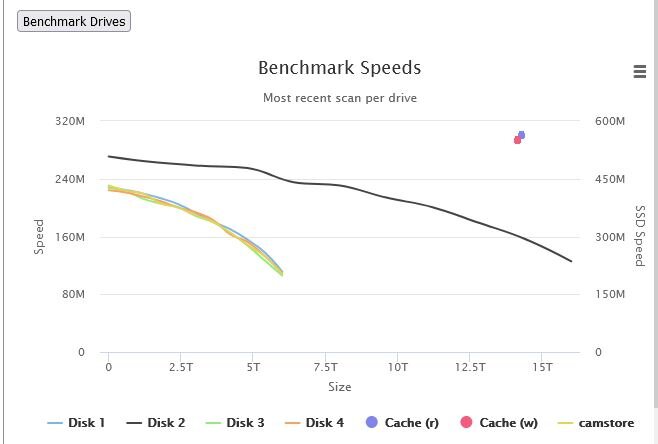
Don't overlook access speed when comparing large vs small capacity drives. Here is a benchmark from my backup server, which has several HGST Ultrastar 6TB drives and one Ultrastar 16TB drive. Access times are significantly faster for the 16TB, as much as 2x faster when at the 6TB mark.
-
The problem with one standard answer is that it isn't 100% true 100% of the time. Just like everything, it is much more nuanced than that. Which containers you run, and the features they may contain play a role. And that software tends to get bigger with every new update, as more features are added. As much as I love binhex (great support, lots of documentation) his containers are usually on the chunky side and always take up more space than the same application from someone else. That's why they take the top 8 rows of your screenshot. Seeing that most folks have their docker.img on a nVME or SATA SSD, the size difference from going from 20GB to 40GB really is insignificant, especially on a 1TB drive. So it isn't the size of the file, but more important is if you can't explain why the file is so big (or even why it is growing). That might indicate a misconfigured docker, writing to docker.img isntead of someplace it should.
-
Actually, it wouldn't even be slower, if set up as this: Set the Download directory for NZBGet to be on a NVMe/SSD drive. Set your Media directory to be array only. Download speed will be the same. Once file is completed, Radarr/Sonarr will move files from Download (SSD) to Media (Array). By having Media share using cache, what ends up happening is files download to Downloads (SSD) to Media (SSD cache) then to Media (Array) when the mover finally moves. Do it the way I suggest above, you can also avoid completely filling up your cache (as long as you download at a moderately fast speed).
-
As a follow up, it would be better to make sure the boot flash and Coral TPU are even on different USB controllers. If you go to Tools > System Devices, you can see where things are connected. Here is my server running Frigate:


-
Are your Unraid boot flash drive and the Coral TPU on the same USB controller/hub? If so, move your flash drive to a different controller. (A USB 2.0 port for the flash would likely work, as the Coral should be in a USB 3.0 port) I have a feeling that the Coral may be temporarily going off line (the USB controller/hub dropping connection). There have been a number of posts across the Internet with folks having issues with this, and I have seen it in my Unraid syslog as well. If your boot flash is on the same controller, and the hub drops out, Unraid will not automatically pick it back up in the same, correct state needed. On the Coral issue, some folks report it is the USB cable supplied with the TPU that is at fault. They replaced with a better quality cable, and issue was resolved.
-
As I upgraded the drives in my Unraid server from 6 and 8TB to 16TB, I repurposed the original drives and some hardware on hand to build a second Unraid server (as well as throw some of them into external USB enclosures, which I rotate offsite). The backup server would sleep most of the time, only being woke up 2x a month to rsync data to it (it now also runs my Frigate service, so now a 24/7 operation). Here is the thread I started when I began the build:
-
This version of the plugin was deprecated a long time ago. Can you lock it?
-
Maybe -1 and -2 does not come with fans ("position" = mounting positions) and -3 and -4 have fans pre-installed?
-
Click the Lock icon to unlock the dashboard tiles, then you can grab them and move them. Click the Wrench icon to select which tiles show on the dashboard.

-
Did you press the "Apply" button at the bottom left of the screen? I can't recall how many times I have forgotten to do this.
-
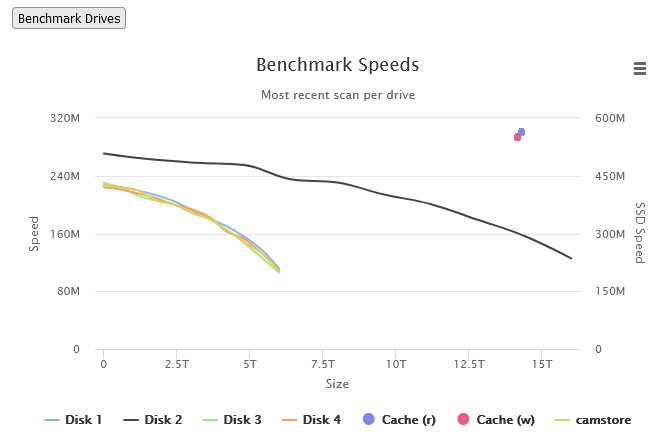
A follow up on my previous post. With a bunch of 6 and 8TB drives on hand after upgrading mu main server, I decided to build a second server, which I use to backup the media from my main server and runs Frigate for my security camera. It is populated with 4 6TB and 1 16TB HGST drives. With DiskSpeed, the read speeds range from: 6 TB = 230 MB/s to 110 MB/s 16 TB -= 270 MB/s to 125 MB
-
8TB will have faster access speeds as well as use less power, generate less heat, and have fewer connections (points of failure). My original server had several 6TB drives. Switched that up to 16/18TB drives of the same brand/similar model and was pleasantly surprised how much faster the bigger drives are.





