





ConnerVT
Members
-
Joined
-
Last visited
Everything posted by ConnerVT
-
^ Exactly what Tim wrote. This is how I have my server configured for HD and 4K Radarr dockers.
-
@Hoopster Check your IM
-
How much RAM should the RPi4 have for this to work well?
-
The external GPU doesn't need to live in the server full time. Put it in when you need it, take it out afterward. My server runs for months without me ever attaching a monitor, keyboard or mouse. I only have a GPU to do transcoding of video. Think I only have had to run a local GUI once in close to a year. I keep a KB, mouse, two spare drives and some cables in the desk drawer where the server lives. The original post was asking if he needed a APU or CPU. So one would figure the issue of needing a video output was addressed. Also answered in other posts in this thread.
-
I did not say the 5700G runs hot. I said I've read is the 5700G runs hotter than the 5700X. I wrote this with two thoughts in mind: More heat usually means more power consumption. This looked to be a factor to Stubbs, as he mentioned But I heard APUs have lower idle power consumption thanks to monolithic design. This statement is not really correct. APUs are more typically designed with laptop systems in mind, where space and power consumption are important factors. However, the 5700G isn't really a laptop processor, more of a "Hey, we can relax some of the limiting used on these other versions and sell it as a desktop CPU...". Ryzen temps at idle are always great. But there are also times where a server is running at 80%+ for extended periods of time, with all of the drives spinning, where the system gets heat soaked. Ambient room temp, case cooling and CPU cooler all start to come into play here. Both are 65W TDP processors, and the difference in power used between the two are likely minimal (I haven't yet seen a definitive benchmark between the two). This is why I feel if you don't have a use for the iGPU, skip adding the unneeded hardware to your system and buy the CPU that has more features which can be used daily (such as a bit more processing speed and additional cache).
-
Times out = When starting to play a movie in Plex, it somes back with an error saying it could not start playing the media. Need to go back and press Play again, which then it plays without issue. This is because the drive was still spinning up and the file unavailable longer than Plex is willing to wait for the file. Dynamix Cache Directories doesn't consume a lot of memory for me. I run 18 Dockers and a Home Assistant IO VM, with 52K media files using 11TB. I have 16GB of DRAM which Unraid reports I use 35-40%.
-
Have you confirmed that the fan seems to actually run at this speed? Or does the fan speed change when under load, the temperature rises, and it still reports 56%?
-
Unless you really have a need for the iGPU, I would opt for the 5700X. I have been looking at picking up a CPU upgrade for this system, and have been recently researching this. I haven't seen that the 5700G uses less power. And it is counter intuitive, as what I've read is the 5700G runs hotter than the 5700X. (Heat = power used). The 5700X has a bit more performance. Along with the additional cache and ECC, it also has PCIe 4.0. The 5700G is 3.0. MAM59 is correct, every server needs a fallback GPU of some kind that works with the BIOS setup or for those times when the server doesn't start up as expected and you need to troubleshoot. It doesn't need be in your system full time, but available in those rare cases when you need one. I have an old GT710 I used before I put a Quadro P400 in the my server.
-
I've been using Dynamix Cache Directories. Seems to work as advertised. My drives do not spin up doing file directory type accesses. Only seem to spin up when actually accessing/reading a file on that one drive. As far as spinning up/down drives: It takes enough time to spin up a drive that some applications (talking about you, Plex) will error when trying to read a file on a spun down disk, and the application times out. This can be an issue for users other than myself, especially when accessing media files off of my own LAN. My goal is to keep as many drives as I can spun down until needed. But my media files can be problematic if the drive is spun down. My solution is to exclude the Media share from several of the drives, and set those excluded drives to a 15 minute spin down. The drives that hold my media files never spin down, so I never see the timeout errors from Plex. Seems to be the best compromise.
-
Yes you are. These applications function more like a self hosted Netflix. On a basic "Just show the video" side, it will play that video on many more platforms than just a PC browser - Smart TVs, TV streaming devices such as Roku and AppleTV, tablets, smartphones. They take your file and transcode it to the best format and bitrate the device and network connection can handle. They can handle multiple user accounts, maintaining a watch list to show you what you have already watched, what is the next episode in the series you've been binging, etc. Add a tuner, and they give you DVR functionality and on screen TV guide, Expanded info about the movies, and enhanced search functions ("What other movies/shows do I have with so-and-so in it?") Some have been adding free streaming channels and on-demand movies. All this in a slick user interface that even my non-technical wife can navigate. Plus, if you have multiple users watching stuff, much easier and secure than having people navigate through the files on your computer, looking for that movie to play.
-
Missed that the second time around. But it was early my morning, and ended up out the door late to work. 😞 Thanks for pointing me to the right place. All formatted now, another 6TB added to the array.
-
Your hardware *not* shutting down when the fans stop? (Sorry, a moment of levity seemed needed) Have you asked around in the ASUS forum? Perhaps it is more widespread than Unraid (such as across several distros/kernels) Keep cool.
-
Exactly why I keep by boot flash inside my case. Connected to a motherboard USB connector with a cable having a Type-A connector. Can't smash it, can't lose it.
-
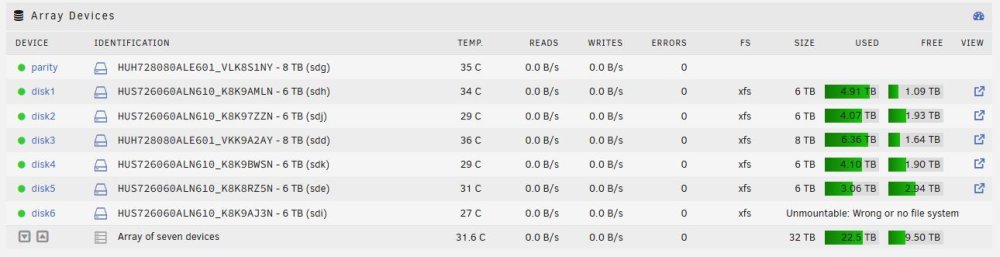
Just added a new drive to my array yesterday. No data currently on it. It was a cold spare I had pre-cleared over a year ago. When added to the array, Unraid decided it wanted to do a clear on it anyway. As I was in no rush I allowed it to do so. Woke this morning, the disk was cleared, green dot and Healthy. But space not included in the array, filesys set to "auto" and not "xfs". I went into the drive's config, and changed the File System Type to xfs. I was thinking it would have given me the option to format the drive (to xfs) but no joy. Now fs shows xfs, but still not mounted with Unraid reporting "Unmountable: Wrong or no file system". Where do I go from here? Diagnostics attached, currently on 6.10.3. Thanks! malta-tower-diagnostics-20221214-0506.zip
-
In Unraid, cache isn't an all or nothing proposition. It can be configured by Share, where each share can be written directly to the parity protected array, cached first then using Mover moved to the parity protected array, or even reside exclusively in the cache pool. I do a bit of all of these. For my Backup and Media shares, I write directly to the array. To me, neither are speed critical. Backup is for the other systems on my LAN, so already limited by Ethernet speed and how fast the client can generate the compressed file. Almost all of the media is already downloaded and processed to the faster Cache pool, so would be redundant to rewrite it to cache before moving it to the array. Photos, Downloads, Nextcloud and Parking shares I do cache. Generally small files I will need access to right off or don't want to sit and wait for them to complete copying. On Cache pools I have my Appdata for Dockers, VM vdisks (currently running a small Home Assistant VM ) and a Transcode share (for Plex and Unmanic running on an ancient SSD I had kicking around). These always reside in cache for the speed. Keeps everything running snappy. Anything important gets backed up regularly, so easy to put things back and running in case of failure (equipment or human). The one weakness of Unraid is the speed writing to a parity protected array. When Unraid was created, everything in the world of computers was slow compared to today. The addition of cache, Turbo Write (an improved methodology for writing parity protected data), cache pool capabilities, all have helped speed data write speeds. Out of the box, it is a capable system for most users. But there are a number of configuration changes that can be made to fit most use cases.
-
One thing to note with Unraid - If you are using a RAID capable card, you want to configure it as a HBA. LSI cards typically need to be reflashed for this. Unraid manages drives by their serial number, and RAID controllers can get in the way, if you would, by not consistently reporting a unique S/N. One of the tasks that Unraid make easy (or even possible, depending what you compare it to) is when, in the future, you need expand your array. Everyone thinks "I'll *NEVER* fill up all of this storage!" until they do. Adding an additional drive is very straightforward, regardless of the model or size. Many times, the new drive you get is much larger than what you built with several years ago. Even swapping your Parity drive out to the new one and repurposing the old Parity drive is an easy task. Ah, the curse of the Internet. There is a vast amount of information - Some correct, some outdated, some we will kindly say unreliable. Unraid has been around for some time. Unlike some old apps I use that haven't been updated in years, Unraid has evolved a lot, with new features to both the system and its add-ons. It is always important to check when the information you're seeing was fresh. I suspect you knew that, but good to remind those who might be reading.
-
If all you are using a non-integrated GPU is to display browser or movie player video, and perhaps transcode video, assigned to a VM, a Nvidia Quadro T400 (not the old Quadro 400) or its predecessor Quadro P400 are good choices. At full power, they only draw 35W, and don't even require a power cable as they get all they need from the PCIe slot.
-
I find that Unraid falls in the middle between an "appliance" NAS and a full blown built from the ground up Linux system. A base Unraid install is not very complicated to get up and running, and then you have the ability to configure much more if/when you wish. If you are comfortable/capable of building your wanted system from a base distro, and have the time/desire to do so, Unraid may or may not be your starting part. I've been running my Unraid server for about 2 years. I would say the 2 biggest benefits are: 1. Ability to use mismatched size drives in the array. Too many RAID methods have requirements which lock you into aligning your drive hardware in a specific manner. Need more storage? Unraid will let you add another random drive, with the only limitation being that the data drives remain equal/smaller than your parity drive(s). 2. The community. I stop by this forum nearly every day, even though my server continues to run great and I usually don't have an active upgrade or project. There are so many good people here, knowledgeable on the system (and its issues, at times) who are quick to help. People writing plugins, creating docker templates, even making new custom case icons and GUI banners, just to benefit the Unraid user base. This is unlike *many* other tech forums I have visited, where a newbie looking for help is dismissed quickly and a specific technical question may have crickets for a response.
-
Correct.
-
Not even close to an expert at this. But a quick Google search of "ASM1153 SATA 3Gb/s bridge" finds many hits going back ro 2017 and beyond, with other ASM chips at 6Gb/s. Makes me think nothing may have changed in the base kernel/drivers of Linux in general.
-
Two years ago, when I built my first Unraid server, I knew zero about Docker. I now have 18 of them running full time on the server, with another 8 or so utilities that I start up when needed. If you are already comfortable with VM (and systems in general) you will quickly like Docker.
-
Don't feed the trolls.
-
Overseerr works well with Sonarr and Radarr for searching TV/movies and requesting content. Beautiful interface and is phone friendly as well.
-
A fan plugged/wired to a Molex connector is already running at 100%.
-
You can see the specs for my system below, in my siggy. It currently runs 19 dockers and 1 VM (Home Assistant), all on a very modest 1st gen Ryzen 1500X and 16GB DRAM in a mid-tower case. I've done some torture testing, running a parity check while streaming/transcoding a couple of movies and downloading files, and it didn't miss a beat. So unless you have some known scenario where you are really going to ask for more than your system can handle, one system should suffice. As Vr2lo wrote, I would be more concerned that the network would end up being the bottleneck, especially when serving 4K content.



