





ConnerVT
Members
-
Joined
-
Last visited
Everything posted by ConnerVT
-
I didn't think it was anything to do with the nVidia driver or plugin directly. I was just trying to pick your mind (as the expression goes), for maybe "one of those things you find out while working on other things." I believe you have more insight to all things related to Unraid's use of GPUs than most anyone. I really appreciate all the help you have given me. I've been invested in the Plex platform for years before I built an Unraid server. Use to run Media Browser, until it evolved into Emby. For those not watching in real time, that was a hot mess. Been on Plex ever since. Bought a Lifetime Pass for $75USD in 2018 and haven't looked back.
-
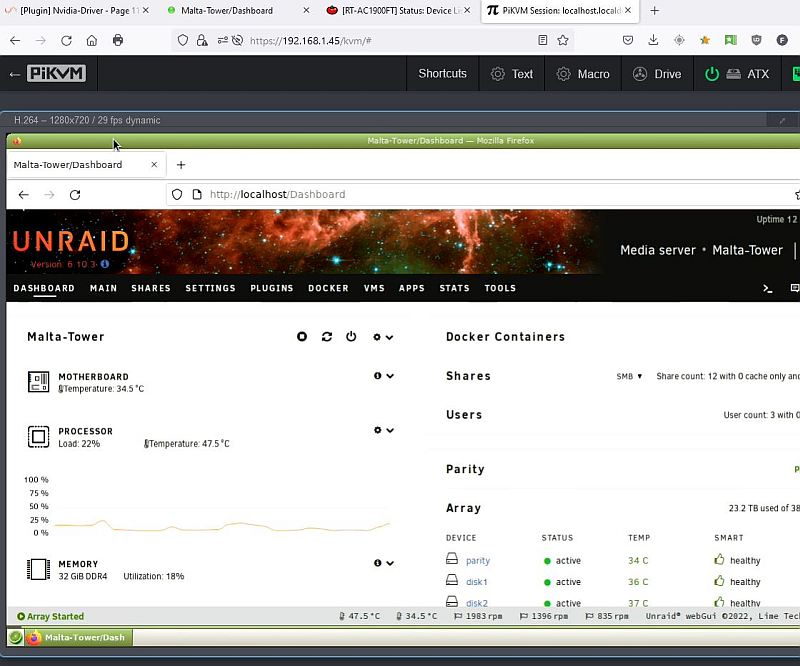
@Hoopster A quick post script to an easy transaction. I finally have the PiKVM connected to my Unraid server, and all is working great. Thank you so much for the painless transaction, as well as your help when I was first testing it out with the PiKVM temporarily connected to an old laptop.
-
Mainly to conserve the resources of the P400 (memory and running processes), and because the iGPU is in the system and paid for, so might as well put it to use. It may also be the better option working with the KVM, as it is more tightly associated with the hardware if addressing BIOS/setup issues. I just never expected it to be this much frustration
-
I spoke too soon. 😞 A Reboot put me back into that strange display resolution (640x960) on a monitor connected to the iGPU. (At least it boots to iGPU) A Shutdown/power button start does display correctly (1360x768). I now at least have a path to get here. Interested if you have any ideas on the reboot/640x960 and how it can be corrected.
-
A quick follow up. When I tried "disable_xconfig=true" earlier, I may have been booting with UEFI. One notable difference I saw on my machine is the text size (and GRUB menu) had smaller text. In hindsight, this may be why I had the funny looking resolution when I tried this config entry before. Something to think about.
-
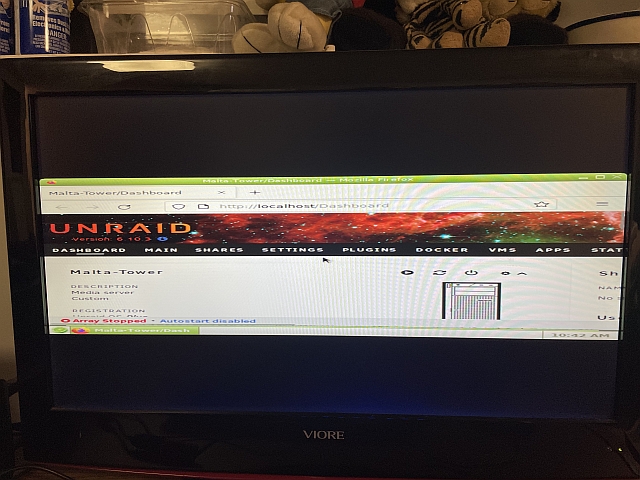
WOO HOO! You are my hero! First time I've seen this 100% correct since I started on it a week ago Sunday. I had at one point added "disable_xconfig=true" to the config file. It ended up displaying out put that was squished down and extending too wide for the monitor (see picture). I had found this in a bug report thread for 6.9. I then had a bunch of issues undoing it (set to 'false', removed entirely) that I ended up rebuilding my flash from an earlier backup. (That's a whole other frustrating story). So I decided not to go down that path again. So thank you, once again, for your help. Not just for this, but all you do for the Unraid community!
-
Hello, my friend. I've been troubleshooting an issue now for over a week, and I could use some of your expertise in an area where, for my expertise, I'm well over my head. I posted a thread last week in the General sub-forum, but haven't had much response. I recently upgraded my server with a new 5700G and B550 motherboard. The server retains the Quadro P400. The goal is to use the AMD iGPU as an Unraid console (to use KVM) and the P400 for transcoding in Unraid dockers. The issue is I cannot get the iGPU to display the Unraid login screen when booting into "Unraid OS GUI Mode" with the P400 and nVidia plugin installed. With a monitor attached to the iGPU, from a power on boot I can watch boot sequence on the display, the initial Unraid boot text, GRUB menu, then more Unraid text. I displays "Staring Samba" for just over a minute, then the display is blanked. In my current configuration, if I boot into GIU Safe Mode, the display on the iGPU boots into the Unraid log in, and works as I would expect and desire. I have tried so many different combinations of things: EUFI vs Legacy, uninstall/reinstall both nVidia and Radeon_Top, remove P400, plugged HDMI dummy plug into P400 (was needed in earlier non-iGPU setup to boot), and more. Each time I (usually) start from a power off boot. I have so many hours now of troubleshooting, I have lost track. What is common is if I remove the nVidia from the situation (physically or Safe Mode) the iGPU displays fine. It seems that Unraid switches the console from the iGPU to the P400 at some point. Any input you can offer is greatly appreciated. The diags attached is the current/latest configuration in the standard GUI bott up. malta-tower-diagnostics-20230124-0845.zip
-
I went through the entire server to see what was correct, and what was missing. All dockers and plugins were fine, as were defined Users and Shares, and things like network configurations, etc. Seems it was limited to resetting passwords (lost the password on the User for SMB access from my Win10 machine as well as root) and all of the Array and Pool drive assignments.
-
This is one reason I was hesitant moving forward with the recovery. Everything was there as expected, yet it wasn't behaving as it should. I have been troubleshooting an issue with this new configuration (new 5700G processor with iGPU and new motherboard) which won't correctly display the Unraid GUI when the nVidia Quadro P400 is also installed. I had been switching back/forth between UEFI and Legacy, GUI and GUI in Safe Mode, adding/removing P400, etc. It has been two days of troubleshooting, and my brain can't even remember all I've done. On the good side, the array hasn't been set to auto start, as I've been rebooting so much. It should not have contributed to the config/super.dat issue, but may have helped avert more trouble. I've taken a little break from it after seeing my data back and safe. I does seem all is back where it was - Dockers and plugins all installed, no unexplained errors logged. So crisis averted, thanks to your help.
-
Thank you sir! I look to be back on the road to recovery. Thank you so much for holding my hand through this. I've read too many threads in this forum where people blindly move forward without knowing for sure what they do is correct. I didn't wish to be one of them.
-
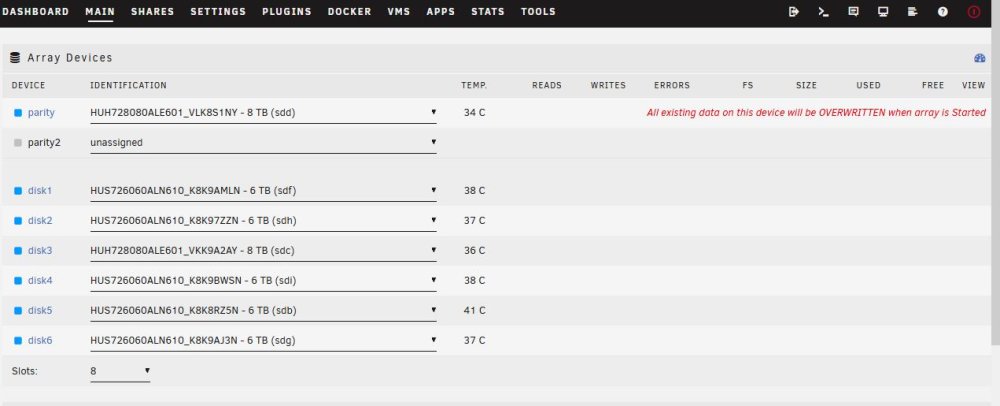
Thanks for that last link. I was looking in the Troubleshooting chapter of the manual, and it wasn't really a step-by-step. Too much to lose if I did something out of order. Maybe just a nervous Nellie, but after New Config (Array) I still had nothing assigned in MAIN array slots. I have addedthe drives back to their original slots, and have checked "Parity is already valid". Put the "All existing data on this device will be OVERWRITTEN when array is Started" message is still a bit concerning. I am all set to start the array, correct?

-
Fortunately, I have a hard copy of the array drive config. (and easy enough to see from Unassigned devices which is my Parity Drive). Because if you look in the disk.cfg file, it has a bunch of info *except* the drive ID/slot info. Probably why it isn't configured correctly on the server at the moment. Really need to know the safe procedure to New Config and assign things correctly. The Manual isn't all that clear to me.
-
Been troubleshooting a display adapter issue, and tried to roll back my boot flash drive to an earlier configuration. I currently have my flash drive (original one for license key) loaded with the My Servers backup files. When I boot up, it asks for me to reset my password. OK, no problem. But now all of my array drives are no longer in my array, but now in Unassigned Devices. It would really ruin my life day to zero out 40TB of data. How should I proceed? Attached is diag from before I created this mess. malta-tower-diagnostics-20230122-0926.zip
-
It is said "God helps those who help themselves." I've been trying, and spent the entire morning attempting to help myself. But I have ended up right where I started. Maybe the Unraid gods will look down favorably on me for my efforts. I have been configuring and re-configuring BIOS, removing and reinstalling PCIe boards, and configuring and rebooting the server without getting the Unraid GUI to display on the iGPU whenever the nVidia Quadro P400 is installed. With the P400 installed, I see the Unraid menu, it boots to the Unraid menu selection, I watch the initial boot message text. Then the screen goes blank, and in a minute or too you can access the server from another machine. Without the P400 installed, all boots as described before, but the Unraid GUI displays and works fine. For the things I tried in BIOS, I lost track. Motherboard is a MSI B-550-A Pro, which has the grey BIOS screen (if that helps any). I had made so many changes, I finally got it to the point it was stuck in 640x480 mode, then had it so most of the text was in Chinese. I finally just reset the BIOS, and put back the stable settings I have been running all this week. Some of what I've tried (working from memory here): -- Booted both in EUFI and Legacy modes -- Set the default mode to IGP, Forced (not gaming Mode), and Auto (memory IGPU uses) -- It has a mode to either scan for VGA ability, that is at default (I tried Ignore, that's when things went very bad) -- SVM is enabled (for IOMMU, which I must have) My best guess is that bzroot-gui (which I assume is the graphical terminal code) is choosing the PCIe display adapter over the IGPU, regardless of the setup. Other OS will boot to the iGPU on this hardware, just not Unraid. Is there something I can add to Syslinux that will direct the GUI to the iGPU? I'm open to any and all advice at this point. malta-tower-diagnostics-20230121-1347.zip
-
With DDR4 prices dropping, decided to double what I have in the server, also dropping from 4 sticks to 2. 32GB for my modest system.
-
I have the APC 1350VA equivalent to the one you linked. Has been excellent. -- https://www.amazon.com/APC-Sinewave-Battery-Protector-BR1350MS/dp/B0779QFRRT Sticking with APC gives you better capabilities with communication software, and less chance of smoke.
-
Background: Been running my server headless for the past couple years. I just upgraded the 1500X/B350 to a 5700G/B550 yesterday, and has been running well for the past 24 hours. I believe I have it all configured/working as it was previously. One reason I went with the 5700G was to use the iGPU to connect to a PiKVM (thanks Hoopster!) and leave the nVidia P400 unconnected for Unraid to use for transcoding use (Plex/Unmanic). Now for the head scratching part: Booting from the Unraid OS GUI Mode, I see the initial boot up text on the screen (attached to the 5700G's iGPU). After that, the screen goes blank for a bit, then that screen has only a non-blinking underline cursor. If you reboot/shutdown from another computer browser, you can then see the shutdown text as Unraid unmounts/kills stuff in the shutdown process. Another interesting thing to not is I have the GPU Statistics plugin, and it always shows at least one process running (the bzroot-gui? nvidia-smi shows the process is /usr/libexec/Xorg). I have double checked the BIOS settings, and I believe I have it set to boot to the iGPU (which, in fact, it does). Though this may be the first MSI motherboard I have owned (ever?), so I don't know my way around the menus as I do for Gigabyte or ASRock. I have not tried with a monitor attached to the P400, as I only have one monitor (easily) available, and the results would likely have been influenced by having a monitor attached to it anyway. When I was running the 1500X combo, I could boot the Unraid GUI locally if I wished. So the question is: Is there something I can do to force the Unraid GUI to display on the iGPU? malta-tower-diagnostics-20230117-1344.zip
-
Thanks for the reply. I figured that would be part of the solution. Sometime this year I will have my Internet upgraded to 500/500 fiber, and know my SOHO router isn't going to cut it. So researching if pfSense on my server is the solution. It is a good time to rethink my entire network here at home. So laying the ground work, to plan ahead as to what I'll need to do. there will be some stuff I'll need figure out once I actually have pfSense installed.
-
Did you find an answer to this? Planning to install a pfSense VM in my server soon, and this is one of the configuration questions I have as well.
-
Obviously one isn't backing up 130TB to USB external HDDs. 😆 But TimTheSettler is correct - Drive and network throughput is likely the limiting factor. Especially painful for non-fiber Internet users and cloud backup solutions.
-
Backup strategy is very personal. Everyone has a different opinion of what is valuable, and what is irreplaceable. So the first thing to do is assess what of your 130TB is irreplaceable. Is the data business or personal? For me, it is personal data. Photos, personal movies, important documents and the like. Backups of my personal daily driver computer. I have backup up (with Macrium) that system where I can easily re-image over 1TB of data. While I would miss my media library, built up over a number of years, the cost to back it up is more than I am willing to invest a backup system to do. I would rebuild if all was lost. A bigger concern is where, physically, you store the backup. It does no good to have it in a system sitting next to the current one if some major tragedy happens at your site. I back up my backups, on drives in USB enclosures. Roughly each month, I swapped drives and keep one in my desk at work. Backup to a system at your location is certain to be faster than cloud backups. While the initial backup will take some time (especially if you chose to back up all 130TB) at least you don't need to sit and watch while it takes place. Afterward, a periodic incremental backup can be scheduled to keep the backup in sync. My computers back up to my server daily. Weekly, Unraid backs up my appdata and VMs, followed by a backup to the aforementioned USB external drives.
-
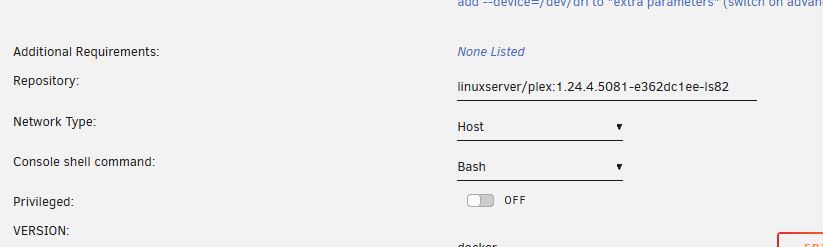
This is exactly what I do (along with Unmanic as well). My drive is a *very* old Kingston HyperX 120GB. It has been in at least a half dozen machines previously. Figured I'd just beat the snot out of it until it finally dies. I can't complain for the use it has given me all of these years. How exactly did you revert back to the previous version? I needed to do this awhile back, as Plex broke their live TV streaming. It would stop the playback every 10 minutes or so. Hard to watch a football game that way. After some searching around the Internet, I found which was the best version for this issue. Then searched the linuxserver.io tags for that version. Goes in the Repository line as in my screenshot. Plex always has issues. They fix or add one thing, and break two or more. Their regression testing is terrible to non-existent. It isn't linuxserver.io's fault - They take the application's current release, put it in a Docker container with the appropriate hooks, and put it up for download. Issues with the application are on the application's developers, not them.
-
Switch to Advanced View. Then a few lines down from the Repository entry.
-
We'll find out Soon™️
-
Latest Quadro T400 currently selling @ $150-200 new. Previous Quadro P400 can be found used in the $50-75 range. I have a Quadro P400 in my system, does fine with a couple of transcodes and a basic display duties for the server.





