





ConnerVT
Members
-
Joined
-
Last visited
Everything posted by ConnerVT
-
I'm not much of a black or white person. The world is many shades of grey. I won't discount deceptive practices, but know there are many layers to the puzzle. The inner workings of a model can change for a number of reasons. A component is no longer available. The desire to improve one feature/specification may necessitate that another area/specification also need be redesigned (which a decision is made by the company as being less important). Perhaps a certain aspect is over designed, so it is cost reduced with little/no impact to overall operation. I can think of others. They could change the model name every time a minor change is made. But this would impact the retailers, as people want the latest model, usually with no idea what the difference is. And that is the crux of the consumer computer market - most people don't know what's inside what they are buying, and generally over spec the computers they buy. I know more than many (been in the computer industry doing design, manufacturing, service and sales for nearly 40 years) and I typically over buy my needs (for my toys, anyway). You only see designs stay static in the commercial market, where the need for 1-to-1 replacement of components is much more needed.
-
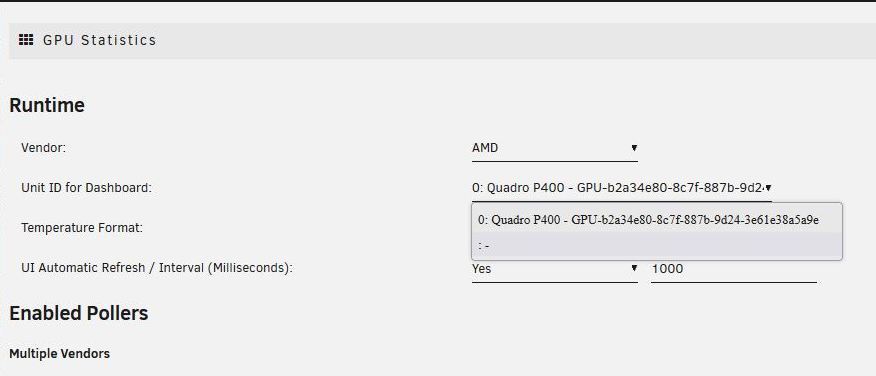
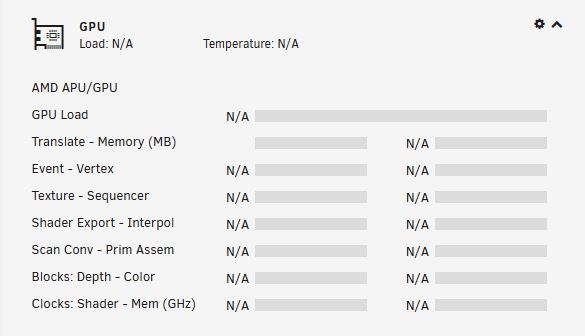
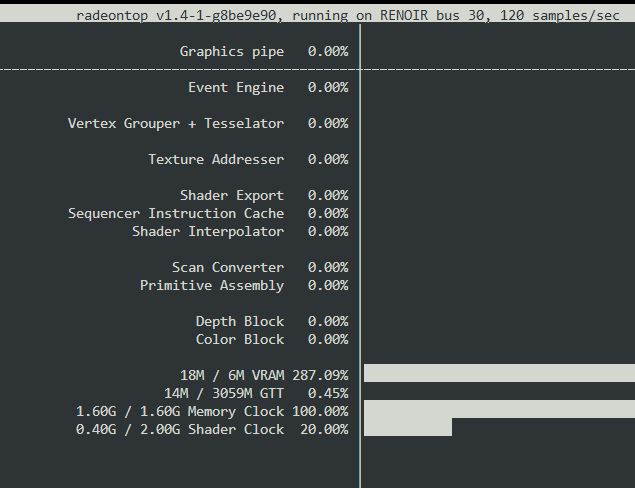
Been using this plugin for awhile, works great with my Nvidia P400. Thank you for this. Recently upgraded my CPU to a 5700G APU. I am using the iGPU as a local display on the server, driving a PiKVM, and all of that works well. My question is, can/should this plugin also be able to display the AMD statistics? When I configure it for AMD, I don't get a real selection for it in the config page, and then only N/A across the board for the stats. I do have Radeon-Top installed.
-
I agree. But it is a bit more complicated than that. Nearly every manufacturer contracts someone else to manufacture some (or all) of the PSU they sell. So many of PSU you buy have the same components, and even circuitry, inside the box they sell. Other than the PSU case and cabling, the difference between models and brands comes down to two things - how they spec what the actual electronics and the quality control of what goes out the door. The better reviewed brands do a better job at the last part. They have history in providing good products that work and last a long time. This is why they have better reviews and loyal customers. The lower tier entry level lines they offer are for them to be included in that particular market. Usually still a decent PSU, but things get funny when looking at low cost markets. Someone has $50 to spend on a PSU. Well known brand has a 450W supply, but I can get a 1000W PSU from Alibaba for the same price? Which do you think is a better value? Which is going to work better? Last longer? At the bottom end of the marker, it gets murky. Always best to move up a tier and stick to known commodities, especially for a system where reliability is more important than price.
-
Why would you think a Nvidia driver would be used to utilize a AMD GPU?
-
-
Online PSU calculators work fine for typical desktop computers. Not so much on server applications. Just as most power supplies in the consumer market are designed for your typical desktop/gaming computer. Most consumer PSU have 100W or so dedicated for the 3.3V/5V CPU and motherboard. The 8-pin PGU connector is 12V and can deliver 150W. But the biggest concern for most Unraid users is how much 12V is available for all of those spinning rust drives. While spun down or spinning and not busy power consumption is roughly 5-8 watts. But at power up (or spinning up a spun down disk) power can spike to double of this. And for some Unraid functions such as starting a parity check or a clean shutdown, all of the disks may spin up at the same time. As having a huge, power hungry GPU in an Unraid server is usually folks running gaming VMs, a typical server can run easily with a much more modest one in the 650-750 watt range. I generally feel it is better to shop quality over quantity. An efficient PSU from a quality manufacturer (my first choice is SeaSonic, but many have good experiences with Corsair). Skip the budget lines, and step up to at least the next tier model. When comparing different models and brands, check the data sheets for how much 12V power the supply has.
-
OK, this makes your question/concern much clearer. A VPN is an encrypted connection from one point (device) to another point (device). Someone (ISP or one who gains access along the interconnected machines between these two points) can see which 2 points are connected and the data, but since the data is encrypted cannot easily tell what is being sent. Using a public VPN service (such as PIA or NordVPN), you are connecting your phone to their device with the encrypted tunnel. From there, they connect to your server over the Internet as any non-VPN connection would. Using a private VPN tunnel, such as Wireguard set up on your server and corresponding Wireguard client on your phone, the encrypted tunnel covers the entire path between your server and your phone.
-
Following up to close this thread. I jumped over to another support thread, where ich777, our master of all things display related, helped me out. I had tried this earlier, but it didn't seem to work. Turned out it *does* work perfectly, from a power off start. There is some other issue going on, where a Reboot does display on the AMD iGPU but in a strange 640x960 resolution (output is long and squished). So at least a partial solution, and one which I can work around, now that I know what I know now.
-
I didn't think it was anything to do with the nVidia driver or plugin directly. I was just trying to pick your mind (as the expression goes), for maybe "one of those things you find out while working on other things." I believe you have more insight to all things related to Unraid's use of GPUs than most anyone. I really appreciate all the help you have given me. I've been invested in the Plex platform for years before I built an Unraid server. Use to run Media Browser, until it evolved into Emby. For those not watching in real time, that was a hot mess. Been on Plex ever since. Bought a Lifetime Pass for $75USD in 2018 and haven't looked back.
-
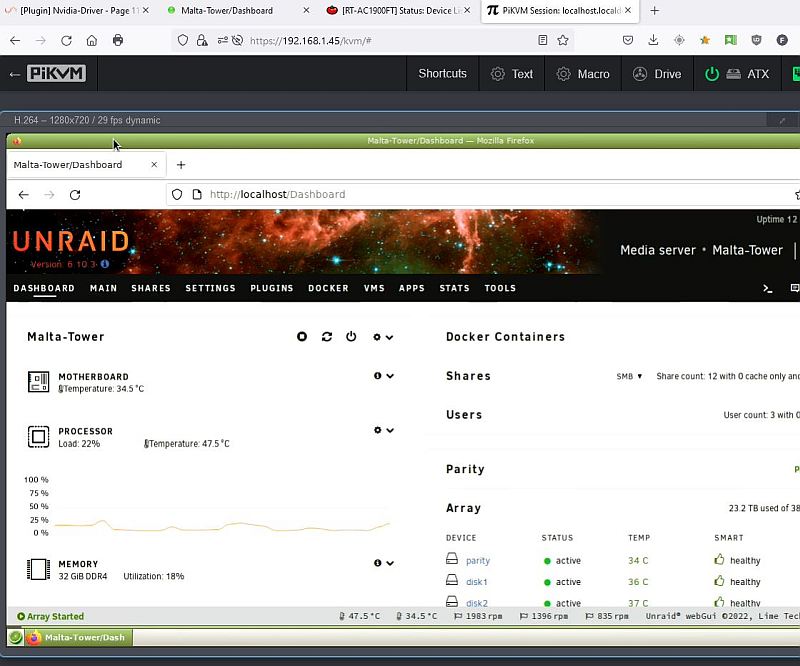
@Hoopster A quick post script to an easy transaction. I finally have the PiKVM connected to my Unraid server, and all is working great. Thank you so much for the painless transaction, as well as your help when I was first testing it out with the PiKVM temporarily connected to an old laptop.
-
Mainly to conserve the resources of the P400 (memory and running processes), and because the iGPU is in the system and paid for, so might as well put it to use. It may also be the better option working with the KVM, as it is more tightly associated with the hardware if addressing BIOS/setup issues. I just never expected it to be this much frustration
-
I spoke too soon. 😞 A Reboot put me back into that strange display resolution (640x960) on a monitor connected to the iGPU. (At least it boots to iGPU) A Shutdown/power button start does display correctly (1360x768). I now at least have a path to get here. Interested if you have any ideas on the reboot/640x960 and how it can be corrected.
-
A quick follow up. When I tried "disable_xconfig=true" earlier, I may have been booting with UEFI. One notable difference I saw on my machine is the text size (and GRUB menu) had smaller text. In hindsight, this may be why I had the funny looking resolution when I tried this config entry before. Something to think about.
-
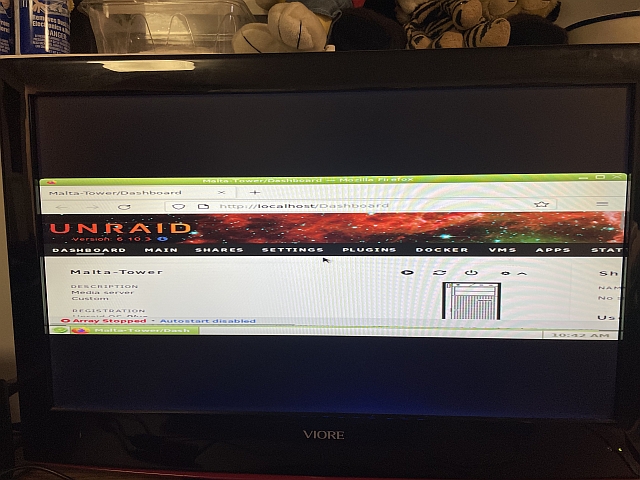
WOO HOO! You are my hero! First time I've seen this 100% correct since I started on it a week ago Sunday. I had at one point added "disable_xconfig=true" to the config file. It ended up displaying out put that was squished down and extending too wide for the monitor (see picture). I had found this in a bug report thread for 6.9. I then had a bunch of issues undoing it (set to 'false', removed entirely) that I ended up rebuilding my flash from an earlier backup. (That's a whole other frustrating story). So I decided not to go down that path again. So thank you, once again, for your help. Not just for this, but all you do for the Unraid community!
-
Hello, my friend. I've been troubleshooting an issue now for over a week, and I could use some of your expertise in an area where, for my expertise, I'm well over my head. I posted a thread last week in the General sub-forum, but haven't had much response. I recently upgraded my server with a new 5700G and B550 motherboard. The server retains the Quadro P400. The goal is to use the AMD iGPU as an Unraid console (to use KVM) and the P400 for transcoding in Unraid dockers. The issue is I cannot get the iGPU to display the Unraid login screen when booting into "Unraid OS GUI Mode" with the P400 and nVidia plugin installed. With a monitor attached to the iGPU, from a power on boot I can watch boot sequence on the display, the initial Unraid boot text, GRUB menu, then more Unraid text. I displays "Staring Samba" for just over a minute, then the display is blanked. In my current configuration, if I boot into GIU Safe Mode, the display on the iGPU boots into the Unraid log in, and works as I would expect and desire. I have tried so many different combinations of things: EUFI vs Legacy, uninstall/reinstall both nVidia and Radeon_Top, remove P400, plugged HDMI dummy plug into P400 (was needed in earlier non-iGPU setup to boot), and more. Each time I (usually) start from a power off boot. I have so many hours now of troubleshooting, I have lost track. What is common is if I remove the nVidia from the situation (physically or Safe Mode) the iGPU displays fine. It seems that Unraid switches the console from the iGPU to the P400 at some point. Any input you can offer is greatly appreciated. The diags attached is the current/latest configuration in the standard GUI bott up. malta-tower-diagnostics-20230124-0845.zip
-
I went through the entire server to see what was correct, and what was missing. All dockers and plugins were fine, as were defined Users and Shares, and things like network configurations, etc. Seems it was limited to resetting passwords (lost the password on the User for SMB access from my Win10 machine as well as root) and all of the Array and Pool drive assignments.
-
This is one reason I was hesitant moving forward with the recovery. Everything was there as expected, yet it wasn't behaving as it should. I have been troubleshooting an issue with this new configuration (new 5700G processor with iGPU and new motherboard) which won't correctly display the Unraid GUI when the nVidia Quadro P400 is also installed. I had been switching back/forth between UEFI and Legacy, GUI and GUI in Safe Mode, adding/removing P400, etc. It has been two days of troubleshooting, and my brain can't even remember all I've done. On the good side, the array hasn't been set to auto start, as I've been rebooting so much. It should not have contributed to the config/super.dat issue, but may have helped avert more trouble. I've taken a little break from it after seeing my data back and safe. I does seem all is back where it was - Dockers and plugins all installed, no unexplained errors logged. So crisis averted, thanks to your help.
-
Thank you sir! I look to be back on the road to recovery. Thank you so much for holding my hand through this. I've read too many threads in this forum where people blindly move forward without knowing for sure what they do is correct. I didn't wish to be one of them.
-
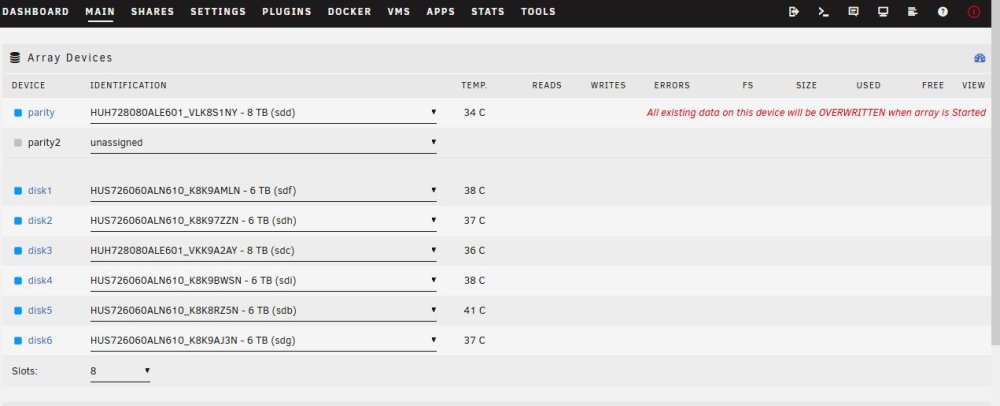
Thanks for that last link. I was looking in the Troubleshooting chapter of the manual, and it wasn't really a step-by-step. Too much to lose if I did something out of order. Maybe just a nervous Nellie, but after New Config (Array) I still had nothing assigned in MAIN array slots. I have addedthe drives back to their original slots, and have checked "Parity is already valid". Put the "All existing data on this device will be OVERWRITTEN when array is Started" message is still a bit concerning. I am all set to start the array, correct?

-
Fortunately, I have a hard copy of the array drive config. (and easy enough to see from Unassigned devices which is my Parity Drive). Because if you look in the disk.cfg file, it has a bunch of info *except* the drive ID/slot info. Probably why it isn't configured correctly on the server at the moment. Really need to know the safe procedure to New Config and assign things correctly. The Manual isn't all that clear to me.
-
Been troubleshooting a display adapter issue, and tried to roll back my boot flash drive to an earlier configuration. I currently have my flash drive (original one for license key) loaded with the My Servers backup files. When I boot up, it asks for me to reset my password. OK, no problem. But now all of my array drives are no longer in my array, but now in Unassigned Devices. It would really ruin my life day to zero out 40TB of data. How should I proceed? Attached is diag from before I created this mess. malta-tower-diagnostics-20230122-0926.zip
-
It is said "God helps those who help themselves." I've been trying, and spent the entire morning attempting to help myself. But I have ended up right where I started. Maybe the Unraid gods will look down favorably on me for my efforts. I have been configuring and re-configuring BIOS, removing and reinstalling PCIe boards, and configuring and rebooting the server without getting the Unraid GUI to display on the iGPU whenever the nVidia Quadro P400 is installed. With the P400 installed, I see the Unraid menu, it boots to the Unraid menu selection, I watch the initial boot message text. Then the screen goes blank, and in a minute or too you can access the server from another machine. Without the P400 installed, all boots as described before, but the Unraid GUI displays and works fine. For the things I tried in BIOS, I lost track. Motherboard is a MSI B-550-A Pro, which has the grey BIOS screen (if that helps any). I had made so many changes, I finally got it to the point it was stuck in 640x480 mode, then had it so most of the text was in Chinese. I finally just reset the BIOS, and put back the stable settings I have been running all this week. Some of what I've tried (working from memory here): -- Booted both in EUFI and Legacy modes -- Set the default mode to IGP, Forced (not gaming Mode), and Auto (memory IGPU uses) -- It has a mode to either scan for VGA ability, that is at default (I tried Ignore, that's when things went very bad) -- SVM is enabled (for IOMMU, which I must have) My best guess is that bzroot-gui (which I assume is the graphical terminal code) is choosing the PCIe display adapter over the IGPU, regardless of the setup. Other OS will boot to the iGPU on this hardware, just not Unraid. Is there something I can add to Syslinux that will direct the GUI to the iGPU? I'm open to any and all advice at this point. malta-tower-diagnostics-20230121-1347.zip
-
With DDR4 prices dropping, decided to double what I have in the server, also dropping from 4 sticks to 2. 32GB for my modest system.
-
I have the APC 1350VA equivalent to the one you linked. Has been excellent. -- https://www.amazon.com/APC-Sinewave-Battery-Protector-BR1350MS/dp/B0779QFRRT Sticking with APC gives you better capabilities with communication software, and less chance of smoke.
-
Background: Been running my server headless for the past couple years. I just upgraded the 1500X/B350 to a 5700G/B550 yesterday, and has been running well for the past 24 hours. I believe I have it all configured/working as it was previously. One reason I went with the 5700G was to use the iGPU to connect to a PiKVM (thanks Hoopster!) and leave the nVidia P400 unconnected for Unraid to use for transcoding use (Plex/Unmanic). Now for the head scratching part: Booting from the Unraid OS GUI Mode, I see the initial boot up text on the screen (attached to the 5700G's iGPU). After that, the screen goes blank for a bit, then that screen has only a non-blinking underline cursor. If you reboot/shutdown from another computer browser, you can then see the shutdown text as Unraid unmounts/kills stuff in the shutdown process. Another interesting thing to not is I have the GPU Statistics plugin, and it always shows at least one process running (the bzroot-gui? nvidia-smi shows the process is /usr/libexec/Xorg). I have double checked the BIOS settings, and I believe I have it set to boot to the iGPU (which, in fact, it does). Though this may be the first MSI motherboard I have owned (ever?), so I don't know my way around the menus as I do for Gigabyte or ASRock. I have not tried with a monitor attached to the P400, as I only have one monitor (easily) available, and the results would likely have been influenced by having a monitor attached to it anyway. When I was running the 1500X combo, I could boot the Unraid GUI locally if I wished. So the question is: Is there something I can do to force the Unraid GUI to display on the iGPU? malta-tower-diagnostics-20230117-1344.zip





