





ConnerVT
Members
-
Joined
-
Last visited
Everything posted by ConnerVT
-
You had me second guessing myself for a moment. It is 8-9 posts up the thread. https://forums.unraid.net/topic/138034-time-for-another-backup-server/?do=findComment&comment=1258044
-
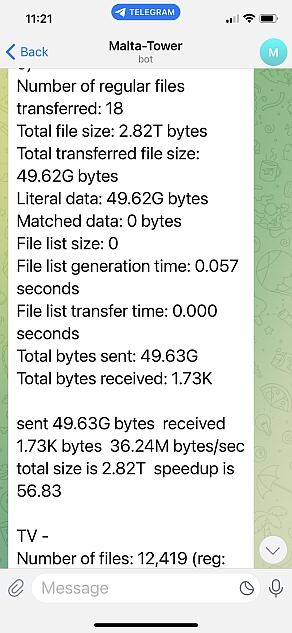
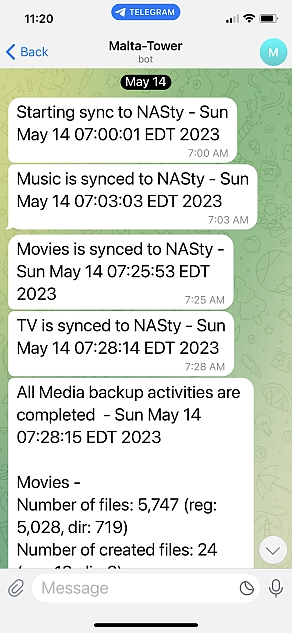
A quick follow up on how well this is working. I have the User Script cron job set to run twice a month, on the 14th and the 28th. Yesterday was the first time where the script ran automatically, where I wasn't triggering it while sitting beside watching. (After all, isn't automating things the reason we do this stuff?) I was sitting in a diner having breakfast, 200 miles away from home, when the attached Telegram texts started coming in. Don't you love when a plan comes together? 😁
-
Of course you can. No different than backing up any other files. A bit of a hassle if you are trying to have several UD external USB drives as the backup destination, as you need figure how to split up your data set among several drives. Or you could create a pool in Unraid, and put a backup share there. I recently took some old hardware I had on hand, and built a second Unraid server just to back up the media files on my main Unraid server. Several people tossed some good ideas into this thread:
-
You will need backup storage space as large (really larger) than the space that the media files take. Media (as I assume movie/TV video and audio files) does not compress (zip, tar, rar) as it is already compressed as part of the encoding process.
-
I hade similar issues when trying to get my Ryzen iGPU to display the local GUI. Try this:
-
I think I've read somewhere "Parity is not a backup". (Maybe it was here on the forum 😉). That's why I built the backup server - to back up the last of the data that wasn't duplicated somewhere. My main server does utilize a parity drive, as it allows one to perform array maintenance tasks much more easily. I just recently shrunk/moved/swapped 5 drives around in my array. Over 100 hrs of rebuilding, zero errors, minimal stress. For the backup server, if a drive fails, the data is on the main server. Replace the drive, run the sync script, back in business. No real down time, as the server's only purpose is to archive.
-
I really like my PiKVM. It has worked flawlessly since I got my IGPU and Unraid to play nice with one another (not the PiKVM's fault). I've been wanting to add Cloudflared locally on it, so I can use CF Tunnel and Zero Trust to further isolate it from the mean, cold world. Unfortunately, there isn't a pre-built version of Cloudflared that runs on Arch with the Pi4 ARM processor (it is a special flavor, from what I understand). I went to build it myself, but Go had been updated a week before I tried, and another dependency now needs to get updated before I can proceed. I have CF Tunnel running through NPM, but that does me no good if I need to power on the server, now would it? I've been trying to avoid going with Tailscale, only because of the funky DNS blocking scheme here at work. CF Tunnel pumping everything through port 443 and my unknown domain goes right through. Can't even connect to my server with Unraid Connect from work. Like the choice of case as well. As you read in my backup server thread, it is in the Silverstone SG11 Sugo cube. I bought this case because it can fit both a standard ATX power supply and mATX motherboard. I wasn't happy with the cooling, when trying to have it be a quiet PC. Replaced it with the Fractal Core 500, which only fits an iTX motherboard, an added expense when I changed cases. Fast forward a few years, now the old case and motherboard are reunited. Guess it was meant to be.
-
Better question: Is it worth it? It will be a power hog with a very early encoding chip, taking up 2 PCIe slots, that may or may not work. A second hand Quadro P400 for $50 USD will sip power and likely work better. For a little more money, better performance from a Quadro T400.
-
Have you every installed and used Unraid on this flash drive before this time? I believe Unraid counts the total days the GUID has been used, not just the current instance. (Just spit balling here, but there is a possibility...)
-
A few reasons for the no parity decision. First is the case is limited as far as how many 3.5" drives it will hold. It has only 3 bays for 3.5". I could mount a fourth drive in the 5.25" bay, but the case is airflow challenged. The 3.5" bays have a quality 120mm fan right on them (that's the case's only intake fan). The 5.25" bay is in a cooling air null (really meant for an optical drive). Second is I built this almost completely from parts on hand, and had the 3 6TB sitting idle in a box. If I used one of the 3 for parity, there wouldn't be much of any room left to back up any future data. I'm not spending more money to buy bigger drives at this time. Lastly, the data it stores isn't irreplaceable. It is more for the convenience if something really funky happens to the media server array (or server itself). I can restore the data back to the main server, or even just install Plex on the backup if the main server is out of service for awhile. The backup will sleep nearly all of the time, and with it holding just media files it isn't the end of the world if there are issues with it. Even 90% of something is much better than 100% of nothing.
-
Check your BIOS for "Power Supply Idle Control" (or similar) and set it to "typical current idle" (or similar). When you update some BIOS, it is possible the value can be reset, or worse, not even included in the newer BIOS revision. Older AM4 motherboards have a limited amount of CMOS memory. As newer Ryzen chips were released (with more functionality to configure) sometimes the code for an often unused setting/feature would be removed. My rule of thumb is to use the latest BIOS version released before the next generation is released (unless there is a specific issue in a later version you must have).
-
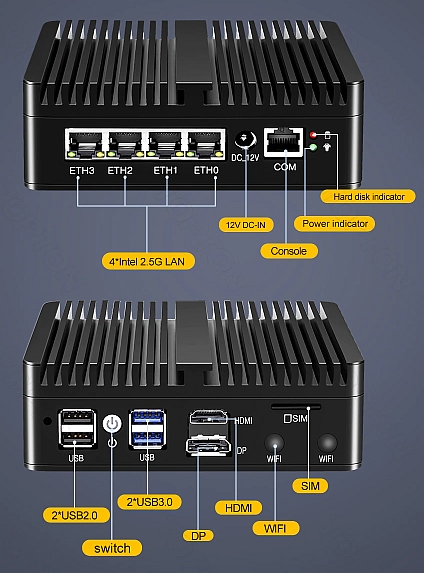
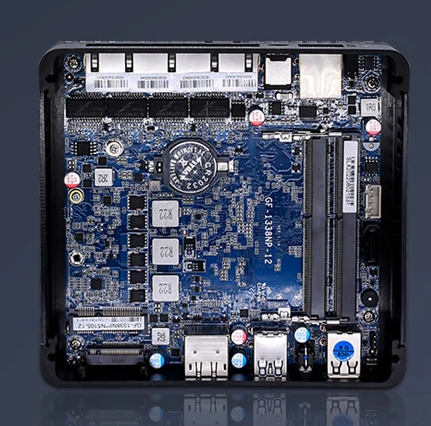
It is done. The backup server is running in the way I had hoped, and have the initial backup of my media now contained in it. Figure I would write up a post build report, both to help anyone looking to do something similar, and for me to have a place to come back to when I question "Why did I do that?". Many thanks go to @Hoopster and @Aran, whose input to this thread got me thinking of how to put this all together. Also a h/t to RealLukeManning (don't know if he is a forum member) whose Telegram bash script on GitHub was a great starting point for the notifications in my backup script. The Hardware: As I've said before, I could have just thrown a 20TB drive in the server, mounted with UD. But still had 3 of the 5 6TB drives I had replaced from my initial server build (as well as CPU/MB/DRAM and a case from another system). The backup server was an opportunity to put it all to use, as well as learn some new stuff. Isn't that the goal of a home lab server? The backup server is as stripped down as you can get. 3x 6TB drives, no parity or cache drives. A GT710 GPU that was sitting in a drawer, which I only use for basic troubleshooting (lowest powered card that works with Win10). I built the server, created a 6.10.3 Unraid flash (same as I currently run in my main server), and installed some basic plugins. Both Docker and VM services are turned off, as I will not be using them. SSH from Main to Backup Server: With the backup server functional, the next thing was to set up a ssh connection from the main server to the backup and transfer a file. I first started with a video from SPX Labs, but was having issues getting that to work. As always, coming in for the win was SpaceInvaderOne, with his SSH Keys on Unraid video. Fast and simple solution, and could now copy a file from one server to the other via ssh. Sleep and WOL: Much of what I've read about Unraid systems sleeping/WOL has been mixed, ranging from simple to you may have issues. On the surface, it is very simple, more than 95% so. Getting the little details ironed out, well that took a bit more effort. Installing the Dynamix S3 Sleep plugin got me 95% there. Configured to trigger on disk activity alone, my system would go to sleep, and then wake on a keyboard touch (I'm still configured with a GUI boot up). I then tried to wake the backup server from my main, using etherwake. Got back an unknown command. Etherwake isn't in Nerd Tools, but is installed with the Wake On Lan support plugin. Could now wake up the backup server remotely. I allow the server to go back to sleep automatically. One thing I did notice. After waking up, I had one core stuck at 100%. Found it was proc XORG. As I had booted into the GUI interface, it looked as my Nvidia GPU wasn't playing happily (though it did display the login screen as would be expected). I installed the Nvidia Driver plugin (and set nvidia-persistenced to reduce power usage) and this issue has not been seen since. Backup Script: I don't have a lot of experience in cli or bash scripts. But I do have the internet and can build on the work of others before me. I have some previous experience with rsync (I use a script to back up other files from my server). So I set out with a simple task: Wake up the backup server. Back up three folders from my main server, sending me notifications (via Telegram, which is how my servers already send notifications), and once complete, send/save some stats as to how things went. I didn't need to get all -verbose with rsync (no need for 58K lines of file listings). This will likely be a once a month operation, so just interested to see how much was added. Also I didn't feel need to keep permanent log files, so the script's logfile is more than sufficient (plus basically duplicated in my Telegram bot stream). My bash code might be more brute force vs eloquently written, but I like the output formatting and most importantly, it works. #!/bin/bash #description=This script backs up shares from Malta-Tower Media share to NASty # Backs up Media share folders Movies, TV and Music # WOL sent to NASty then wait for destination to wake # Sync folder, saving stats # Send Telegram sync complete message for folder, send stats to log # Once all folders sync, send Telegram message all done + stats for each folder #arrayStarted=true # Telegram variables - From Github - h/t to RealLukeManning TOKEN=XXXXXXXXX CHAT_ID=XXXXXXXXX URL="https://api.telegram.org/bot$TOKEN/sendMessage" # Send message backup is starting MESSAGE="Starting sync to NASty - $(date)" curl -s -X POST $URL -d chat_id=$CHAT_ID -d text="$MESSAGE" > /dev/null # Wake NASty from sleep etherwake -b XXXXXXXXXXXXXXXXXXXX # Wait for 2 minutes sleep 2m # Start Music backup MUSICSTAT=$(rsync -ah -p --delete-during --stats "/mnt/user/Media/Music/" "[email protected]:/mnt/user/Media/Music") MESSAGE="Music is synced to NASty - $(date)" curl -s -X POST $URL -d chat_id=$CHAT_ID -d text="$MESSAGE" > /dev/null echo $MESSAGE echo $MUSICSTAT # Start Movies backup MOVIESSTAT=$(rsync -ah -p --delete-during --stats "/mnt/user/Media/Movies/" "[email protected]:/mnt/user/Media/Movies") MESSAGE="Movies is synced to NASty - $(date)" curl -s -X POST $URL -d chat_id=$CHAT_ID -d text="$MESSAGE" > /dev/null echo $MESSAGE echo $MOVIESSTAT # Start TV backup TVSTAT=$(rsync -ah -p --delete-during --stats "/mnt/user/Media/TV/" "[email protected]:/mnt/user/Media/TV") MESSAGE="TV is synced to NASty - $(date)" curl -s -X POST $URL -d chat_id=$CHAT_ID -d text="$MESSAGE" > /dev/null echo $MESSAGE echo $TVSTAT # Send message that all backup is complete MESSAGE="All Media backup activities are completed - $(date)" curl -s -X POST $URL -d chat_id=$CHAT_ID -d text="$MESSAGE%0A%0AMovies - $MOVIESSTAT%0A%0ATV - $TVSTAT%0A%0AMusic - $MUSICSTAT" > /dev/null echo $MESSAGE Conclusion: I'm glad I chose to do things the "hard way" and build a second server vs. just tossing a USB drive on my main server. I learned a bit about bash, as well as digging deeper into several Linux operations. I find it is vastly easier to learn of something when you have a project. It then isn't just more information for you to soon forget, but an enjoyable journey (even with the cussing that always happens) as you work your way to a satisfying conclusion. I need to get out of my comfort zone more often. Thanks for reading.As the main issue is counterfeiting, products like Kanguru which look to have a very secure supply chain and are not purchased through an aggregate distributor such as Amazon definitely reduce the likelihood of a premature drive failure.Or in User Scripts, with "At first start of array".You have a valid concern, Jonathan. I've worked in semiconductor manufacturing for nearly 25 years. Once a die has its passivation layer it is much less fragile. You still need to use care, take your time to align things correctly and avoid twisting or flexing. In this case, the N5105 has CPU and GPU dies mounted on an interposer, which has a stress collar around the outer edge. The copper shim I used (0.8mm) added little stress, as it took up the space poor fitment and the sanding done to remove burrs that existed around the screw holes drilled in the aluminum block and top case. Unless a person thinks every task requires power tools and a hammer, it is not all that challenging for someone with at least moderate skills.I could go the SMB route. But it would add a another layer of complexity that isn't needed in this case. The backup server will be sleeping nearly 99% of the time (once initially loaded) and in a perfect world, never needs to be accessed other than running the backup task once a month. I don't mind diving into the cli world. As I said earlier, it would be much more simple for me to just toss a 20TB drive in my main server, and back up to that. I use these projects to keep me up to date on things. Hate to say it, but been messing with computer tech, both professionally and as a hobby, for nearly 40 years now. The toys I took apart as a kid had motors and gears. Now young teens take apart microprocessor based systems and write code. I've stayed relevant and employed by keeping up to date with things in the computing world, by taking on different projects to learn stuff. As for OPNSense, I started a new thread, as it may completely derail this thread if I posted here.I didn't want to derail my own thread on building a backup Unraid server to archive media from my main server, so I will start a new thread here. There is this thread on another forum which currently has over 2700 posts on these appliance PCs, so likely there is some interest in the subject. I originally started by thinking of running pfsense in a VM on my server. I want to learn some about VM, and figured this to be as good a project as any. I picked up a dual Intel nic which I put in the server, and continued my research. Ultimately, I decided that running virtualized on a server that is already tasked with several other important duties wasn't the best model for me. My research kept bringing me to something that's been pretty hot for the past year. Coming out of China, there have been a number of small fanless PCs with 4 Intel 2.5Gbe ports. Originally only Celeron based, they are starting to be available with even more powerful processors. I went with a N5105 Jasper Lake based system, which was under $150 USD with no RAM or NVMe included (as I had both on hand). I seemed to be the best balance of cost, performance, heat and power usage for my home network firewall. Loaded OPNsense on bare metal, though there are many folks running Proxmox with a number of packages on these little boxes. You can read the thread I linked above, if you have several hours to kill. If not, my tl;dr is - A solid little system. It has a few weak points. One is the supplied power adapter is a bit questionable. Most people who would be doing this likely have a better quality one (12VDC) they can use. The other is the CPU heat sink assembly from the manufacturer is pretty shoddy. Mine shot up over 90 C throttling just running CPU-Z benchmark (not the stress test). The CPU die is bare (no integrated heat spreader) which contacts an aluminum block screwed to the top case/heatsink. With a lot of (I'll assume) cheap thermal paste. I disassembled this and using sandpaper, smoothed the block and case, removing burrs and anodization. I added a thin copper shim and some quality paste. Stress tests over time now sit in the 60-70 C window, well within the Celeron's acceptable range.
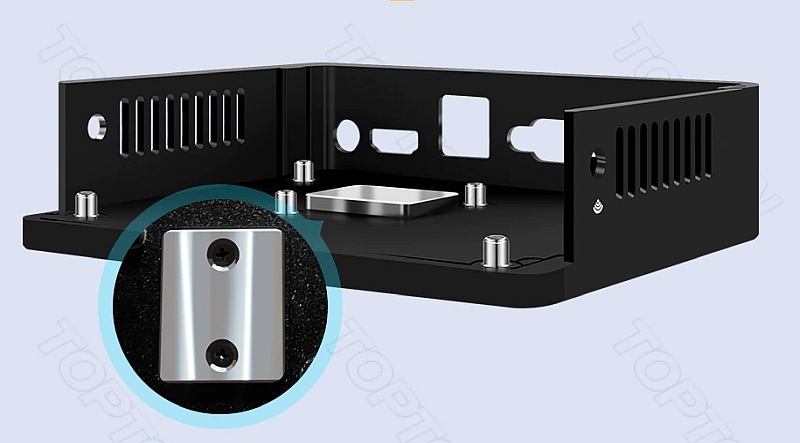 Finishing up the last of several 12 hour work days, so haven't had time to "Play with my toys" (as my wife would say). The plan is to keep this machine as simple and basic as possible. No parity, no cache, VM and Docker turned off. Just a plain ol' NAS. I could of done the same thing with a 20TB drive, but what fun is that? Plan for the upcoming days: Get a persistent ssh connection between main server to the backup server. Test that rsync can write/update to backup server. Install S3 sleep plugin on backup server and test WOL works reliably. Write script that will wake backup server, rsync desired folders (subset of my Media share), Put backup server back to sleep, send notification of a job well done. Once all is working and happy, I'll then see if I can transition from apcupsd to NUT, as both servers, as well as my OPNSense firewall mini PC, all run from the same UPS.Guess that's okay if you have a place to secure it, out of the way of it impeding airflow. And I would want that to be secure, as the metal bracket falling on electronics would not be ideal. I find the cable with rubberized cover around the Type-A connector more versatile. A zip tie or two can secure it where you want, out of the way. If your server behaves, you shouldn't need to unplug it for years.I ran a 1st gen 1500x in my server for over a year. The only two things I needed to get it to run reliably was to set the speed per the charts in the FAQ (which are right from AMD documentation) to 2133 and set to Typical Idle Current. The later was definitely needed, with my failure mode being that the system would lock up (stall) before changing to that BIOS setting. My 1500X was first run silicon. I got it one day before the official launch day. (I was pumped to get it, as I was one of many co-workers who made that chip.) The Internet is forever. So if someone posts something, it gets quoted again and again, even when it is no longer valid. When the original launch of Ryzen in 2017 happened, AMD was very focused on the Windows OS, and the Linux community had a lot of catch up to do. There were issues with Ryzen and Linux then, but both AMD and Linux have caught up considerably. the EPYC processor now sells as well as Intel processors in the data center space. This would not happen if the AMD processor was still flawed. Ryzen's Infinity Fabric (which handles all memory transfers) is very tightly tied to memory hardware, and is a bit less forgiving than Intel's memory handling. So you can't push it to the marketing department's claimed memory speeds. When they say "DDR4-3200" the 3200 is the XMP speed, what they tested the RAM to run. But that's the rating of the RAM, not the memory controller running it. You can put 150MPH tires on a Prius, but you'll never get it to go that fast. My experience has been that Windows is a bit bore forgiving than Linux when it comes to memory errors. (Not sure that's a plus for Windows or not.) Running my server at JEDEC speeds vs XMP may decrease performance, but that is more than offset by stability.Or this cable, which I use in both of my servers. I prefer the cable to the adapter, as it allow you to locate the flash in a spot out of the way and not likely to get bumped if you need to go into the case.For the Unraid build, I started with some of the components coming from my desktop PC upgrade: Ryzen 1500X, mATX MB, my first NVMe drive, and 8GB of DDR4 I had bought for another PC (now decommissioned). For ~$600, I bought a case, 4 re-certified 6TB drives, PSU, 8GB more DDR4, and some cabling. The case, power supply and cables may be all that is still in the server. I've made a lot of changes in the 2 years I've been running Unraid. That 1500X/MB/DRAM combo, and 3 of those 4 drives ended up in a backup server I just built this week. It all ended up in the case I had replaced when I updated when I updated the desktop PC I mentioned at the start of this post (just realized that as I typed this). More confusing than a hillbilly family gathering. 🤪Last reply in this thread from someone associated with Limetech was April 3.The build has begun. This may be the least expensive system I've assembled (ignoring the fact I did already spend $$$ when I first acquired the parts). Nearly everything is from upgrades done to other systems around the house. I bought a mid-grade power supply, an 80mm fan and a header to USB cable. Having 16TB of drives and not having a use for them is not usually a problem I've had in the past. Building in a Silverstone SG11 Sugo case. It was originally my daily driver's case, but the cooling isn't that great without really spinning up the fans. Really goes against the main reason to build a SFF/MFF system. It sits next to the desk in the family room, so it needs to be quiet. Fan noise is not an issue on the server bench in the basement. The build went smoothly, except for one SATA cable I forgot to attach to a drive, and the usual "Why can't I get this *#@% flash drive to boot??!?". All now resolved. Done messing with it for today and I will pick back up on it tomorrow. The operation will move downstairs, to put the system on the network, get basic Unraid functions working and start configuring it for its backup functions.




