





ConnerVT
Members
-
Joined
-
Last visited
Everything posted by ConnerVT
-
Did you try some sort of system security/port scanner/etc. type of program recently? The logins have Users that are some of the most common default Users.
-
I too would like to learn of this as well, as I really don't wish to remodel my entire network model when switching from macvlan to ipvlan.
-
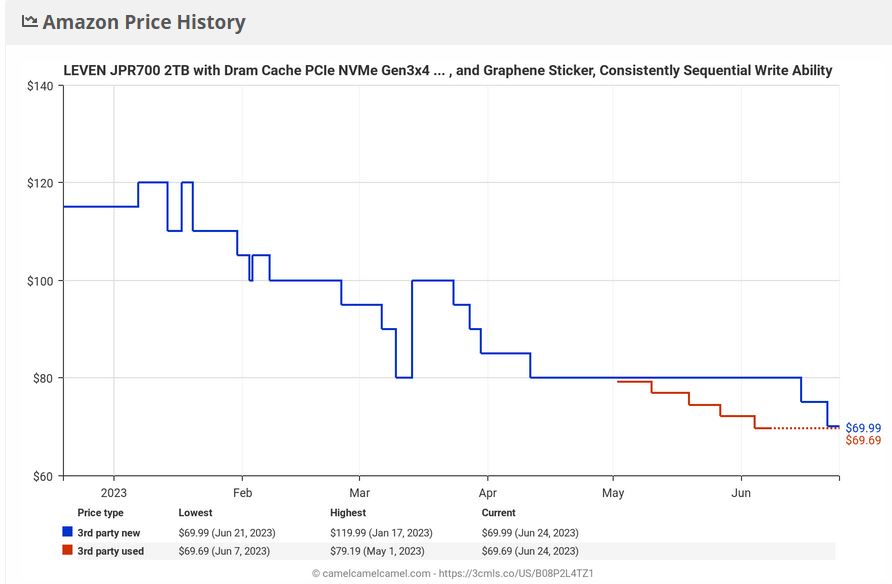
Any rumors on the street if/when 6.12.3 might be released? Soon™?Even without knowing what your current boot flash drive is, I would recommend that you just keep using it, if it has not been having any issues. Why do I suggest this?: There have been quite a few reports in the past year of flash drive failures which are likely due to counterfeit flash drives. Most common are Sandisk and Samsung (the two most popular brands). Online storefronts of Amazon, Newegg and Alibaba are where you are most likely to find these. Brick and mortar stores have a much more reliable logistics chain. 64GB is much more storage than needed for an Unraid flash. I have less than 1GB on the 8GB drive for my main server (20 of 34 dockers running). The extra space on the boot drive will tempt you to use it for other server storage. Which will accelerate wear. Flash drives are designed for intermittent R/W access, which works for Unraid - The system is read from the flash drive and loaded into RAM, then sits idle for most of the time (installing/updating plugins and such). Newer technology flash drives have smaller and denser memory cells, which are more prone to failures from heat (generated by excessive duty cycle from writes). In my opinion (working in semiconductor manufacturing for nearly 25 years) the older flash memory is more durable. I also have a Samsung Fit 64GB in my main server. I almost never use it, but leave it plugged in for when I need to copy something off the server and take the flash drive (and files) with me somewhere.6.10.3 has been stable as a rock and trouble free. Would have upgraded to 6.11.x, but was waiting for a final release then had some questions regarding the kernel playing nice with AMD processors. I'll think of upgrading to 6.12.x once it is finally understood what the issues are currently. There will be more releases.I have never seen hovering display actual memory usage. Ever. And I know I have tried once or twice in the past. But only have experienced 6.9 and 6.10, so do not know when it may have become available. (I'll believe it when I see it )Well, that at least removes some possible reasons for what you are seeing. I know FF can be, uh, problematic at times (but hat is my goto browser when I'm allowed to choose).Does it behave the same way in different browsers? Have you tried clearing cookies?2 Unraid servers Over 80TB of storage 20 Dockers running 24/7 Have not seen a crash or hang in 2 years Even with several hardware upgrades, repurposed hardware changes, and new software packages Unraid 6.10.3 Take a step back, and have an objective read of the recent forum threads. It makes my head hurt. Something ain't right.Going the Magic Mirror (or similar) route would end being so much easier to implement (and likely more customizable) that running something natively from your sever.Perhaps I spoke too soon (no ™). Let me restate: I won't even think of updating until I see a few weeks of quiet in the most recent of the 6.12.x Release Announcement threads. 😞Corrupted codecs and needing to delete the codecs folder has been a thing with Plex for years. Though needing to do this a few times a month is a bit excessive. When I ran my Plex server on my daily driver Windows machine, I was maybe once every 6 months or so. Since I moved to Unraid (I run this LIO docker) I haven't needed to do it once. I would start thinking if there is something out of the ordinary for your Plex install. Unique encoding or container types, re-encoded files, over encoded files, oddball or over stressed/intermittent hardware, etc. Everyone's implementation and usage is different, so you are the best person to know what could be triggering this happening.Plex has had these issues with later Intel iGPU and HDR for several years now. Best is to find a earlier release that works for you, then stay there for awhile. I've stopped chasing the latest Plex updates. They keep breaking stuff as they rush to roll out the newest enhancements.Thank you JorgeB. This is why I asked for your input. Even more important than the things you know is knowing what things you don't! 😁I don't have first hand experience with switching from ReiserFS to XFS, I came to Unraid after XFS was the default. I did recently upgrade my 6TB drives to 16TB, and shrank my array. So confident in my answers for that part. My feeling is that as long as you change the Disk Setting File system type: from the default "auto" to "XFS" before formatting the drive (checking the format box at starting the array, after assigning the new drive) it *should* format to XFS and rebuild. (Data is data). But I will defer to @JorgeB or one of the true Unraid gurus to confirm if I'm correct. Of course, swapping one XFS drive for another should definitely not be an issue. I would still manually set File system type: to XFS anyway. That's my common practice.Replace one of the 2TB drives with a 4TB drive. Allow the drive to be rebuilt from parity. Repeat, until all 3 4TB drives have been installed. Then follow the Shrink Array procedure from the Unraid docs. There is a couple ways to do this, but in your case (small capacity drives) the easiest would be to move the data on the drives to be removed to the new 4TB drives, remove/uninstall the drives from the array, and rebuild parity.Plex has had issues for years with HDR Tone Mapping. It will work/not work depending on the version of Plex and the processor/iGPU/GPU used. Probably the best bet is to roll back to a previous (preferably known good) version of Plex and see if you have a problem still.There are no files on your (former) 4TB Parity drives. They contain parity data, and aren't even formatted with a file system.Time for a 6 month check in. Prices continue to drop on most computer components, with memory (both RAM and solid state storage) leading the way down. Just picked up a 2TB NVMe with DRAM cache for $70. At the beginning of this year, it was selling for $110+. This is just one data point of many, many 1000's of components that make up the market, but the majority share a similar trajectory. Companies are still dealing with too much inventory, and the market won't be buying unless the World's economy improves.
 Did this ever happen?Excellent. Thank you! That is just what I was looking for. I had hoped it was as simple as this. Generally, when I start thinking like this, it ends up costing endless hours of traveling down the wrong path to the simple solution. 😖My script runs on the Main server. I wish to run the Mover on the Backup server after the rsync from Main -> Backup has completed. @JorgeB Wouldn't adding /usr/local/sbin/mover to the script run the Mover on the Main server, and not the Backup server?To reduce the amount of time the Main server is transferring files/running the backup script. The Backup server has only one function - a simple NAS that only is accessed by the Main server once a week. I am not concerned of the extra power used by the Backup doing a two-stage write operation (writing to cache then move to array). The transfer between Main and Backup servers would be significantly faster writing to SSD cache vs HDD array.This is what I'm working with: I have my Main Unraid server backing up files on my Backup Unraid server. It does this by a bash script using rsync. There are SSH keys configured so the Main can write to the Backup server. The Backup spends most of its time at sleep, with the script running on the Main waking the Backup server before executing the rsync. The Backup server currently has no cache drive installed. Writing directly to the array. Backup server goes to sleep after 15 minutes of inactivity. I'm thinking of installing a cache drive in the Backup server. But the cache drive won't help if the Backup server is asleep at the scheduled Mover time. So the question I have is: Can the Mover be invoked on the Backup server by a command I can add to my script that is run on the Main server? If so, what would that look like? TIA




