





luzankia
Members
-
Joined
-
Last visited
-
Hello, I just installed StoryScan and saw that the field "WebUI" isn't set, it should be set to "http://[IP]:[PORT:3455]".
-
I just started my first full flash server based on a Beelink ME Mini so here is may take : Black : And White : and Gray :



-
I updated to the RC1 this week. Saturday morning, I tried to transfer archive from my NAS to my Unraid server via Solid Explorer on my android Tablet. The transfer would fail at the initialization without much information. I jumped to my Windows Tablet to make the transfer with the same result. This time however, Windows told me that there were not enough space on the drive to transfer my files. I do have enough space… I jumped a second time to my main computer and obtained the same result. I tried to create a new folder and was welcomed with this popup (The file '<%1 NULL:NameDest>' is too big for the destination file system.): I can still delete files without issues. All share aren't impacted, my d*d, p*o and s*n show this behaviour and b*p or l*e work fine. Even my Qbittorrent container couldn't write new files on the problematic share. While I was writing this, I tried to remove the cache pool named "Transfert" from some failing shares, and they are now behaving normally. I will empty and reformat it before reintegrating it to my share. anjuna-diagnostics-20251005_1520.zip
-
It should work, you can see a similar adapter on this thread and the JMB585 is working fine with Unraid.
-
I have two 4 drives cage laying around from an old proliant. They too have the motherboard connector but they work fine without. I used them with a P410 HBA in my own attempt to build a DIY server case with a LTO drive.
-
It should be "powertop-2.15-x86_64-1.txz" and 2.17MB in size. EDIT : I just checked https://github.com/mgutt/unraid-packages/raw/main/6.11.0/powertop-2.15-x86_64-1.txz and the link work for me.
-
Hello, With the release of the version 1.0 of Komga, the default port went from 8080 to 25600 so the template need to be fixed for Komga to work after update. More infos here : https://komga.org/installation/upgrade.html
-
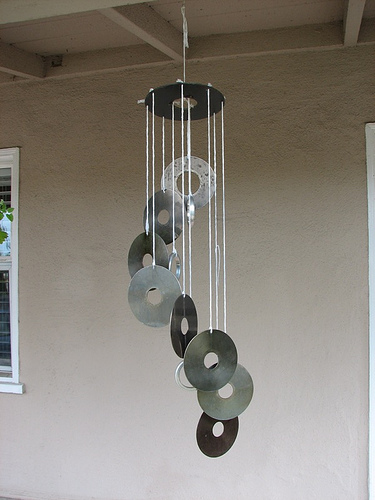
I do wind chime with them, like that : This one is not mine. I did two of them. For the upper part, I used old 5"1/4 Quantum Bigfoot platter and 10 standard 3"1/2 platters for the hanged part. Everything with fishing thread. Inspired by : https://www.evilmadscientist.com/2006/how-to-make-hard-drive-wind-chimes/ So yes, I drill holes too...
-
I had to try 3 different computers before I could update my sata card. Is the card visible in the Windows's peripherals manager? Maybe you have a faulty card? Envoyé de mon S88Plus en utilisant Tapatalk
-
You can trim down this kind of pcb by snapping off the part that you don't need. I had to do that on a m.2 2 USB adapter.
-
As I did it, yes. I created a docker based on this Dockerfile docker-tachidesk/Dockerfile at main · Suwayomi/docker-tachidesk (github.com) and uploaded the final image on my dockerhub. I have no knowledge on github's fork but it should be possible to automate this.
-
If you see the lsi config menu, it possible that you are still in legacy mode or have CSM activated in your uefi. You should try disactivate CSM or go full uefi. I had a similar problem with an HP p410 on a dell motherboard. Impossible to boot until I get ride of any legacy related option in the uefi. The downside is that you can't acces the card config utility but if it's in it mode, you don't really need it. Envoyé de mon S88Plus en utilisant Tapatalk
-
Wikipedia say that an 8x drive go up to 11 MB/s (22 for a 16x) where a sata hdd go easily at 170 MB/s so take a second drive and rip 2 disk at a time and no cache ^^
-
I will add that I did it too and that the silverstone flasher is, in fact an asmedia software. Before upgrading I did too had kicked out drives ans since then, no problem.
-
Glad to hear that. [emoji106] Envoyé de mon S88Plus en utilisant Tapatalk





