ConnerVT
Members
-
Joined
-
Last visited
Everything posted by ConnerVT
-
Dashboard reports used RAM (without cache). From screenshot, looks about right. If you hover your mouse over the Used line on the Stats chart, it should show you a numerical value for the point you are at. They should be pretty close.
-
Also need to consider that nearly none of the Dockers on CA are directly from anyone associated with Limetech, but rather from community members. And many aren't even community members, but some developer who threw together a docker template, put it up on CA, and haven't been seen since. It is only from the goodness of the heart of some developers to even offer support for the dockers they have offered. Some are truly awesome community members here who give hours of their life daily to Unraid support. Others (even well known names) post up things, that over time don't age well, but are never seen to support or ask questions. It is the choice by each contributor how they wish to support their work - a single thread for each docker, a single thread for all of the dockers they provide, support on a different site entirely (such as Github), or no support at all. If you mandate "This is how you have to do it..." you will likely end up with many more choosing no support at all. Let us be thankful for the work they give us for free, and even more thankful when offering their assistance.
-
That's where it gets fuzzy. The GV100 is a generation behind the newer RX8000. Which would explain the 10% lower Tensor Performance rating. But then, it has 10% more Tensor cores. HBM2 memory is inherently faster. Thus the higher memory bandwidth. But memory only comes into play if it is the bottleneck, and can't keep up with the computational speed of the cores. Who knows? Above my pay grade on that. The chart you posted with the benchmarks, if from a reputable source and comparable to the tasks you plan, may be the tie breaker.
-
Not an expert on AI, LLM or neural networks. But I do have some wicked Google Fu skills. And two very different queries ended up on this blog post. I also have 40 years of computer hardware design and semiconductor manufacturing experience, so I understand trying to compare memory size, memory type, Tensor cores, different generations of GPU chips, etc. The blog seems to prioritize the number of Tensor cores (performance) over memory bandwidth. My instinct is that this is correct.
-
It isn't said enough: This man is the best. 👏
-
Solid card. Have one in each of my servers. Never have had an issue.
-
^ This I too thought of running pfSense/OPNsense on my main Unraid server. The 2 port 1GBe nic PCIe card I picked up just for that purpose is still in the server. But after thinking through the details, there was just too much down side to it. Things that Espessomatic mentioned above, security concerns, remote management setups for both the firewall and the Unraid server and the services running on it, I just couldn't get comfortable with how it all was going to be modeled. Ended up buying one of those inexpensive 4 2.5GBe port Celeron N5105 PC boxes and loading OPNsense on it bare metal. Completely isolated from any of my other systems (other than the WAN/LAN, of course). Hasn't missed a beat, 100% pleased with the decision.
-
Run nvidia-smi from the Unraid terminal.
-
Is Drive 3 where you keep the good stuff? 😜
-
You would be better off asking in the Community Applications support thread.
-
Unfortunately Plex has a history of breaking things as they release new features.
-
Ellesmere based GPUs are not great transcoding cards. Seeing only an occasional 1-2% GPU Load is not uncommon. Most of a GPU is not used during transcoding (just any dedicated transcoding hardware in the chip). Most of a GPU is for calculating what is to be drawn on the monitor attached to the GPU (as when playing games, etc), so is unused. Your screenshots show that it is hardware transcoding. Not sure why you have such a load on your CPU. Try some other media files, maybe without the need to audio transcode or that are using subtitles. Try to determine exactly what is causing the issue. Baby steps...
-
Plex has had issues for years with HDR transcoding (tone mapping). Probably an application issue to ask at the Plex forum. It seems every few Plex updates they break it, then spend a couple releases getting it work. Only to break it again. You can try rolling back to a previous version of Plex (ideally one that is known have HDR tone mapping work correctly).
-
I use the Versa H21 as a server case. I picked up an StarTech 4x3 hot swap rack that fits nicely in the case. Gives me an extra 3.5" slot in the case as well as easy access from the front without needing to open the sever case.
-
My first Unraid server was built with a repurposed 1500X. I had intermittent freezes just as you are seeing. First gen Ryzen CPUs had issues running in Linux, later generations are much less prone to this lockup issue. I was able to resolve it by following the FAQ I'll link below. Two things to check for in your BIOS settings: Power Supply Idle Control = Typical Idle Current Set DRAM speed to 1866 (currently it looks as you have 2400) The Power Supply Idle Control prevents the power supply from idling too low when there is not much demand on it. Unfortunately, that isn't enough power to keep the CPU running. If you set to Typical Idle Current, you can also set the C-States back to auto, and allow the CPU to handle power management. Seems you have mismatched sets of DRAM. Usually not ideal, but this shouldn't be an issue in this case. The limiting factor isn't the DRAM, but rather the Infinity Fabric of the CPU (AMD's name for the Ryzen's internal memory controller and bus). See the chart in the FAQ. Your configuration most likely requires it to be set to 1866 (1st Gen, 4 DIMM, and I'll assume Dual Rank for Kingston). You may be able to bump it up to 2133 if 1866 resolves the issue, but honestly there is little to be gained by doing so. It is a server, not a top end gaming rig.
-
Just over 4 years, only have used Docker image. Never had it give an issue. Currently have 27 running, 35 installed on my primary server.
-
Playing with it some, looks as I'll need to New Config what I need.
-
Need to swap a larger drive into my backup server. The array does not have parity. The Unraid manual gives all the details when there *is* a parity drive, but no mention if there isn't one. Do I need to cycle through stopping the array, assigning "no device", starting array, stopping again and assigning the new drive? Or can I just directly assign the new drive in the old drive's slot?
-
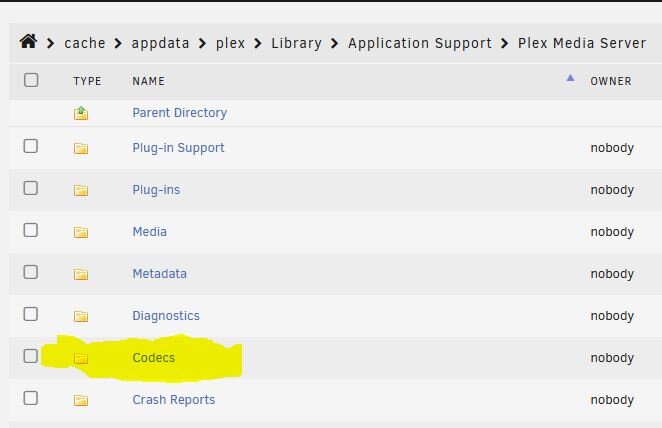
A couple of thoughts: 1. Don't use the Plex Web client for troubleshooting. It has a long standing issue when changing the requested transcoding. Instead, use a Plex App on your client device - AppleTV, Roku, smart TV, etc. 2. Delete the contents of you Codecs folder. This has solved odd transcoding issues for many people in the past, even for those using hardware transcoding. Your Plex server app will go out and re-populate the folder with a fresh set of codec files when you start the Plex docker.
 Yes. Access speeds of HDD drives decrease as you go from access the first sector to the very last. For my 16TB drives, that is nearly a 50% decrease. Parity speeds track with the speed of the drive with the slowest access speed.Two things to consider: Access time (read/write time) of the slowest drive being accessed during Parity Check/Rebuild is typically the gating factor as to how fast it is running at any one time. Spinning HDD access times are always the fastest at the start of the Parity Check/rebuild, and slowest at the end. If all you had are spinning rust drives, you probably would have seen an increase in speed once the 4TB drives were finished. Since they are SSD, there will be no speed increase, just slowly getting slower (or maybe not - I don't know if Unraid is smart enough to recognize that it just needs to write zeros for the rest of the task).Group 15 is the USB hub - All of the listed devices are grouped together, as IOMMU cannot control/separate these, only the hub (which is part of the motherboard). Try a different USB port, so it is sitting alone in Group 19. Then pass Group 19.In Docker, click Frigate and Edit to open the template. Select Advanced View (top right corner. Add what you need in Extra Parameters.