





ConnerVT
Members
-
Joined
-
Last visited
Everything posted by ConnerVT
-
Probably was the cheapest PCB blank available at the board house of that physical size. Allowed space for the 4 less expensive SATA connectors across the top and freeware PCB layout software to do the design. All about making it as cheap as possible.
-
DOH! I think I figured out what happened. 🫢 As I wrote previously, I have a number of maintenance tasks I run. Several bash scripts and some plugins, all that send Telegram notifications when run. All of the server tasks are spread out so not to overlap (and at times where they have low impact on media server users). But I also have another task - a backup of my desktop workstation which runs daily. Macrium Reflect, which runs local on that workstation. It only sends notifications on failure. Macrium does a full backup on the first Monday, weekly differential every Monday, and an incremental daily. The daily incremental is usually very fast (10 minutes or less). The day before Appdata Backup ran, I copied a large amount of data to the workstation (+1 TB). I usually move this to a drive on the workstation that isn't backed up, but there wasn't enough free space. So it ended up on a drive that is included in the backup. When Appdata Backup ran, the server was busy with Macrium writing a ton of data directly to the parity protected array, while trying to verify the 16GB / 80000+ files of the Plex appdata backup file. I'm pretty confident that the array drives were thrashing around madly for a few hours. The Macrium backup completed without any error, so I did not receive any notification from it. My apologies for sounding the alarm. At least this is something you can add to your troubleshooting toolkit as a possibility if someone asks about something similar. Thank you for your time and support of this very useful plugin.
-
Hmmmm... Perhaps this is related to what I recently posted above? 🤔
-
My thoughts exactly. If there was some other drive activity that was taking that long, it would be something which I would had received a Telegram notification (backups, media downloads, parity checks, etc all go to my phone via telegram). I will see what happens next week. Maybe just a head scratching, one off glitch in the Matrix. Just thought I would toss it into this thread, to document and save some data about it, in case it comes up again for me or someone else.
-
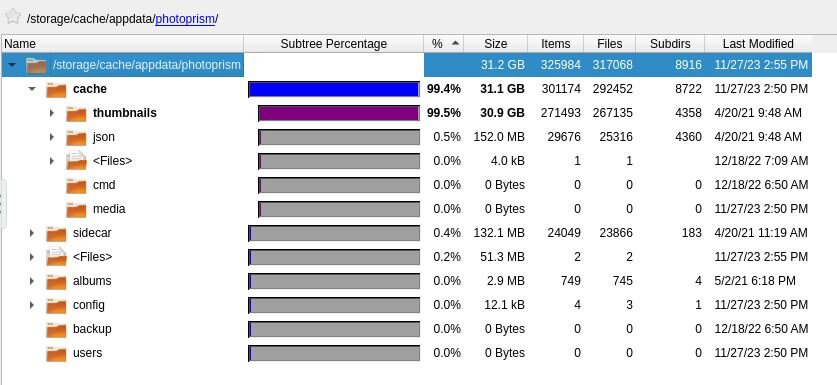
The Immich iOS app can automatically upload photos (can turn on/off this in app). Like many iPhone apps, you need to actually open the app for it to start this task - an issue for most Apple apps, it doesn't like running things in the background. I don't believe Immich will remove photos from your phone, so they likely would upload again if removed from the Immich photo directory. The screenshot is from QDirStat docker. A very useful tool when trying to figure out what is using your storage space.
-
Photoprism Cache directory holds several thumbnail files for each photo in your library. It makes up almost the entire appdata directory for the app. This is one of the reasons I moved on to Immich. Photoprism just doesn't scale well with large photo libraries.
-
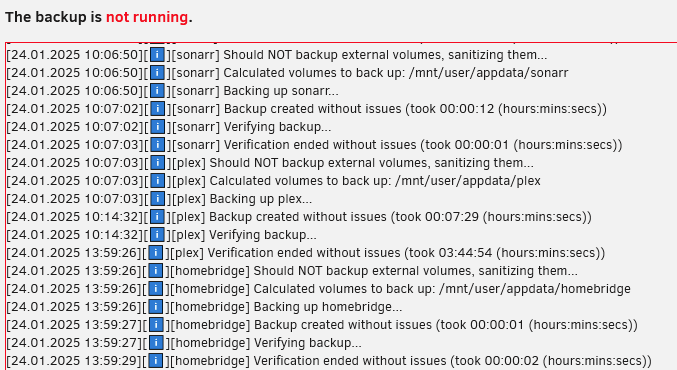
@KluthR Not looking for a fix, but wanted to note something strange that happened this week. I run a weekly appdata backup of ~30 Docker containers. A very plain vanilla config: Stop all - backup - start all, standard appdata locations, only exclusion is the Plex Cache folder. I consistently end up with ~33GB with 107 files. Usually completes in 24 minutes. No major changes made on the server or any Docker. The only change was installing the Unraid Patch the other day. (Server still on 6.12.10). All plugins and (most) Dockers up to date. Appdata backup ran yesterday and took just over 4 hours. No errors in Appdata Backup log. File is the same 33GB/107 files. No other activity going on at the time of the backup. I get Telegram notifications for many of my maintenance activities. Very strange that that it took 10x longer than it has done for many months. Seems as the Plex verification is what added all the additional time. I'll see what happens at next week's scheduled appdata backup. Just wanted to pass this along, in case you find yourself hunting this issue down. Adding Debug Log : f03fcb63-b91f-4dfa-8848-c78442a7923b
-
Also seeing it right after installing the Unraid Patch plugin on my 6.12.10 Main Server. Yeah, I know, update. It will be, eventually. But this narrows it down to possibly being related to the installation/presence of the security patches.
-
Even though it goes against my nature to install any software that ends in "0" (and ".0.0" is even worse), I pulled myself together and updated my backup server to 7.0.0. It is a fairly plain vanilla server, with Frigate and MQTT dockers running on it. It does have a Realtek motherboard NIC that needs the plugin installed, which I left in place during the install. All went without event. Thanks to everyone who contributed to this milestone revision.
-
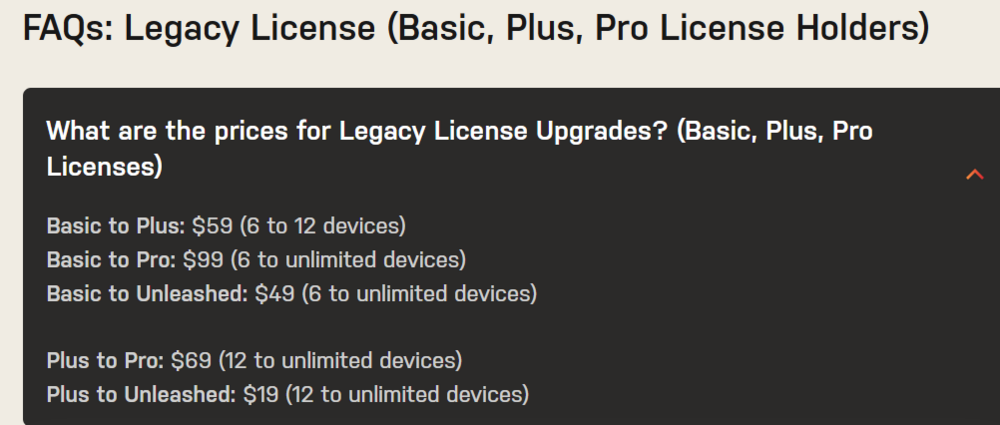
Scroll down to the bottom of the Pricing > Buy Now page: Pro is lifetime updates, Unleashed is annual (one year of updates).
-
My guess is that /mnt/dockers/appdata/ isn't either one of these paths: [Main] Backing up from: /mnt/user/appdata, /mnt/cache/appdata
-
Frank has some good Google Fu skills, especially when searching things Unraid. Thanks!
-
No. Unraid only runs on x64 processors. Those two arm ARM based.
-
The 1500x and the 1700 are the same Ryzen family. This I know, I work where they built all of the 1st and 2nd generation Ryzen chips. I also have been running Ryzen since 1st gen, where my pre-ordered chip arrive a week early. Nothing on any board manufacture's QVL applies to any non-Windows OS. If you want stable, you need to set the memory to 1866. See if this resolves your lock up issue. If it does, you can try 2133 and see if you are lucky and it remains stable.
-
You have Dual Rank memory and 4 DIMMs. Don't get hung up on the marketing department's 2666 claim. You need to run at 1866. This is what a 1st Gen Ryzen's Infinity Fabric based memory controller can handle. My first Unraid server ran a 1500x. I had similar issues, until I clocked the memory as it was required. I seriously doubt you will see any performance hit on your server.
-
Unraid license is not tied to any hardware - It is associated to the boot flash drive. you can upgrade hardware as you wish. Even take the flash drive and use in a completely different system.
-
This isn't a very active sub-forum. You are probably better off posting in the General Support sub-forum and/or the Appdata Backup thread on Plugin Support. You'll get more eyes on your question this way.
-
@SpencerJ Weren't you folks hiring someone to rebuild the USB Creator code? Seems that a deep dive is needed into why the USB creator code has issues, and perhaps need to have a broader view of the current flash drive hardware and market as a whole. I understand LT's need to protect their IP, as well as the difficulty in any migration away from the flash drive based system. But the long ongoing issues folks have creating a boot flash drive is not a good look.
-
The Unraid license is tied to the USB flash drive it it was associated with. All that matters is the *.key file is in the flash drive's config folder. You can plug the flash drive into any machine, and it is good to go (except for needing to configure for new hardware and drives).
-
The Roku should Direct Play (so no transcoding needed) most everything you may have in your media directory if both the server and the Roku are on your home LAN. (Note, in _cjd_'s comment above, Plex always does CPU transcoding when using subtitles). The P400/T400 is a great little card for a home Plex server (where you don't need the extra horsepower to have many transcodes going at once). Single PCIe slot and low power usage. The same transcoding hardware as used in the comparable generation GTX/RTX GPUs, but without the huge number of CUDA cores (which are no use for only transcoding video). The Quadro T400 is going for $100-150 on eBay, what my P400 was when I got it a couple of years ago. Now the P400 is selling for pennies ($30-50), but I recommend the T400 4GB over the P400. P400 is based on the Pascal, T400 on Turing architecture which replaced Pascal. Pascal will likely be losing support at some point so it is best to spend a few extra $$ and go with the T400 4GB card.
-
It isn't a question of "Will it work" but rather "Will it work with the load I expect to put on it". Can my car pull a trailer? vs Can my car pull a trailer with a 40' sailboat on it? My VW sedan can pull a garden trailer with a lawn mower, but I would need a beefy truck to pull a sailboat. My first Unraid server had a 1500X. It transcoded just fine with a Nvidia Quadro T400 (remember, you will need a video card, as you won't wish to do CPU transcoding). But it was nearly only serving one user at a time, and mainly within my home network. If you will have several simultaneous users you then need more powerful hardware.
-
That will work. Just didn't want you to have overlooked that. I would go the PCIe HBA route. But you will want to pick a different card from the one you linked as Marvel controllers have been known to have issues. I have JMB585 based cards in both of my servers, and never had any issues. Would be good if you review this thread:
-
Motherboard has 6 SATA connectors. Where are you going to connect the other 2 HDD?
-
If you are testing it with a web browser, try again with an actual Plex client (smart TV, Apple4K TV, Roku, etc). The Plex web browser has had funky issues for years. You can also delete the contents of your codec folder in your appdata. Stop Plex, delete, restart. Plex will download fresh set of codecs at startup. This has fixed issues for many people. I've also had success fixing flaky playback by downgrading to an earlier version of Plex (usually 2 versions or so back). Plex tends to break working stuff when they update to add stuff I don't use/want/need.
-
It was right where he left it. Alternative answer: It was in the last place he looked. 😁




