





jmztaylor
Members
-
Joined
-
Last visited
Everything posted by jmztaylor
-
Please post diagnostics
-
IIRC that IP address could possibly change so I wouldn't use that. Try using the 192 IP address in radarr
-
have you tried running /usr/sbin/mcelog > mcelog.txt and checking out that file?
-
Need diagnostics posted
-
Probably the ethernet driver issue referenced here
-
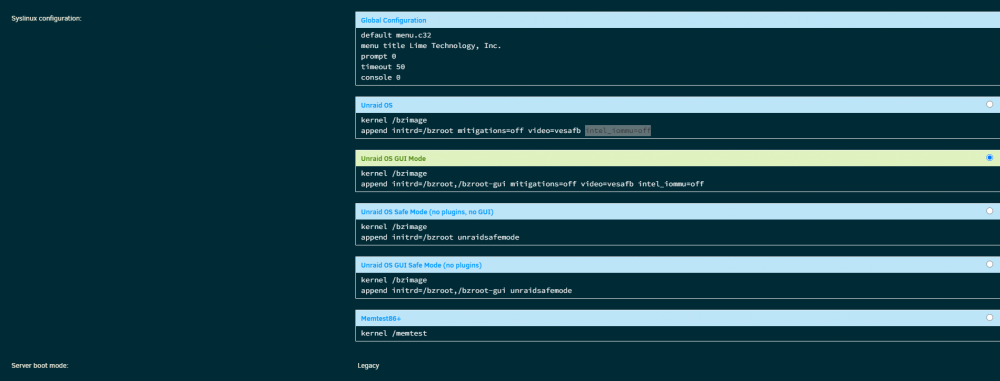
Virtualization can be enabled but VT-d specifically needs to be disabled. If you don't have a VT-d option like I do not then add this to the syslinux config by clicking on the flash drive under Main. intel_iommu=off Then reboot. Screenshot shows where to put it. Virtualization will work if you need it in the future but you will not be able to passthrough devices to the VM
-
Plugging it into another computer is always the easiest
-
it will be in the logs folder on the flash drive
-
Basically both are the same. But I would do A as it would allow the system to evenly write to all the disks. Then you won't have the issue of parity running and you are trying to copy stuff over. Or waiting for parity to complete to copy data over
-
I've had issues restoring from backups with Plex. But for me to get it to work I had to delete multiple files and then only restore the 2 .db files and start plex again. Of course make backups of these files first. Shutdown plex Delete: com.plexapp.plugins.library.blobs.db com.plexapp.plugins.library.blobs.db-shm com.plexapp.plugins.library.blobs.db-wal com.plexapp.plugins.library.db com.plexapp.plugins.library.db-shm com.plexapp.plugins.library.db-wal Restore ONLY (copy from backup): com.plexapp.plugins.library.blobs.db com.plexapp.plugins.library.db Start plex again. See if that works for you. If the other DB files in that directory are not corrupted you might be able to restore one of the dated ones that are in this folder. Also make sure the date stamps you restore are the same dates.
-
The go file contents should be exactly like this with each option on new lines #!/bin/bash http_proxy=http://10.x.x.x:8080 https_proxy=http://10.x.x.x:8080 echo "export http_proxy=\"http://10.x.x.x:8080\"" >> /root/.bash_profile echo "export https_proxy=\"http://10.x.x.x:8080\"" >> /root/.bash_profile # Start the Management Utility /usr/local/sbin/emhttp &
-
Bullseye works fine. I saw in the first post Ubuntu 19+ wont work. Im not familiar with systemd so thought 18 would work. But yes I can reproduce that. Thanks
-
Yeah thats what I did to get network connectivity. Still, all IP functions work like pinging my router but anything domain 'temporary failure in name resolution'
-
Been waiting for something like this. I just created a ubuntu bionic container and have no network connection. Nothing is shown on the page under address and 'ip a' doesn't show an IP address either. EDIT: I was able to get network connectivity using lxc.net.0.ipv4.address lxc.net.0.ipv4.gateway But I don't see a place to put dns resolver info.
-
Is there a bug tracker for the iommu issue?
-
A load average of nearly 40 is hitting the CPU very hard and would make sense how everything would come to a screeching halt.
-
Using port forwarding no reason to have it in DMZ. If you are running a website from the unraid server you will need to change the unraid GUI ports to anything other than 80/443 in Settings->Management Access. Then just port forward 80 (http) and/or 443 (https) to your unraid server.
-
So the cache pool is returning no more errors but parity check on array is returning errors. Last run there was zero. So between the upgrade and this issue some corruption was introduced. What should be believed? That parity is still good and needs to do corrections or restart with blank parity and trust the data is good?
-
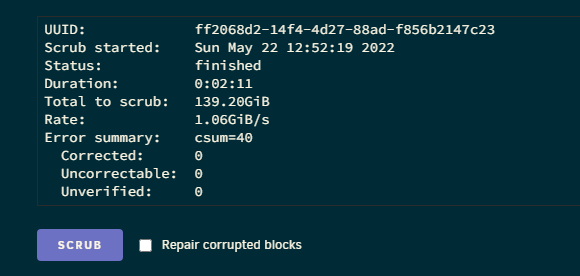
FWIW, I ran the scrub and this is what shows Edit: Ran repair right after and all corrupted files are plex phototranscoder files. So no big deal with those. tower-diagnostics-20220522-1332.zip
-
Didn't think my cache pool had an issue. Parity was showing sync errors on the array.
-
Is there documentation for that?
-
What is the solution for the parity sync errors. If this issue causes corruption, what should be trusted?
-
It for sure is disabled and VMs are failing to start due to virtualization turned off. I have added that line to syslinux to be sure and rebooted. tower-diagnostics-20220522-1220.zip
-
Yeah I disabled Intel Virtualization Technology. Assumed it was the same thing
-
Ok missed the advanced view switch. Here is latest diags with 6.10.1 installed and iplan enabled. tower-diagnostics-20220522-1149.zip





