PicPoc
Members
-
Joined
-
Last visited
Everything posted by PicPoc
-
Sorry but this doesn't work... Log/pass : superadmin/ or Log/pass : superadmin/-empty- Doesn't work.
-
Thanks, but : I saw "phpmailer" but composer is needed ? And may be sendmail. But sendmail is not present on Apache-PHP...
-
Hi ! I want to sendmail from a php script in Apache-PHP. Is it possible ? Sendmail is on unRAID but not in the docker... Is there a way to bridge the docker and unRAID for sendmail?
-
Same question for me
-
Great Could you explain what you ended up doing? Starting with Plop didn't work?
-
Je ne sais pas de quelle manière tu as accédé à la machine mais tu peux l'éditer par le webterminal (le Terminal) via le webgui en haut à droite.
-
J'ai essayé avec nginx mais DeeMix deviens inaccessible. Sans doute que ma config n'est pas bonne... si quelqu'un l'a déjà fait je serais intéressé. Merci.
-
Il est possible de changer les valeurs en éditant le fichier par la ligne de commande : # vi /boot/config/network.cfg On retrouve les lignes : DNS_SERVER1= DNS_SERVER2=
-
Tu as ces débit depuis la dernière mise à jour, la v6.11 ou avant ?
-
Merci pour ton retour c'est très intéressant. De mon coté je suis obligé d'utiliser Mac OSX v10.6.8 (Snow Leopard) et je crains que ce ne soit jamais résolu les problèmes de débits. Tant pis, je ferais les sauvegardes depuis un OS plus récent. Ca serait top que ce soit résolu dans peu de temps. Ca rame dur les débits via SMB ! Pour NFS, reste à voir la configuration car unraid utilise nfs4 il me semble !
-
-
Thanks for the answer.
-
Hi guys, I wanted to known if unraid 6.x works with PATA disks (IDE disks) ? Thanks.
-
Voici J'ai fais une erreur, j'ai inversé le disque de parité et le disque de données puis démarré l'array sans m'être rendu compte de mon erreur. J'avais coché "Parity is already valid" puisque la config était connue. Forcément, impossible de voir les données ! Pour m'en sortir, j'ai démarré la machine avec le CD de knoppix et lancé GParted. Fait un "check" et il a corrigé la "table des matières" de la partition. Le disque est maintenant montable. Les données se retrouvent dans le dossier "lost+found" et bien sont présents. Ca peut servir à du monde à l'avenir.
-
Merci tout de même pour ce message. J'ai tenté des choses mais c'est incompréhensible. Il manque sans doute quelque chose mais quoi ?
-
Hummmmmm personne n'a d'avis ?
-
I used a tool on php and with ProxyPass & ProxyPassReverse on another ip, with this similar config and it's works like a charm. I also tried another way with filebrowser on 80 : ProxyPass /filebrowser http://192.168.1.10 ProxyPassReverse /filebrowser http://192.168.1.10 But it still doesn't work any better. Filebrowser need something special. A temp folder
-
Tu nous tiendra au jus car franchement sur Mac c'est de plus en plus pourri. Entre les nouveaux OS tout les ans, les trucs modifiés ou enlevés, le tout très médiocre ils sont devenus complètement tarés. Ils ne cherchent qu'à faire du produit pour passer sur instagram pour en vendre des tonnes... C'est devenu ultra à chier... Les débit en SMB c'est la merde, il faut utiliser NFS mais c'est un merdier sans nom, car ca déconne sur certaines configuration. J'ai une machine de travail sur MacOS et un serveur en AFP et ca marche super bien puisque ca reste sur le même OS... Super pour l'ouverture "Think différent" : tu parles ! C'est bien fini depuis longtemps. J'aimerai bien avoir un retour sur cette nouvelle version 6.11. Tu nous diras donc Gothan ! Je voudrais remplacer mon serveur MacOS mais les débits sont lents (25Mo/sec) en gigabit pour certains fichiers, parfois ca monte à 80Mo/sec mais c'est très rare. Il faut dire que j'ai de tout petits fichiers mais en 2022 ça crains...
-
Filebrowser fonctionne très bien mais lorsque je veux ajouter filebrowser dans Apache-PHP, je n'arrive pas à y accéder. Voici ce qu'il affiche : Il tourne en boucle, il manque quelque chose et je ne comprends pas quoi. Voici ce que j'ai ajouté dans le fichier de configuration de Apache-PHP "proxy-config.conf" : <VirtualHost *:80> ServerAdmin [email protected] ServerName my.dyndns.net ServerAlias my.dyndns.net Alias /test "/var/www/test.php" <Location /filebrowser > ProxyPass http://192.168.1.10:8080 ProxyPassReverse http://192.168.1.10:8080 </Location> DocumentRoot /var/www/ ErrorLog ${APACHE_LOG_DIR}/error.log CustomLog ${APACHE_LOG_DIR}/access.log combined </VirtualHost> Avez vous une idée de ce qui manque ? J'ai posté sur le forum général ici : https://forums.unraid.net/topic/78481-support-knex666-filebrowser/page/7/#comment-1174547
-
Filebrowser works fine but when I want to add filebrowser in Apache-PHP I can't access it. This is what it displays: It's looping, something is missing and I don't understand what. Here is what I added in the Apache-PHP configuration file "proxy-config.conf": <VirtualHost *:80> ServerAdmin [email protected] ServerName my.dyndns.net ServerAlias my.dyndns.net Alias /test "/var/www/test.php" <Location /filebrowser > ProxyPass http://192.168.1.10:8080 ProxyPassReverse http://192.168.1.10:8080 </Location> DocumentRoot /var/www/ ErrorLog ${APACHE_LOG_DIR}/error.log CustomLog ${APACHE_LOG_DIR}/access.log combined </VirtualHost> Do you have any idea what is missing ?
-
Hi ! This Theme is really nice : where did you find it ? Thanks
-
Oh! Yes !!!!! It's working now ! Thank you once again for your perseverance, it's very kind. It's a great program, which really meets my needs. These icons are much better for the users, they visualize the files much better. Great!
-
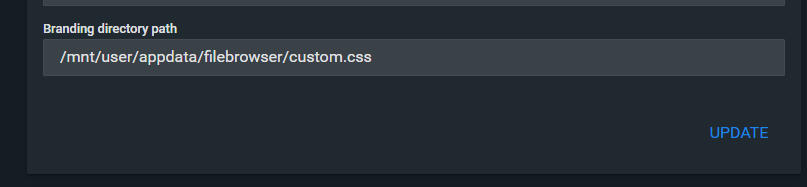
Thanks for your detailed information Alturismo : It's really cool ! OK, custom.css works with this add: Copy "custom.css" in "/appdata/filebrowser/" folder ("/database/custom.css" in the docker) Add in preferences of FileBrowser Branding directory path : /database And this docker use ccs file "/database/custom.css" BUT, this file (custom.css) is not correct. It's: NOT : Files with different colors. Strange !! For information : https://thehomelab.wiki/books/other-guides/page/filebrowser-custom-icon-colors-how-to
-
Thanks again. In the documentation nothing clearly explains where to put this file. I tried several options, seen from the docker and as you showed me, but I don't see. I am not an expert in docker and I have realized that the documentations are succinct each time. I don't really understand why! I'm going to test other things but it's too random like this to succeed in moving forward.
-
Thanks again for your help, but I don't understand how write in the preferences. This doesn't work :