Elmojo
Members
-
Joined
-
Last visited
Everything posted by Elmojo
-
My fault. I found in a thread elsewhere that this container does auto-forwarding. I missed that in the docs somehow. All I had to do was turn on the STRICT_PORT_FORWARD variable, and it appears to be working just fine now with WG. Speaking of, given the bug you noted above, and 'downgrade' update, do I need to do that, or am I okay to stay as I am, since it appears to be working?
-
Ok, I'm mostly there... I've signed up for PIA, and reconfig'd the docker to use PIA, and WG. I can start the docker, and access the webGUI for qBT. It reports that it's no longer 'firewalled', however, the logs show that port forwarding isn't enabled. I believe it, since I can't find anything in the docs that says how to PF when you're not using the PIA windows app. Even if I was, the port is 'randomly assigned', so wouldn't it change each session?
-
You know, I fixed it, but for the life of me I can't recall how! I know that's super not helpful, sorry! Now that I think of it, I believe the solution was to stop the container, edit it, and change the VM Console Protocol to SPICE. Once I got it up and running once, I was able to set up RDP, then I never had to use the console again.
-
It does indeed look very advertis-y, but thank for that info! If you use it and haven't had any issues, I feel better. Is configuring it with WG fairly easy? I'm pretty technical with most things, but i swear, I struggle with dockers and networking for some reason. lol
-
So I'm super confused after reading the last couple pages, most likely because I'm a little thick. lol Since mullvad has dropped port forwarding support, I have to switch to a new VPN provider. I've heard all sorts of horror stories about PIA not being safe to use, but it seems like this container (and many users here) feels otherwise. I'm not wild about them being US-based, since that opens up the possibility of court-ordered logs being surrendered. I was considering AirVPN, but I'm a little worried about how tricky the config would be getting things working with the docker. Anyway, I guess I'm looking for some advice on which VPN would be the best specifically for use with this docker, using WG. I know PIA has 'built-in support', but is it really as safe as an EU-based VPN, or just easy? I'll be purchasing a multi-year subscription to some VPN this evening, so some advice greatly appreciated...
-
Bummer. I'm already invested in Mullvad for some other services. I already have STRICT_PORT_FORWARDING set to "No". It's been that way since setup. If I was to switch to a different VPN, is there one that has gotten the stamp of approval from users here? I'm not super familiar, but I've been very happy with Mullvad in general, for their price, service, and general setup. I use it for a couple different things, but this is perhaps the most important, so I guess I need to consider another option. Is Wireguard an alternative? I've never been clear on exactly what that is or how it works, or if it's really even a VPN in the traditional sense.
-
I know I'm missing something super obvious here. Everything has been running smooth for a while now, but recently all downloads have ceased, and newly added downloads are stuck at "downloading metadata". I'm using Mullvad VPN. What have(n't) I done to break it? EDIT: I did a little more digging, and discovered that Mullvad has removed support for port forwarding. Is this my issue? What's the alternative? They support WG. Can that be a replacement? Sadly, I've never really understood the difference, or how QBt makes use of the VPN, it just....works.
-
Thanks, I'll just stick with the simple solution for now.
-
So nice to see this being worked on again! Thanks JTok and those who are assisting you!
-
Thanks for the detailed reply! Maybe I misunderstand how TV and Anydesk are working, but somehow they are both able to wake my remote machines (several of them) from sleep over the internet. Regardless, I appreciate your explanation. I do use HA, but only on my network here at home, not at any of the other locations where there are machines I'll need to wake. Would it still be of any use? I suspect no. For now, the simplest solution has been just to leave the machines awake (never sleep) and let the monitors turn off. We're not really concerned with power consumption, since it's not many machines in total, and they are spread out over various locations.
-
Has anyone been able to get WOL working in Rustdesk outside of a local LAN? I've asked on the Rustdesk Github, and the answer is "you can't", but that seems...implausible. I feel like there has to be a way to do such a simple and commonly-needed thing, especially since Teamviewer and Anydesk do it without issue. Any ideas?
-
I'm having the same issue, except that mine is a brand new Win11 install. Mine also halts at the "spice-server bug" line. Did you ever find a solution?
-
Yes, both in IT mode. One is a PERC H810 in HBA mode. That one is running my external MD1200 disk shelf. Those drives all sleep perfectly. The other is a PERC H730, also in HBA mode. That one is running the internal drives connected to the backplane. Most of the drives sleep fine, except for the 5x 6TB Seagate drives I bought a couple months ago.
-
Any additional thoughts on this? It feels like I'm really close to having this working...
-
Nope, mine are on Dell full size HBAs.
-
There are a myriad factors that can govern how certain hardware works (or doesn't) within a given environment. There often is no simple "explanation", unfortunately. If you find a definite culprit for the failure to sleep, other than "it's Dell's fault", then by all means, please share it!
-
I don't think this is correct. I have 2 RAID cards in my T630, both flashed to non-DELL firmware. All my drives spin down just fine, except for the specific Seagate SAS drives noted above. There doesn't seem to be anything in iDRAC or the Dell BIOS that would wake drives, but I haven't done a deep dive looking for that specifically. There are so many Dell servers out there in home labs, I think we'd have heard about it if this was a widespread, known issue.
-
I agree, but my cooling is kinda...overkill. lol I have a dedicated 14k BTU AC that's blowing directly into the intake of the server. All my server equipment is in a separate room, which is maintained at roughly 20c/45%RH. All the other drives in the same chassis run 32-40c when spooled up, and the drives in my external disk shelf avg 23-26c when up. It's only these Seagate drives that refuse to spin down, and also have temp issues. It's baffling. They're also the newest drives in my system, by far.
-
I would suggest you scan back through the last few pages of the thread. I'm having the same issue, with different Seagate drives. From my research, this seems to be an issue with some Seagate SAS drives, and I've been unable to find a solution thus far. It doesn't appear to be related to the controller, or to this plugin. If you find anything to the contrary, please share it! I'm actually unable to use my drives right now. Since they stay spun up all the time, they are running really hot (51c avg) and I'm afraid to leave them in service.
-
Possible, I guess. I'm using 38400, which is what I used in putty and it worked fine there. As for protocol, The thread that discusses how to talk to these MD1200 boxes says it uses the standard 8N1. However, that's not specifically an option with screen. The article linked above lists these variables as options... /dev/ttySX: Linux serial port (e.g., /dev/ttyS0 [COM1] ) baud_rate: Usually 300, 1200, 9600 (default), 19200, or 115200. This affects transmission as well as receive speed. cs8 or cs7: Specify the transmission of eight (or seven) bits per byte. ixon or -ixon: Enables (or disables) software flow-control (CTRL-S/CTRL-Q) for sending data. ixoff or -ixoff: Enables (or disables) software flow-control for receiving data. istrip or -istrip: Clear (or keep) the eight bit in each received byte. I'm using the baud rate (38400) and cs8 flags in my string. That may be incorrect, or incomplete. Anyone have any ideas? The folks over at STH have an extensive thread on the MD1200. It lists the communication as "RS232, 38400-8-n-1", if that helps.
-
So this is odd... I opened terminal and tried "screen /dev/ttyS1 38400,cs8", to see if maybe my serial port was just a different ID. I got the same blank screen with the solid cursor. However, if I pressed the up arrow (for history), I got all my serial console history from the MD1200! This tells me that my serial port is ttyS1, and that it does indeed appear to be able to talk to the MD1200, which is great news. Here's the weird part.... After that first contact, every time I try to connect again, or enter any new commands, the 'conversation' is getting more and more garbled. I no longer see the standard prompt for the MD1200 console interface (something like Bluedress_1.06.00:), nor can I even type commands at this point. I can start typing, but then it sort of stutters or freezes and doesn't allow me to complete the commands or execute them. If I arrow up, and execute past commands, it may or may not work, but the output is increasingly jumbled. Any idea what's happening?
-
Aha! I see, said the blind man... lol Now I have a blank screen, which makes sense, since nothing is connected. I'll check it out after a meeting this evening that I need to go prepare for. Thanks for the help! You're always on the ball, SimonF.
-
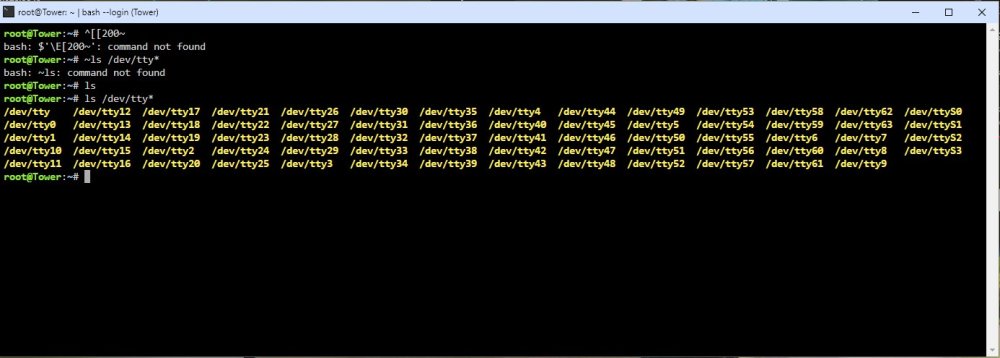
I'm not sure why it shows so many. My server only has 1 physical serial port. Maybe the others are internal headers or something?
-
When I run the screen command in terminal, using "screen /dev/ttys0 38400,cs8", I get the response: "Cannot exec '/dev/ttys0': No such file or directory" Is that just because the cable is not physically connected at the moment? I'm not super familiar with how serial comms work.
-
Gotcha! When I run that command in terminal, I get the attached... Looks like that last column on the right are serial devices, no? How do I figure out which is the actual serial port?