Amr0d
Members
-
Joined
-
Last visited
-
Die Unterordner wurden in Windows 11 angelegt und haben ursprünglich mal funktioniert als Ziel für die Datensicherung.
-
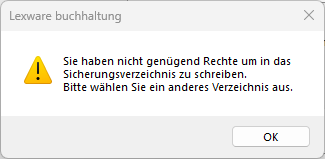
Guten Tag, ich habe ein Problem mit der Datensicherung von Lexware Buchhaltung und Faktura Software. Beim schließen fragt das Programm immer ob man eine Datensicherung machen möchte und dafür habe ich einen Netzwerkshare auf meinem Unraid angelegt. In Windows kann der Benutzer ohne Probleme Dateien auf den Share kopieren oder löschen etc. In der Software bekomme ich aber immer folgende Meldung: Mache ich die Datensicherung aber nicht in einen Unterordner funktioniert das. Also Laufwerk "X:/" geht, aber nicht X:/Datensicherung". Das Problem hatte ich allerdings nicht immer. Beim letzten Mal habe ich im Windows Credential Manager einfach die Daten gelöscht und danach ging es wieder ein paar Monate und jetzt bekomme ich diese Meldung wieder. Mein Trick vom letzten Mal hat jetzt leider auch keine Abhilfe geschaffen und weiß nicht mehr so Recht weiter. Wenn ich das Backup einfach lokal auf dem PC speichere und dann in den entsprechenden Ordner kopiere, funktioniert das auch. Nur eben nicht direkt aus dem Programm heraus. Benutzt jemand Lexware Software und hatte das Problem schon mal oder hat jemand eine Ahnung wo und was ich nachschauen kann um dem Problem auf die Schliche zu kommen? Lexware sagt leider nur, dass ich dem Share dann bitte für den User Schreibrechte einrichten soll. Mir würde es schon helfen wenn ich irgendwie nachweisen könnte, dass es nicht an Unraid sondern an Lexware liegt.
-
Ich nutze Adminer dafür, sollte ja keinen Unterschied machen?! Aber ja, ich komme auf die Datenbank mit den Zugangsdaten. Ja, das dachte ich mir schon. Dann werde ich das in Zukunft über einen Docker laufen lassen.
-
Hat zumindest in der Vergangenheit super funktioniert. Aus dem Grund packt man die Container ja in das selbe custom Netzwerk, dann nimmst du anstelle der IP einfach den Namen des Containers. Unabhängig davon funktioniert es aber mit der IP ebenfalls nicht. Da bekomme ich den gleichen Fehler.
-
Thema Datenbank: Ich habe mir den Postgresql 17 Container aus dem CA runtergeladen und dort folgende Variablen entsprechend ausgefüllt POSTGRES_PASSWORD, POSTGRES_USER, POSTGRES_DB Die Angaben habe ich dann per copy/paste in der Variable DATABASE_URL vom open-archiver Container entsprechend ersetzt. Da beide Docker im selben custom Netzwerk sind habe ich anstelle der IP einfach den Dockernamen inkl. Port angegeben. Bisher hatte ich den Eindruck, dass man da nicht viel falsch machen kann, aber scheinbar liege ich da falsch. Funktioniert hat diese Methode ja auch bei immich, Nextcloud und ähnlichem. Thema mehrere Datenbanken oder lieber einzelne Docker pro App? Das Thema hatte ich im Unraid Discord angesprochen und dort hat man mir dazu geraten lieber für jede App einen eigenen Datenbank Container anzulegen. Das wäre professioneller. Daran habe ich mich erstmal gehalten. Lieber wäre es mir aber schon wenn das alles unter einem Hut wäre. Ist glaube ich auch viel übersichtlicher. Aber das kann ich ja immer noch machen. Laufen sollte das erstmal.
-
Dann habe ich ja alles erstmal richtig gemacht. Woran kann es dann liegen, dass ich einen "Invalid DATABASE_URL" Fehler bekomme?
-
Guten Morgen liebe Community, ich versuche seit gestern den Open-Archiver Container von janmer einzurichten und habe mir dafür auch die zusätzlichen Container runtergeladen die im CA drinstehen: Valkey, Meilisearch und Postgresql17. Letztere laufen auch laut den Logs ohne Probleme. Ich habe im Template des open-archiver containers auch alle Daten eingetragen, aber starten will er nicht. Das liegt daran, dass ich nicht weiß was ich im Feld DATABASE_URL eingeben muss bzw. es falsch eingegeben habe, denn der Log zeigt einen Invalid Database URL Fehler an. Der Standardwert für dieses Feld lautet postgresql://POSTGRES_USER:POSTGRES_PASSWORD@postgres:5432/POSTGRES_DB Liege ich damit richtig wenn ich die Werte durch die Angaben aus meinem Postgresql17 Container ersetzen muss? Im Log steht dann folgendes: Invalid DATABASE_URL, please check your .env file. TypeError: Invalid URL at new URL (node:internal/url:827:25) at encodeDatabaseUrl (/app/packages/backend/dist/helpers/db.js:6:21) at runMigrate (/app/packages/backend/dist/database/migrate.js:16:57) at Object.<anonymous> (/app/packages/backend/dist/database/migrate.js:24:1) at Module._compile (node:internal/modules/cjs/loader:1706:14) at Object..js (node:internal/modules/cjs/loader:1839:10) at Module.load (node:internal/modules/cjs/loader:1441:32) at Function._load (node:internal/modules/cjs/loader:1263:12) at TracingChannel.traceSync (node:diagnostics_channel:328:14) at wrapModuleLoad (node:internal/modules/cjs/loader:237:24) { code: 'ERR_INVALID_URL', input: 'postgresql://postgres-open-archiver:passwort123@postgresql17:5432/open-archiver-db' } Migration failed! Error: Invalid DATABASE_URL at encodeDatabaseUrl (/app/packages/backend/dist/helpers/db.js:14:15) at runMigrate (/app/packages/backend/dist/database/migrate.js:16:57) at Object.<anonymous> (/app/packages/backend/dist/database/migrate.js:24:1) at Module._compile (node:internal/modules/cjs/loader:1706:14) at Object..js (node:internal/modules/cjs/loader:1839:10) at Module.load (node:internal/modules/cjs/loader:1441:32) at Function._load (node:internal/modules/cjs/loader:1263:12) at TracingChannel.traceSync (node:diagnostics_channel:328:14) at wrapModuleLoad (node:internal/modules/cjs/loader:237:24) at Function.executeUserEntryPoint [as runMain] (node:internal/modules/run_main:171:5) Scope: all 5 workspace projects Lockfile is up to date, resolution step is skipped Progress: resolved 1, reused 0, downloaded 0, added 0 Packages: +630 ++++++++++++++++++++++++++++++++++++++++++++++++++++++++++++++++++++++++++++++++ Progress: resolved 630, reused 0, downloaded 83, added 63 Progress: resolved 630, reused 0, downloaded 169, added 103 Progress: resolved 630, reused 0, downloaded 196, added 110 Progress: resolved 630, reused 0, downloaded 218, added 118 Progress: resolved 630, reused 0, downloaded 286, added 271 Progress: resolved 630, reused 0, downloaded 466, added 466 Progress: resolved 630, reused 0, downloaded 547, added 466 Progress: resolved 630, reused 0, downloaded 554, added 466 Progress: resolved 630, reused 0, downloaded 554, added 467 Progress: resolved 630, reused 0, downloaded 625, added 625 Progress: resolved 630, reused 0, downloaded 628, added 626 Progress: resolved 630, reused 0, downloaded 629, added 628 Progress: resolved 630, reused 0, downloaded 629, added 629 Progress: resolved 630, reused 0, downloaded 630, added 629 Progress: resolved 630, reused 0, downloaded 630, added 630, done .../[email protected]/node_modules/esbuild postinstall$ node install.js .../[email protected]/node_modules/esbuild postinstall$ node install.js .../[email protected]/node_modules/esbuild postinstall: Done .../[email protected]/node_modules/esbuild postinstall: Done dependencies: + concurrently 9.2.0 + dotenv-cli 8.0.0 devDependencies: skipped ╭ Warning ─────────────────────────────────────────────────────────────────────╮ │ │ │ Ignored build scripts: msgpackr-extract, sqlite3. │ │ Run "pnpm approve-builds" to pick which dependencies should be allowed │ │ to run scripts. │ │ │ ╰──────────────────────────────────────────────────────────────────────────────╯ packages/frontend prepare$ svelte-kit sync || echo '' packages/frontend prepare: Missing Svelte config file in /app/packages/frontend — skipping packages/frontend prepare: Done Done in 24s using pnpm v10.13.1 > [email protected] db:migrate /app > dotenv -- pnpm --filter @open-archiver/backend db:migrate > @open-archiver/[email protected] db:migrate /app/packages/backend > node dist/database/migrate.js [[email protected]] injecting env (0) from .env (tip: prevent committing .env to code: https://dotenvx.com/precommit) /app/packages/backend: ERR_PNPM_RECURSIVE_RUN_FIRST_FAIL @open-archiver/[email protected] db:migrate: `node dist/database/migrate.js` Exit status 1 ELIFECYCLE Command failed with exit code 1. Ich habe es auch ausprobiert mit dem Standardwert, ebenfalls ohne Erfolg. Was mache ich falsch? Ich sehe meinen Fehler nicht und wäre euch wirklich dankbar wenn ihr mich in die richtige Richtung schubsen könntet. Die Zugangsdaten sind übrigens nicht die echten, ich habe sie nur für das Beispiel angepasst.
-
Hi everyone, I am trying to share my Unraid to a friend and vice versa, so we decided to use Tailscale for this and on my end everything works as intended but not for my friend. Here's an overview of the setups and what we have planned: 2x Unraids running on 7.2.0 running Tailscale plugin 2025.11.05.0614 We have two different Tailnets in which we share our Unraid servers. I am sharing my Tower to his tailnet and vice versa. (Optional bonus question: Could we use just one tailnet in which we both add our Unraid servers?). On each Unraid we have created a user and a share which we want to connect to via the "Add remote SMB/NFS share" in Unraid. We can both ping each others server and access it via https in the browser but only I am able to access the remote share that he created for me on his server. Said friend can only ping my server successfully (from Unraid console) and it shows as "connected" in his Tailnet but when he adds the SMB remote share in Unraid it always says "Remote server is offline". Both Tailnets are setup identical when it comes to settings, which are default settings except for HTTPS, which is enabled. Why can he ping my Unraid but when he adds the remote share it shows that my server is offline? What could I do to solve this? We tried to set this up multiple times to make sure we did everything right but nothing seems to help. In the end I am always able to access my remote share but he can't access his. Any help is appreciated! Thank you!
-
Not sure if it is just me but I can't delete items anymore in the desktop app and browser extension. According to GitHub this seems to happen only to people who selfhost via third-party software like vaultwarden. Can somebody confirm this? I am using Bitwarden 2025.6.1
-
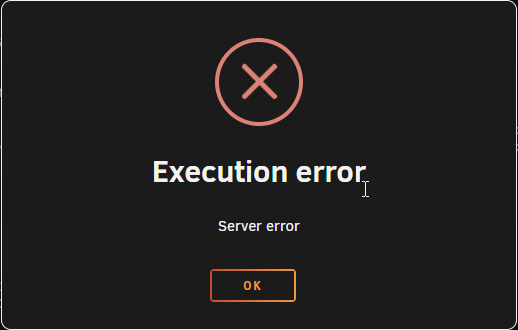
Everytime I want to start this container I get the following error message. There are no logs I can view so I am a bit clueless on what to do to solve this problem. Maybe you can give me an advice or even a solution on this. I am not sure what information you need to help me but if you do feel free to ask.
-
Just to make sure I am doing everything right before I change anything: When I want to enable barcode scanning in paperless I can simply edit the docker and add "PAPERLESS_CONSUMER_ENABLE_BARCODES" as a container variable and write "true" in there. Is that how it works?
-
I thought about that as well but all of the cases I could find are to deep for my rack.
-
I am looking for a small 1U rackmount case that has similar specs like the Synology RS422+ but there seems to be no manufacturer that offers cases like this. Do you have any recommendations for this? I only have 1U available for my build and really don't want to buy a normal case. Maybe you can help.
-
I have the exakt same problem. I don't have any graphics card installed and want to use this container solely for Steams "Game File Transfer over Local Network" feature. May you can point me in the right direction. Thank you! Here are some logs: Build: [2024-08-24 02:48:43] [master] [860451da74b397385f1b1658545d2bb891aa8e46] [debian] all values are hidden [ /etc/cont-init.d/10-setup_user.sh: executing... ] **** Configure default user **** - Setting default user uid=99(default) gid=100(default) - Adding default user to any additional required device groups - Adding user 'default' to group: 'video' - Adding user 'default' to group: 'audio' - Adding user 'default' to group: 'input' - Adding user 'default' to group: 'pulse' - Setting umask to 000 - Create the user XDG_RUNTIME_DIR path '/tmp/.X11-unix/run' - Setting ownership of all log files in '/home/default/.cache/log' - Setting root password - Setting user password DONE all values are hidden [ /etc/cont-init.d/11-setup_sysctl_values.sh: executing... ] **** Configure some system kernel parameters **** - The vm.max_map_count is already greater than '524288' DONE all values are hidden [ /etc/cont-init.d/30-configure_dbus.sh: executing... ] **** Configure container dbus **** - Container configured to run its own dbus DONE all values are hidden [ /etc/cont-init.d/30-configure_udev.sh: executing... ] **** Configure udevd **** - Disable udevd - /sys is mounted RO - Enable dumb-udev service - Ensure the default user has permission to r/w on input devices DONE all values are hidden [ /etc/cont-init.d/40-setup_locale.sh: executing... ] **** Configure local **** - Locales already set correctly to en_US.UTF-8 UTF-8 DONE all values are hidden [ /etc/cont-init.d/50-configure_pulseaudio.sh: executing... ] **** Configure pulseaudio **** - Enable pulseaudio service. - Configure pulseaudio to pipe audio to a socket DONE all values are hidden [ /etc/cont-init.d/60-configure_gpu_driver.sh: executing... ] **** Found Intel device 'Intel(R) Xeon(R) E-2286G CPU @ 4.00GHz' **** - Enable i386 arch - Install mesa vulkan drivers **** No AMD device found **** **** No NVIDIA device found **** DONE all values are hidden [ /etc/cont-init.d/70-configure_desktop.sh: executing... ] **** Configure Desktop **** - Enable Desktop service. - Ensure home directory template is owned by the default user. - Installing default home directory template DONE all values are hidden [ /etc/cont-init.d/70-configure_xorg.sh: executing... ] **** Generate default xorg.conf **** - Configure Xwrapper.config - Configure container as primary the X server - Enabling evdev input class on pointers, keyboards, touchpads, touch screens, etc. DONE all values are hidden [ /etc/cont-init.d/80-configure_flatpak.sh: executing... ] **** Configure Flatpak **** - Flatpak configured for running inside a Docker container DONE all values are hidden [ /etc/cont-init.d/90-configure_neko.sh: executing... ] **** Configure Neko **** - Disable Neko server DONE all values are hidden [ /etc/cont-init.d/90-configure_steam.sh: executing... ] **** Configure Steam **** - Enable Steam auto-start script DONE all values are hidden [ /etc/cont-init.d/90-configure_sunshine.sh: executing... ] **** Configure Sunshine **** - Enable Sunshine server DONE all values are hidden [ /etc/cont-init.d/90-configure_vnc.sh: executing... ] **** Configure VNC **** - Configure VNC service port '32036' - Configure pulseaudio encoded stream port '32037' - Enable VNC server - Disable audio stream - Disable audio websock DONE all values are hidden [ /etc/cont-init.d/95-setup_wol.sh: executing... ] **** Configure WoL Manager **** - Disable WoL Manager service. all values are hidden **** Starting supervisord **** - Logging all root services to '/var/log/supervisor/' - Logging all user services to '/home/default/.cache/log/' all values are hidden 2024-08-26 20:02:36,352 INFO Included extra file "/etc/supervisor.d/dbus.ini" during parsing 2024-08-26 20:02:36,352 INFO Included extra file "/etc/supervisor.d/desktop.ini" during parsing 2024-08-26 20:02:36,352 INFO Included extra file "/etc/supervisor.d/neko.ini" during parsing 2024-08-26 20:02:36,352 INFO Included extra file "/etc/supervisor.d/pulseaudio.ini" during parsing 2024-08-26 20:02:36,352 INFO Included extra file "/etc/supervisor.d/steam.ini" during parsing 2024-08-26 20:02:36,352 INFO Included extra file "/etc/supervisor.d/sunshine.ini" during parsing 2024-08-26 20:02:36,352 INFO Included extra file "/etc/supervisor.d/udev.ini" during parsing 2024-08-26 20:02:36,352 INFO Included extra file "/etc/supervisor.d/vnc-audio.ini" during parsing 2024-08-26 20:02:36,352 INFO Included extra file "/etc/supervisor.d/vnc.ini" during parsing 2024-08-26 20:02:36,352 INFO Included extra file "/etc/supervisor.d/wol-power-manager.ini" during parsing 2024-08-26 20:02:36,352 INFO Included extra file "/etc/supervisor.d/xorg.ini" during parsing 2024-08-26 20:02:36,352 INFO Included extra file "/etc/supervisor.d/xvfb.ini" during parsing 2024-08-26 20:02:36,352 INFO Set uid to user 0 succeeded 2024-08-26 20:02:36,416 INFO RPC interface 'supervisor' initialized 2024-08-26 20:02:36,416 CRIT Server 'unix_http_server' running without any HTTP authentication checking 2024-08-26 20:02:36,416 INFO supervisord started with pid 1 2024-08-26 20:02:37,418 INFO spawned: 'dbus' with pid 428 2024-08-26 20:02:37,419 INFO spawned: 'udev' with pid 429 2024-08-26 20:02:37,422 INFO spawned: 'xorg' with pid 430 2024-08-26 20:02:37,424 INFO spawned: 'frontend' with pid 431 2024-08-26 20:02:37,425 INFO spawned: 'pulseaudio' with pid 432 2024-08-26 20:02:37,427 INFO spawned: 'x11vnc' with pid 433 2024-08-26 20:02:37,429 INFO spawned: 'desktop' with pid 434 2024-08-26 20:02:37,430 INFO spawned: 'sunshine' with pid 435 PULSEAUDIO: Starting pulseaudio service 2024-08-26 20:02:37,845 INFO reaped unknown pid 454 (exit status 0) 2024-08-26 20:02:38,431 INFO success: dbus entered RUNNING state, process has stayed up for > than 1 seconds (startsecs) 2024-08-26 20:02:38,431 INFO success: udev entered RUNNING state, process has stayed up for > than 1 seconds (startsecs) 2024-08-26 20:02:38,431 INFO success: xorg entered RUNNING state, process has stayed up for > than 1 seconds (startsecs) 2024-08-26 20:02:38,431 INFO success: frontend entered RUNNING state, process has stayed up for > than 1 seconds (startsecs) 2024-08-26 20:02:38,431 INFO success: pulseaudio entered RUNNING state, process has stayed up for > than 1 seconds (startsecs) 2024-08-26 20:02:38,431 INFO success: x11vnc entered RUNNING state, process has stayed up for > than 1 seconds (startsecs) 2024-08-26 20:02:38,431 INFO success: desktop entered RUNNING state, process has stayed up for > than 1 seconds (startsecs) 2024-08-26 20:02:38,431 INFO success: sunshine entered RUNNING state, process has stayed up for > than 1 seconds (startsecs) 2024-08-26 20:02:39,908 WARN exited: xorg (exit status 1; not expected) 2024-08-26 20:02:39,930 INFO spawned: 'xorg' with pid 514 2024-08-26 20:02:39,951 WARN exited: xorg (exit status 1; not expected) 2024-08-26 20:02:41,305 INFO spawned: 'xorg' with pid 539 2024-08-26 20:02:41,325 WARN exited: xorg (exit status 1; not expected) 2024-08-26 20:02:43,330 INFO spawned: 'xorg' with pid 569 2024-08-26 20:02:43,351 WARN exited: xorg (exit status 1; not expected) 2024-08-26 20:02:46,417 INFO spawned: 'xorg' with pid 611 2024-08-26 20:02:46,439 WARN exited: xorg (exit status 1; not expected) 2024-08-26 20:02:47,440 INFO gave up: xorg entered FATAL state, too many start retries too quickly 2024-08-26 20:03:07,809 WARN exited: x11vnc (exit status 11; not expected) 2024-08-26 20:03:07,809 WARN exited: sunshine (exit status 11; not expected) 2024-08-26 20:03:07,811 INFO spawned: 'x11vnc' with pid 879 2024-08-26 20:03:07,813 INFO spawned: 'sunshine' with pid 880 2024-08-26 20:03:07,869 WARN exited: desktop (exit status 11; not expected) 2024-08-26 20:03:07,871 INFO spawned: 'desktop' with pid 887 2024-08-26 20:03:08,881 INFO success: x11vnc entered RUNNING state, process has stayed up for > than 1 seconds (startsecs) 2024-08-26 20:03:08,881 INFO success: desktop entered RUNNING state, process has stayed up for > than 1 seconds (startsecs) 2024-08-26 20:03:08,881 INFO success: sunshine entered RUNNING state, process has stayed up for > than 1 seconds (startsecs) 2024-08-26 20:03:08,881 INFO reaped unknown pid 893 (exit status 0) 2024-08-26 20:03:38,008 WARN exited: x11vnc (exit status 11; not expected) 2024-08-26 20:03:38,008 WARN exited: sunshine (exit status 11; not expected) 2024-08-26 20:03:38,010 INFO spawned: 'x11vnc' with pid 1254 2024-08-26 20:03:38,013 INFO spawned: 'sunshine' with pid 1255 2024-08-26 20:03:38,074 WARN exited: desktop (exit status 11; not expected) 2024-08-26 20:03:38,076 INFO spawned: 'desktop' with pid 1262 2024-08-26 20:03:39,085 INFO success: x11vnc entered RUNNING state, process has stayed up for > than 1 seconds (startsecs) 2024-08-26 20:03:39,085 INFO success: desktop entered RUNNING state, process has stayed up for > than 1 seconds (startsecs) 2024-08-26 20:03:39,085 INFO success: sunshine entered RUNNING state, process has stayed up for > than 1 seconds (startsecs) 2024-08-26 20:03:39,085 INFO reaped unknown pid 1268 (exit status 0) 2024-08-26 20:04:08,208 WARN exited: x11vnc (exit status 11; not expected) 2024-08-26 20:04:08,208 WARN exited: sunshine (exit status 11; not expected) 2024-08-26 20:04:08,210 INFO spawned: 'x11vnc' with pid 1627 2024-08-26 20:04:08,212 INFO spawned: 'sunshine' with pid 1628 2024-08-26 20:04:08,281 WARN exited: desktop (exit status 11; not expected) 2024-08-26 20:04:08,284 INFO spawned: 'desktop' with pid 1635 2024-08-26 20:04:09,292 INFO success: x11vnc entered RUNNING state, process has stayed up for > than 1 seconds (startsecs) 2024-08-26 20:04:09,292 INFO success: desktop entered RUNNING state, process has stayed up for > than 1 seconds (startsecs) 2024-08-26 20:04:09,292 INFO success: sunshine entered RUNNING state, process has stayed up for > than 1 seconds (startsecs) 2024-08-26 20:04:09,292 INFO reaped unknown pid 1641 (exit status 0) 2024-08-26 20:04:38,409 WARN exited: x11vnc (exit status 11; not expected) 2024-08-26 20:04:38,409 WARN exited: sunshine (exit status 11; not expected) 2024-08-26 20:04:38,411 INFO spawned: 'x11vnc' with pid 2000 2024-08-26 20:04:38,413 INFO spawned: 'sunshine' with pid 2001 2024-08-26 20:04:38,490 WARN exited: desktop (exit status 11; not expected) 2024-08-26 20:04:38,493 INFO spawned: 'desktop' with pid 2008 2024-08-26 20:04:39,503 INFO success: x11vnc entered RUNNING state, process has stayed up for > than 1 seconds (startsecs) 2024-08-26 20:04:39,503 INFO success: desktop entered RUNNING state, process has stayed up for > than 1 seconds (startsecs) 2024-08-26 20:04:39,503 INFO success: sunshine entered RUNNING state, process has stayed up for > than 1 seconds (startsecs) 2024-08-26 20:04:39,503 INFO reaped unknown pid 2014 (exit status 0) 2024-08-26 20:05:08,613 WARN exited: x11vnc (exit status 11; not expected) 2024-08-26 20:05:08,613 WARN exited: sunshine (exit status 11; not expected) 2024-08-26 20:05:08,615 INFO spawned: 'x11vnc' with pid 2373 2024-08-26 20:05:08,617 INFO spawned: 'sunshine' with pid 2374 2024-08-26 20:05:08,695 WARN exited: desktop (exit status 11; not expected) 2024-08-26 20:05:08,697 INFO spawned: 'desktop' with pid 2381 2024-08-26 20:05:09,707 INFO success: x11vnc entered RUNNING state, process has stayed up for > than 1 seconds (startsecs) 2024-08-26 20:05:09,707 INFO success: desktop entered RUNNING state, process has stayed up for > than 1 seconds (startsecs) 2024-08-26 20:05:09,707 INFO success: sunshine entered RUNNING state, process has stayed up for > than 1 seconds (startsecs) 2024-08-26 20:05:09,707 INFO reaped unknown pid 2387 (exit status 0)
-
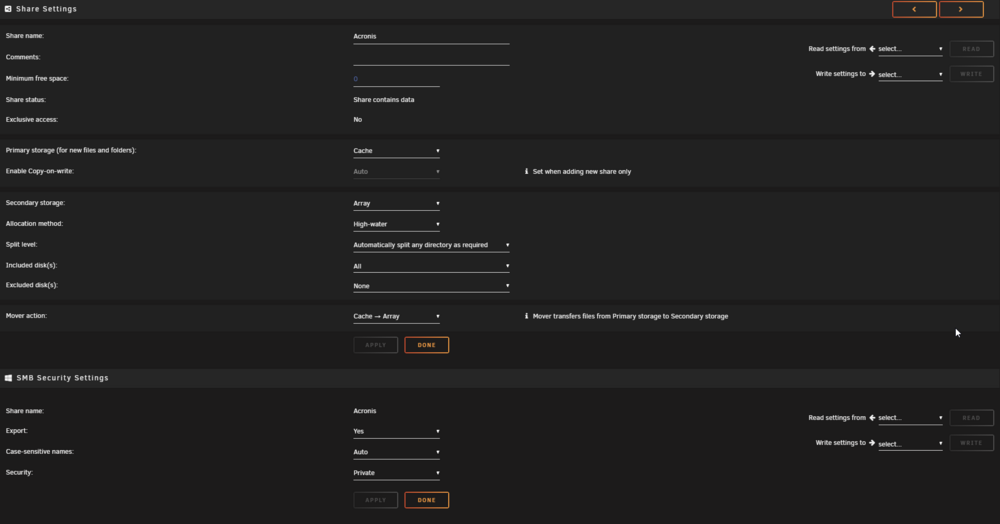
Ich mache jeden zweiten Tag Vollbackups zwischen 50 und 550 Gb pro PC mit anschließender Validierung und das funktioniert zumindest mit meinem True Image 2021 einwandfrei. Ich nutze allerdings einen Cache (siehe Signatur) damit das ganze etwas flotter geht. Meine Einstellungen sehen ähnlich aus wie deine. Geht auch ohne Cache aber dauert dann ewig. Hast du evtl. Einstellungen im Acronis gemacht die dazu führen, dass das Backup vorzeitig abbricht und er direkt zur Validierung übergeht?