MAM59
Members
-
Joined
-
Last visited
Everything posted by MAM59
-
After running it monthly for a year or so, I have set it to quarterly now since 3 yrs. No errors until now. Having 2 parity drives in an array is too much I think. Disk failures today are luckily unfrequent statistically so having one fallback drive is usually enough. Maybe if you have 20+ drives in your array, 2 parity drives would be a good idea though still not needed.
-
I don't like "AI assisted development" too, even it is hip these days. AI may help you to find certain functions or structures to use, but I never would let it write full code for me. It would take longer to check it than to write it myself. And I have seen a lot of "AI-generated-mistakes" already. So, if the community rules are "no AI", don't complain, just obey. (And yes, "30 years" is nothing, you youngster 🤣 I did not count really, but I guess, I am over 50yrs now already... or maybe a little less...)
-
Maybe a wrong descion, it will depend on my test soon to come (after the drive is locked again soon)
-
It is even more wierd. The disk "works" for some hours, even days obeying spinup and spindown commands. But suddenly it reports back status 1 (not supported). From then on, UNRAID does not even try anymore to spin it up or down. THAT is the main problem, it is locked until reboot. When it happens next time I will try manually the hdparm commands for spinning up and down and see, if status 1 keeps on, or if it was as wrong reading somehow.
-
Also ich bin nun etwas weiter: nach einem Reboot kann man die Platte 4 wieder "runterfahren" aber irgendwann kommt dann bei sdspin der returnwert 1 und ab da ist die Platte "blockiert" Es geht also ein paar Stunden/Tage gut, danach klemmt die Platte. Die Frage ist: "Was is returnwert 1 bei SDSPIN?" Fazit: sobald einmal 1 kam, wird die Platte nie wieder angefasst von sdspin. Das muss also irgendwo gespeichert werden bis zum Reboot Da SDSPIN nur ein Skript ist, war die Lösung einfach: "1" bedeutet "unterstützt wahrscheinlich kein standby". Das ist aber in diesem Falle ein Fehler. Ich warte mal ab, bis es wieder passiert, und probiere dann mit hdparms direkt. Vielleicht kommen da sinnvollere Hinweise bei heraus
-
Son Hexenwerk gibts hier nicht, alles schnödes SATA. Ach ja, ich sollte was anhängen, wobei, da findet sich kein Hinweis auf eine mögliche Ursache... Wobei, selbst wenn man manuell versucht, diese Platte runterzufahren, /dev/sdf taucht noch nichtmals in der Versuchsliste im Syslog auf :-( f-diagnostics-20260715-1803.zip Wobei, bei genauerer Durchsicht fällt mir folgende Zeile auf: Jul 8 12:00:22 F emhttpd: sdspin /dev/sdf up: 1 Vorher hat er noch sdf erfolgreich runtergefahren, danach irgendwann wieder hochgefahren, und als Ergebnis kam obiger Eintrag. Was immer das bedeuten mag (für andere Laufwerke finde ich solche Zeilen nicht)
-
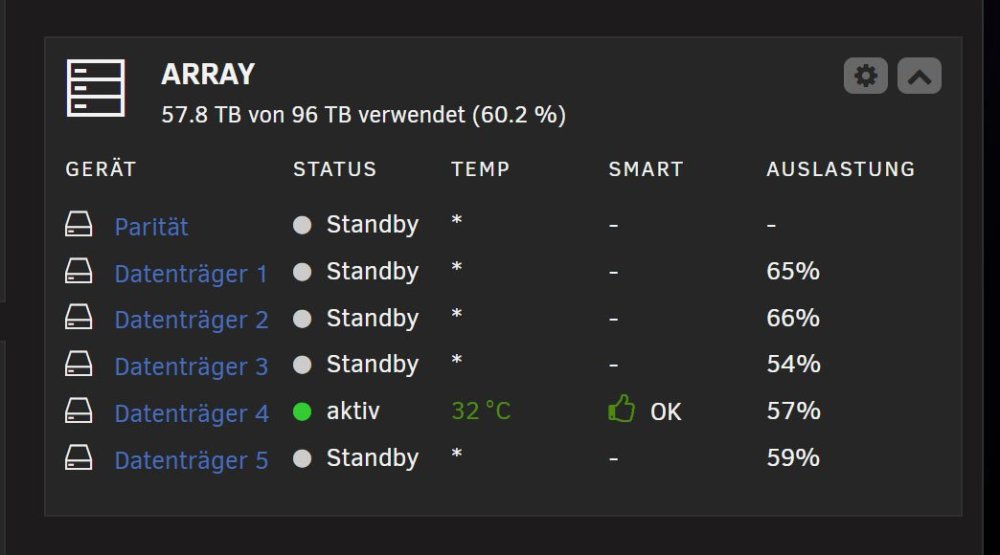
Mein Problem existiert schon ewig, aber bislang hat niemand eine sinnvolle Idee geschweige denn Abhilfe geschaffen :-( Also starten wir nochmal einen Versuch: alle Array Platten sind in der Startup Gruppe "Array" mit einem Timeout von 30min. Nach 30min Inaktivität fahren auch alle brav herunter und sparen Strom. Alle? Nein, EINE Platte bleibt standhaft und läuft weiter: Aus unerfindlichen Gründen mag Platte 4 nicht schlafen gehen, auch von Hand kann man sie nicht dazu bewegen. Ja, ich weis, "da wird irgendein Task eine Datei blockieren", die Standardantwort. Aber, da ist nix besonderes drauf: Und "Openfiles" zeigt auch nichts auf Disk4 Egal was ich mache, Disk4 bleibt immer an :-( SNIEF! (wenn man die Startdup Gruppen deaktiviert, KANN man Disk4 runterfahren !) Also, da ist echt der Wurm drin, wo ist der Siegfried, der diesem Lindwurm den Garaus macht???
-
It MIGHT kill your docker because the routes are different to the services. Disable either in UNRAID (network config) or switch it off in the BIOS (the logs show that docker is started, maybe it is unreachable because of wrong network config)
-
hmm, nothing special found but: lo UNKNOWN 127.0.0.1/8 ::1/128 tunl0@NONE DOWN eth0 UP wlan0 UP 192.168.0.201/24 metric 3004 bond0 UP br0 UP 192.168.0.200/24 metric 1 shim-wlan0@wlan0 UP fe80::50bb:b500:112:31ab/64 wg0 UNKNOWN 10.66.236.68/32 docker0 DOWN 172.17.0.1/16 tailscale1 UNKNOWN 100.XXX.XXX.16/32 fd7a:115c:a1e0::3739:1211/128 fe80::b680:21d4:c09d:4084/64 You try to put br0 and wlan0 into the same subnet 192.168.0.*. This cannot work! they will fight for the connections and it is unpredictable who wins (and may even change after reboots). Disable wlan0 (or put it into a different subnet) and reboot.
-
to have a chance to get a "more than guessed" answer, you should supply diagnostics
-
Wierd setup you have... anyway... just install "unassigned devices" plugin and it will show you both NVMes One of them will be mountable, the other seems to have no valid filesystem This will be the former parity drive. (still dont understand why someone uses two nvme drives within an unraid array (no TRIM support!!!) and uses one as data the other for parity. The more common approach would be to create a mirrored zfs pool, but again.. it is your choice.)
-
Ok, dange :-) Noch ein Grund mehr, NIX zu ändern 😁 Ich wundere mich nur, was die Leute hier für einen Aufwand betreiben mit gespiegelten ZFS Pools usw. Ist doch Banane, zumal die Lizenz ja nun im TPM steckt. Aber egal, soll sich jeder so kompliziert gestalten, wie er will, auch wenn es keinerlei Nutzen hat.
-
hmm, ich kann da nur raten (benutze die "neue" Bootmethode nirgends, mein Vertrauen ist da nicht so ausgeprägt...), aber, so wie ich das verstehe, gibts keine RAM Disk mehr bei "neuem Boot", oder nicht? Insofern wäre das Laden und Entpacken nach von bzroot&Co nur der Anfang des Updates. Danach müsste ja noch eine Stage folgen, wo die dann entpackt werden und auf die SSD(s) gespeichert werden. Aber, wie gesagt, ich habs nie ausprobiert und werde es wohl auch nie.
-
2 Unraid Licenses, 1 active, one for testing only 1 backup server (Windows) 1 Freebsd Server (Mail, Homepage and a lot of network stuff) (*) 1 Windows PDC (just for DNS, MS-DNS is so easy to handle, no match in the *nix world) (*) (* these are Mini PCs with 2*10G and 2*2.5G LAN interfaces, power consumption <15W each)
-
hmm, das wird dann wohl "/data" sein... (oder das ist der Pfad zu den Quelldateien?) Üblicherweise gibt Dir ein Hover mit der Maus oder ein Aufruf von "Edit" mehr Infos zum Sinn der Einstellung (hoffentlich :-) ) ) Musstest Du in dem DuploDingsDa irgendwo den Zielpfad unter /data einstellen?
-
na ja, was fehl schlägt, ist das Lesen der Originaldaten. "Zugriff verweigert" bei Appdata usw. Guck Dir mal die Dateiberechtigungen da an und wem sie gehören. Eventuell läuft der Backup Docker mit dem falschen Benutzer und darf nicht an die Daten ran (und was man nicht lesen kann, darf man auch nicht kopieren...) Es gibt zwar unter Tools den Knopf "Docker save Permissions", aber der sorgt öfters für noch mehr Ärger. Also lieber von Hand gucken und ggf, korrigieren.
-
No, I've meant it the other way round. IF you have cache dirs installed AND you are low on memory, THEN there might be a chance of "lost files" (not actually lost on disk but not shown in "dir-like" commands because the cache was full and the file entry did not make it into the list anymore) So my advice was intended to tell you "if you are running 'cache dirs', deinstall it and see if things change". "cache dir" speeds things up a lot, so many people are using it.
-
jaja, die Absicht ist löblich... aber ich bin mir (noch) nicht so ganz sicher, ob es so wirklich funktioniert. Warten wir den morgigen Vormittag ab... (das Problem ist, dass unterschiedliche Shell Implementationen die Umleitungen zu verschiedenen Zeiten durchführen könnten, dann müsste die Reihenfolge der Parameter geändert werden) Er macht ja "schreiben den normalen Output in die LOG Datei" und danach "schreibe die Fehler in den normalen Output". Da kommt es dann drauf an, ob der "normale Output" zu dem Zeitpunkt bereits umgelenkt ist (wie gewünscht), oder die Shell die Aktionen ggf umsortiert und der "normale Output" dann immer noch stdout ist. Wir werden sehen)
-
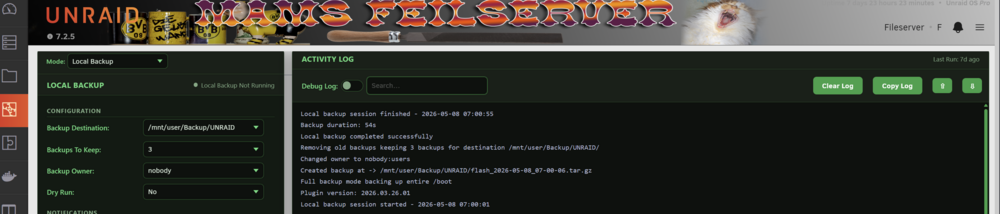
jaja, Notes sind eben biegsam. Der Bug ist immer noch da, auch in der genannten Version. Oder, der Crontab Eintrag wird nur einmal erstellt und bei Updates nicht korrigiert. mussich später mal ausprobieren... Update (es ist später :-) ): probiert, alter Eintrag gelöscht, neuen erstellt, sieht immer noch mysteriöus aus: 1 7 * * * sh -c 'SCHEDULE_ID=schedule_1774242723 /usr/bin/php -f /usr/local/emhttp/plugins/flash-backup/helpers/run_schedule.php >> /tmp/flash-backup.log 2>&1'
-
Föhn! Dann kannste ja gleich auf 7.2.6 updaten und das Spielchen vielleicht wiederholen, loool 😁 Aber zumindest weiste nun, wo die Backups sind und wie man sie benutzt.
-
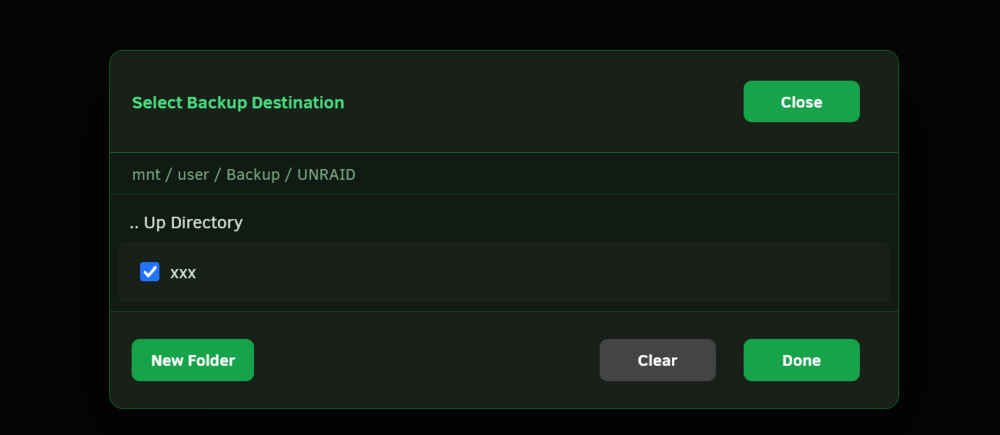
Nimm FireFox :-) Nee Spaß beiseite, die Bedienung ist nicht wirklich intuitiv... Du musst eine Verzeichnisebene HÖHER sein, dann taucht das Zielverzeichnis in der mittleren Liste auf, DANN kann man davor einen Haken machen und DANN endlich "DONE" drücken. Ist ein Intelligenztest 😁 (Gibt übrigens noch eine nervige Macke: beim erzeugten Cron Job hat der Autor vergessen am Ende ">/dev/null 2>&1" anzuhängen, also krieg ich jeden Morgen um 7 ne Iiiieeh-Mehl, dass das Backup gestartet wurde :-( Meckern hat bislang nicht geholfen, gab noch kein Update dafür/dagegen)
-
LOL, war keine Absicht 😜 (um ehrlich zu sein, ich hab gar nicht bemerkt, dass "Appdata Backup" den Flash gleich mitsichert, hätte nie in der Not diese Ordner durchgesucht, loooooooooooooooooooooooooooool)
-
ja, deshalb hatte ich auch schon meine Aussage korrigiert :-) Ich mach auch bei beiden ein Flashbackup, sind eben nur unterschiedliche Ziele und Zeiten (Appdata 1* pro Woche, Flash täglich)
-
jaja, ist selten :-) Ich fand es nur einfacher zu benutzen als den doch arg verschachtelten Baum von Appdata Backup. Aber funktional sind sie wohl identisch.
-
Dann fröhliches Konfig-Raten :-) Aber wenn die Images noch da sind, kann die Konfig ja nicht sooo schwer sein. Das passiert eigentlich nur bei "kranken" Dockern wie z.B. "Nextcloud AIO". Die bringen eine eigene Updatemethode mit, da kann die GUI nicht helfen. Keine Panik! beim Array KANN ein Share auf allen Platten sein, MUSS aber nicht. Der wird erst bei einem gewissen Füllstand auf der nächsten Platte weitergeführt. Und natürlich hattest Du das Problem schon immer, denn normalerweise guckt niemand auf disk*. Im Array sieht man dann nur EINEN Ordner, nicht WO er ist (ausser man lässt sich die Verteilung durch Klicken von "Berechnen..." unter Shares anzeigen. Das ist aber nur eine Info und hat keine Auswirkungen auf die Funktion des Shares). Du solltest eher die jeweilige Docker Konfiguration anpassen, ist ungefährlicher als das große Dateien verschieben. Allerdings finde ich es befremdlich, dass Pfade direkt zu Array Platten zeigen, statt zum Share (da wäre es dann egal wo er wirklich liegt) ?!?!? Da issa doch... ??!?!? NB: ich empfehle Dir DRINGEND den Einsatz des Plugins "Flash Backup". Das kann automatisch tägliche Sicherungen des Sticks auf eine Platte schreiben und mehrere Versionen bereithalten... Nur so für die Zukunft...