





Encore
Members
-
Joined
-
Last visited
Everything posted by Encore
-
hab mir gedanken gemacht und würde mein netzwerk doch mal komplett auf "sicher" trimmen... würde mir also auch ein draytek svdsl modem kaufen oder alternativ eine digibox basic / speedport und den in bridge modus setzen könnte mir einen gebrauchten RB2011UiAS RM für 50 euro kaufen, wäre dass eine Firewall die empfehlenswert wäre? dazu noch unify AP die Fritzbox würde ich dann als Wlan AP auch mit nutzen neben dem Unify ap - oder nur die fritzbox und mir den unify AP einsparen)
-
die IOT geräte (nen staubsauger und paar lampen) wären ja im gast WLAN der Fritzbox, , geräte die ins Gast LAN netz müssten, habe ich nicht - alle IOT geräte die ich aktuell habe, haben wlan und sind mit dem Fritzbox wlan vebrunden. --- also würdest du empfehlen, dass ich mir dann die i350 4er nics holen soll und das ganze dann via pfsense eher mache statt dem pi? - da 180+~ für die verlinkte router würde ich jetzt nicht ausgeben wollen wegen dem wireguard docker - docker nutze ich ja nicht dafür, sondern das native plugin für unraid - wireguard läuft bm also nicht im docker sondern direkt auf dem unraid via community plugin (nicht das binthex wireguard oder Ähnliches ) - sondern direkt als plugin
-
ich weiß 😄 beziehe mich aktuell grade auf Ford Prefects post
-
welchen router würdest du als alternative empfehlen? Habe mal bisschen geschaut, der Pi 4 hat 4gb ram, ne schnellere CPU(APU) als die meisten ARM basierten router die ich gefunden habe, sowie gigabit lan (der soll auch das gigabit wohl schaffen) sowohl ein einzeln angebundener USB3 port, welcher laut Netz an die 5gbs rankommt und somit auch den usb nic voll ausreizen könnte? da hätte ich aber dann das problem, dass wenn aus irgendwelchen gründen die VM nicht startet ich auch nicht mehr auf unraid selbst komme, oder? also mich nicht mehr auf die GUI einloggen kann / allgemein verwalten? der dient auch quasi nur dazu um das Internet vom "Schlafzimmer" - wo die Fritzbox steht + TAE ins Büroi zu bringen Quasi "Fritzbox -----wlan ---- 1750E Repeater (mit eigener LAN Buchse) ja, da habe ich aber das GAST wlan der Fritzbox aktiviert und die IOT geräte sind in dem GAST Wlan der Fritzbox "verbannt" ich glaube ein Exposed Host auf den Unraid komplett zu machen wäre fast schon lebensmüde, da der dann offen im netz steht Ich nutze das Wireguard Plugin in Unraid und hab eine Route in der Fritzbox angelegt, klappt auch soweit wunderbar, komme zb vom Handy ins Heimnetz LAN den VPN nutze nur ich, um unterwegs geschützt zu sein und auch zB im LTE Netz von meinem Adguard zu profitieren wenn ich auf Youtube so schaue, haben leute mit Gigabitanbindung eine OpenWRT auf nem Pi4 4gb laufen und bei download / upload sind ca 1 1/2 kerne ausgelastet, somit wäre doch eigentlich noch "puffer" fürs routing, firewall usw? Möchte mich jetzt nicht auf den PI festfahren, rein von den Speccs die ich von anderen ARM Router mit z.B. Router OS gesehen habe, sahen von den specs viel viel schlechter aus. Einzig und allein AES ni fehlt dem pi, aber das wäre nicht so wichtig da dieser nicht für VPN dienen soll sondern das der unraid host selbst macht ---------- Daher wäre jetzt die Frage, ob ich für 50 euro auf kleinanzeige nen i350 quad adapter kaufe und das ganze via VM mache - wobei ich dann glaube, dass die vm IMMER laufen muss, da ich michs onst total selbst aussperre? oder ob ich das ganze via PI Probiere mittels USB NIC Dann wäre aber noch die problematic mit dem "Ausbremsen" da der unraid host ja nur 1 nic hat, würde das denn sehr ins Gewicht fallen? Ich habe eine 250/40er ~ Leitung, kratze also nichtmal im Gbit limit^^ edit: das wäre zb 1:1 genau die selbe kombo die ich "in gedanken" habe - nur dass ich theoretisch noch nen 2x nic anschließen könnte via usb Wlan Performance ist laut Ersteller vom Video verbessert: zitat Update - In the current OpenWRT version for RPI, the AC WiFi link speed is inscreased to 200 Mbps. rohe werte mit Auslastung in "stresssituationen" für den pi mit AES software usw. --- wiegesagt bin nicht unbedingt an den pi gebunden, will jetzt auch nicht fanboyn und offen für alles 😃 nur vl steckt noch der pi 3 in gedanken welcher wirklich grottenschlechte verbindungen / performance hatte da alles über einen bus lief
-
würde ungern ein externes Modem mir zulegen müssen um die externe Firewall richtig einzubinden wäre es theoretisch machbar auf dem pi 4 openwrt zu installieren mittels usb nic zu arbeiten ? also wan an den repeater der das Internet dann von der FRITZ!Box nimmt den usb nic dann an den Switch und dann vom Switch ins unraid und dort via vlans arbeiten ? vpn würde auf unraid selbst laufen da macht das fehlende aes ni vom pi nichts Stehe da aktuell im Kopf noch aufm Schlauch wenn ich nen i350 kaufe wie müsste ich das dann aufbauen so das ich die FRITZ!Box fürs private Netz weiter nutzen kann? und bei bedarf ich bestimmte Dienste auch erreiche aber umgekehrt die nicht das Heimnetz ja der Switch kann vlans Trunk Groups usw stehe da noch bisschen auf dem Schlauch, wenig bis garkeine Erfahrung bisher mit vlans .. würde zb wollen das meine Windows vm im privaten Netz hängt und die Container welche öffentlich erreichbar sind in eine dmz? quasi ziel: FRITZ!Box steht im Schlafzimmer im Büros ist der Fritz 1750e mit nem lan Anschluss im selben Raum wie der repeater ist der Switch und der unraid Server. Ziel wäre ohne ein Modem kaufen zu müssen (damit ne Pfsense zb ppoe usw macht ) das tv Handys usw usw im Netz der FRITZ!Box sind sowie meine Windows vm contsiner Nextcloud usw in einem abgeschotteten Bereich ich aber vom Netz der FRITZ!Box drauf zugreifen kann aber umgekehrt nicht. der Server läuft 24/7 Stehe da vl in Gedanken extrem auf dem Schlauch ein i350 würde ich mir noch kaufen zur Not falls zwingend notwendig dachte sei ggfls mit dem pi openwrt und dem usb nic auch umsetzbar aber vl hast du eine detailliertere Umsetzungsidee muss nicht total ins Detail gehen aber vlans setzen usw hab ich bisher nie gebraucht da mangelts mir an Erfahrung .
-
Hey zusammen, erstmal zum ist Zustand und was für Hardware ich nutze / habe: - unRaid OS Plus I9 9900k 48GB Ram rtx3090 (nem Miner billig abgekauft) 1x 4TB Parity 1x 4TB Array 1x 1 TB Array 1x 2 TB Array 2x 512GB NVME Cache MPG Z390 GAMING PRO CARBON (MSI) USB PCIe 4 Port Fritzbox 7590 SVDSL 250/40 (down/up) --- Was ich noch rumliegen hab: Fritzbox 1750E Repeater TP Link TLSG108E V4.0 Raspberry Pi 4 4gb 1x USB Gbit Nic Aktuell betreibe ich auf meinem Unraid mehrere Docker - u.A nextcloud, adguard, pterodactyl panel + wings (Gamehost Panel) etc. Nun würde ich das ganze aber ein wenig "absichern" wollen, SOLLTE jemand in zb die Nextcloud kommen oder in eine andere VM / Container, dieser nicht direkt mein gesamtes Heimnetz ausspionieren / angreifen kann. Mein Gedanke war zuerst, ein externes modem zu holen, einen minipc mit 4 ports + pfsense + externen AP etc.. Da mein Unraid 2 Zimmer entfernt von der TAE steht und ich kein Patchkabel quer durch die Wohnung legen kann / darf (WAF (Wife Acceptance factor). Nun war meine Idee, ob man das ganze irgendwie mit meinen bestehenden mitteln absichern kann Mir geistert da was von OpenWRT aufm PI + usb nic , der dann an den VLAN fähigen Switch hängt der am LAN des 1750E hängt oder irgendwas in der schiene. So das ich weiterhin meine Fritzbox fürs heimnetz nutzen kann, die Container /VMs welche von Außen zugreifbar sind aber "abgeschottet" von meinem restlichen netz sind.. das ganze muss nicht b is ins kleinste Detail perfekt sein, aber zumindest mal ein wenig besser als aktuelle ist situation: hängt alles in getrennten docker netze, mit portfreigaben in der fritzbox zum unraid host selbst hin.. hat jemand ein paar gedankengänge / guides für mich, was ich da ambesten basteln könnte um ein wenig sicherheit zu bekommen ? achja: nutze mein Haupt Windows auch virtualisiert, dafür sind 2x nvmes durchgeschliffen, dh auf dem unraid läuft auch noch mein Windoof mit der RTX im passtrough - falls relevant
-
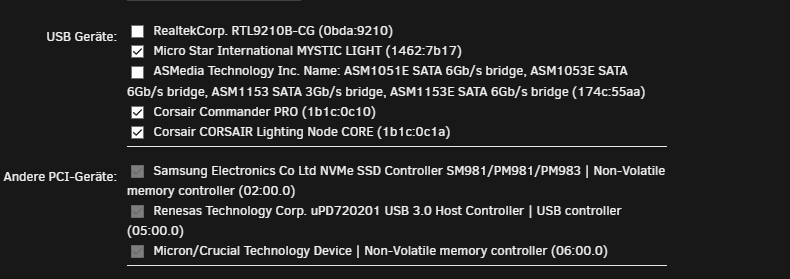
du musst die entsprechenden "usb" Geräte durchreichen, damit mysticlight usw funktioniert. kann damit auch meine ICUE lüfter steuern, wenn ich den commander pro durchreiche, einzig und allein RAM geht nicht, da du den controller nicht an eine VM durchreichen kannst - bzw würde en host auch crashen im bild als Beispiel: Corsair Commander Pro + Lightning Node + Mystic Light Danach kannst du in einer Windows VM die Farben mittels MSI Board / ICUE einstellen
-
Version: 6.10.0-rc2 in windows i can access via \\unraid without issues
-
no i used the permission fix tool of unraid, they set the .sh files to 666 after i give them 755 the container works i prefer to use the cache, bcs if i use the array, they will spin 24/7 - energy costs in germany is very high (nearly 40ct / kwh at moment the "if anybody facing the same problem" is just a little write out of the fix for lazy ppl like me ❤️ and btw. sry for some typos, not my native language
-
dont know how to use multiquote xd You can edit files from both /mnt/user/... and /mnt/cache/... only some games need the real path and it's okay if you access it through SMB that actually uses /mnt/user/... -- nice! I can't imagine why this should give you issues. -- im facing permission denied for my other containers - entrypoint.sh i will try to fix permissions, fresh created garrysmod container works fine Yes, if it's set to prefer, but then the game servers will not work properly anymore because you've now force the container to write to the Cache. But please don't set your Cache to Yes because then nothing will work properly anymore - so the best is to use cache only on the pterodactyl share, right? in case i move the server to another host system i can simply make a copy of the directorys , move them to other host and use the compose file i used before, right? TY A LOT! 😃 if anybody facing th e same problem: my compose file is : version: '3.8' services: wings: image: ghcr.io/pterodactyl/wings:latest restart: always networks: - wings0 ports: - "8181:8080" - "2022:2022" tty: true environment: TZ: "Europe/Berlin" WINGS_UID: 988 WINGS_GID: 988 WINGS_USERNAME: pterodactyl volumes: - "/var/run/docker.sock:/var/run/docker.sock" - "/var/lib/docker/containers/:/var/lib/docker/containers" - "/mnt/cache/pterodactyl-node/wings/:/etc/pterodactyl" - "/mnt/cache/pterodactyl-node/wings/:/mnt/cache/pterodactyl-node/wings" - "/mnt/cache/pterodactyl-node/wings/:/var/log/pterodactyl" - "/tmp/pterodactyl/:/tmp/pterodactyl" - "/etc/ssl/certs:/etc/ssl/certs:ro" # you may need /srv/daemon-data if you are upgrading from an old daemon #- "/srv/daemon-data/:/srv/daemon-data/" # Required for ssl if you use let's encrypt. uncomment to use. #- "/etc/letsencrypt/:/etc/letsencrypt/" networks: wings0: name: wings0 driver: bridge ipam: config: - subnet: "172.21.0.0/16" driver_opts: com.docker.network.bridge.name: wings0 and my config.yml is (JUST THE SYSTEM PART (mounts): system: root_directory: /mnt/cache/pterodactyl-node/wings/ log_directory: /mnt/cache/pterodactyl-node/wings/logs data: /mnt/cache/pterodactyl-node/wings/volumes archive_directory: /mnt/cache/pterodactyl-node/wings/archives backup_directory: /mnt/cache/pterodactyl-node/wings/backups dont use /mnt/user ... as ich777 said 😃 for garrysmod/tf with pterodactyl
-
IT WORKS IT WORKS IT WORKS!!!!!!!!!!!!! Assigned anonymous gameserver Steam ID [A-1:3804776457(19505)]. VAC secure mode is activated. wuhuuuuuu but maybe dumb question, can i still access the files over the share path if i use the real path instead fuse path? im bit lazy and access the files over the smb share is lot easier instead use always the cli for private use xd
-
if i set the mount to the cache location, will the mover move them in case cache is full? so i changed the paths in docker compose , compose down compose up and changed config.yml system: root_directory: /mnt/cache/pterodactyl-node/wings/ log_directory: /mnt/cache/pterodactyl-node/wings/logs data: /mnt/cache/pterodactyl-node/wings/volumes archive_directory: /mnt/cache/pterodactyl-node/wings/archives backup_directory: /mnt/cache/pterodactyl-node/wings/backups to use cache instead user i will try. im facing permission issues now with my teamspeak container etc. i think i need to run the permission fix of unraid, right?
-
my games are located at /mnt/user/pterodactyl-ng/wings i created in unraid a share for this (pterodactyl-ng) and set to prefer mode yes without pterodactyl - via unraid docker - it works maybe i have misspelled. the files are on the cache drive (prefer cache = yes ) and have set to use 1 disk after another for array stuff. so u think if i change the mounts of pterodactyl to use the /mnt/cache/ XYZ instead /mnt/user/ XYZ shoud work? i can give it a try hope i dont destroy anything haha
-
tested both, your container (facing same issue in pterodactyl) ---- on unraid self it works as container---- and the pterodactyl egg my goal is to have access to the files via the share so i can easly adjust something, make backup and protected by array all other games works with the fuse path, any possibility to change just the garrysmod path to /mnt/cache? or shoud i move the whole mount to this path? i can give it a try
-
im facing the exact same issue - using pterodactyl wings / panel. all works fine, i can run minecraft, ark, sinusbot, teamspeak etc. but garrysmod makes me cry. facing the resource/serverevents.res issue my wings compose is: https://pastebin.com/wqPQbMCx as i said, all other works fine, ark, minecraft, sinusbot, teamspeak etc. any have a solution for this? i mounted the files to my share to easly access it - works like a charme but garrysmod is like a diva... pls help, spend 3 days for this alrdy xd no help so far on pterodactyl discord so im asking here, maybe someone have the same issue and got fixed it and can explain, user FRESH just said it was magical fixed checked the serverevents.res content - all as is shoud, checked permissions etc etc. all other container "pterodactyl EGGS" - works so far my config.yml https://pastebin.com/YsZEAC3N edited IP / Website with XXXXXX
-
yep me too..
-
yep problem with emails still there. test email is ok - but receive passwords / reset passwords didnt send. etc
-
i dont find the word in english, so i link this video maybe after this all is clear the parity needs to check /rebuild each sector of the whole disk as i know
-
where can i find the log files for my dockers?
-
i will get the problem if i want to make the server public avaliable for my friends bcs internal i have 254 ips bcs nat but external i can just fordward 1x the 25565 port so i need to change it to another port i want to play skyblock with my friends together like my other MC server 😞 edit: im stupid, i think i can make a portforward (listen external port 25566 and forward it internal (nat) to my skyblock IP to port 25565 )
-
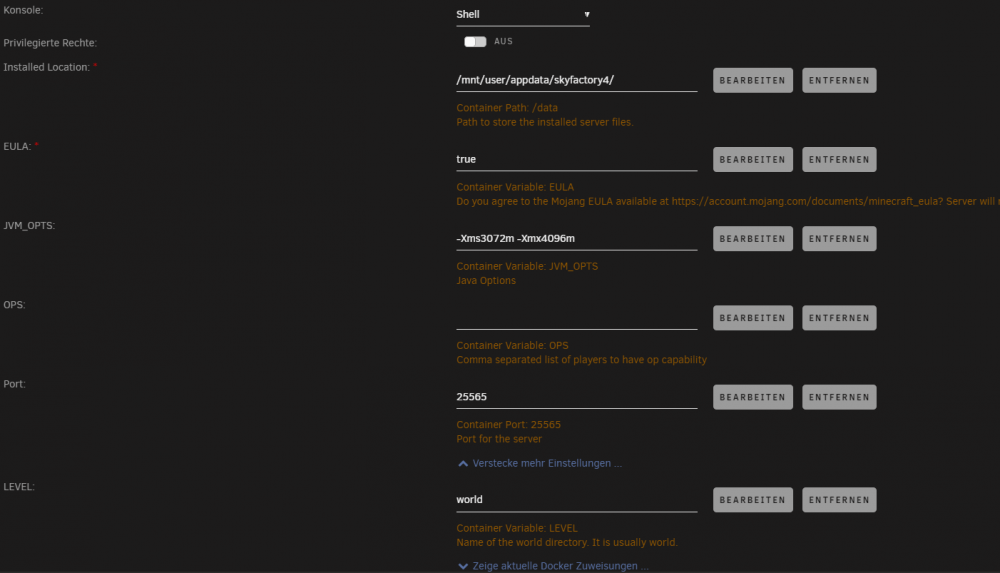
i have edit the motd inside server.properties on /mnt/user/appdata/skyfactory4 - but after container restart, it resets to default. if i change template port number from 25565 to like 25566 it stays in the template but unraid shows 192.168.178.112:25565 <----> 192.168.178.112:25565 ( (but this needs to be 25566 like i choosed on the template) (im not using default bridge, im using the custom one the custom:br0 (macvlan?) and give my container own ips. on the screenshot is 25565 - changed this to 25566 i didnt see a MODT env -- so i can add a env inside the template, call it "MODT" and as value my personal modt? a list of possible env would be nice for the modt i changed the modt line inside server.properties (after docker restart, this will reset always to the skyfactory4 powered by docker one) Command: root@localhost:# /usr/local/emhttp/plugins/dynamix.docker.manager/scripts/docker run -d --name='SkyFactory4' --net='br0' --ip='192.168.178.112' -e TZ="Europe/Berlin" -e HOST_OS="Unraid" -e HOST_HOSTNAME="unRAID" -e HOST_CONTAINERNAME="SkyFactory4" -e 'EULA'='true' -e 'JVM_OPTS'='-Xms3072m -Xmx4096m' -e 'OPS'='' -e 'TCP_PORT_25565'='25566' -e 'MOTD'='Skyfactory4 powered by PlayerX' -e 'LEVEL'='world' -l net.unraid.docker.managed=dockerman -l net.unraid.docker.icon='https://raw.githubusercontent.com/Goobaroo/docker-SkyFactory4/main/SkyFactory4.png' -v '/mnt/user/appdata/skyfactory4/':'/data':'rw' 'goobaroo/skyfactory4' 99169907e8fc64618f462e9093c1b1f0509e5a822ea5744cc5bdbbeaf7a80348 Der Befehl wurde erfolgreich ausgeführt! #tested now with MOTD as -e in template, this works now! but still, port didnt change and maybe access to the minecraft console would be nice // change rcon password enable/disable it etc as optional env variables in template but all optional i think a list with possible -e variabled helps a lot to setup self sry for my bad english and typos, not my native language ❤️ ty btw for this great container
-
got it, thanks ❤️ but why is this on linux and not on windows too? unraid and windows didnt use the same kernel, windows have they own why is windows nearly plug and play with remotedesktop / install intel driver and rdy to go and linux needs to compile the kernel? i915 drivers are in nearly all public distros ? or is this a "intel thing" ? falls du deutsch kannst, kannst auch gerne auf deutsch schreiben - sofern es die regeln zulassen - 😃
-
ty for answer. the documentation looks like if i install a ubuntu without desktopenv. (installed manually?) will this maybe work too with like kubuntu with alrdy installed kde plasma or parrot os etc. ? or need i to install without desktop envi, install it manually etc and follow documentation? sry for stupid question
-
skyblock 4 if i change the port number it still expose to 25565 .. but i need to use 25566 (have another mc instance running) it seems the port variable have no function on the template same happens if i change the server.properties (to adjust the modt) if i restart the container, the custom server.propertie is replaced with the default one.. sadly
-
did this work on linux VMs too? addet this to a linux vm, but i just get blackscreen on vncviewer in unraid

