





Nodiaque
Members
-
Joined
-
Last visited
Everything posted by Nodiaque
-
sometime a simple restart fix a lot of issue. I had my share layer of problem with docker networking in the past where some of my docker would stop having a working internet.
-
I never saw that, I don't even get why it's trying to make a cert check. It seems like a web failure where it cannot get to where it need to check for cert validation It seems to happen to other person using other docker too. Some says to empty the folder and try again https://github.com/parkervcp/eggs/issues/2687
-
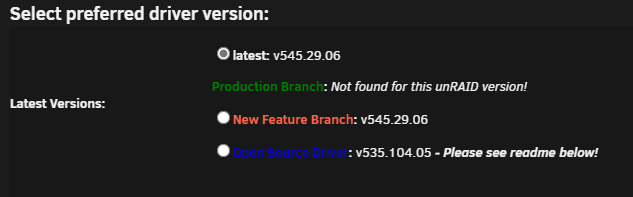
I don't have this luck. Unraid 6.12.4 I swear I had production branch before but it's gone since I moved the card in my case (found out it was in x1 instead of x16). Quadro RTX A4000. Cannot run any games in steam, it just either start and stop or just show nothing.
-
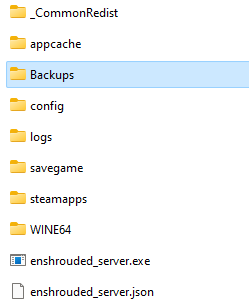
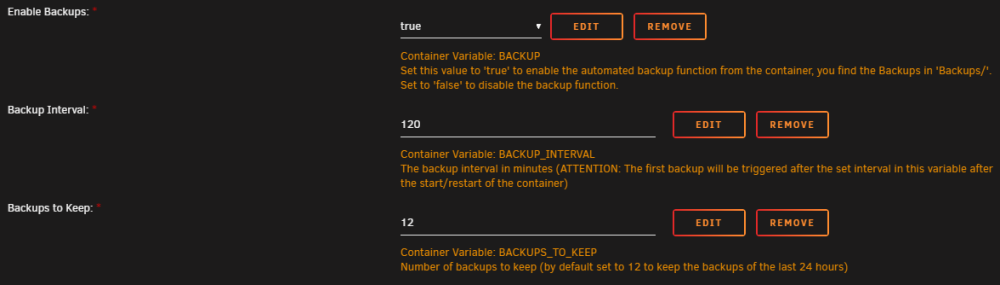
Update everyone. Enshrouded container now support backup. It is not enable by default in the docker so if you just update the container without adding field in the template, backup won't work. I have updated the xml template if you want to update from CA directly and get the new template (there might be a slight delay before CA sees the update). To enable, add the following 3 Variable: BACKUP value true BACKUP_INTERVAL value x in min (i.e. 120 for each 2 hours) BACKUPS_TO_KEEP value x for number of backup to keep In the log file, you will see this entry only if it's enabled: You will also see a new folder called "Backups" with timestamped backup


-
I just read about that somewhere. Do you have to change the filename to match the filename on the server? Caused that's what I read somewhere else but there was no comeback.
-
Hello, I was wondering if it's possible to have a pre-run backup script per container? I have 3 container that I would like to run a script before they are stopped. I'm using the option to stop, backup, start each container. I see at the bottom there's 4 type of script but are these per container or before/after the global job? Thank you
-
Haven't heard from anyone nor my player this issue and I've been running it since I made the server. Check the docker log (not the server log) to see what it says cause the update process is the same as all other container from ich777, it's a simple download from steam like on your computer. Unless you actively delete the content of appdata, it never touch it. You can check the start script in my github, there's nothing to erase something beside if the config file is missing (and this could even be removed since the game does it itself).
-
In-Game server browser is still part of the EA. It has it's own quirk much like palworld and there's nothing we can do unfortunatly. According to your log, everything is running like it should. In fact, you wouldn't have an enshrouded_server.log if the server wasn't running.
-
I do nothing on the save file. Are you sure your mapping is properly done? Unless the game itself does something with the savefile, the Docker doesn't touch anything. All I do is start steam than start the server exe. Server browser is depending on the game dev, I have no control over it. IF you can see them in steam server browser and can join, there's not much else that can be done. Great!
-
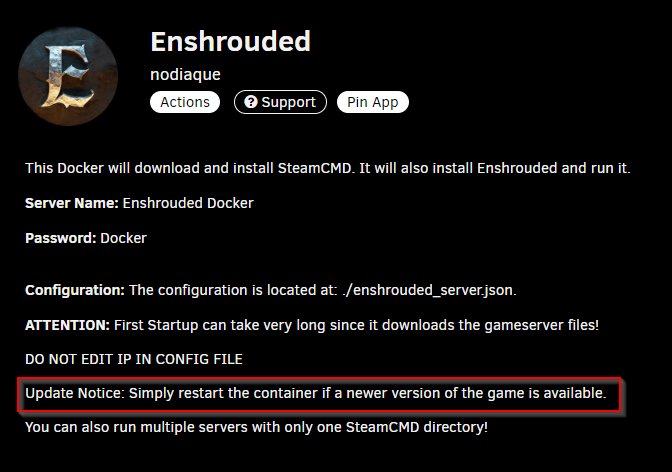
Don't forget this game is in early access and not even a week old. Perform issue is sure to happen, specially since it's not linux native. For importing the local game, you could try importing the savefile. I don't own the game so I can't say. I know your character progress will follow since it's the same way has valheim
-
Game browser can take a very long time before it show. Check with Steam game browser as pointed I think in page 3 or 4 using the favorite option to see if you can find it with local ip. If you can't find it with local ip and port (try both port), something is wrong. If you don't see any error in the log, it's network related. If it's working, you can try public ip. Please note that some router doesn't allow loopback connection through public ip.
-
Ah, for me according to grafana and my UPS, it cost me about 180$/year to run (in CAD). But my computer did CPU transcoding on 75% of the core for 6 months so that does raise the bill. 15$/month is not a much for everything this server does for me. edit: My UPS give me this information at 10c/kwh (which is higher than my actual cost that varies). There's more than just the server. This server also have 9 HDD and 2 SSD + an RTX A4000 doing active transcoding for Emby. It's a precision 5820, it's not a power efficient computer. At idle, it consume about 200w with all HDD spinned down and nothing transcoding. It easily reach 400W on load. There's also a camera VM server 2022 running blueiris using AI that is in a docker using GPU for object recognition and such, which add to the load.
-
External IP could be blocked by your router (some router doesn't like when traffic goes out and then in). If you don't see anything in the log file saying it's not loaded, it's something on your network. It should at least work locally. I myself have 2 users and no one complained. And I'm running about 60 dockers with emby, transcoding in fileflows 2 node with CPU transcode, palworld, conanexiles, all of the mods 9 minecraft, etc. I got about 30 users total in and out of various service I have. Xeon gold w-2275 and 128gb ram.
-
Currently, the game itself have backup but I think it's just a single backup. Maybe the dev will add something in the futur that we can add. Else, it would be a total custom solution not supported by the dev. For daily restart, you can simply use a user script (it's a plugin in CA). Or, if you use appdata backup/restore, this will restart your docker. It will also make a daily backup if you configure to run it daily.
-
I suggest this using local IP first. If local IP doesn't work, there is something wrong at either Unraid ou routing level (unless you see error in the log).
-
That's the old docker. Later I said this was gone due to bug and possible other problem. Now it will just say if the file is missing that it's downloading it, else it won't touch anything. You should be able to see it by using the lan option in the server browser an specifying ip and ports. If that doesn't resolve, something is wrong in either your router or docker port configuration. Running as admin is for the steam on your pc not the server, but I don't see why that would change anything (it in fact has nothing to do with it). In server browser from steam, try using the lan and adding one with ip and ports. Your log show its running fine so it's not a docker issuer. It can be a firewall issue, docker network issue, etc. Try toggling docker on/off, restarting unraid. Sometime unraid have weird network configuration stuck, happened to me more than once. If you can connect with local ip, it's a ISP/Firewall issue. Your ISP could be blocking it too.
-
No it's not wrong, I just saw in many case to not use the bridge network in unraid, but it might have changed, this is some years ago. It was a best practice to use a custom network.
-
This log file shows me everything is working fine. Check firewall port that you might not have put properly. I see Bridge network, are you sure that's what you want? Normally people don't use the bridge network but use custom network or ethx. For game browser, it take a certain delay before it appear, it's nothing we can fix since it's not on my end. edit: when you say come back and edit the file, you edit the file offline or while the server was running? Never update a config file while a server is running (at least game server).
-
Have nothing to do with Wine. I have one running on Windows and same problem. It's just heavy unoptimized. Dev knows about that
-
I see "waiting for log file..." at the end. This doesn,t exist anymore. Are you using latest docker image?
-
OHHH!!! THat's the problem... I have both server setup in the same hours so I didn't catch that, that's what need to be fixed. Fixing it right now
-
I mean, what is the typo? I've checked what you typed vs the xml and I don't see any difference.
-
Good new everyone!
-
No problem Squid, you have the right to have a life outside the forum. I was just thinking, maybe it could be a group of user that does it? I'm thinking future wise or the "what if something happen to Squid" scenario.
-
The game is early access and highly unoptimize. And it has a lot of bugs. Dev recommend daily restart. I have it with 6 users and it's using more than 16gb of ram.





