





Nodiaque
Members
-
Joined
-
Last visited
Everything posted by Nodiaque
-
I myself run pihole on unraid. It's not bad, you just have to think to have 2 dns. That's why I have another unraid running on a small server that I call HA that is running a duplicate instance of each network critical component like DNS. That's the way to go. You can use Pi or anything you want to run pihole. Everything can go down, even a pihole. We have unraid server that have years of uptime (not OS updated) and I've saw pi rebooted daily. Now for the DNS question, here's how OS work. First, they get the DNS from your DHCP. If you are using pihole, the DHCP should only distribute the IP of the pihole. I'll get on to why later. If you have multiple PiHoles, the DHCP server should give all of them (or at least those you want to be used). The client itself use a round robin way for queries. Your computer does a lot of queries and this is done to be sure a server doesn't get overloaded. The primary server do tend to receive more query. If the server it query fail as unreachable, it will try to contact another DNS in the list. It doesn't keep a tab on who is up or not, so it might try again for another query on the unreachable server. This can cause latency, but won't stop your Internet from working. That's how all of the internet work (without talking about Load Balancer and other stuff like it, simple flat explanation). It is not a list of server 1, then 2, then 3, it's round robin random style. If you are running windows, run ipconfig /all in a cmd and you will see under DNS a simple list, no priority. Now, why don't you want your DHCP to broadcast both the PiHole DNS and the router DNS? Normally, you would configure pihole to use your router DNS. The reason is PiHole won't know anything about local network if you connect it directly to an internet DNS. You can do it, but you need to make other configuration in PiHole to forward those type of dns query to the router. For a beginner, it's just easier to connect to the router DNS. But the reason to not send the Router DNS to the client is because of the round robin said earlier. By doing this, it means that some query goes to pihole, some goes to the router. Which mean that if you block in pihole a website, like www.xxx.com, if at the time of the request, the computer query the router, it won't be blocked. Don't forget that a computer also have a cache DNS. When a domain name is resolved, it cache the information for a certain amount of time (and browser can have their own cache also seperate of the OS, Edge and Chrome are notorius for that). Which mean that if you resolve and address and then block it, it could still work for a while. That's why in the documentation, it is recommended to close all browser and clear local dns cache of the client when testing; sometime even a reboot.
-
honestly, you could just spin a redis native one. Once Bitnami goes down, so will all your redis container. There's 2 I could find, the one from jj9987 which is a plain redis, no path mapping and config file. Just launch and forget (which mean no option and also not running with unraid docker user) and the one I created (there's a bug in the template, read description to fix, still waiting on return on why it's doing that) that comply with unraid user and permission. With the one I created, you have a persistence path (which is required to backup your data) in which you can plug your current bitnami data. The second path is the one that is bug, it should end with /config/. This is where you will put the redis.conf. The template show you where to get the redis.conf template. After, you need to check if in the current container appdata, you have a folder "appendonlydir". If so, you need to enable appendonly in the config. I suggest you read the config file. The default config file container run without a password in protected mode, which mean nothing can connect to it. You need to edit the file for "requiredpassword" to add a password and/or change the binding so it listen to everything. The template explain very well everything required. I myself did it for immich, nextcloud and authelia. Moved over my 3 instances from bitnami to my container using the same config file (but different password).
-
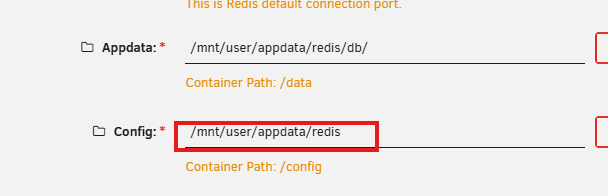
Hello, I have a template I did for redis which I did like all my other template (create on my system, click save, copy/paste and remove extra stuff like date installed). In the template, I have 2 path but weirdly, when I installed from the CA, the second path is truncated: XML: CA New installation (ran from another server that never installed it): XML: unraid_template/nodiaque/redis.xml at master · nodiaque/unraid_template Can someone help me understand why? I've checked under invalid template and template error and all I find is Duplicated Template: Nodiaque's Repository - redis - redis But I only have 1 xml for redis so I don't understand. Thank you

-
You could also simply take a proper redis container and use redis.Conf, and configure in that config file no password. Problem with custom one is when the owner stop updating or remove all its container like bitnami will in September, you will be left with container without update and no recovery if you need to rebuild.
-
passwordless means protected mode off also. I'm unsure how long this will be supported. On the one I just put online, you create the config file and you have 100% control over it. There's also no persistance on that redis container edit: there seems to be a bug with my template and I don't get why. My template put a /conf/ path but when you add it from the CA, the path is truncated. Currently investigating
-
Ah, I though it was someone else immich image. Mine is up for the last year if not more and stable so I haven't done anything beside container update. I was using bitnami redis that just broke and just made my own container with the official redis instead (and also created a template). Is there a gain to go with valkey?
-
What's the difference with the docker from ImageGenius? It's the one I'm running that use immich-postgresql and a redis database (not vaultkey).
-
Summary: Support Thread for Nodiaque Redis docker Application: Redis Official DockerHub: https://registry.hub.docker.com/_/redis/ This template run the official Redis container without any modification. The template simply add requirements for Unraid compatible install as parameter. Before first run, you must create the appdata folder with the required config file. The default structure look for /mnt/user/appdata/redis/conf/redis.conf /mnt/user/appdata/redis/db/ All chmod with nobody:users redis.conf reference is to be found here: Redis configuration | Docs You can also use redis-full.conf which will require changing the post-argument option. Refer to redis docker hub for more information on how to use redis-full.conf at redis - Official Image | Docker Hub There is currently a bug with the template that I can't find the problem. The path for the config is wrong although it's good in the xml. The path should end with /conf/
-
Honestly, since Bitnami is moving away from container and all their container will be discontinued in September it's better to just move on. I've saw another container that is using the official redis but it's lacking many configuration. I'm currently making a template from it that I successfully ran.
-
For me with redis, I'm getting this error after the modification from last page 1:C 03 Jun 2026 11:44:48.982 * oO0OoO0OoO0Oo Redis is starting oO0OoO0OoO0Oo 1:C 03 Jun 2026 11:44:48.982 * Redis version=8.8.0, bits=64, commit=00000000, modified=1, pid=1, just started 1:C 03 Jun 2026 11:44:48.982 * Configuration loaded 1:M 03 Jun 2026 11:44:48.983 * monotonic clock: POSIX clock_gettime 1:M 03 Jun 2026 11:44:48.986 * Running mode=standalone, port=6379. 1:M 03 Jun 2026 11:44:48.986 * Server initialized 1:M 03 Jun 2026 11:44:48.988 * Reading RDB base file on AOF loading... 1:M 03 Jun 2026 11:44:48.988 * Loading RDB produced by version 8.4.0 1:M 03 Jun 2026 11:44:48.988 * RDB age 11202523 seconds 1:M 03 Jun 2026 11:44:48.988 * RDB memory usage when created 0.97 Mb 1:M 03 Jun 2026 11:44:48.988 * RDB is base AOF 1:M 03 Jun 2026 11:44:48.989 * Done loading RDB, keys loaded: 46, keys expired: 0. 1:M 03 Jun 2026 11:44:48.991 * DB loaded from base file appendonly.aof.7.base.rdb: 0.003 seconds 1:M 03 Jun 2026 11:44:50.238 * DB loaded from incr file appendonly.aof.7.incr.aof: 1.247 seconds 1:M 03 Jun 2026 11:44:50.238 * DB loaded from append only file: 1.251 seconds 1:M 03 Jun 2026 11:44:50.238 # Can't open the AOF manifest file temp-appendonly.aof.manifest: Permission denied 1:C 03 Jun 2026 11:44:52.257 * oO0OoO0OoO0Oo Redis is starting oO0OoO0OoO0Oo 1:C 03 Jun 2026 11:44:52.257 * Redis version=8.8.0, bits=64, commit=00000000, modified=1, pid=1, just started 1:C 03 Jun 2026 11:44:52.257 * Configuration loaded 1:M 03 Jun 2026 11:44:52.257 * monotonic clock: POSIX clock_gettime 1:M 03 Jun 2026 11:44:52.259 * Running mode=standalone, port=6379. 1:M 03 Jun 2026 11:44:52.259 * Server initialized 1:M 03 Jun 2026 11:44:52.261 * Reading RDB base file on AOF loading... 1:M 03 Jun 2026 11:44:52.261 * Loading RDB produced by version 8.4.0 1:M 03 Jun 2026 11:44:52.261 * RDB age 11202527 seconds 1:M 03 Jun 2026 11:44:52.261 * RDB memory usage when created 0.97 Mb 1:M 03 Jun 2026 11:44:52.261 * RDB is base AOF 1:M 03 Jun 2026 11:44:52.262 * Done loading RDB, keys loaded: 46, keys expired: 0. 1:M 03 Jun 2026 11:44:52.262 * DB loaded from base file appendonly.aof.7.base.rdb: 0.002 seconds 1:M 03 Jun 2026 11:44:53.442 * DB loaded from incr file appendonly.aof.7.incr.aof: 1.180 seconds 1:M 03 Jun 2026 11:44:53.442 * DB loaded from append only file: 1.182 seconds 1:M 03 Jun 2026 11:44:53.446 # Can't open the AOF manifest file temp-appendonly.aof.manifest: Permission deniedI tried using one of the older tag from docker hub but none work, I'm getting error about tag not found even when using copy/paste. Without the modification, I'm getting this redis 11:48:17.55 INFO ==> redis 11:48:17.55 INFO ==> Welcome to the Bitnami redis container redis 11:48:17.56 INFO ==> redis 11:48:17.57 INFO ==> ** Starting Redis setup ** redis 11:48:17.59 INFO ==> Initializing Redis redis 11:48:17.60 INFO ==> Setting Redis config file chmod: changing permissions of '/opt/bitnami/redis/etc/redis.conf': Operation not permitted
-
You should run both with the same user. I have cwa with shelfmark no problem, everything is running smooth
-
Hello, no it won't reinstall steamcmd. They share the same path specially to prevent that. It download steamcmd only if it's not present. Unless you mount to a different path. As for proton or not, there's no real difference. Some says proton work best, other says without work best.
-
Hello, I suggest going to the shelfmark project to get help on using this. There is something in the configuration not working.
-
Theere's something on the official FAQ about that. You can look on the windrose. There's a setting you can put to help with that.
-
that's the log for steamcmd, not windrose itself
-
There is no option to where the log file goes. Its just a - log. But, are you sure it's not under appdata? Since everything is installed in appdata, it should be under that folder
-
xvfb is a framebuffer that emulated a window for games that require a screen to work. On the official FAQ, they say to use xvfb. I setup without xvfb first and added a way to have xvfb. That's the only difference. Both docker are using wine to run the game. Funny thing is jcoker is actually doing unraid template from ich777 like me. We have the exact same base. His docker run using xvfb like mine with xvfb. We even havec 99% the same script. The difference is he used a watchdog, I don't. I did see that way of doing things on other docker. It's more of a choice.
-
well if you run a smart test it will slow down everything, that's for sure. The config file location are all showed in the docker description when you install from unraid app. I do not run the server nor have the game so I can't really help with much except reading both the FAQ on page1 and the link inside that post. Windrose is a very problematic game server
-
If you just use the template as it is, it won't download steamcmd on top. The script check if steamcmd exist and only download it if needed. The rest is like any steam, it can be used for many apps. Unless you don't use the say steamcmd folder in both docker. As for the best version, there isn't. Some people state they have better performance on the Proton version, other have it better on the regular. I myself run the regular no problem but I do have a very big server. Proton is just an extra layer on top of wine. It's 99% made for graphic performance of a game when you play with it, not when you just try to run the text base version (Server).
-
Stuff have changed in a patch recently even for mods. Check the official game documentation.
-
Just create a new env variable from the unraid template ui, put VALIDATE as name and true as value
-
their own doc says to do that or validate. Having to run validate to update is bad and shouldn't be needed. You can try with validate. Add a new env called VALIDATE and set it true in the unraid template. It will add the validate statement on the steamcmd.
-
The worst is they don't update their doc. They have like 3 places for the doc and each says different thing.
-
My understanding of that is it for invite code mode, but I can be wrong. I'm saying that since the doc says IP address used for listening sockets. While there's 2 other config for direct connect but it says for futur usage.
-
It should be the same as when on windows. Verify the permission on the file, maybe the container can't access them


