





Revan335
Members
-
Joined
Everything posted by Revan335
-
Hatte es so verstanden das dies bei ihm aus irgendeinem Grund nicht vorhanden war. Aber das ist natürlich der favorisierte Weg. Danke für die Screenshot Doku.👍
-
Steht drin. Mode ro für Read Only. Hier der Ausschnitt. Du weißt wo man die Templates findet? Auf dem USB Stick/Flash -> /boot/config/plugins/dockerMan/templates-user

-
Wenn du den Erweiterten Modus (im Template Editor) einschaltest oder in das Template selbst schaust, dann solltest du die entsprechende Option sehen. Ob die jetzt auf RO oder RW steht.
-
This Error Message is nervous. Event: Appdata Backup Subject: [AppdataBackup] Warning! Description: Please check the backup log! Importance: warning '/tmp/Nginx-Proxy-Manager-Official/var/log' does NOT exist! Please check your mappings! Skipping it for now. Yes, this is a temp Path, but its the original Path from the Template. That's what's working when the Docker Container is Running. But actually he is stopped. Can i or you do anything? @KluthR
-
Hab den Punkt und die Lösung in der Doku ergänzt, da ich dieses Phänomen auch schon hatte und diesen Thread verlinkt.
-
Falls weiterhin noch Snapshots vorhanden sind wo sie eigentlich nicht hin gehören wie bspw. im Root Verzeichnis des Cache statt im Docker Verzeichnis, liegt das soweit ich das bis jetzt herausgefunden hab, das der Docker Pfad vor dem Start des Docker Dienstes nicht dort (im Cache/NVMe ...) existiert hatte und automatisch beim Start angelegt wurde. Ein Beispiel wie dieses im Root Verzeichnis aussehen kann. Es ist daher wichtig die Anleitung von Unraid für den neuen empfohlenen Pfad bei ZFS Nutzung zu befolgen, damit der Ordner vor Dienst Start schon existiert und nicht automatisch erstellt wird. Diese Legacy Snapshots sind nämlich wie auch schon im Thread vermutet Automatische Snapshots vom Docker Dienst der die ZFS Funktionalitäten dafür nutzt. Für die jeweiligen Docker Container und dessen Layer und andere Bestandteile die man installiert hat. Wenn man bspw. einen seiner Docker Container löschen würde, dann würden die zugehörigen Legacy Snapshots auch wieder verschwinden. Sollte es immer noch nicht klappen, wäre eine Formatierung des Cache noch ne Idee, damit man einmal Clean starten kann.
-
Can you fix this? That the false positive message not showing on the boot?
-
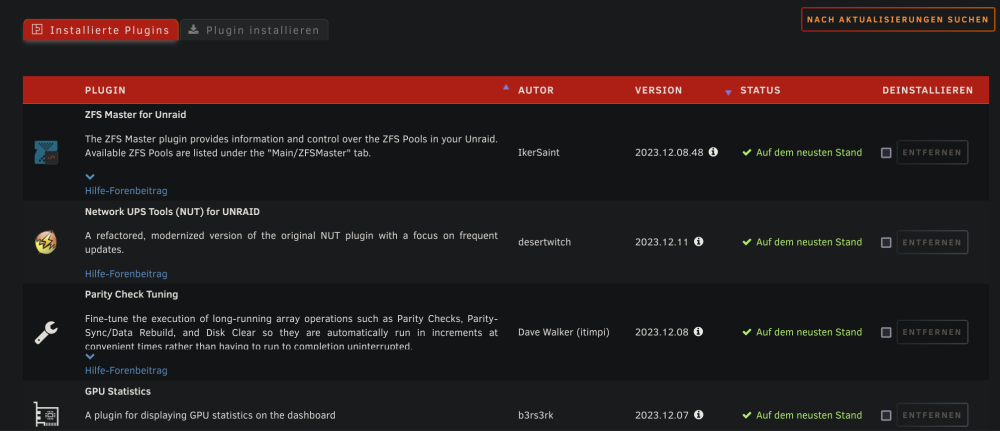
I mean this. The 2023.12.08.x is above the 2023.12.11 Maybe its a Bug in the Plugins Sorting and you can used the actually Schema too.
-
@IkerCan you remove the .48 in the Version that fix the Sorting in Plugins Overview.
-
Do you Restart the Docker? Can you access the Docker/Server via terminal from your Client? I renamed the keys to matebook in the Docker ssh key folder. But that is maybe Cosmetic.
-
Wie erkennt er das er fertig isr?
-
You must create the Key Pair from the Device that will Access to the Server. For example the Client/PC make your Backup to the Borg Server Docker on Unraid. You create the Key Pair on the Client and Copy the Public key to the Borg Server in the SSH Key Folder. Than Reboot the Docker and he create a Folder with the Name of the SSH Key in the other Backup Folder. Than you can Access/Backup your Client. A Documentary for the Create is in the linked Thread. From mgutt. rsync-server. The First is this Thread. The Second is the Thread from mgutt and his rsync-server with a Documentary for the Key Pair Creation.
-
You need to create the SSH Keys that he not found.
-
It's working! Many Thanks! Can you add a Delay Option? First load ZFS Master than the Folders? The ZFS Master under Main its not showing until the Folders are loaded finished. Best wishes to you and all others too!
-
Ich würde auf eine Art Script tippen, das das bewerkstelligt. Aber möglich ist das gewiss. In UD kann man auch Scripts hinterlegen. Das wäre aber auch was mich interessieren würde.
-
Grob gesagt ist das die Ebene die Unraid nutzt um Cache und Array zu kombinieren. mnt/user ist bspw. alles aus Array+Cache. Finde gerade keinen passenden Wiki Eintrag dafür. Ja, das ist die Share Einstellung die ich meinte. Nim nur diese und alle anderen Platten nicht.
-
OK, das mit Mini ITX und nur einem PCIe Slot ist natürlich doof. Ich würde ja sagen. Weil das Array ja auch noch die Parity hat und die SSD dann bestimmt auf HDD bzw. die niedrigste Platte gedrosselt wird. Aber das kann einer der Experten besser beantworten. Hatte das Glück bei mir, dass ich mehrere m.2 Slots hatte oder ne m.2 Karte noch dazu stecken konnte. Zusätzlich zu den SATA Karten. Vielleicht wäre dann ein regelmäßiges Backup der SSD hilfreich um nen möglichen Verlust zu reduzieren. Vielleicht dann doch nen größeres Board? Dann hast du auch mehr Kapazität für die Zukunft abseits von mehr SATA Ports onboard und mehr PCIe Slots. Aber sehe gerade das Gehäuse auch nur miniITX kann und mit SFX PSU läuft. Das müsstest du dann auch noch vergrößern. Mit deinen Platten hast du auch schon alles an HDD Slots voll und da auch keine Erweiterungskapazität mehr. Ich hatte bei meiner SATA Karte teilweise das Problem das trotz 4 Ports nur 2 oder 3 Platten daran laufen. Vermutlich weil die Power vom Slot dann doch nicht ausreicht oder andere Gründe. Je nach Einstellung kommt dann noch die FUSE Ebene des Arrays als Flaschenhals dazu. Die müsstet du dann ausschalten. #Exklusiver Zugriff Auch müssten die Shares der SSD nur auf diese zeigen und alle anderen Patten exkludiert werden. Bin mir also nicht sicher ob du glücklich damit werden wirst.
-
Many Thanks for the Info's!
-
Maybe he main 2023.12.01 not 2023.12.01.main or v2023.12.01./main/... in the Past.
-
That was great! This was improved the sorting in Plugins Overview too! Every Plugin have the same Version Schema.
-
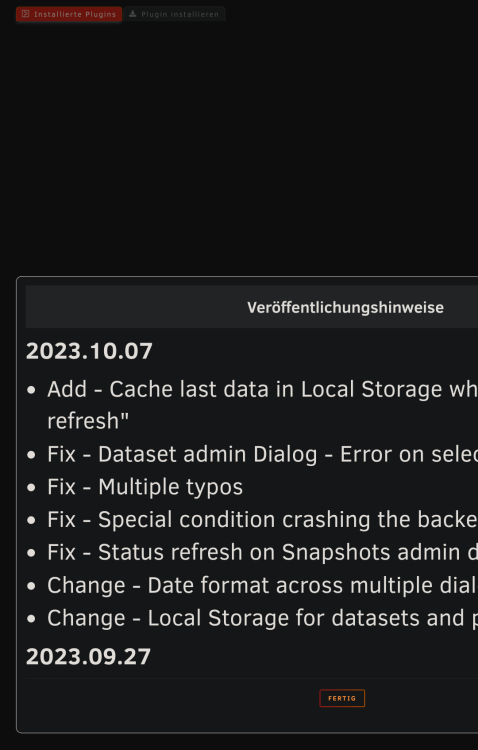
Many Thanks for the Update! What's the Changelog? He was not showing.
-
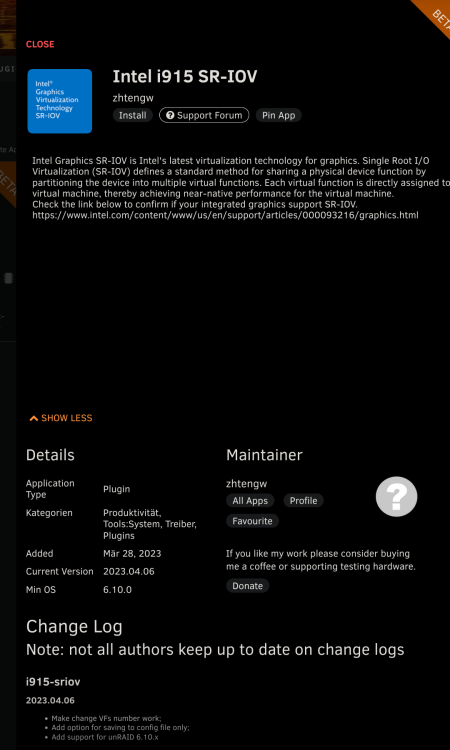
Is this the correct and actually Plugin? Is ich777 not the new Maintainer or published a new Update for this? Required the Packet a newer Kernel like from 6.12.5? 6.12.4 don't working. Edit: OK, I can see its not in the CA: When its added to CA?
-
Is this only for Intel CPU oder GPUs or for AMD CPU/GPU and NVIDIA GPUs too?
-
Die X20 scheint günstiger zu sein. Als das X18 Modell bei gleichen Speicher. Würde also die X20 nehmen. Auch wenn der Feature, Speed, ... Unterschied nicht so groß sein sollte.
-
Is this the same like Share Mover/Cache Settings? For example system/appdata only cache and other Shares Cache First an by exceeded the Limit min free Space in the Cache and Share Settings move to Array. Or Override this Mover Plugin Setting the Share/Cache Settings?


