





Revan335
Members
-
Joined
Everything posted by Revan335
-
I sended to you! Many Thanks!
-
He's back. Here the Message from E-Mail: Event: Unraid Status Subject: syslog error Description: Sep 21 02:47:07 Raster root: Fix Common Problems: Error: Machine Check Events detected on your server Sep 21 02:47:07 Raster root: mcelog: ERROR: AMD Processor family 25: mcelog does not support this processor. Please use the edac_mce_amd module instead. Importance: alert
-
Es ist wieder da. Hier die Meldung aus der Mail: Event: Unraid Status Subject: syslog error Description: Sep 21 02:47:07 Raster root: Fix Common Problems: Error: Machine Check Events detected on your server Sep 21 02:47:07 Raster root: mcelog: ERROR: AMD Processor family 25: mcelog does not support this processor. Please use the edac_mce_amd module instead. Importance: alert
-
Very Strange the Error is no longer in the syslog as actually message. Fix Common Problems too, no Message there about this.
-
Sehr seltsam/strange die Meldung ist aus dem Log verschwunden also wird nicht mehr gemeldet. Aus dem Fix Common Problems ist es auch weg.
-
Hello, have anyone a Idea? Many Thanks! Greetings Revan335
-
Hallo, bekomme folgende Meldung bei Fix Common Problems. Im syslog wird mir gesagt das meine CPU nicht von mcelog unterstützt wird. Wie kann ich jetzt weitere Infos dazu sammeln? War mcelog nicht in neueren Versionen Teil von Unraid? Vielleicht auch dieses Modul integrieren? Sep 10 15:47:01 Raster root: Fix Common Problems Version 2023.07.29 Sep 10 15:47:07 Raster root: Fix Common Problems: Error: Machine Check Events detected on your server Sep 10 15:47:07 Raster root: mcelog: ERROR: AMD Processor family 25: mcelog does not support this processor. Please use the edac_mce_amd module instead. Sep 10 15:47:07 Raster root: CPU is unsupported Vielen Dank! Viele Grüße Revan335
-
With IPvlan no Config changes required?
-
Es liegt am btrfs, dass macht besonders im RAID Betrieb bei einigen Probleme. Kannst dir gerne meine Erfahrungen und die der anderen anschauen. Bspw. Da steht auch was zu den Metadaten die vermutlich der Knackpunkt sind.
-
Any Notification/Progress about the Status of the Scrub?
-
How can i scrub this UD?
-
On the Way! Maybe you need the mirrored syslog from flash drive? I have rebootet the Unraid Server before you posted. I the USB Disk are not showed after the Reboot, i pluged this to a Linux Client and thats worked. I can access and managed Data on there. I have checked the FS with GParted no Errors. Than i pluged the USB Disk to the Unraid Server and he was showed to UD.
-
Have another Problems to? I cant't say from which 6.12. Version this exists.
-
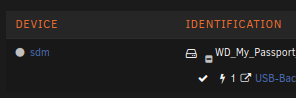
I have Problems under 6.12 with a UD USB Disk with btrfs. Aug 20 02:31:49 Lucy kernel: I/O error, dev sdm, sector 175136 op 0x0:(READ) flags 0x1000 phys_seg 4 prio class 2 Aug 20 02:31:49 Lucy kernel: btrfs_dev_stat_inc_and_print: 6 callbacks suppressed Aug 20 02:31:49 Lucy kernel: BTRFS error (device sdm1: state EA): bdev /dev/sdm1 errs: wr 0, rd 431, flush 0, corrupt 0, gen 0 Aug 20 02:31:49 Lucy kernel: I/O error, dev sdm, sector 2272288 op 0x0:(READ) flags 0x1000 phys_seg 4 prio class 2 Aug 20 02:31:49 Lucy kernel: BTRFS error (device sdm1: state EA): bdev /dev/sdm1 errs: wr 0, rd 432, flush 0, corrupt 0, gen 0 Aug 20 02:31:49 Lucy kernel: I/O error, dev sdm, sector 175136 op 0x0:(READ) flags 0x1000 phys_seg 4 prio class 2 Aug 20 02:31:49 Lucy kernel: BTRFS error (device sdm1: state EA): bdev /dev/sdm1 errs: wr 0, rd 433, flush 0, corrupt 0, gen 0 Under 6.11 i have no Problems! The UD Disk works for a undefined while when i Reboot the Unraid Server or Connect to another PC like Linux and than connect back to Unraid. Under UD have the Disk no Errors. I can umount, but not mount again. After the Steps above i can mounted.

-
Genau. Das sind dann Datasets soweit ich das bisher verstanden hab. Da kann man auch nicht per Krusader, Dynamix File Manager, bash .... ran. Über das ZFS Master Plugin oder den entsprechenden ZFS Befehlen kann man da was machen.
-
Als Ergänzung: https://docs.unraid.net/unraid-os/release-notes/6.12.0 Laut den Notes ist /mnt/user/docker der neue empfohlene Pfad bei Verwendung von ZFS: Dementsprechend ist dann der ZFS Master Plugin Exclude /docker.* Ergänzungen bei neueren OS Versionen wie 7.3.x:
-
Im Prinzip ist es egal wo der Docker Pfad liegt, es muss nur überall beachtet werden und angepasst werden. Default vor 6.12/ZFS war /mnt/user/system/docker. Jetzt ist es /mnt/user/docker https://docs.unraid.net/unraid-os/release-notes/6.12.0 Was aber nicht heißen muss, das man nun alles anpassen muss. Manche nutzen auch statt /mnt/user /mnt/cache aber das ist durch die neuen Exclusive Shares auch hinfällig, weil es quasi den gleichen Effekt hat. Ich vermute du hast den Pfad von The Geek Freaks? Ich hab es bei mir entsprechend angepasst und dann den Share im ZFS Master Plugin ausgeschlossen, damit es nicht mehr angezeigt wird und Verwirrung stiftet. Hab ich in der besagten Doku beschrieben. Hatte er scheinbar nicht gesendet, sorry. Hier die Doku:
-
Scheinbar hat er den Post nicht gesendet. Hier nochmal die Doku dazu von mir:
-
Genau, das ist das gleiche Verhalten. Hab dazu auch ne Doku geschrieben und dort verlinkt. Hab es inzwischen auf meinem Backup System so gemacht wie in der Doku/Release Notes von 6.12 beschrieben und nen separaten Docker Share genutzt. Das Hauptsystem hat noch 6.11.x Zu 6.12.4 finde außer das es schon min. 14 RC Versionen gibt nichts hier im Forum. Auch keine Threads wie bei den RCs für 6.12 und Co. mit den Details, Notes .... oder auch Blog Einträge und News.
-
Maybe can help anybody other?
-
How Updates working? How can find the Version of your work? How can I notify about new Versions? Have your Work a Backup Function for example the BackupScript Folder? The Repository Folder is under BackupScripts/Repository/Job Name for example? Can you @D4v3 add the Repo Folder to your work?
-
Meine APCs in Steckerleisten Optik haben jedenfalls keine in den Räumen verbreitet.
-
Strange, the Cache is more empty. The Mover must be worked but I changed no config. Maybe a Plugin Update. I'm watching this in next time. Many Thanks!
-
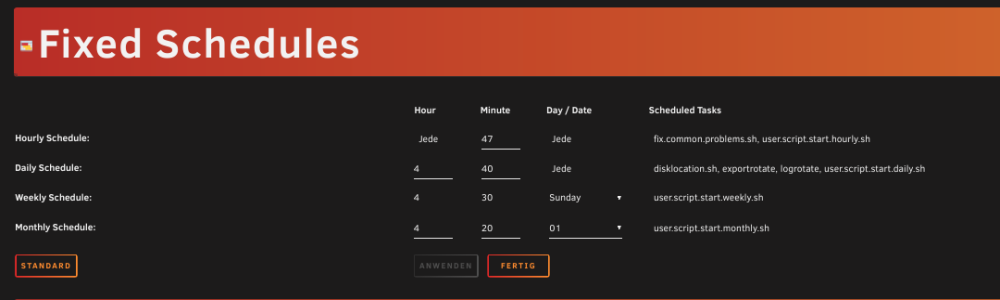
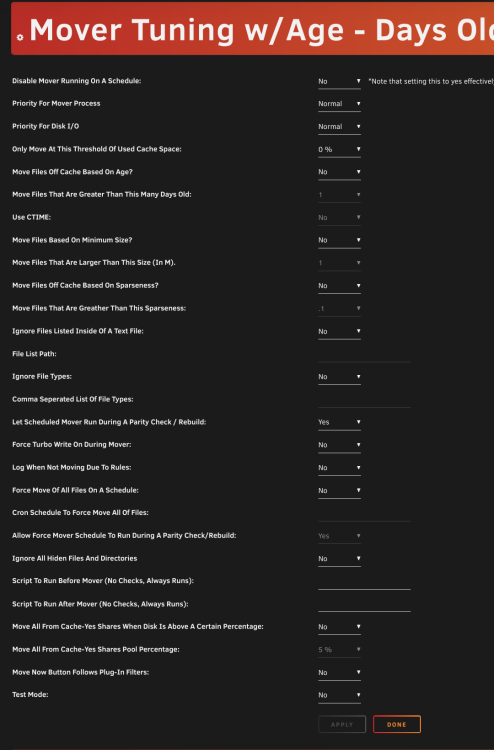
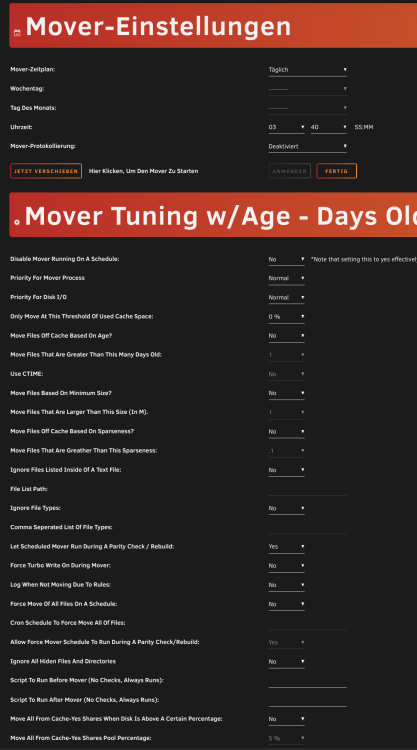
I have installed the plugin on 6.11 and the mover not working. How can I checked this on syslog or another log and fix this? Here is the Config:
-
The new recommended docker Path is on the 6.12 Documentation/Release Notes -> Docker /mnt/user/docker not /mnt/system/docker on ZFS with special Config. https://docs.unraid.net/unraid-os/release-notes/6.12.0 Can you change the default Docker Path and his configuration to this? Then have new Installations the new Path and Config without reading the Release Notes. When 6.13 or higher released "nobody" read this old Release Notes/Documentation.




