





HardwareHarry
Members
-
Joined
-
Last visited
Everything posted by HardwareHarry
-
Hi alturismo, ich hab alles so eingestellt wie beschrieben.....wobei mein Problem ja die VM's sind und nicht Docker. Host access bei docker ist enabled, Docker steht auf mcvlan Docker Service enabled oder disabled macht aber auch keinen Unterschied. In den Netzwerkeinstellungen ist Bonding aus. Wie schon oben geschrieben, sobald ich in den Netzwerkeinstellungen Bridging deaktiviere und in der VM vhost0 einstelle können sich Server und VM nicht mehr sehen.
-
I have the exact same issue. Translation from the German subforum nasng-diagnostics-20231231-0022.zip
-
Ich hab ein etwas seltsames Problem. Ich bin von 6.11.5 direkt auf 6.12.5 und zwei Tage später auf 6.12.6. Eine Windows VM mit dem standard Virtio Netzwerk-Model und vhost0 als Netzwerk läuft. Alles im selben Subnetz an einer Fritzbox. Keine VLAN, keine separierten Netzwerksegmente oder andere späßchen, eigentlich eine recht einfache Konfig. Alle meine Rechner können auf die Shares und den Server zugreifen. Der Server kann auf alle Rechner zugreifen bzw. sie pingen Die VM hat Internet Zugriff und kann alle Geräte im Netzwerk pingen und auf sie zugreifen. ABER Die VM und der Server sehen sich gegenseitig überhaupt nicht. Weder kann die VM den Server pingen noch der Server die VM. Unnötig zu sagen, dass die VM auf die Shares nicht zugreifen kann. Erst wenn ich (wie aktuell) wieder eine public Bridge mit br0 einrichte (dabei auch die Netzwerk-Settings der in der Win-VM beibehalte) habe ich alle Effekte von oben UND Server und VM können sich sehen und die VM kann auf die Shares des Servers zugreifen. Geändert hab ich insofern nur -Bridging auf eth0 eingerichtet -die Netzwerkverbindung der Vm in den Vm Settings von vhost0 auf br0 geändert. Sobald ich das Bridging deaktiviere und die Netzwerkverbindung auf vhost0 ändere sehen sich wieder nur die VM und der Sever nicht alle anderen Geräte schon.. Die virtio Driver hab ich aus Verzweiflung auch mal auf 240 aktualisiert - keine Änderung Die Netzwerkverbindung in der WIN-VM hab ich gelöscht und komplett neu eingerichtet - keine Änderung Hat jemand eine Idee wo der Hase hier im Pfeffer liegt? Es kann doch nicht sein, dass unter vhost0 alle Geräte im Netzwerk miteinander kommunizieren können nur die VM und der Server auf dem sie läuft nicht. EDIT: Mir scheint jemand anders hat das gleiche Problem
-
Hi all, I 'm planning to update my network but I ran into a brain.exe error (ok it's too late right now and I'm too unexperienced in that regard). Perhaps you guys can help me to reboot and get me back on track: Hardware I have: 1 Unraid NAS With 2 Port Mellanox x3 Card 40G (1 Port has a 40G QSFP+ to 10G SFP+ Converter with a 10G SFP+ SR Module [WORKING]) currently there is 1 on-board 1G NIC used as connection 1 Unraid BACKUP NAS 1 Port Meallanox x3 Card 40G 1 PC 2,5G On-board NIC 1 40G DAC Cable 1 OM4 cable LC2LC 1 Switch (2 x 10G SFP+ and 4x 2,5G RJ45) 1 SFP+ Port has a 10G SFP+ SR Module [WORKING]. 1 RJ45 is connected over 1G to 1 Internet router How do I setup up this in a way (hardware connecting and software setting) that NAS and BACKUP can go the full 40G ( the obvious thought was a dedicated connectionover DAC cable but with which network settings ?) AND The PC being able to connect to the NAS with 2,5G (update to 10G planned to connect to the second SFP+ Port on the switch) AND the PC being able to configure and connect to the NAS and BackupNAS Is this even possible? I first thought about a configuration as show in the image attached but in that case - in my understanding - I would not be able to connect to the backup server Gateway & DNS in the 192.168.1.x network would be configured as 192.168.1.1
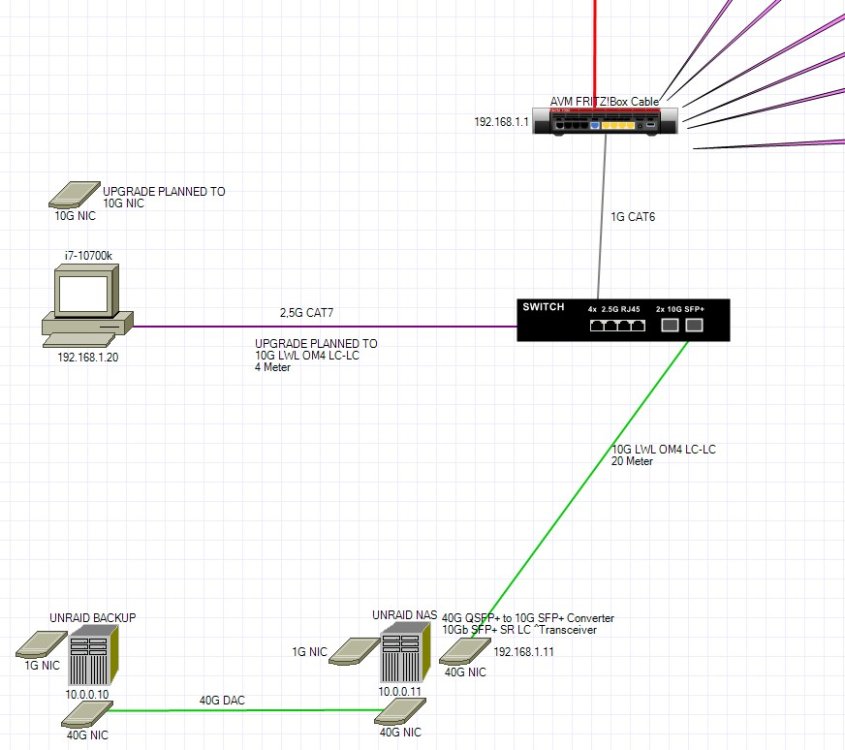
-
Danke kein Wirsing....... 😁 Ein Schwabe? Das erste mal das ich jemanden (ausser mich) Frau Werwolf zitieren höre/lese
-
I'd say it worked but I do have other problems. Tried it with 2 pooled 1Tb Samung Evo Plus 1TB on a Asus WS C246 Pro. Generally it worked. However the tool only finds 1 Drive and updates that one drive. The second is not shown. It's shown in the BIOS and it works within Unraid. I tried the way described here and I tried a USB update stick. Don't now if the problem is the board, a Bios setting or the samsung tool.
-
64GB ECC-2666 running @2400
-
Why should adding intel_iommu=on iommu=pt to start cfg change the error message from bzimage checksum error to -> bzroot checksum error ......if there is a problem with the USB stick. I don't see a benefit in doing this as restoring the old 6.9.2 works fine, from the same stick. To me this is a bug in the 6.10.1 the only question is what is the trigger and how can we find a workaround.
-
As I currently tried to support a buddy of mine with excatly this error I can confirm that - this NOT ONLY happening to Dell Servers. - intel_iommu=on iommu=pt did not work for him but changed the error massage from bzimage checksum error to bzroot checksum error - intel_iommu=off did not work too What we tried until now: - Updated all plugins, OS Update Check from Fix common problems was OK - Updated within GUI - Restart: --> bzimages checksum error - copied bz* files inlcuding crc files from the 6.10.1 zip to the USB -> bzimages checksum error - Tried the add the command intel_iommu=on iommu=pt to start cfg but that changed the error message from bzimage checksum error to -> bzroot checksum error - We rolled back to 6.9.2 everything is working fine - tried to update again as we thought it was an error in the update process --> Same error as before. - We rolled back to 6.9.2 everything is working fine His Hardware MB: Intel DG45ID CPU: Intel Core2Due E8400 RAM: 8`GB DDR2 GPU: Intel 82G45 onboard Grafik SATA Controller: Onboard NIC: Onboard
-
I take the last reports from Backblaze and use the most reliable HDDs in that list when combining age, amount of drives and failures. My conclusion from following this list since years is that in most cases you can not trust a manufacturer you have to have a look at specific drives. https://www.backblaze.com/blog/backblaze-drive-stats-for-q1-2022/ https://www.backblaze.com/blog/backblaze-drive-stats-for-2021/
-
Great! Thanks for the input! I just hoped for more users to answer in the english section includig the german users (as in most forums)
-
Hi all, I'm new here and are just configuring my first build. I think of the following hardware: i3 9100 (last i3 with ECC beside embedded ones or more power consuming Xeons) I'd even use the 9100t with 35W TDP but it seems unavailable since 3. January 2022 (I know TDP ist not the normal usage but I take it as an indicator also the base clock is lower) 16GB ECC(Little bit too much I think but I tend to use more RAM than needed 4-6 Sata drives and 1 or 2 SSD as cache. I'd prefer mATX but if an ATX bord is better I'd use another case. IPMI is not really necessary but if it's there, why not use it. According to my assumption 300W Power Supply should be enought but the smallest Seasonic or BeQuite with a high efficiency rating seem to be 400-450W Versions A low power consumption would be a bonus but I can't find any informations about the power consumption of the boards below. However its difficut to get a 1151 Mainboard for the i3 in Germany at the moment. All recommendations from forums.unraid.net/topic/99393-häufig-gestellte-fragen/ and other typical recommendations I found in the forum seem not to be available anywhere. I can't find any sellers for Gigabyte C246N-WU2, C246m-WU4 Fujitsu d3644-b or Supermicro Boards - despite one which ist not far beyond the 300€ limit. I found the following available Mainboards below 300€ on the German market: ASUS WS C246M PRO (mATX) https://www.asus.com/de/Commercial-Servers-Workstations/WS-C246M-PRO/ ASUS WS C246 PRO (ATX) https://www.asus.com/de/Commercial-Servers-Workstations/WS-C246-PRO/ ASUS WS C246M Pro/SE (mATX) https://www.asus.com/de/Motherboards-Components/Motherboards/Workstation/WS-C246M-PRO-SE/ ASUS P11C-M/4L (mATX) https://www.asus.com/de/Commercial-Servers-Workstations/P11C-M-4L/ SuperMicro X11SCM-F (mATX) https://www.supermicro.com/en/products/motherboard/X11SCM-F GIGABYTE C246-WU4 (ATX) https://www.gigabyte.com/de/Motherboard/C246M-WU4-rev-1x#kf ASRock Rack C246 WSI (mITX) https://www.asrockrack.com/general/productdetail.asp?Model=C246 WSI#Specifications ASRock Rack E3C246D2I (mITX) https://www.asrockrack.com/general/productdetail.asp?Model=E3C246D2I#Specifications What do you think would be the best option for Unraid? Any tips, recommendations or even just any thoughts are VERY welcome as I have no clue which would be best choice.




