





galluno
Members
-
Joined
-
Last visited
-
Hi, as the title says, my server has begun to spit MCE in the server' syslog, filling it up after half an hour, more or less... I have attached the diagnostics, I'm not worried about the server stability, as I can use the services without hiccups, but ram usage is a concern... Thank you to anyone who will help me 🙏 gallu-diagnostics-20250112-1758.zip
-
I have a Dell R510, with double Intel R510, the solution mentioned in @JorgeB's message was the correct one, now it booted thanks! BTW, what is causing this issue?
-
Hi all! I just updated my server to Unraid 6.10.1 after a few days of stability test with 6.10; problem is that now unraid can't boot because of a bzroot checksum error, and I don't know what to do except the basics: I tried to replace the bzroot.sha256 from the usb with the one in the 6.10.1 zip, but no luck with it; I already formatted my USB drive (16GB, FAT32) and tried to use it as is, without having my config/ installed on it, but it failed nontheless. I don't know if going back to 6.10 would fix the problem, but I see no advantage of going back if the new release fixes issues Sadly I don't have any diagnostics zip that I can provide
-
Yeah, I too have this kind of problem. At first start the container eats up 5801MiB of ram. Don't know why, as it does not have a GUI or else. Before I updated it, it used as much as 9 gigs of ram o.o

-
Hi! I'm trying to host my own git server, using Gitea combined with SWAG, I followed @SpaceInvaderOne's guide on how to add reverse proxies for select applications, I think I did it right, as I get to an error page, saying Error 403 Permission Denied; SWAG redirects the traffic "correctly", but I can't figure out what I configured wrongly. Could someone help me? app.iniis Gitea's own config. gitea.subdomain.conf
-
Thanks! Works flawlessly now
-
@binhex sorry to bother you, but there has been an update of Crafty Controller a while ago, could you update your image as well? It fixes an annoying bug where Crafty crashes after deleting a server with tasks (backup or else)
-
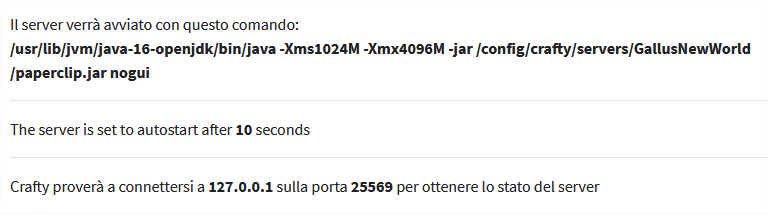
Yup, the path you are specifying in the Server Jar field is not correct, you should just type the name of your jar file, that's it The config on the side should look something like this
-
galluno changed their profile photo
-
Hello, here to say that I cannot install/update any package. I don't know why, I attached the diagnostics file, if it can help, but the syslog shows no errors while trying to update. gallu-diagnostics-20210321-1843.zip
-
@helvete Check the forum post of UUD, here you can see the procedure needed for images to work
-
I noticed Zombie Panic! Source is now on the CA list! Thank you so so much @ich777
-
Hey! I was looking to set up a server for zombie panic Source, but I did not find it, can you please add it? I don't want to setup a new VM just for it to run, thanks for what you are doing for the community
-
Hello! I'm currently trying to set up anon access in Grafana, in order to make the dashboard visible to others, but I cannot find grafana.ini, because it is located in another folder, not mapped in unRAID: every time I try to map it, the docker spits out errors, saying it cant locate the file grafana.ini or grafana-server is not available, and it doesn't start. I tried mapping it using paths from the docker setup and also using ENV variables, nothing worked. Sadly, there is no ENV variable solely for enabling anon log-in I tried to bash into the container but for some reason the user is not root, so there is not much I can do, vim cant save the modified grafana.ini because of that. What shall I do?
-
Hello! I installed the plugin on my server, but it seems like it cannot retrieve the system temps of most sensors, only a few ambient and other that I do not care about. I have a Poweredge R510, no iDRAC enterprise, but I'm putting money aside for getting the module. I wanted to use ipmitools but I cannot figure out how to install the contents of the .txz file into unraid. Any help would be much useful, I have an intermediate experience with linux, but I'm new to server stuff and still figuring out how to do most things. By the way, this is the output i get with ipmisensors, most of the entries are empty or not available root@Gallu:~# ipmisensors ID | Name | Type | Reading | Units | Event 1 | Temp | Temperature | N/A | C | N/A 2 | Temp | Temperature | N/A | C | N/A 3 | Temp | Temperature | N/A | C | N/A 4 | Temp | Temperature | N/A | C | N/A 5 | Ambient Temp | Temperature | 23.00 | C | 'OK' 6 | Planar Temp | Temperature | N/A | C | N/A 7 | CMOS Battery | Battery | N/A | N/A | 'OK' 8 | VCORE PG | Voltage | N/A | N/A | 'State Deasserted' 9 | VCORE PG | Voltage | N/A | N/A | 'State Deasserted' 10 | 0.75 VTT PG | Voltage | N/A | N/A | 'State Deasserted' 11 | 0.75 VTT PG | Voltage | N/A | N/A | 'State Deasserted' 12 | CPU VTT PG | Voltage | N/A | N/A | 'State Deasserted' 13 | 1.5V PG | Voltage | N/A | N/A | 'State Deasserted' 14 | 1.8V PG | Voltage | N/A | N/A | 'State Deasserted' 15 | 5V PG | Voltage | N/A | N/A | 'State Deasserted' 16 | MEM CPU2 FAIL | Voltage | N/A | N/A | 'State Deasserted' 17 | 5V Riser PG | Voltage | N/A | N/A | 'State Deasserted' 18 | MEM CPU1 FAIL | Voltage | N/A | N/A | 'State Deasserted' 19 | VTT CPU2 FAIL | Voltage | N/A | N/A | 'State Deasserted' 20 | VTT CPU1 FAIL | Voltage | N/A | N/A | 'State Deasserted' 21 | 0.9V PG | Voltage | N/A | N/A | 'State Deasserted' 22 | CPU2 1.8 PLL PG | Voltage | N/A | N/A | 'State Deasserted' 23 | CPU1 1.8 PLL PG | Voltage | N/A | N/A | 'State Deasserted' 24 | 1.1 FAIL | Voltage | N/A | N/A | 'State Deasserted' 25 | 1.0 LOM FAIL | Voltage | N/A | N/A | 'State Deasserted' 26 | 1.0 AUX FAIL | Voltage | N/A | N/A | 'State Deasserted' 27 | Heatsink Pres | Entity Presence | N/A | N/A | 'Entity Present' 28 | iDRAC6 Ent Pres | Entity Presence | N/A | N/A | 'Entity Absent' 29 | USB Cable Pres | Entity Presence | N/A | N/A | 'Entity Present' 30 | Stor Adapt Pres | Entity Presence | N/A | N/A | N/A 31 | Riser Presence | Entity Presence | N/A | N/A | 'Entity Present' 32 | FAN MOD 1A RPM | Fan | 3360.00 | RPM | 'OK' 33 | FAN MOD 1B RPM | Fan | N/A | RPM | N/A 34 | FAN MOD 2A RPM | Fan | 3360.00 | RPM | 'OK' 35 | FAN MOD 2B RPM | Fan | N/A | RPM | N/A 36 | FAN MOD 3A RPM | Fan | 3360.00 | RPM | 'OK' 37 | PFault Fail Safe | Voltage | N/A | N/A | N/A 38 | FAN MOD 3B RPM | Fan | N/A | RPM | N/A 39 | FAN MOD 4A RPM | Fan | 3360.00 | RPM | 'OK' 40 | Presence | Entity Presence | N/A | N/A | 'Entity Present' 41 | Presence | Entity Presence | N/A | N/A | 'Entity Present' 42 | Presence | Entity Presence | N/A | N/A | 'Entity Absent' 43 | Presence | Entity Presence | N/A | N/A | 'Entity Present' 44 | Presence | Entity Presence | N/A | N/A | 'Entity Present' 45 | Status | Processor | N/A | N/A | 'Processor Presence detected' 46 | Status | Processor | N/A | N/A | 'Processor Presence detected' 47 | Status | Power Supply | N/A | N/A | N/A 48 | Current | Current | N/A | A | N/A 49 | Current | Current | 0.60 | A | 'OK' 50 | Voltage | Voltage | N/A | V | N/A 51 | Voltage | Voltage | 228.00 | V | 'OK' 52 | Status | Power Supply | N/A | N/A | 'Presence detected' 53 | Status | Cable/Interconnect | N/A | N/A | 'Cable/Interconnect is connected' 54 | OS Watchdog | Watchdog 2 | N/A | N/A | 'OK' 55 | SEL | Event Logging Disabled | N/A | N/A | N/A 56 | Intrusion | Physical Security | N/A | N/A | 'OK' 57 | PS Redundancy | Power Supply | N/A | N/A | N/A 58 | Fan Redundancy | Fan | N/A | N/A | 'Fully Redundant' 59 | CPU Temp IF | Temperature | N/A | N/A | N/A 60 | System Level | Current | 154.00 | W | 'OK' 61 | Power Optimized | OEM Reserved | N/A | N/A | 'OEM Event = 0001h' 62 | Drive | Drive Slot | N/A | N/A | 'Drive Presence' 63 | Drive A | Drive Slot | N/A | N/A | N/A 64 | Drive B | Drive Slot | N/A | N/A | N/A 65 | Cable SAS A | Cable/Interconnect | N/A | N/A | 'Cable/Interconnect is connected' 66 | Cable SAS B | Cable/Interconnect | N/A | N/A | 'Cable/Interconnect is connected' 76 | ECC Corr Err | Memory | N/A | N/A | N/A 77 | ECC Uncorr Err | Memory | N/A | N/A | N/A 78 | I/O Channel Chk | Critical Interrupt | N/A | N/A | N/A 79 | PCI Parity Err | Critical Interrupt | N/A | N/A | N/A 80 | PCI System Err | Critical Interrupt | N/A | N/A | N/A 81 | SBE Log Disabled | Event Logging Disabled | N/A | N/A | N/A 82 | Logging Disabled | Event Logging Disabled | N/A | N/A | N/A 83 | Unknown | System Event | N/A | N/A | N/A 84 | CPU Protocol Err | Processor | N/A | N/A | N/A 85 | CPU Bus PERR | Processor | N/A | N/A | N/A 86 | CPU Init Err | Processor | N/A | N/A | N/A 87 | CPU Machine Chk | Processor | N/A | N/A | N/A 88 | Memory Spared | Memory | N/A | N/A | N/A 89 | Memory Mirrored | Memory | N/A | N/A | N/A 90 | Memory RAID | Memory | N/A | N/A | N/A 91 | Memory Added | Memory | N/A | N/A | N/A 92 | Memory Removed | Memory | N/A | N/A | N/A 93 | Memory Cfg Err | Memory | N/A | N/A | N/A 94 | Mem Redun Gain | Memory | N/A | N/A | N/A 95 | PCIE Fatal Err | Critical Interrupt | N/A | N/A | N/A 96 | Chipset Err | Critical Interrupt | N/A | N/A | N/A 97 | Err Reg Pointer | OEM Reserved | N/A | N/A | N/A 98 | Mem ECC Warning | Memory | N/A | N/A | N/A 99 | Mem CRC Err | Memory | N/A | N/A | N/A 100 | USB Over-current | Memory | N/A | N/A | N/A 101 | POST Err | System Firmware Progress | N/A | N/A | N/A 102 | Hdwr version err | Version Change | N/A | N/A | N/A 103 | Mem Overtemp | Memory | N/A | N/A | N/A 104 | Mem Fatal SB CRC | Memory | N/A | N/A | N/A 105 | Mem Fatal NB CRC | Memory | N/A | N/A | N/A 106 | OS Watchdog Time | Watchdog 1 | N/A | N/A | N/A 107 | Non Fatal PCI Er | Memory | N/A | N/A | N/A 108 | Fatal IO Error | Memory | N/A | N/A | N/A 109 | MSR Info Log | Memory | N/A | N/A | N/A 110 | Temp | Temperature | N/A | C | N/A 111 | Temp | Temperature | N/A | C | N/A 112 | Temp | Temperature | N/A | C | N/A 114 | ROMB Battery | Battery | N/A | N/A | N/A 116 | FAN MOD 4B RPM | Fan | N/A | RPM | N/A 117 | FAN MOD 5B RPM | Fan | N/A | RPM | N/A 118 | FAN MOD 5A RPM | Fan | 3360.00 | RPM | 'OK' 119 | Ambient Temp | Temperature | N/A | C | N/A 120 | Ambient Temp | Temperature | N/A | C | N/A 121 | vFlash | Module/Board | N/A | N/A | N/A 122 | iDRAC6 Upgrade | OEM Reserved | N/A | N/A | N/A
-
Duh, how I did not see that before haha Thanks for your work! :)



