





uldise
Members
-
Joined
-
Last visited
Everything posted by uldise
-
interesting, where do you plan to fit them?
-
have you some link on this?
-
No, unraid is still loaded into RAM.
-
What NC version? when i updated my NC from v11 to v17, this warning disappears only on v17. but i'm using my Apache web server as reverse proxy, and i had to add trusted_proxies and overwritecondaddr to my config.php. see here: https://docs.nextcloud.com/server/17/admin_manual/configuration_server/reverse_proxy_configuration.html
-
No probs, see pic. attached.
-
Just updated my Guacamole instance too. all works as expected, didn't noticed something new and Guacozy docker works too with this new version..
-
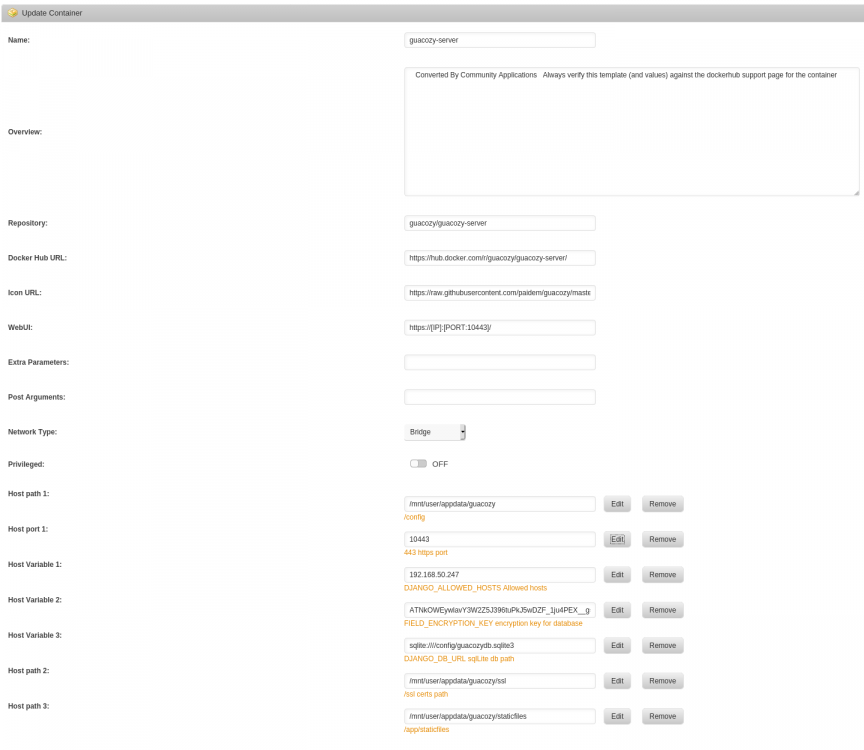
if you have an interest, i got it working. some manual work needed, but it just works then.. yes, it looks interesting, but lacks of 2FA authentication, if you wanna make it accessible public. just let me know, i can publish docker settings.
-
no worry about that. i'm trying to help everyone, if i can. And sorry for my English, it's not my native.
-
Yes.
-
Yes.
-
Host path is correct, but Container path not. set container path for example /data2 and then on second part of previous instruction, add Local storage and choose /data2 as Location.
-
you wanna just attach your Local unraid folder to nextcloud? then first, you need to map you unraid folder to docker path in your Nextcloud docker settings. Second, use "Local" storage and point it to mapped path inside docker container.
-
i just hope, this will change sometimes, just to be sure unraid host is stable enough without a need to add additional packages by plugin maintainers..
-
why not to go docker route?
-
this was the reason i switched to pfsense with openvpn in it..
-
sorry, no mind. i have nextcloud docker, but i have Apache web-server that serves reverse proxy for nextcloud too.
-
what router do you have? for example, in Mikrotik world this feature names Hairpin NAT. Look for similar with your router model.
-
Hi, and thanks for plugin - just installed on my second unraid VM, and looks like it works - i see on Esxi host it's running.
-
-
sorry have not tried jet. as i wrote, i can use your plugin with very success, if i can manually enter information about drives that is used for other esxi VMs - then i would have one place to store information on all drives in server.
-
i will add my two cents too i have an older SM X8 board with older quadro in it, and i'm experienced a very similar problem - if i choose quadro as my primary video in bios, then no remote console - just a blank screen. then i choose BMC integrated video as primary in BIOS and started experiment. first i installed Ubuntu desktop, and with all latest Nvidia drivers i cant use quadro as main video - simple blank screen. next, i installed a fresh Windows 10, with all latest Nvidia drivers i can successfully use quadro as primary video, and have access to remote console via integrated BMC. so, looks like it's an old SM problem, and i'm not sure, even if you ever have a nvidia drivers in unraid, will quadro work correctly? looks like a proven variant with VM for transcoding is a way to go..
-
i'm running unraid on top of esxi. so not all drives belongs to unraid VM. but if i could store info from all 24 bay server drives in this plugin, this would be very cool
-
a quick question: can you enter devices fully manually?
-
Thanks for new images! but i have a question about Windows RDP connection. i have two nearly identical Win10 VMs, and i have configured Guac connections to them without password stored on Guac. one VM works like expected - on connection it just displays login dialog and asks for password, but second VM just disconnects immediately with message "The remote desktop server is currently unreachable. If the problem persists, please notify your system administrator, or check your system logs." when i enter a user password in guac, then it works - it connects to VM without asking a password. on tomcat\catalina.log a see the following.. 19:43:14.959 [http-nio-8080-exec-2] INFO o.a.g.tunnel.TunnelRequestService - User "uldise" connected to connection "5". Exception in thread "Thread-15" 19:43:15.006 [http-nio-8080-exec-6] INFO o.a.g.tunnel.TunnelRequestService - User "uldise" disconnected from connection "5". Duration: 46 milliseconds java.lang.IllegalStateException: Message will not be sent because the WebSocket session has been closed at org.apache.tomcat.websocket.WsRemoteEndpointImplBase.writeMessagePart(WsRemoteEndpointImplBase.java:425) at org.apache.tomcat.websocket.WsRemoteEndpointImplBase.sendMessageBlock(WsRemoteEndpointImplBase.java:309) at org.apache.tomcat.websocket.WsRemoteEndpointImplBase.sendMessageBlock(WsRemoteEndpointImplBase.java:250) at org.apache.tomcat.websocket.WsRemoteEndpointImplBase.sendString(WsRemoteEndpointImplBase.java:191) at org.apache.tomcat.websocket.WsRemoteEndpointBasic.sendText(WsRemoteEndpointBasic.java:37) at org.apache.guacamole.websocket.GuacamoleWebSocketTunnelEndpoint.sendInstruction(GuacamoleWebSocketTunnelEndpoint.java:152) at org.apache.guacamole.websocket.GuacamoleWebSocketTunnelEndpoint.access$200(GuacamoleWebSocketTunnelEndpoint.java:53) at org.apache.guacamole.websocket.GuacamoleWebSocketTunnelEndpoint$2.run(GuacamoleWebSocketTunnelEndpoint.java:253) any ideas? EDIT: got it working - just recreated a connection and it started to work...
-
Thanks again, and you are doing a great job for us users with not so much experience in docker containers.. if i can test more things, feel free to ask.


