





aglyons
Members
-
Joined
-
Last visited
Everything posted by aglyons
-
Can you make a screen recording of what you are doing? When you subscribe to a channel, the entire channel will be queued up to download. The queue will run on the scheduler settings, but it is limited to not connecting to YT to download more than once per hour. If you click on the Channels page, it should list all your subscribed channels. If you click on one of the channels, it should bring you to a page listing all the downloaded videos. Are you saying that this is not happening? The other thing that I should mention in the event that his makes a difference. There is a Chrome plugin for TA that will allow you to subscribe to channels and add individual videos to the download queue. This plugin also syncs the YT cookie with TA. It is this cookie sync that may be the difference and what might be stopping your install from downloading properly.
-
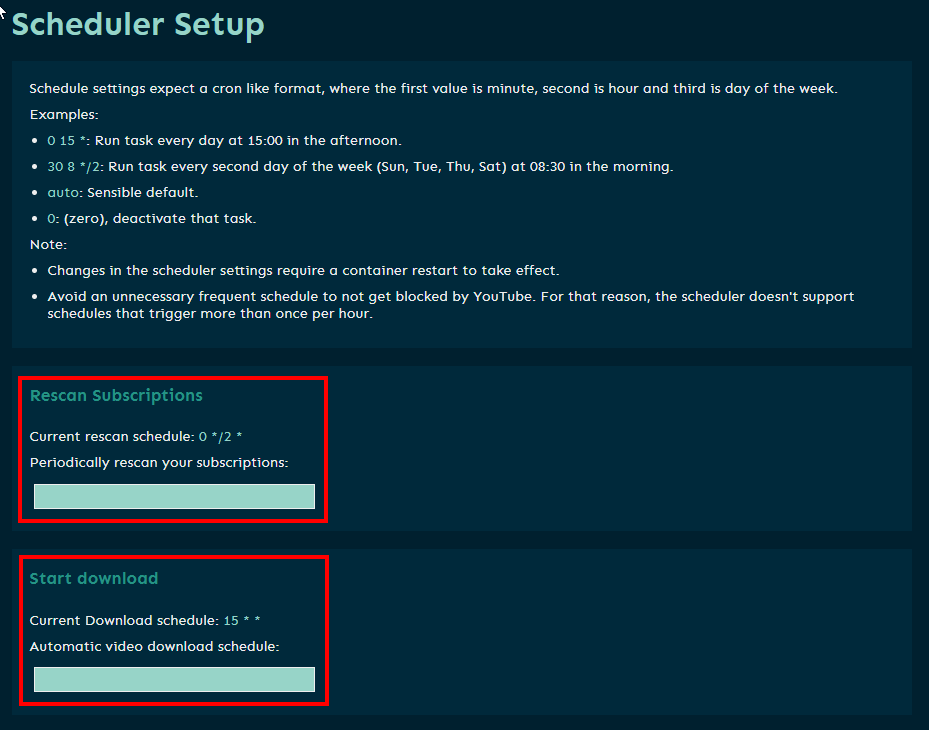
Can you be a bit clearer here? Do you mean that in TA channels, you see the subscribed channels and there are videos listed there? If you click on one can you watch it in TA? That would mean the TA is working fine. If that's not what you mean, I would take a look at the Scheduler Setup (in TA not the Docker template settings) and check what the rescan and start download frequency are set to.
-
I came across this article regarding recently discovered Docker container vulnerabilities that were previously missed by regular scan methods. https://www.helpnetsecurity.com/2023/02/23/hidden-vulnerabilities-docker-containers/ Apparently many Dockerhub containers were all identified as having significant security issues that could leave them open to be hacked and compromised. It would be awesome if there was a way an Unraid plugin could query a list of vulnerable images, if there is one.
-
Don't be so fast to judge that. If volatility of the data on the cache was not a concern then we wouldn't have the CA Autobackup plugin for the appdata folder. Clearly it was looked at as a potential problem of losing data. In my searching I have seen other posts that ring similar to what I am suggesting. The last post in that thread read as follows; So others have created a script to achieve this result. That tells me that this is a feature that should be built in. And before anyone jumps on his choice of words, yes Unraid is not backup. I posed the question of what harm would leaving the data on the array rather than outright moving it? So far I haven't seen a strong negative effect. That's the spirit! Now we're talking about scenarios and how to handle them. I would think that it would be possible to either bury the array data that makes it almost impossible to not know what you are touching. Or, even simpler, a warning message telling the user that they are touching non-cache data of a cached share. Another option is clicking on the file browser doesn't bring you to the array contents but rather the cache contents. That is actually how it works right now. That would effectively make it impossible to touch the array files. None of these solutions would be impossible to implement. Can we at least agree that having data sit on the cache drives at all times that never hit the array ever is asking for data loss at some point. And that this should be given some thought and attention? Everything I have written are ideas that I have just quickly put out for discussion. I am not the creator, I'm not a developer. I have no power to say that this is how it is going to work going forward. I'm a customer that has run into a gotcha that had me pay a price. My intention is to help other new users of Unraid not experience the same thing. And with that, I rest my case.
-
In the meantime, yes. I think this would work. Thanks for the suggestion. At the very least, the current data in the cache pool would be somewhat protected from my fat fingers. I haven't found anything like that other than the CA Autobackup for appdata. I should point out though, using your analogy of 'fat fingers'. Mother nature graced me with fat fingers. Developers are the ones that put the buttons very close together. Should we blame mother nature or could the developers space the buttons out a bit?
-
On the contrary. my original observation was an assumption and my error. My suggestion is to fundamentally change the cache function from a move operation to a clone operation. I'm not suggesting it is or should be a backup. But what harm could come from leaving the data on the array and use the cache data as the working version? I know the general consensus from IT professionals is, as you put it, "if you need to protect against data loss due to fat finger operations, you need a backup." That's not really how the world works. Some enterprising IT professionals accept this and provide some solutions. I can't count how many times the recycle bin on my Synology has saved my butt. It's a simple thing, but effective. The Unraid platform has always been referred to by others as non-professional and for hobbyists use. So maybe providing the non-professional users some level of 'oops control' would be a nice addition. I understand that this is most likely a significant change and not a small feat. But I do hope that this is approached with an open mind and some consideration in the future.
-
I guess I have misunderstood them. That being said, I would appreciate those that run the show consider this observation. Consider retaining the array data in its place. When the array is shutdown, copy from the cache back to the array. In the very least that would help to avert complete data loss in the event of a hardware problem. If the cache is blown up (for some reason) the cache 'copy' would be toast but at least there would be a copy of the data -albeit maybe not the most recent. Yes, that could slow down the array shutdown process. Updated files in the cache would have to be compiled and moved back to the array. To me, this is a win-win trade off. There is speed in the cache and security in the array. fingers crossed.
-
So I was re-working my cache drive situation. I bought two SSD drives to add a secondary cache in RAID0 for larger data transfers. Previously, I had 2 x 250GB ssd drives and set those up as a RAID1 array for smaller, more important cache content. All of these share were set to be cache:prefer. During the alignment process of the RAID1 array, I checked the files on the drive. I noticed that one of the shares had a folder sitting on the RAID1 cache that I had already re-assigned to the larger RAID0 cache earlier. So I didn't give a second thought when I deleted that folder on the RAID1 cache. Well, I found out the hard way that deleting that folder on the RAID1 cache told the system to ALSO delete the entire share on the main array. The entire share was blown away! I searched for a solution to restore deleted files/folders. The first step was determine which drive had the original share. That was impossible because it no longer existed so checking each of the drives showed nothing. While I would like to restore that data, it wasn't the end of the world. I can chalk it up to a learning experience. But if there is a solution I am all ears. While this might be a very unique situation. Does this sound like it could be an unexpected function? I mean, the cache is a working copy of the original source content, especially so when set to 'prefer'. AFAIK the only time that content moves is when the array is stopped. The mover then moves the cache copies back to the array. In this situation, deleting the folder on the cache IMMEDIATELY deleted the share on the array. @limetech Any suggestions/comments?
-
Now I'm not the dumbest guy in the room so when I'm looking at this, it doesn't seem to make sense why it's working the way it is. I have two NIC's in the system (well, three but one I ma not using so it's port down). I only have a bridge set on the eth0 NIC with that NIC the only member. The eth1 port does not have a bridge or bond set. I have some containers set to use the 'Bridge' network. For some reason, those containers can be reached via the IP assigned to the eth0 nic AND the eth1 nic IP addresses. This doesn't make sense to me. On a side note; I first went to look at the documentation but I was surprised to see how thin the content there was. There was nothing in detail explaining each setting on that page. https://wiki.unraid.net/Manual/Additional_Settings#Network_Settings knoxx-diagnostics-20230220-1159.zip
-
Thanks @CorneliousJD, I rebuilt the container with the new image and I noticed something in the logs. 8:M 19 Feb 2023 16:43:48.852 # WARNING Memory overcommit must be enabled! Without it, a background save or replication may fail under low memory condition. Being disabled, it can can also cause failures without low memory condition, see https://github.com/jemalloc/jemalloc/issues/1328. To fix this issue add 'vm.overcommit_memory = 1' to /etc/sysctl.conf and then reboot or run the command 'sysctl vm.overcommit_memory=1' for this to take effect. Did you see this as well? I wonder if this error is specifically for container use and could cause an issue or, if this issue is specifically for running REDIS on bare metal? I also added the now required variable 'path.repo' to the containers config. I think I passed the path correctly. I didn't see any errors in any logs in either REDIS or ES. TA seems to work ok too. EDIT: WOW, I tried to go though the bug report in the git and thought I was reading a different language lol. I'm not really sure if this issue was resolved or if it's still a problem or what!?!
-
I was running some Docker updates and got a docker.img usage warning. I started to look and see if I had something set to store logs in the wrong spot and noticed the path for error logs. /tmp/Nginx-Proxy-Manager-Official/var/log I can't find out where that path is on the server. It's not in any share, it's not on the thumb drive and it's not in the cache. Where are these log files being stored and is there any management that needs to be done to keep them in check?
-
Went down a long rabbit hole and came to this conclusion (at the end of the thread). It appears that the GUI on my system is reporting that all drives are currently running a SMART test. I have confirmed via CLI that no tests are actually running. I've updated my hardware profile and that was submitted 02-12-23. Yes, I am running a PERC310 in HBA mode. I've confirmed the PERC310 does support SMART status and testing. SMART tests do work properly and report back correctly. It's just the GUI reporting weirdness. Attached is the log package. knoxx-diagnostics-20230212-1818.zip
-
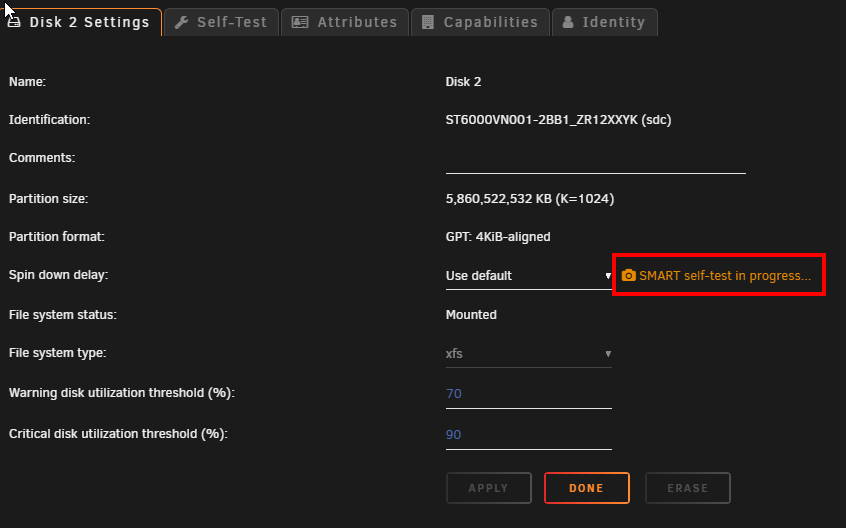
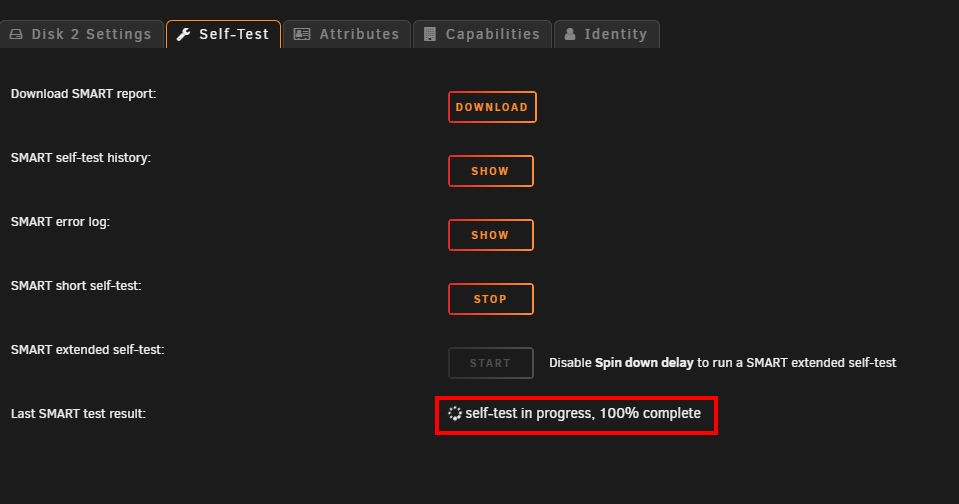
OK, so this long rabbit hole brought me to this conclusion. There was nothing wrong with SMART testing to begin with. There is however, I think a bug in the Unraid UI. Switching the default SMART controller type back to auto, results in manually triggering tests to run, report the progress % and complete successfully without error. BUT, The UI for each drives disk settings will report there is a test running, and, the self-test page will also show "self-test in progress, 100% complete". THis is shown even though there are no self-tests actually running. I've confirmed with smartctl that no tests are currently running on /dev/sdc yet the GUI is showing a test in progress. root@KNOXX:~# smartctl -a /dev/sdc smartctl 7.3 2022-02-28 r5338 [x86_64-linux-5.19.17-Unraid] (local build) Copyright (C) 2002-22, Bruce Allen, Christian Franke, www.smartmontools.org === START OF INFORMATION SECTION === Model Family: Seagate IronWolf Device Model: ST6000VN001-2BB186 Serial Number: ZR12XXYK LU WWN Device Id: 5 000c50 0e39de1db Firmware Version: SC60 User Capacity: 6,001,175,126,016 bytes [6.00 TB] Sector Sizes: 512 bytes logical, 4096 bytes physical Rotation Rate: 5425 rpm Form Factor: 3.5 inches Device is: In smartctl database 7.3/5417 ATA Version is: ACS-3 T13/2161-D revision 5 SATA Version is: SATA 3.1, 6.0 Gb/s (current: 6.0 Gb/s) Local Time is: Sun Feb 12 16:41:53 2023 EST SMART support is: Available - device has SMART capability. SMART support is: Enabled === START OF READ SMART DATA SECTION === SMART Status not supported: Incomplete response, ATA output registers missing SMART overall-health self-assessment test result: PASSED Warning: This result is based on an Attribute check. General SMART Values: Offline data collection status: (0x00) Offline data collection activity was never started. Auto Offline Data Collection: Disabled. Self-test execution status: ( 0) The previous self-test routine completed without error or no self-test has ever been run. Total time to complete Offline data collection: ( 0) seconds. Offline data collection capabilities: (0x73) SMART execute Offline immediate. Auto Offline data collection on/off support. Suspend Offline collection upon new command. No Offline surface scan supported. Self-test supported. Conveyance Self-test supported. Selective Self-test supported. SMART capabilities: (0x0003) Saves SMART data before entering power-saving mode. Supports SMART auto save timer. Error logging capability: (0x01) Error logging supported. General Purpose Logging supported. Short self-test routine recommended polling time: ( 1) minutes. Extended self-test routine recommended polling time: ( 729) minutes. Conveyance self-test routine recommended polling time: ( 2) minutes. SCT capabilities: (0x70bd) SCT Status supported. SCT Error Recovery Control supported. SCT Feature Control supported. SCT Data Table supported. SMART Attributes Data Structure revision number: 10 Vendor Specific SMART Attributes with Thresholds: ID# ATTRIBUTE_NAME FLAG VALUE WORST THRESH TYPE UPDATED WHEN_FAILED RAW_VALUE 1 Raw_Read_Error_Rate 0x000f 081 064 006 Pre-fail Always - 134257168 3 Spin_Up_Time 0x0003 093 091 000 Pre-fail Always - 0 4 Start_Stop_Count 0x0032 100 100 020 Old_age Always - 124 5 Reallocated_Sector_Ct 0x0033 100 100 010 Pre-fail Always - 0 7 Seek_Error_Rate 0x000f 081 060 045 Pre-fail Always - 125890195 9 Power_On_Hours 0x0032 092 092 000 Old_age Always - 7136 10 Spin_Retry_Count 0x0013 100 100 097 Pre-fail Always - 0 12 Power_Cycle_Count 0x0032 100 100 020 Old_age Always - 55 183 Runtime_Bad_Block 0x0032 100 100 000 Old_age Always - 0 184 End-to-End_Error 0x0032 100 100 099 Old_age Always - 0 187 Reported_Uncorrect 0x0032 100 100 000 Old_age Always - 0 188 Command_Timeout 0x0032 100 100 000 Old_age Always - 0 189 High_Fly_Writes 0x003a 100 100 000 Old_age Always - 0 190 Airflow_Temperature_Cel 0x0022 067 047 040 Old_age Always - 33 (Min/Max 31/36) 191 G-Sense_Error_Rate 0x0032 100 100 000 Old_age Always - 0 192 Power-Off_Retract_Count 0x0032 100 100 000 Old_age Always - 284 193 Load_Cycle_Count 0x0032 100 100 000 Old_age Always - 855 194 Temperature_Celsius 0x0022 033 053 000 Old_age Always - 33 (0 21 0 0 0) 195 Hardware_ECC_Recovered 0x001a 081 064 000 Old_age Always - 134257168 197 Current_Pending_Sector 0x0012 100 100 000 Old_age Always - 0 198 Offline_Uncorrectable 0x0010 100 100 000 Old_age Offline - 0 199 UDMA_CRC_Error_Count 0x003e 200 200 000 Old_age Always - 0 240 Head_Flying_Hours 0x0000 100 253 000 Old_age Offline - 6333h+41m+47.380s 241 Total_LBAs_Written 0x0000 100 253 000 Old_age Offline - 54866540544 242 Total_LBAs_Read 0x0000 100 253 000 Old_age Offline - 264620654405 SMART Error Log Version: 1 No Errors Logged SMART Self-test log structure revision number 1 Num Test_Description Status Remaining LifeTime(hours) LBA_of_first_error # 1 Short offline Completed without error 00% 7136 - # 2 Short offline Completed without error 00% 7136 - # 3 Short offline Completed without error 00% 7135 - # 4 Short offline Completed without error 00% 5617 - SMART Selective self-test log data structure revision number 1 SPAN MIN_LBA MAX_LBA CURRENT_TEST_STATUS 1 0 0 Not_testing 2 0 0 Not_testing 3 0 0 Not_testing 4 0 0 Not_testing 5 0 0 Not_testing Selective self-test flags (0x0): After scanning selected spans, do NOT read-scan remainder of disk. If Selective self-test is pending on power-up, resume after 0 minute delay. The particular line to refer to for a currently running test is; Self-test execution status: ( 0) The previous self-test routine completed without error or no self-test has ever been run. If the test WAS currently running that would have a value showing the current progress like this. Self-test execution status: ( 249) Self-test routine in progress... 90% of test remaining.
-
So interesting how others have said this is sporadic and they can't figure out what is going on. Once I've *kind of* figured out my SMART scanning issue, that message went away. I am wondering if smartctl is doing a long scan of drives (which can take upwards of 12 hours) is the cause of the services message?
-
I think this IS actually resolved. Manually triggering a shot self-test does return a message in red saying "Errors occurred - Check SMART report" but checking the SMART report shows no problem. And, if you refresh the screen the message changes to green and says "Completed". The interesting thing is this error message only pops up for 3.5inch spinning drives that are part of the Unraid array. I don't see the same error message on SSD drives that are part of the cache pool.
-
And I spoke too soon. Triggering a manual short test produced an error message; [GLTSD (Global Logging Target Save Disable) set. Enable Save with '-S on'] There's a bunch of hits online about this actually being a bug in the smartctl app. There was this one post on (https://bugzilla.redhat.com/show_bug.cgi?id=1907729) at the very end mentioning blacklisting the individual USB disk -it was a post about external drives and smart failing. The search continues
-
OK, fixed it. Dell PERC310 running in HBA mode. You have to set the SMART controller type to SCSI mode. Once I did that I could see the "Last Smart test results:" spinning and return "Completed" I checked the report download and was presented SMART stats. smartctl 7.3 2022-02-28 r5338 [x86_64-linux-5.19.17-Unraid] (local build) Copyright (C) 2002-22, Bruce Allen, Christian Franke, www.smartmontools.org User Capacity: 6,001,175,126,016 bytes [6.00 TB] Logical block size: 512 bytes Physical block size: 4096 bytes Lowest aligned LBA: 8 Rotation Rate: 5425 rpm Form Factor: 3.5 inches Logical Unit id: 0x5000c500e39dc12a Serial number: ZR12XYE5 Device type: disk Transport protocol: SAS (SPL-4) Local Time is: Sun Feb 12 15:40:56 2023 EST SMART support is: Available - device has SMART capability. SMART support is: Enabled Temperature Warning: Disabled or Not Supported Read Cache is: Enabled Writeback Cache is: Enabled === START OF READ SMART DATA SECTION === SMART Health Status: OK Current Drive Temperature: 27 C Drive Trip Temperature: 0 C Error Counter logging not supported [GLTSD (Global Logging Target Save Disable) set. Enable Save with '-S on'] SMART Self-test log Num Test Status segment LifeTime LBA_first_err [SK ASC ASQ] Description number (hours) # 1 Background short Completed - 70 - [- - -] Long (extended) Self-test duration: 43980 seconds [12.2 hours] Device does not support Background scan results logging
-
Querying smartctl from the CLI shows me that it seems to identify the SCSI devices AND it also is identifying the megaraid separately. root@KNOXX:~# smartctl --scan /dev/sdb -d scsi # /dev/sdb, SCSI device /dev/sdc -d scsi # /dev/sdc, SCSI device /dev/sdd -d scsi # /dev/sdd, SCSI device /dev/sde -d scsi # /dev/sde, SCSI device /dev/sdf -d scsi # /dev/sdf, SCSI device /dev/sdg -d scsi # /dev/sdg, SCSI device /dev/sdh -d scsi # /dev/sdh, SCSI device /dev/sdi -d scsi # /dev/sdi, SCSI device /dev/sdj -d scsi # /dev/sdj, SCSI device /dev/sdk -d scsi # /dev/sdk, SCSI device /dev/sdl -d scsi # /dev/sdl, SCSI device /dev/sdm -d scsi # /dev/sdm, SCSI device /dev/bus/1 -d megaraid,0 # /dev/bus/1 [megaraid_disk_00], SCSI device /dev/bus/1 -d megaraid,1 # /dev/bus/1 [megaraid_disk_01], SCSI device /dev/bus/1 -d megaraid,2 # /dev/bus/1 [megaraid_disk_02], SCSI device /dev/bus/1 -d megaraid,3 # /dev/bus/1 [megaraid_disk_03], SCSI device /dev/bus/1 -d megaraid,4 # /dev/bus/1 [megaraid_disk_04], SCSI device /dev/bus/1 -d megaraid,5 # /dev/bus/1 [megaraid_disk_05], SCSI device /dev/bus/1 -d megaraid,6 # /dev/bus/1 [megaraid_disk_06], SCSI device /dev/bus/1 -d megaraid,7 # /dev/bus/1 [megaraid_disk_07], SCSI device /dev/bus/1 -d megaraid,10 # /dev/bus/1 [megaraid_disk_10], SCSI device /dev/bus/1 -d megaraid,11 # /dev/bus/1 [megaraid_disk_11], SCSI device /dev/bus/1 -d megaraid,12 # /dev/bus/1 [megaraid_disk_12], SCSI device /dev/bus/1 -d megaraid,13 # /dev/bus/1 [megaraid_disk_13], SCSI device Querying one of the SCSI devices SDC directly shows that it sees the drive, identifies it just fine and can see that the device is SMART compatible and enabled. root@KNOXX:~# smartctl -i /dev/sdc smartctl 7.3 2022-02-28 r5338 [x86_64-linux-5.19.17-Unraid] (local build) Copyright (C) 2002-22, Bruce Allen, Christian Franke, www.smartmontools.org === START OF INFORMATION SECTION === Model Family: Seagate IronWolf Device Model: ST6000VN001-2BB186 Serial Number: ZR12XXYK LU WWN Device Id: 5 000c50 0e39de1db Firmware Version: SC60 User Capacity: 6,001,175,126,016 bytes [6.00 TB] Sector Sizes: 512 bytes logical, 4096 bytes physical Rotation Rate: 5425 rpm Form Factor: 3.5 inches Device is: In smartctl database 7.3/5417 ATA Version is: ACS-3 T13/2161-D revision 5 SATA Version is: SATA 3.1, 6.0 Gb/s (current: 6.0 Gb/s) Local Time is: Sun Feb 12 15:35:54 2023 EST SMART support is: Available - device has SMART capability. SMART support is: Enabled
-
https://www.reddit.com/r/Tailscale/comments/qmfcaw/smb_issues_via_tailscale/
-
So the next question is, why is Unraid using the Megaraid driver for the controller that is running in HBA mode? @limetech If you have a moment can you help me clear this up?
-
"IT mode stands for "initiator target". It presents each drive individually to the host." https://dannyda.com/2021/09/22/what-are-it-mode-hba-mode-raid-mode-in-sas-controllers/
-
So can you help me understand the difference between HBA (which is non-raid passthrough) and IT mode (which is non-raid passthrough)? Sorry, I'm getting frustrated as my system is running with data on it. If I have to do something dramatic to correct the situation, It's not going to be a fun time.
-
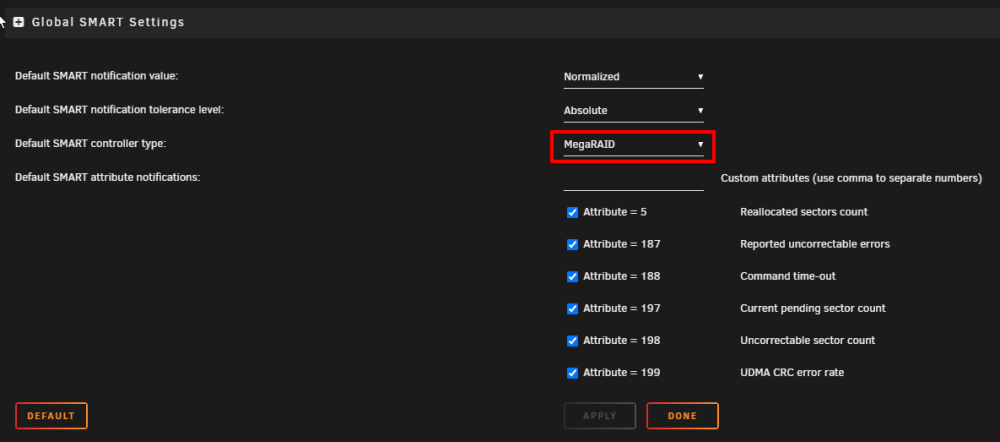
I changed the default Smart Controller Type in disk settings to Megaraid since that is the driver that is being used according to the hardware report. The continuous SMART test seems to have gone away, but, I have now noticed that each individual drives SMART config has some extra fields. It appears as though the Device Name is populated automatically and correctly. But Disk Index does not have a value. I've searched online and through the docs and can't find anything that refers to the Disk Index and where/how I would get that.

-
Poking around I found the hardware profile tool which I had never run before. According the output, from what I can understand, the card has already been flashed to the LSI firmware. <node id="raid" claimed="true" class="storage" handle="PCI:0000:05:00.0" modalias="pci:v00001000d00000073sv00001028sd00001F78bc01sc04i00"> <description>RAID bus controller</description> <product>MegaRAID SAS 2008 [Falcon]</product> <vendor>Broadcom / LSI</vendor> <physid>0</physid> <subproduct>Dell</subproduct> <subvendor>Dell</subvendor> <businfo>pci@0000:05:00.0</businfo> <logicalname>scsi1</logicalname> <version>03</version> <width units="bits">64</width> <clock units="Hz">33000000</clock> <configuration> <setting id="driver" value="megaraid_sas" /> <setting id="latency" value="0" /> </configuration>
-
This wasn't happening when I first got the server set up. This is new. I also have the "Starting Services..." notice at the bottom of the UI which was mentioned in another thread. I'm wondering if they are related somehow. I have a Dell PERC 310 running in HBA mode and from what I understand about Dell's HBA and LSI's IT mode, are the same thing. I've done some more research and according the Dell specs, the Perc310 does support S.M.A.R.T. management, at least it does in RAID mode according to the spec sheet - https://i.dell.com/sites/doccontent/shared-content/data-sheets/Documents/dell-perc-h310-spec-sheet.pdf. I'm looking for clarification in HBA mode but if it's supported in RAID I think it's safe to say it would be.



