





ryry
Members
-
Joined
-
Last visited
Everything posted by ryry
-
At some point (due to an update?) my binhex-qbittorrentvpn started giving ERR_CONNECTION_REFUSED when trying to navigate to it. Would anyone be so kind as to point me in the right direction?
-
Yes, thank you for isolating the error, however I should have explained better. I've bolded the endpoint in the wg0.conf above showing that it is, in fact, there. That said, I wasn't aware that wireguard config files could be downloaded from NordVPN. Are you sure that this is possible?
-
Having some trouble getting wireguard nordvpn going. I've got my private key through a ubuntu vm and have disconnected from nordvpn in the VM and the .conf file from https://nord-configs.onrender.com/. This is the error I'm getting: Can someone lend me a hand? 2024-12-30 17:44:56.904458 [info] Image tags: BASE_RELEASE_TAG=2024110703,INT_RELEASE_TAG=2024110703,IMAGE_RELEASE_TAG=5.0.3-1-01 2024-12-30 17:44:56.987862 [info] PUID defined as '99' 2024-12-30 17:44:57.107871 [info] PGID defined as '100' 2024-12-30 17:44:57.246804 [info] UMASK defined as '000' 2024-12-30 17:44:57.335307 [info] Permissions already set for '/config' 2024-12-30 17:44:57.457932 [info] Deleting files in /tmp (non recursive)... 2024-12-30 17:44:57.570000 [info] VPN_ENABLED defined as 'yes' 2024-12-30 17:44:57.652759 [info] VPN_CLIENT defined as 'wireguard' 2024-12-30 17:44:57.751046 [info] VPN_PROV defined as 'custom' 2024-12-30 17:44:57.876446 [info] WireGuard config file (conf extension) is located at /config/wireguard/wg0.conf 2024-12-30 17:44:57.997686 [crit] VPN configuration file /config/wireguard/wg0.conf does not contain 'Endpoint' line, showing contents of file before exit... [Interface] PrivateKey=**** Address=10.5.0.2/16 DNS=103.86.96.100 [Peer] PublicKey=qIhtTW9K4iXWFo5Q4dOPdXg8/xubXr9yEGoN55D8xnA= AllowedIPs=0.0.0.0/0,::/0 Endpoint=ca1502.nordvpn.com:51820 PersistentKeepalive=25 ** Press ANY KEY to close this window **
-
Thanks for the tip - I changed it to 0002 in the Edit part of the Docker config for the container and it seems to work.
-
Thanks!
-
Mine is saying it can't connect to server - is that the same thing? Where might I add the "--tls=false"?

-
This issue occurs for me as well. I don't really have a way of shutting down cleanly as it is.
-
Did you figure out if it's the CPU?
-
Restarting the container helped get past the 403 and I'm able to do searches but not able to downland anymore. I've been using this happily for months. I wonder if I got banned - there's no message in the logs that would indicate as such. Edit: It worked fine before updating to Unraid Version: 6.12.3 so that may be a factor/
-
I tried this but am getting the following error: 2023/03/29 20:05:43 Fatal error: failed to mount FUSE fs: mountpoint does not exist: /mnt/user/boxaudiobooks/boxaudiobooks Script Finished Mar 29, 2023 20:05.43 This is what my script looks like: #!/bin/bash rclone mount --allow-other box:Audiobooks /mnt/user/boxaudiobooks It works fine other than the errors that I want to get rid of. One per second in the main log: Mar 29 20:11:01 Tower emhttpd: error: share_luks_status, 6173: Operation not supported (95): getxattr: /mnt/user/boxaudiobooks Mar 29 20:11:02 Tower emhttpd: error: share_luks_status, 6173: Operation not supported (95): getxattr: /mnt/user/boxaudiobooks Mar 29 20:11:03 Tower emhttpd: error: share_luks_status, 6173: Operation not supported (95): getxattr: /mnt/user/boxaudiobooks Mar 29 20:11:04 Tower emhttpd: error: share_luks_status, 6173: Operation not supported (95): getxattr: /mnt/user/boxaudiobooks
-
I took a look through the pages (w/search) and didn't find anyone else who has this issue. Is there something I can add to the "edit" page to resolve this? Somethign to set the local mtu setting to 1570 to match potentially? log output from container: 2023-01-13 18:51:27,188 DEBG 'start-script' stdout output: 2023-01-13 18:51:27 WARNING: 'link-mtu' is used inconsistently, local='link-mtu 1569', remote='link-mtu 1570' 2023-01-13 18:51:27 WARNING: 'comp-lzo' is present in remote config but missing in local config, remote='comp-lzo' It looks like the sort of solution may be discussed here but I don't know how to set it up in unraid. https://serverfault.com/questions/957485/how-can-i-fix-link-mtu-and-tun-mtu-are-used-inconsistently-warnings-in-openvpn
-
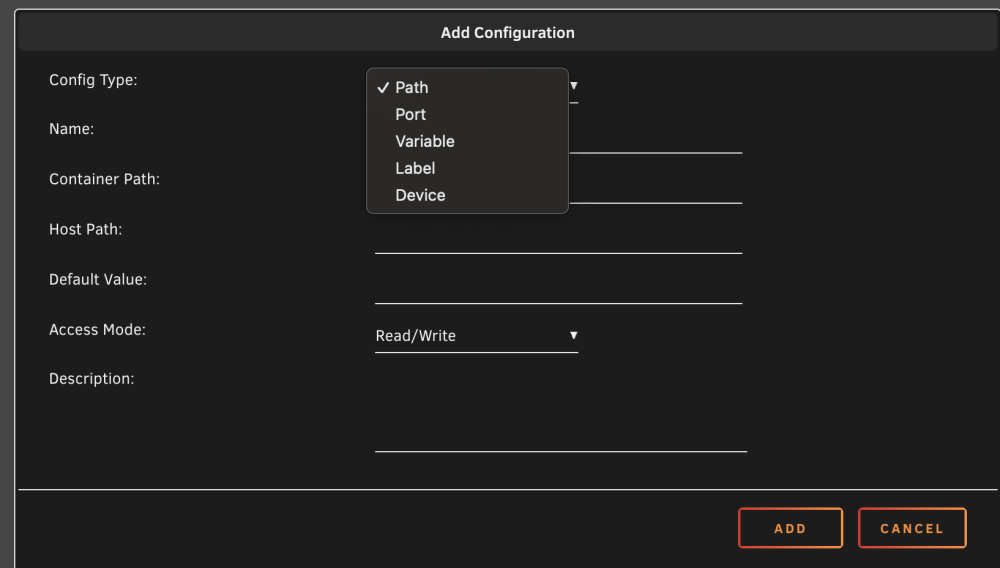
Where is "extra parameters?" I don't see it in the docker "edit" menu.
-
Thanks - I ran auto-tune. They're reporting as good now but I don't see any change in power consumption.
-
It worked again after a reboot - didn't end up needing to change anything. Thanks for your help! I want to try the autotune but with the caution now in OP I also want to confirm that I don't have an incompatible SATA controller. I have the following motherboard: https://www.gigabyte.com/Motherboard/GA-Z77X-UD3H-rev-10#ov Chipset: 2 x SATA 6Gb/s connectors (SATA3 0/SATA3 1) supporting up to 2 SATA 6Gb/s devices 4 x SATA 3Gb/s connectors (SATA2 2~5) supporting up to 4 SATA 3Gb/s devices 1 x mSATA connector * The SATA2 5 connector will become unavailable when the mSATA connector is installed with a solid state drive. Support for RAID 0, RAID 1, RAID 5, and RAID 10 * When a RAID set is built across the SATA 6Gb/s and SATA 3Gb/s channels, the system performance of the RAID set may vary depending on the devices being connected. Marvell 88SE9172 chip: 2 x eSATA 6Gb/s connectors on the back panel supporting up to 2 SATA 6Gb/s devices Support for RAID 0 and RAID 1 Is there a way to check the SATA controller model number via Unraid?
-
Thanks - and just to be clear, I do this by unplugging the usb from the unraid when unraid is off and editing it on another PC that I plug it into? Should I also try it with the installer files (and folder) removed from the temp directory I created from OP?
-
I had someone try and restart it. Still no boot. Invisible to router. Is there a common debug path to a no boot scenario? Would like to avoid a screen but I don’t think I have any options.
-
Well, I guess I did a stupid. I'm away from home at the moment and decided to run the 3 install commands from OP then reboot remotely. Not home for a few days. After shutting down, Unraid isn't even getting an IP - does anyone see how running the commands at the beginning of the post then restarting could result in a no-boot scenario? For some extra info, it's an i7-3770k on a z77 motherboard. edit 2: maybe it was already installed via the tips and tweaks plugin? feeling pretty dumb right now...
-
That worked - thank you.
-
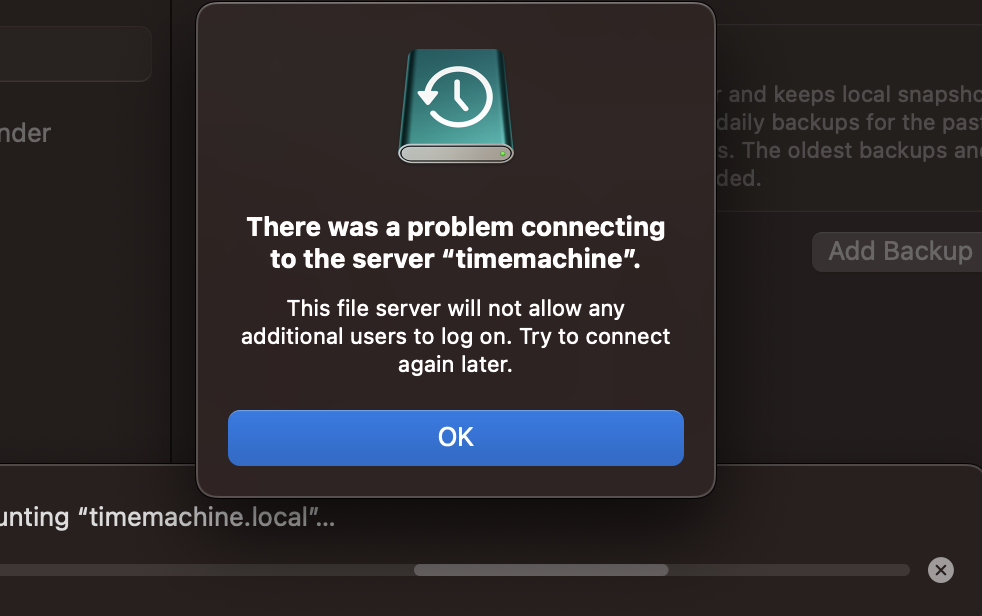
I'm getting this error - any suggestions? I ran the permissions command. I happen to have created the share /mnt/user/timemachine share before the docker connected to it - could that be an issue?
-
Did it anyway and it appears to be fine. Thanks for your notes!
-
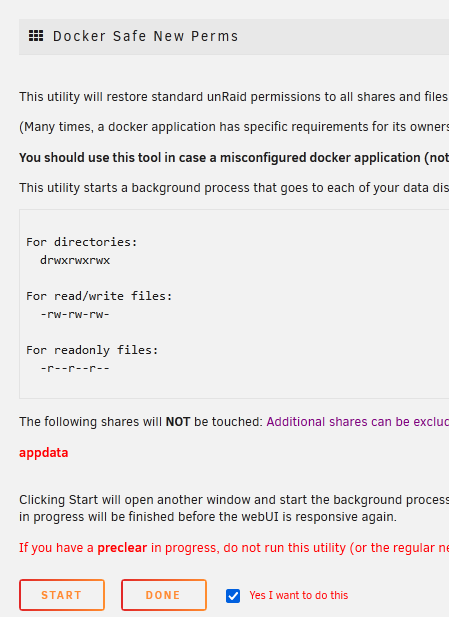
After running the fix common problems docker safe permissions thing (excluding appdata as default selected) I'm still getting errors in the unbalance: There are some permission issues with the folders/files you want to transfer 4178 file(s)/folder(s) with an owner other than 'nobody' 4177 file(s)/folder(s) with a group other than 'users' 2884 folder(s) with a permission other than 'drwxrwxrwx' 17667 files(s) with a permission other than '-rw-rw-rw-' or '-r--r--r--' You can find more details about which files have issues in the log file (/boot/logs/unbalance.log) At this point, you can transfer the folders/files if you want, but be advised that it can cause errors in the operation You are STRONGLY suggested to install the Fix Common Problems plugin, then run the Docker Safe New Permissions command Any ideas?
-
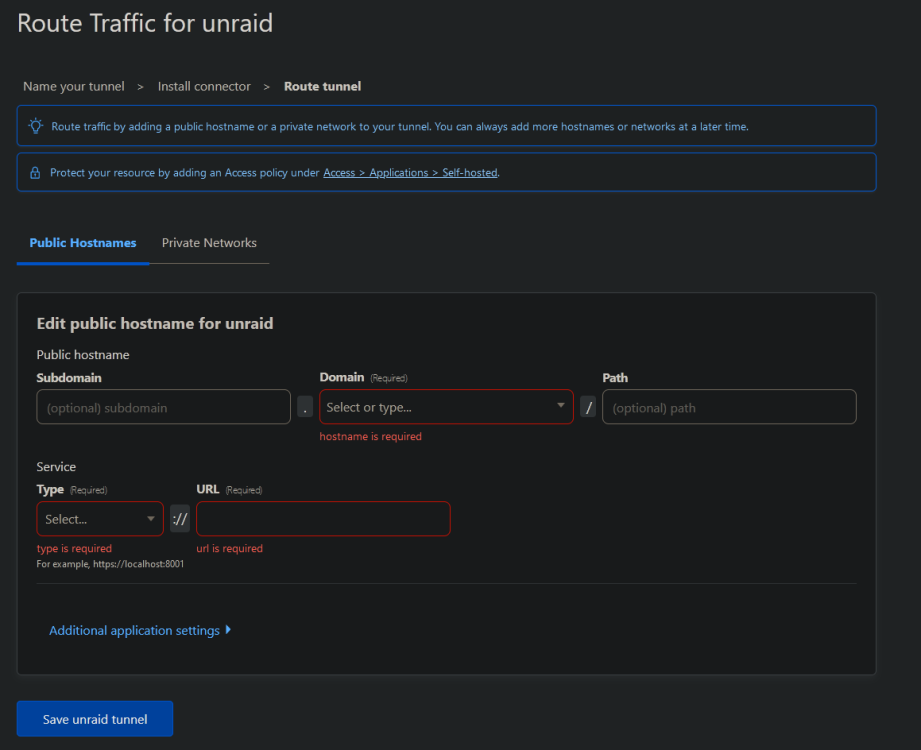
I got it working - in case it helps anyone else: -the subdomain is what you want it to be to access publicly, domain is the selected path. -the type can be http then the url to access your unraid instance locally (assumed static IP) e.g. 192.168.2.32
-
I'm assuming to get the token you go to setup docker tunnel in cloudflared first? The next step is a bunch of inputs. Apologies, but although I've gotten this working with a tunnel to my home assistant VM, I'm lost when it comes to setting this stuff correctly.
-
When I enter the default JWT security key "123456" in the webui it is rejected - what am I doing wrong? It's also not prompting me to register an account like in the demo video - it just asks for security token after clicking log in (no register option). Edit: Just noticed I need to click "get started" in the top right... Working fine now so far Edit2: The CPU usage is pretty high. I'm not doing anything with the web ui - it's not even working and it's using a bunch of CPU power. Am I the only one seeing this?

-
I'd also like to know this.



