





Jaybau
Members
-
Joined
-
Last visited
Everything posted by Jaybau
-
I mounted a share to a VM. New files are created on the host, but by a random user from my Shared User list. How do I change which user owns the hosts shared folder/files? Any other special info on how host shares are managed?
-
When looking at the Dashboard I saw higher CPU usage than normal. I checked htop/top and saw less than 1% CPU usage. I also noticed some other webgui stats looking almost freezing. There's some other stuff in the webui that doesn't seem right. So I decided to try and shutdown docker services, but appeared to get stuck doing that. Then I tried stopping the array, but can't. Tried rebooting, but can't. But other functionality still works, though Diagnostics takes a lot longer than normal. The issues may have been caused by sleep/awake. I will post my Diagnostics if I could. Right now it is stuck doing a SMART short test (perhaps because I was trying to stop the array, or just something else weird): todos '/tower-diagnostics-20251018-0831/logs/docker.txt' ls -l /dev/disk/by-id/[asun]* 2>/dev/null|sed '/-part/d;s|^.*/by-id/[^-]*-||;s|-> ../../||;s|:|-|' smartctl -x '/dev/sde' 2>/dev/null|todos >'/tower-diagnostics-20251018-0831/smart/HUH721010ALE601_7PKN9GXC-2025-06-04 disk4 (sde).txt' smartctl -x '/dev/sdf' 2>/dev/null|todos >'/tower-diagnostics-20251018-0831/smart/HUH721010ALE601_7PKVXGNC-2025-06-04 disk3 (sdf).txt' I would like to force a restart without a power reset. Is there a command that can force a restart, terminate processes if necessary, figure out what is causing the system to not stop? In the meantime, I'll do a power reset. [EDIT] I couldn't post Diagnostics prior to a hard reset. Attached is the Diagnostics after the power reset. tower-diagnostics-20251018-0851.zip
-
Do I have docker storage settings configured correctly? Note: I am using BTRFS for my cache drive. Docker data-root: Directory vs. Image File?Is there a performance trade off between using a directory vs. image file? I prefer docker "data-root" to be a directory rather than a virtual disk (file), so I don't have to keep expanding the virtual drive. Any other tradeoffs to consider? Docker storage driver: Native vs. Overlay2?What should the storage driver be: Native or Overlay2? I am currently using "Native", and I see a folder called "btrfs" with another folder "subvolumes", and with a lot of files. Don't know why. Maybe I should use "overlay2"? What are the tradeoffs? Is there a performance tradeoff? Integrity? Thank you.
-
I'm trying to zip a folder with 20,000 files and approximately 8.5 GB. "Files to Archive" takes forever to respond. "Output Directory" takes longer than forever. I select the output folder (which also has a lot of files), and nothing happens. Not sure if it is doing anything, or what it is doing.
-
Similar problem.
-
Similar issue... I tried going to https://account.unraid.net/server/connect/register. It appears my server is no longer registered. When I try to register, I get a registration failure. Unraid Connect v2025.09.12.1948.
-
What is the easiest way to check to see if Community App template has been updated/changed for my installed docker containers? And if the template has changed, how do I update the template? Is there a way to select the changes and select which changes to merge? Thank you.
-
When executing a "Post-run script", I get this message "...not existing...skipping": [07.07.2025 02:53:40][][Main] DONE! Thanks for using this plugin and have a safe day ;) [07.07.2025 02:53:40][][Main] [07.07.2025 02:53:42][][Main] sh /mnt/user/user_scripts/appdata_backup.sh 'post-run' '/mnt/user/backup/AppData' 'true' > /mnt/user/user_scripts/appdata_backup.log is not existing! Skipping!I have no problems running the command from shell "sh /mnt/user/user_scripts/appdata_backup.sh 'post-run' '/mnt/user/backup/AppData' 'true' > /mnt/user/user_scripts/appdata_backup.log" Debug ID: 70ed6dc9-d570-4345-ae8b-80d7fddba836 Thank you.
-
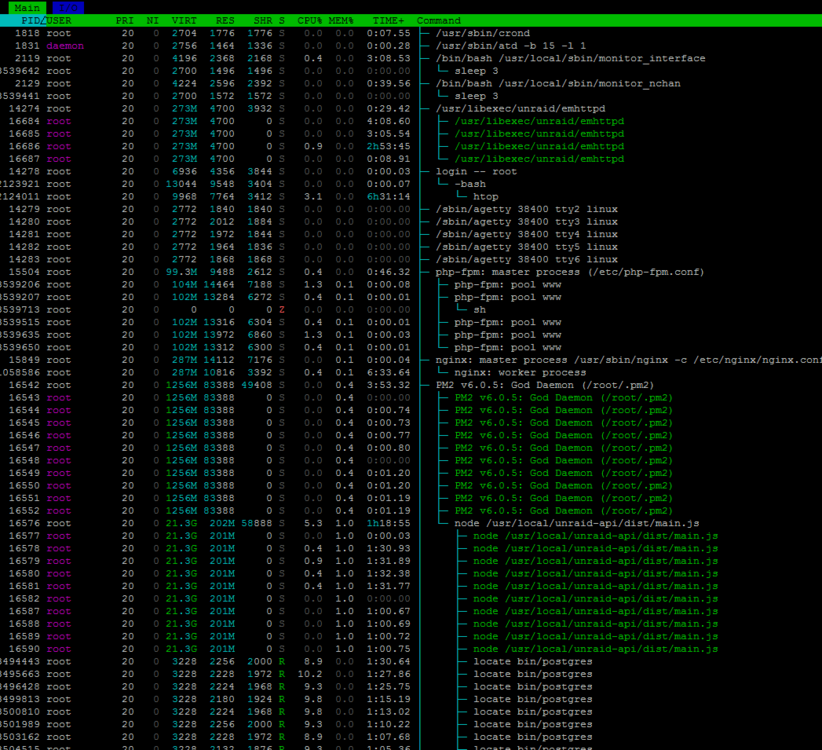
Looks like the "locate bin/postgres" process is coming from Init, PM2 God Daemon, node, unraid-api/dist/main.js.
-
Looks like one of the containers(s) has a memory leak. So I'm limiting the memory per container. Would be great for a better/safer way to limit memory/cpu.
-
Is there a configuration to make sure the docker service is not a higher priority than critical Unraid/OS processes?
-
There's been a number of times where a misconfigured Docker container has taken over my Unraid server. For example, some containers have an automatic restart on failure. When this occurs, the misconfigured container takes over my server and the server is no longer responding. I can't do anything to stop the container because the server is no longer responsive. I also cannot login directly to the physical machine because the login timeout of 60 seconds. The only solution has been to reset the machine. Is there a configuration setting to prevent any docker container from doing whatever it is doing that prevents the server from responding?
-
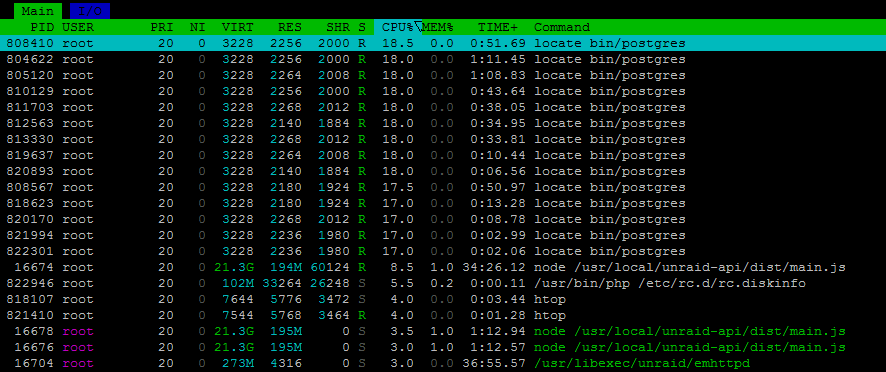
Why do I have the process "locate bin/postgres" consuming so many resources? What it it being used for? tower-diagnostics-20250601-2109.zip
-
Is there an argument to pass the file name to a custom script? My goal is to encrypt the backup file after the backup, then copy the file to an external location. The AppBackup "backup destination" will contain multiple rotated backups, and I don't want to process the completed folders multiple times.
-
Please include tailscale compatibility for Filestash. Executing Unraid Docker Hook for Tailscale ERROR: No root privileges! ERROR: Unraid Docker Hook script throw an error! Starting container without Tailscale! Starting container...
-
Is there a feature to encrypt the backups? A lot of my containers contain API keys and passwords as part of the docker container template.
-
What are the arguments that can be sent to a custom script? What is the argument for a filename and/or full path? Is there a list of common post scripts? I'm looking for a script that will copy the backup file to a second location.
-
@Chlorgas I found that using this repository tag worked for me: testdasi/grafana-unraid-stack:stable-amd64
-
Dasbhoards report "No Data". I just installed Grafana-Unraid-Stack from Community Apps, and the dashboards are reporting "No Data". I followed the instructions from: https://hub.docker.com/r/testdasi/grafana-unraid-stack/ How do I fix/configure? SOLUTION: Docker container log was showing errors: [error] influxdb crashed! [error] loki crashed! Fix: testdasi/grafana-unraid-stack:stable-amd64
-
That's probably the problem. qBittorrent might be accessed by the other containers qbt_manage or cross-seed. I also have appdata configured to stop a container, do the backup, start the container; which leaves qbt_maanage and cross-seed potentially accessing the same folders, though shouldn't be writing to the folders. If this is the root cause, it would be better if I can stop and group multiple containers for backup, and start the containers in the same original order, and with the same "wait". Stop/start all at the same time is not ideal because I have too many containers, and I am backing up 50 GB, all which takes a lot of downtime. SOLUTION: Clicking on app to get the menu for group and excluding folders is awesome! Thank you.
-
I can't get the Ntfy docker container to use Tailscale: Download from Tailscale version 1.82.0 successful! /tmp/tailscale/tail 100%[===================>] 30.04M 10.0MB/s in 3.0s Installation Done! Settings Tailscale state dir to: /config/.tailscale_state Setting host name to "ntfy" /opt/unraid/tailscale: eval: line 273: can't create /var/log/tailscaled: nonexistent directory Starting tailscaled with log file location: /var/log/tailscaled Starting tailscale failed to connect to local tailscaled; it doesn't appear to be running ERROR: Connecting to Tailscale not successful! ERROR: Unraid Docker Hook script throw an error! Starting container without Tailscale! tower-diagnostics-20250326-1943.zip
-
When creating a backup for qBittorrent, I keep getting this error message: tar creation failed! Tar said: tar: /mnt/user/appdata/qbittorrent/BT_backup: file changed as we read it My backup folder also gets a disconcerting suffix "failed": ab_20250325_222009-failed How can I prevent this error? What is causing this error? Backup Type = Stop, backup, start for each container. Skip stopping of containers? = No. Thank you.
-
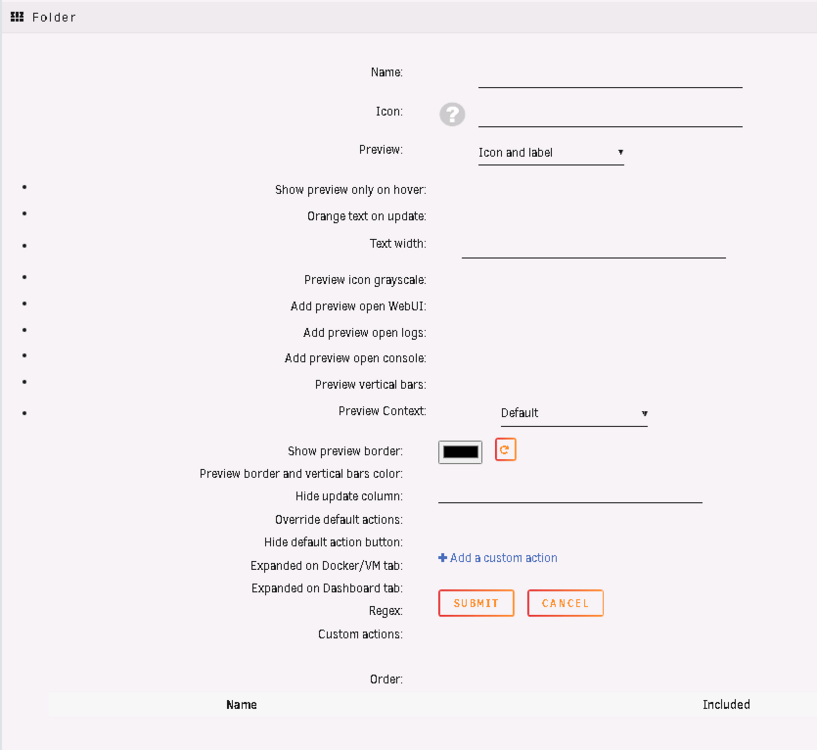
Ran into the issue of FolderView not being editable, and looks like this: Solution: Export existing config. (I didn't think of doing this, so I need to start over). Remove FolderView plugin. Manual install plugin https://raw.githubusercontent.com/VladoPortos/folder.view/refs/heads/main/folder.view.plg. I have no idea why Unraid Plugin Manager didn't do this for us!! Sure would have saved me problems. Import your exported config.
-
I am moving large files using Unraid GUI interface with the "sparse" option checked/enabled. There performance of the transfer averages 5 MB/s, versus 90 MB/s without the "sparse" option checked. Is 5 MB/s normal for "sparse" file copying/moving? Why? tower-diagnostics-20250209-1613.zip
-
I do I install the updated version of jdupes?




