





song
Members
-
Joined
-
Last visited
Everything posted by song
-
6.11.5Latest version,There is no solution for the above topics, such as the lxc container, which I have not installed
-
"Unraid" has been used for a year. Previously, "unriad" was given a solid state hard disk to install docker and virtual machine. Recently, four mechanical hard disks were purchased for "unraid" "When I use it, the shared folder disappears. The first time there was a problem, I was moving files, I canceled the file move, and suddenly found that the shared folder disappeared completely and could not be recovered. So I restarted the system, and the shared folder reappeared. I thought it was caused by my improper operation, "Even with improper operation, I don't think a system can have the most basic service failure. It should at least be able to recover its functions by itself." The second time there was a problem, when I was configuring the "Docker" container, the shared folder suddenly disappeared again. This time I knew that the last disappearance was not caused by my improper operation. When I moved the file, I interrupted the operation of moving the file, I don't think it belongs to improper operation? So I came to the forum to search related topics, and found that many people had the same problems as me, and your official developers did not really solve the problem. Can I continue to use this system? None of the most basic functions can be guaranteed. How can I continue to use them?
-
-
我目前在unraid安装的群晖虚拟机,通过Unassigned Devices插件挂载局域网的群晖共享文件夹来给docker使用,之前使用的主板是技嘉的B560M重启unraid后可以自动搜索局域网并挂载,后来我换了微星B360M迫击炮的主板后每次重启机器SMB哪里的绿灯一直是灰色的,群晖已经早就启动了,需要我重新添加一个SMB点击搜索后,原来已经配置好的SMB绿灯才会亮,请问这是什么原因导致的,是否和我换主板后没有重装系统有关?换完主板后已经更新了两次系统,都有这个问题
-
另外多说几句,在虚拟机内安装的黑苹果虽然可以用,也可以生产力,但是其性能远远低于物理机黑苹果,我已经打算将unraid单独移到另一台机器,这个主机做物理机黑果,并且macinbox是第三方开发人员免费提供的,很久没更新维护了.目前在Big Sur下还能勉强正常使用,12.5下就有很多问题,13更是无法使用,太被动了,生产刚需的话建议直接物理机黑果,unraid黑果不受官方支持,虽然可以核显和独显一起添加使用,机型设置正确后,在解码视频的时候也会出现许多无法解决的问题,例如视频失真.添加核显后,谷歌浏览器的网页无故崩溃等等.取消核显即恢复正常.如果只是用来娱乐看电影的话,可以这样使用,既然买了5700了我觉得就应该让它在物理机下发挥它的性能和你其他硬件协同工作效果更好,个人的一些使用观点
-
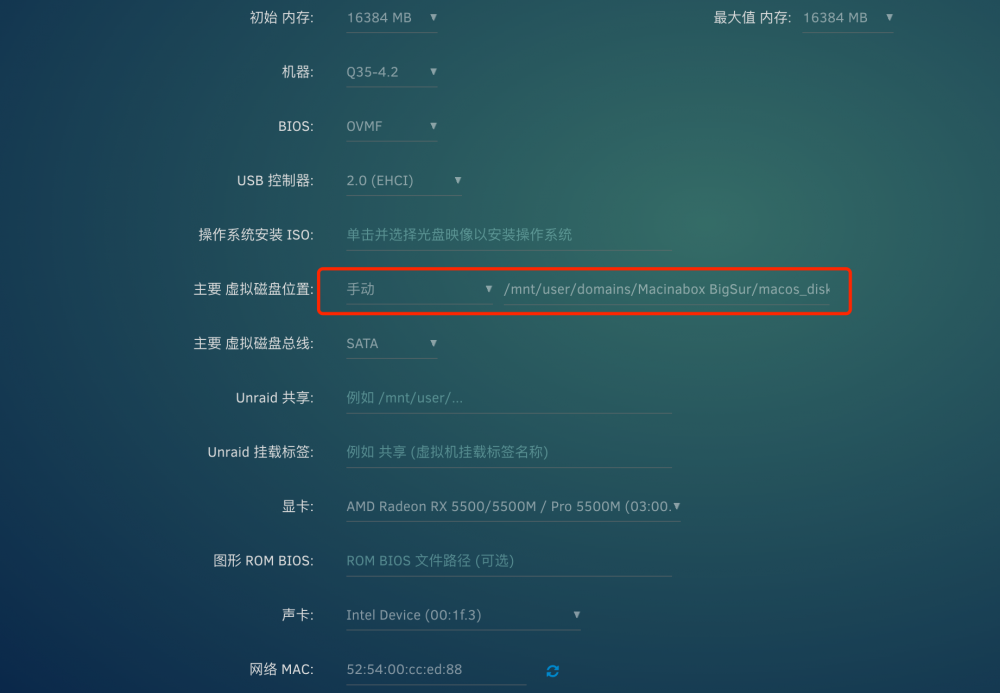
这不是unraid的原因,这是macos对于amd显卡5xxx系列支持的问题,你需要在mac的oc引导内“boot- args”启动参数添加“agdpmod=pikera“,添加这个参数需要你在vnc虚拟显卡下操作,添加完成后记得将efi文件夹复制到mac系统安装盘内,将虚拟机参数的另外两项磁盘移除将oc磁盘的地址位置复制到macos磁盘位置进行替换即可

-
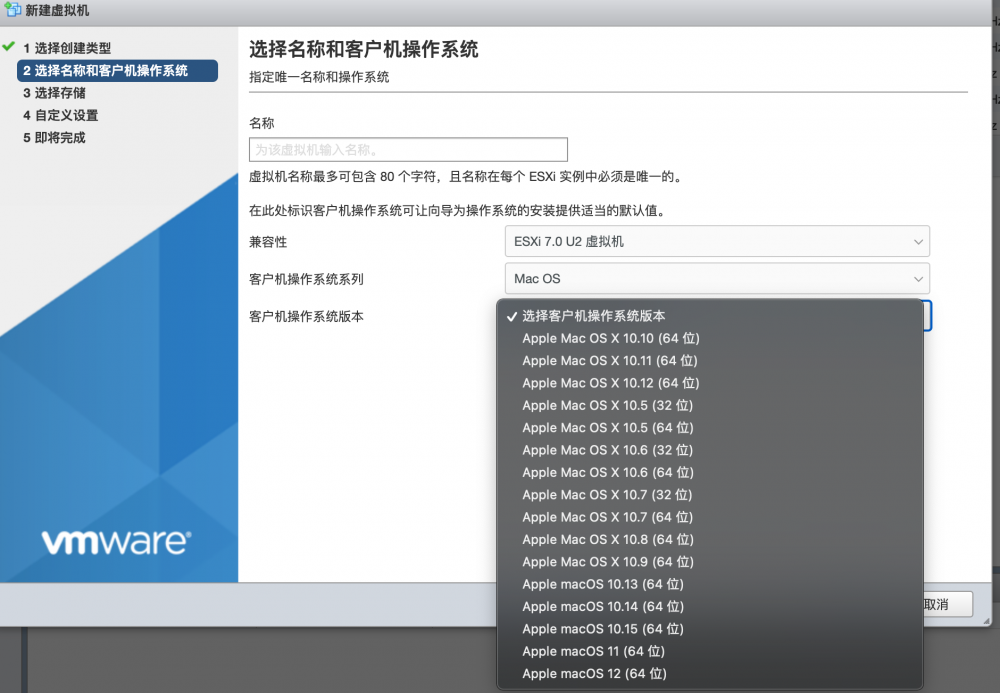
But does "esxi" support MacOS? Their virtual machine module has the apple system. I think "unraid" can also do it. It does not rely on docker to install MacOS anymore!
-
However, the author of "macinabox" has realized this function. I hope that the official can optimize the performance of MacOS virtual machine based on this, embed it into the unread virtual machine module, and optimize these known problems. In addition, after MacOS adds the core display, the container emby under docker cannot be opened After I use "Intel gvt-g" to allocate the core display to MacOS, the Mac will report an error in five languages when booting up. Because the PCI bus location is different, the PCI bus of the core display allocated by Intel gvt-g cannot be modified. If the MAC uses the core display, emby will not be able to use it and can only choose one of two
-
I suggest that developers can add Mac OS virtual machine support to the unread virtual machine, Instead of using the docker container "macinabox" "Although this method is effective, there are many problems. For example, after direct display, you need to remove the virtual machine and recreate the virtual machine every time you change the configuration. Although you do not need to reinstall MacOS, it is also cumbersome. The installation of the latest version of MacOS 13.0 reports an error. I hope the official can directly add the virtual machine module of MacOS. I believe that the ICH 777 can achieve this function. Most of the problems are solved by your plug-in. Thank you very much
-
I need to wait a moment. Maybe it can only be used when the official version is needed. I use Big Sur now. There will be problems when I use Monterey. The auxiliary functions of the setting panel will not be able to be turned on. After restarting the Mac, I can enter it normally. However, after a period of time, this situation will occur again. I can't enter it to display the preference setting error
-
When will "Ventura" be supported? I have upgraded the OpenCORE boot and kext to the latest version. After the installation is completed, the boot appears "five languages" and cannot enter the system!
-
排查你的网线,我之前用的网线是路由器送的那种,和你情况相同,我换了7类线就再也没有出现这样的问题
-
楼主用的什么U盘
-
黑群晖装在UN怎么了?脱裤子放屁?UN对我来说就是个底层系统,装各种虚拟机和容器,硬件直通比较方便,UN不能做到的,我为什么不能用黑裙来替代?群晖的相册是有一个能打得过的吗?群晖的虚拟机性能不行,UN可以啊,作为一个用户,还不是哪个好用选择哪个?互取所长?
-
-
Do you use two different brands of memory? My friend installed unraid using two different brands of memory, causing the transmission image to be damaged. Unplug the other memory and restore it to normal. The transmission image is complete and can be installed normally
-
If it is gray and cannot be changed, you need to remove this virtual machine and add a new virtual machine to change these configurations
-
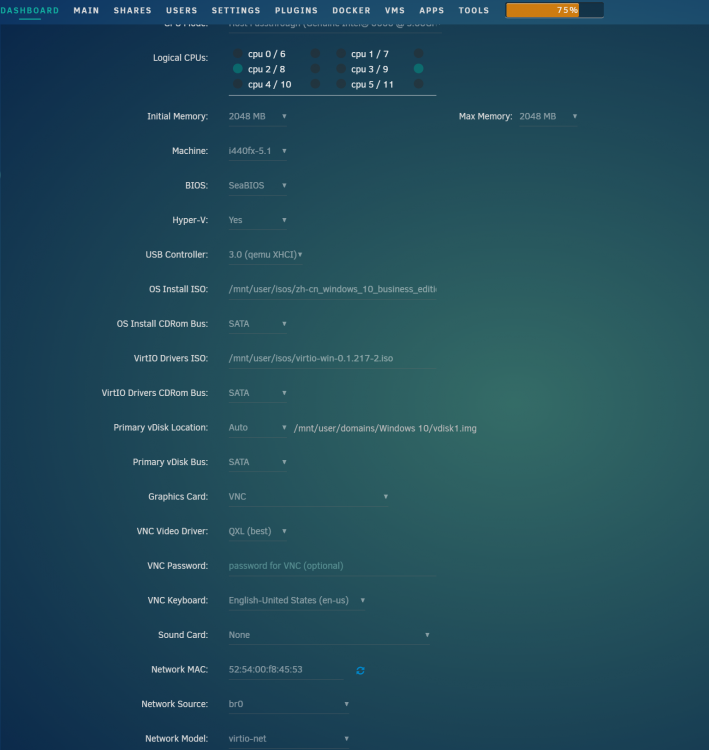
Change the model to "q35-6.2", change all hard disk controllers to "SATA", and then try. If it still fails, I have no choice
-
最怕数据无缘无故丢失,我一直在unraid虚拟黑裙作为NAS,SATA控制器直通给黑裙,unraid只使用M2作为阵列安装虚拟机和容器,unraid我把它作为和PVE,ESXI底层系统去使用,这三个系统中,unraid界面好看,而且直通硬件方便,相比ESXI使用独显就不能用核显,只能二选一,非常鸡肋。虽然PVE也能实现,但是那界面丑的一批,还需要记住大量的命令去实现某些功能,虽然不难,网上有很多教程,但是太繁琐了,相比之下只有unraid更好,结合黑裙使用,很稳定也很方便,满分体验!
-
你重新安装个WIN10虚拟机,把独显作为仅有的显卡,去除掉VNC试试 新建虚拟机的时候直接把这个代码加进去,我测试过,加了这个代码可以直接启动虚拟机安装系统,需要你加入键盘鼠标进行操作,新建的虚拟机安装完网卡驱动后,可以免去重新启动虚拟机的这个步骤就能安装驱动。 如果新建的虚拟机显卡可以安装驱动,那么你直接在你原来的WIN虚拟机上把VNC更改为独显即可。要确保一点,你的显卡有没有UEFI,如果有,请选择BIOS为OVMF,没有的话选择BIOS为seaBios。旧的虚拟机如果选择了和自己显卡不匹配的BIOS是无法点亮屏幕的,需要你移除虚拟机,如果不移除虚拟机直接在虚拟机配置更改BIOS模式,好像会出现问题,我曾经这样做过,你可以尝试一下,如果不行就按照下面的步骤重新配置一下虚拟机。 移除虚拟机但是不要将虚拟机的磁盘删除,新建个虚拟机名称和之前的一样,选择和自己显卡匹配的BIOS模式,硬盘应该会自动选择你原来的虚拟磁盘,可以不用重新安装系统保持原有的数据更换虚拟机的配置 另外加了这个代码,后面修改虚拟机配置这个代码也不会消失,不用重新添加。
-
楼主可以查看我发的贴子,此问题官方已提供暂时的解决方法,后续版本应该会修复
-
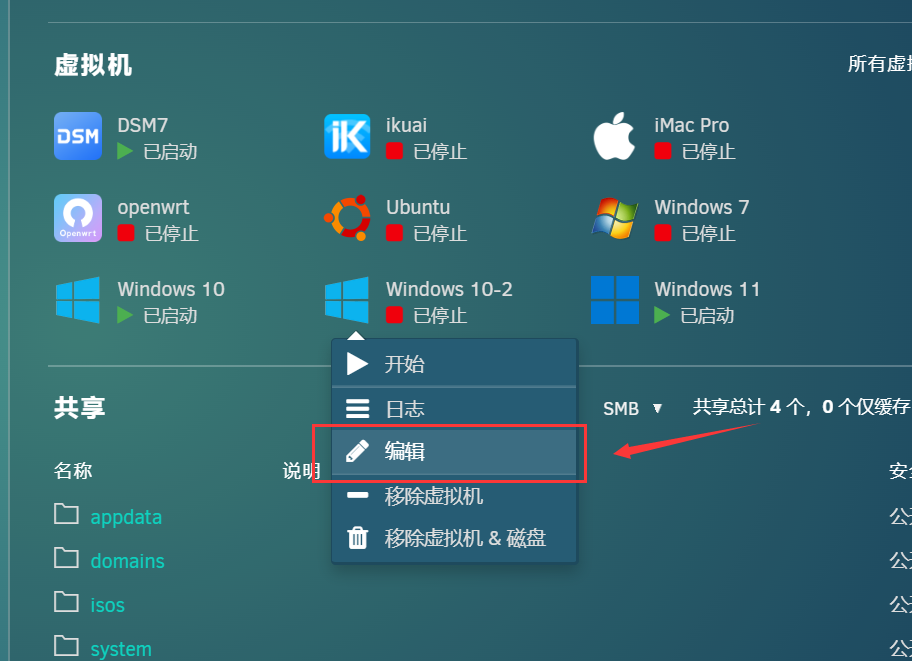
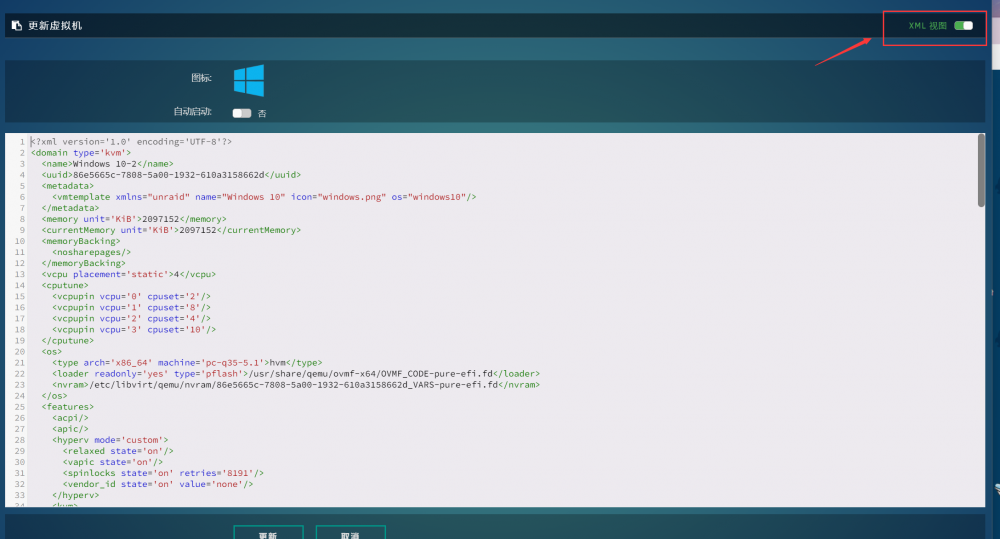
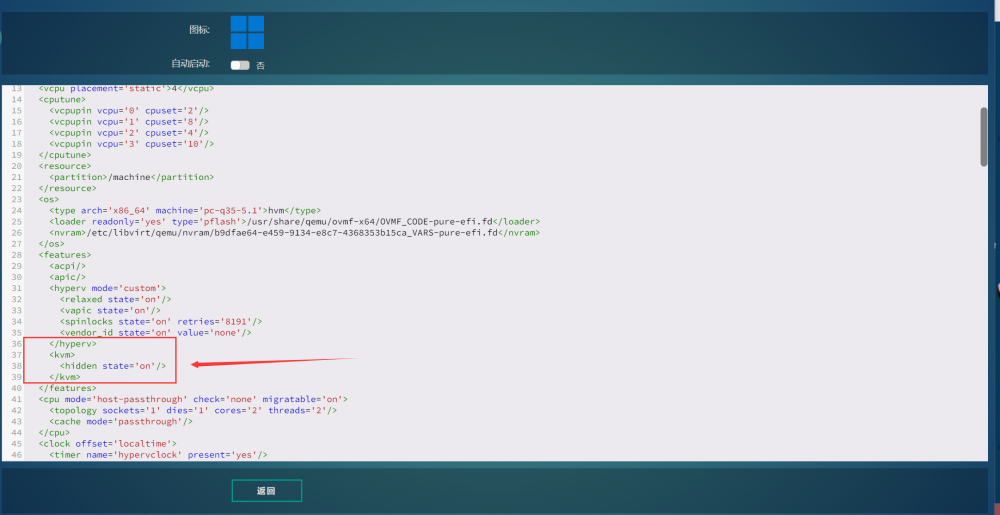
我在6.92版本中使用任何虚拟机添加我的独显GTX650TI都能完美的直通并安装显卡驱动,升级到6.10版本后,MAC OS和Ubuntu可以正常驱动显卡,唯独Windows出现了问题。 症状:安装Windows虚拟机,使用独显可以输出画面,分辨率很低的那种,在系统内安装显卡驱动后,设备管理器提示43的错误,无法驱动显卡! 于是我便在论坛寻求帮助,在得到版主他们的关注后,于今天得到解决的办法。此问题貌似只有老款显卡才出现,受到影响的显卡型号为:" GT740, GT710, GTX650TI, GTX670 "等老款显卡,如果你有同样的问题,请看下面临时的解决办法,后续版本更新,官方可能会修复这个bug。 首先打开Windows虚拟机的编辑 进到虚拟机配置选项,将当前页面更改为XML代码形式 编辑 XML 并在下面的功能部分中</ hyperv> 添加这串代码: <kvm> <hidden state='on'/> </kvm> 如图所示: 添加完代码点击更新,开启虚拟机,如果这个虚拟机是你之前安装好的,首次开启后还是不能加载显卡驱动,你需要在Windows内重启该虚拟机,注意是重新启动,不要关机在开机。 如果你是全新安装的Windows,或许可以省去上面重新启动虚拟机的步骤。我还没尝试全新安装。 如果你添加完代码,后续重新配置该虚拟机,例如分配内存,调整CPU,或者添加USB设备等会导致该代码消失,需要你重新添加此代码 再次感谢官方重视此问题,希望在下个版本中能够修复此问题!
-
Ha ha, that's OK. Thank you very much for your hard work! I will tell this good news in Chinese to my brothers who have the same problems! I would like to ask whether this error will be fixed in the next version update?
-
Thank you very much. Where do you want to add this string of code?
-
如果有苹果的APP应用操作unraid是一件很酷的事,利用第三方软件实现这样的功能非常麻烦,而且不够人性化



