





EdgarWallace
Members
-
Joined
-
Last visited
Everything posted by EdgarWallace
-
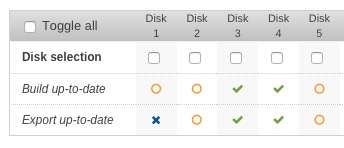
+1 Here is a copy&paste of my settings (files to be excluded): *.nfo,*.dump,*.xml ....maybe a space after each file pattern is missing? I have also cleared all disks according to your guidance ("After a Clear command, do an Export and verify if any excluded files and folders are still present in the exported file(s)") but still see some of these files. I also enabled automatic hashing but each morning the system is showing a similar picture as shown below. Not an issue to me but maybe I can help investigating the root cause.
-
@CHBMB: adding these lines into my "default" file were removing the security warnings: ### Add HTTP Strict Transport Security ### add_header Strict-Transport-Security "max-age=63072000; includeSubdomains"; add_header Front-End-Https on; I'm using Nextcloud 10.0 (stable) with the Nginx-letsencrypt container so that was really helpful. What is the nginx directory within the Nextcloud container doing? My understanding is that it's not needed as Nginx-letsencrypt is doing the job? At least I can ignore the config files there? Thanks a lot. [EDIT] I am also getting the A+ on ssllabs. Good to know :-)
-
Thanks a lot dmacias. After the upgrade and a reboot all is well again. Even with "Enable Network Connection" switched off.
-
The unRAID version is 6.2.1 (see sig.). There was no difference in using localhost or the IP address. Installier the old version and all is fine again (both localhost and network support "off"). Thanks a lot.
-
Yes ilmi-sensors is working without any issue: root@Tower:~# ipmi-sensors Caching SDR repository information: /root/.freeipmi/sdr-cache/sdr-cache-Tower.localhost Caching SDR record 21 of 21 (current record ID 21) ID | Name | Type | Reading | Units | Event 3 | ATX+5VSB | Voltage | 5.01 | V | 'OK' 4 | +3VSB | Voltage | 3.50 | V | 'OK' 5 | Vcore | Voltage | 1.81 | V | 'OK' 6 | VCCM | Voltage | 1.36 | V | 'OK' 7 | +1.05 | Voltage | 1.07 | V | 'OK' 8 | VCCIO_OUT | Voltage | 1.01 | V | 'OK' 9 | BAT | Voltage | 3.10 | V | 'OK' 10 | +5.00V | Voltage | 5.01 | V | 'OK' 11 | +3.30V | Voltage | 3.34 | V | 'OK' 12 | +12.00V | Voltage | 12.30 | V | 'OK' 13 | CPU_FAN1 | Fan | 800.00 | RPM | 'OK' 14 | FRNT_FAN1 | Fan | 600.00 | RPM | 'OK' 15 | FRNT_FAN2 | Fan | 1400.00 | RPM | 'OK' 16 | FRNT_FAN3 | Fan | 1400.00 | RPM | 'OK' 17 | FRNT_FAN4 | Fan | N/A | RPM | N/A 18 | FRNT_FAN5 | Fan | N/A | RPM | N/A 19 | M/B Temperature | Temperature | 56.00 | C | 'OK' 21 | CPU Temperature | Temperature | 48.00 | C | 'OK' I activated "localhost" now and I see the sensors also in the webgui again but Fan Control is disabled. [EDIT] I completely removed the plugin as it was preventing my OSX KVM from starting. The issues were showing up with the latest update.
-
After the server start today my server is full of these error messages: x86/PAT: ipmi-raw:14244 map pfn expected mapping type uncached-minus for [mem 0xdd4ef000-0xdd4effff], got write-back A delete / reinstall didn't fixed the issue: http://pastebin.com/kVfC9UV2
-
I followed Peter_sm's directions and fixed the Security and Setup warnings I was also trying Peter_sm's solution but doesn't work here. Here is my default file: http://pastebin.com/vkEJktz2
-
Thanks landon. Initially I was removing the plugin and reinstalled it without success but your guidance went well and resolved the minor issue.
-
Sorry for the trouble I caused. Will look for a different solution. Thanks a lot Squid.
-
Is anyone having any idea? Thanks a lot.
-
I see thanks a lot for this CHBMB. I am setting up the lets encrypt docker to access my NextCloud docker. Thanks again for this awesome piece of work.
-
I had always issues with updating ownCloud, so I tried your NextCloud container and it is working great...even after 2 updates now I am running it with needo's mariadb and I have the same question as yukonhijack: is a reverse proxy (Apache or Nginx) a requirement? I am accessing NextCloud via my router's dns server but honestly I read a lot about reverse proxy but still get it properly. It is a way to secure the server - correct? So setting up the reverse proxy is a recommendation?
-
I was coming from 9.1 No worries Bunny, I will try the Nextcloud docker now. Thanks for all your support.
-
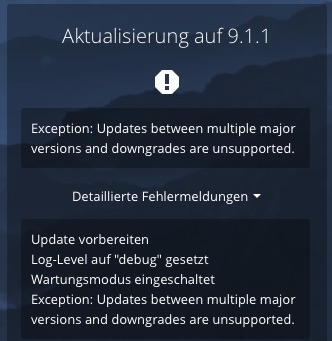
ownCloud Docker: I saw that the update to ownCloud 9.1.1 was available today. After having clicked at the UPGRADE button I saw the error message below. Any advise?
-
I have activated the script at boot time but I am getting error messages: ...shutting down OSX first.... /tmp/user.scripts/tmpScripts/daily_shutdown/script: line 5: 25: command not found ...finally shutting down unRAID.... /tmp/user.scripts/tmpScripts/daily_shutdown/script: line 9: 30: command not found Script Finished Fri, 23 Sep 2016 11:08:59 +0200 These are the lines starting with cron definitions
-
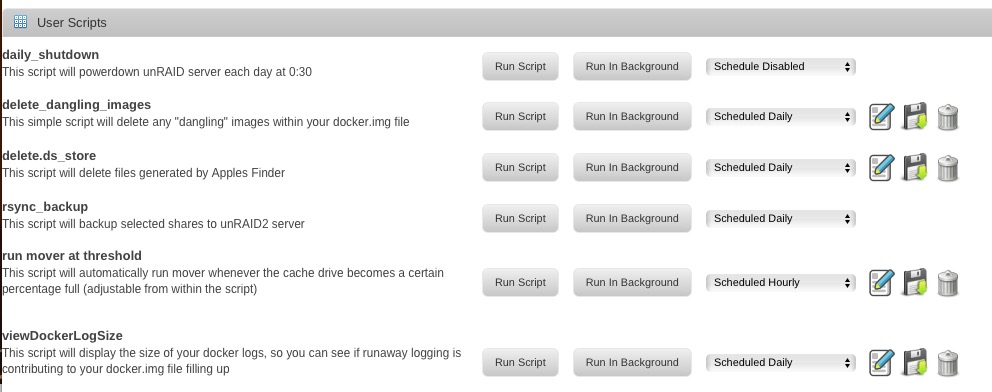
Great plugin thanks for providing it. I have a question related to the scheduler. Background: I am planning to schedule a clean shutdown every night at 0:30: #!/bin/bash # # Shutdown OSX VM echo "...shutting down OSX first...." 25 0 * * * ssh [email protected] sudo shutdown -h now # # Shutdown unRAID echo "...finally shutting down unRAID...." 30 0 * * * /usr/local/sbin/powerdown I guess that I have to disable the schedule as shown in the attachment? Or do I have to enable it in order to get the script active at boot time? Thanks for clarifying this.
-
Hi Gridrunner, I can confirm that your guide was working great. I am not passing through a GPU. Only remaining question is how to increase the screen resolution. Actually system info of the VM is only showing 800x600. THANKS A LOT !!!
-
I still have occurrences when the temperature is high and the log is reporting 100% fan speed but in reality fans are running at 500rpm: 2016-08-19 06:02:06 Starting Fan Control 2016-08-19 06:02:08 FRNT_FAN1(100%):M/B Temperature(46°C) MB is now at 66°C and the hottest disc at 45° [EDIT]Maybe fixed, I decreased the thresholds in the motherboards smart fan settings. Seems to be important with the settings that I am using. Can anyone confirm that this is a correct understanding?
-
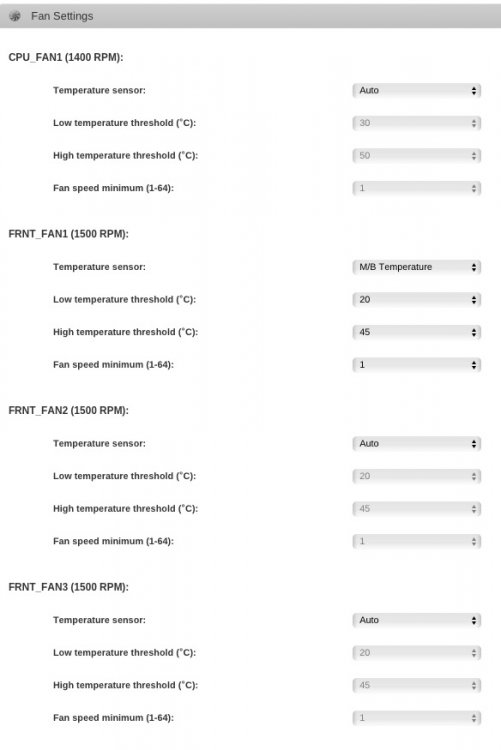
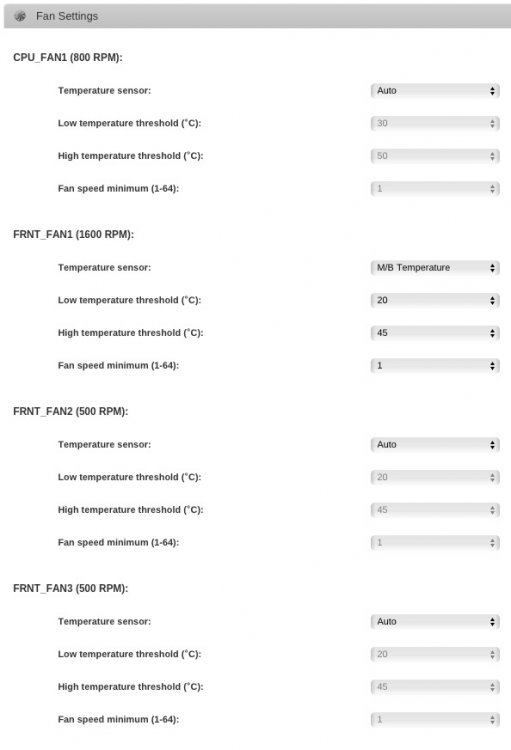
That is an important hint and it happened to me already twice that the server didn't started properly, hence the script was not running and the fans were spinning at very low speed. Finally the disc's went up to 50°C Net, net your advise is to set CPU and the two side fans (the fans for the HDD's) to Auto and just the FRNT_FAN1 as shown in the picture attached because otherwise the MB will getting too hot when the disc's are all spun down (our conversation a few post above..). Thanks a lot again for this GREAT script.
-
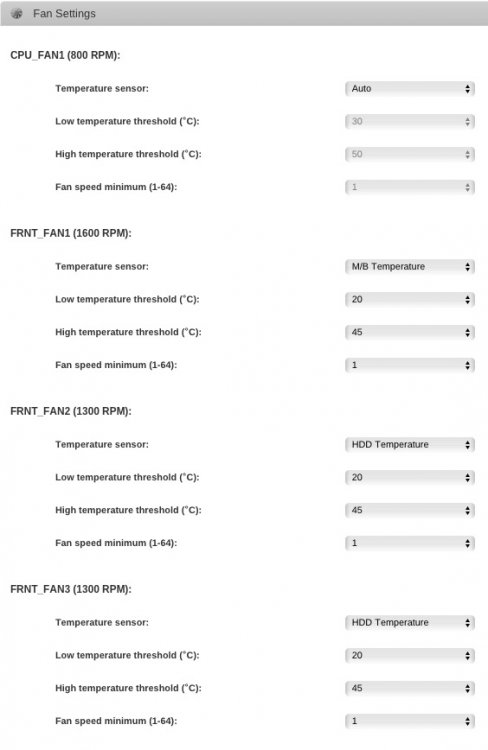
I changed the CPU_Fan to AUTO but the log isn't showing that Fan anymore (see attached file Fan Settings): 2016-08-03 10:43:20 CPU_FAN1(85%):CPU Temperature(47°C), FRNT_FAN1(100%):M/B Temperature(48°C), FRNT_FAN2(64%):HDD Temperature(36°C), FRNT_FAN3(64%):HDD Temperature(36°C) 2016-08-03 10:45:30 fan control config file updated, reloading settings. 2016-08-03 10:45:33 FRNT_FAN1(100%):M/B Temperature(48°C), FRNT_FAN2(64%):HDD Temperature(36°C), FRNT_FAN3(64%):HDD Temperature(36°C) 2016-08-03 10:48:34 FRNT_FAN1(100%):M/B Temperature(48°C), FRNT_FAN2(56%):HDD Temperature(34°C), FRNT_FAN3(56%):HDD Temperature(34°C) IPMI-FRU is showing: FRU Inventory Device: Default FRU Device (ID 00h) FRU Board Manufacturing Date/Time: 06/23/14 - 15:52:00 FRU Board Manufacturer: ASRockRack FRU Product Manufacturer Name: ASRockRack Should I move back CPU_FAN to let's say 30°C (low) and 50°C (high)?
-
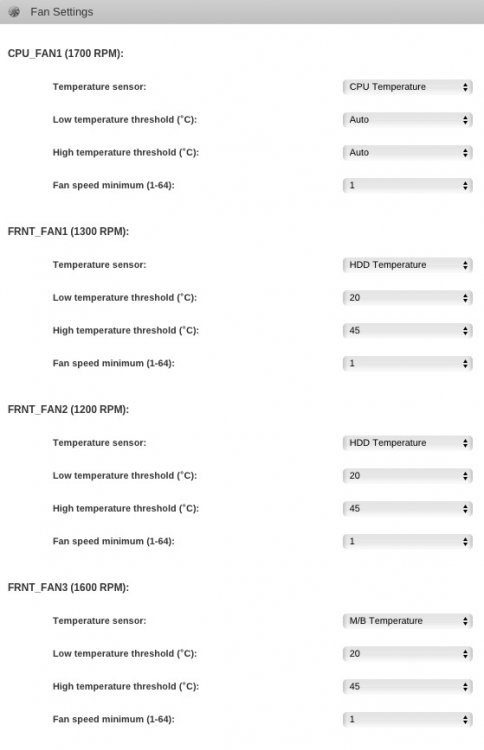
This command is putting CPU Fan to auto and the 3 FRNT_FANS to max: ipmi-raw 00 3a 01 00 64 64 64 00 00 00 00 This is how I modified the boards.json: { "ASRockRack": { "raw": "00 3a 01", "auto":"00 00 00 00 00 00 00 00", "full":"64 64 64 64 64 64 64 64", "fans": { "CPU_FAN1": "00", "FRNT_FAN1": "00", "FRNT_FAN2": "00", "FRNT_FAN3": "00", "FRNT_FAN4": "00", "FRNT_FAN5": "00", "FRNT_FAN6": "00", "FRNT_FAN7": "00" } }, "ASRock": { "raw":"00 3a 01", "auto":"00 00 00 00 00 00 00 00", "full":"64 64 64 64 64 64 64 64", "fans": { "CPU_FAN1": "00", "FRNT_FAN1": "00", "FRNT_FAN2": "00", "FRNT_FAN3": "00", "FRNT_FAN4": "00", "FRNT_FAN5": "00", "FRNT_FAN6": "00", "FRNT_FAN7": "00" } } } CPU is at 44°C, MB at 49°C and HDD max. at 36°C. See fan speed at the pic attached. Does this look ok?
-
Thanks dmacias, understood. I was hoping, that the "AUTO" in Temperature sensor is picking the highest temperature no matter if HDD or MB. Issue is that if all HDD's are inactive the MB can still be pretty hot. So what to choose? Here is my mobo's setup: ipmi-raw 00 3a 01 aa bb cc dd ee ff gg hh aa=CPU bb=FRNT_FAN1 cc=FRNT_FAN2 dd=FRNT_FAN3 So my boards.json should look like so? { "ASRockRack": { "raw": "00 3a 01", "auto":"00 00 00 00 00 00 00 00", "full":"64 64 64 64 64 64 64 64", "fans": { "CPU_FAN1": "00", "FRNT_FAN1": "00", "FRNT_FAN2": "00", "FRNT_FAN3": "00" } }, "ASRock": { "raw":"00 3a 01", "auto":"00 00 00 00 00 00 00 00", "full":"64 64 64 64 64 64 64 64", "fans": { "CPU_FAN1": "00", "FRNT_FAN1": "00", "FRNT_FAN2": "00", "FRNT_FAN3": "00" } } }
-
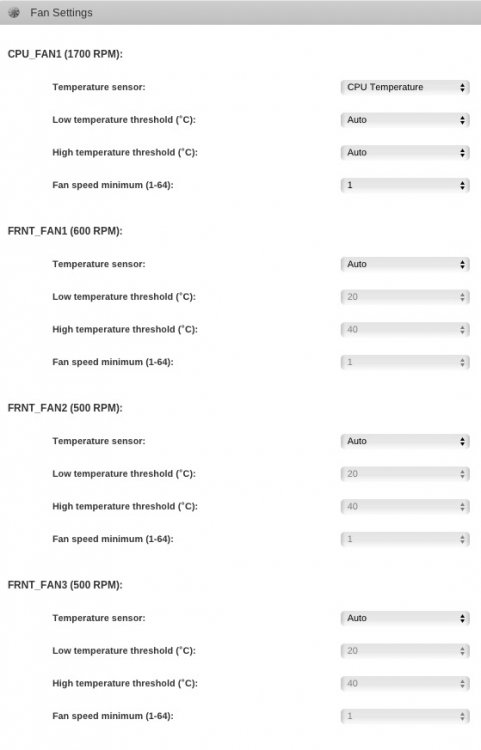
I had some issues with my board but after a BMC chip replacement it is all working again. I have 3 PWM fans installed: ipmi-sensors -t fan ID | Name | Type | Reading | Units | Event 13 | CPU_FAN1 | Fan | 1700.00 | RPM | 'OK' 14 | FRNT_FAN1 | Fan | 1100.00 | RPM | 'OK' 15 | FRNT_FAN2 | Fan | 1000.00 | RPM | 'OK' 16 | FRNT_FAN3 | Fan | 1000.00 | RPM | 'OK' 17 | FRNT_FAN4 | Fan | N/A | RPM | N/A 18 | FRNT_FAN5 | Fan | N/A | RPM | N/A In my understanding FRNT_FAN1-3 should all run on full speed if one of the discs or the MB is running hot? This is the case now. The MB is sitting at 53°C and one of the discs is at 45°C but FRNT_FAN1-3 are running at 500-600 RPM. Fan Control Log: 2016-08-02 03:43:08 CPU_FAN1(100%):CPU Temperature(46°C), FRNT_FAN1(100%):HDD Temperature(46°C), FRNT_FAN2(100%):HDD Temperature(46°C), FRNT_FAN3(100%):HDD Temperature(46°C) What should I do?
-
I do not have issues at all with this plugin but I see an error message on the system console....probably a cosmetic problem?

-
A while ago I was writing down the configuration below but it seems that this changed as I see different Sensors in the WebGUI Overview now (Rear_Fan1, Rear_Fan2, Front_Fan1): BB: FRNT_FAN3 (rear fan of my Silverstone DS380 case) CC: FRNT_FAN2 (lower side fan of my Silverstone DS380 case) DD: FRNT_FAN1 (upper side fan of my Silverstone DS380 case) All 3 fans are PWM fans: beQuiet SilentWings2. Rear_Fan2 and Front_Fan1 are running always at the same speed (if the settings are the same) but Rear_Fan1 is running at approx. half speed. All at AUTO was not working as one of the discs was running hot at 45ºC. I'm trying now the following: Temp. Sensor: HDD Low temp. = 20ºC High temp. = 50ºC Fan speed min. = 1 I see that CPU is at 42ºC (CPU Fan all on auto), Mainboard at 57ºC, Parity disc at 37ºC. I guess that I should rather use a lower High Temp. at 45ºC To your other questions: I just used this tool fruwrite.exe and was able to rewrite the FRU data. That's all. However ASRock still want to send me the BMC chip. I still see strange behavior on the LAN settings. I can't change from Share LAN towards Dedicate LAN and when I am connecting IPMI LAN, LAN1 and LAN2 to the Cisco Switch my router is freaking out so that the whole network is down.


