





Conson Droppa
Members
-
Joined
-
Last visited
-
I’m in between a user and a power user and I say this to not be funny. I open Dozzle and watch the live log of unManic. I squint and read what’s happening. (I suck at reading logs). I google some things that don’t make since or are not verbatim English. Usually gives me a direction to go in. Hopefully someone who is better at this can chime in. Maybe post your log to your last or next comment and I’m sure someone can offer more.
-
Audio? I’ve had transcoding audio max out my threadripper cores. Are you sure the video portion isn’t being skipped because of other reasons and it’s only doing audio? (Ex. File is already 265, etc.)
-
Someone smarter than me can correct me but I think you’d have success if you drilled down into the folder and selected multiple smaller folders. Either all at once or multiple batches. I think selecting the main drive or main share sums up all the data as one file “size”. It will “dispatch” 3800 GB but it can’t fit 3.8 TB on a 2 TB drive in theory. I know that’s not what you’re trying to do, but that’s how the app sees the data. Maybe someone can explain this better than I can.
-
OK, that's why I asked, I didn't want to look past any important steps. Which I did. LOL Just to clarify: Option 1 - I can replace each parity separately while 6 is emulated. Then use a 12 to replace data 6. Option 2 - I can replace parity 1 and then do parity 2 and data 6 at the same time. Thanks.
-
Long time unRaid user and system has been stable for years. I know this has been asked and explained multiple times, but I just want to make sure I am doing it right and there isn't any new procedure out there. I have currently: Dual parity - 2 x 12 TB 10 Data Array - 10 x 10 TB (disk 6 failed w/ power issue) I just ordered two 20 TB to resolve my issue and start my array upgrade journey. I want to upgrade my parity to 20's and use the two 12's to replace data disk 6 and 9. (6 first due to failure) Is upgrading Parity 2 and disk 6 at the same time the way to go? Or should I get parity 2 upgraded and do disk 6 after? Disk 6 is currently emulated. If I didn't have a failed disk I wouldn't be as cautious or worried and just start upgrading as usual. Thanks for any guidance.
-
Had a friend text me and ask if Overseerr was down. It was and I found my Docker page displaying "Docker service failed to start". I checked a few things and downloaded diagnostics. No drive or cache was full. No errors on boot flash. Switching docker settings enabled to "no", save, and back to "yes", save, allows all my dockers to come up fine but goes down again in a few minutes. Any help is appreciated. Disgnostics attached. bayouraid-diagnostics-20240713-1548.zip
-
Space Invader is a great start. I've been on unRaid since 2011 and still watch all his videos for help and ideas. Few suggestions from my opinions. I believe couchpotato is depreciated or being depreciated. I may be wrong though. I would look into SABNZBD for a downloader. Then build out with the ARR's. When starting out, pick a developer and try and stick with them. I mainly use Linuxserver images but binhex and ich777 are great too. Running stuff from all of them. Sticking with one greatly improves multiple dockers having cross compatibility out the box with less or zero changes. Your main question you're asking for help with, as you said, isn't really explainable with a few replies. Lay your groundwork first, get your server/array setup like you want. Get you share(s) setup like you want. Get your plug-ins installed that you want/need. I'll DM you a few questions and answers but I don't want that to stop other from helping you on this thread.
-
Bruh!, OMG! Thank you so much. I have been trying to get this cleared up without bothering anyone for a while now. I knew it had worked before the other way. That's how I had in my notes. Works like a charm with the correct path. @Wolfhunter1043 Caught the "u-" typo too but thanks for the post.
-
Been running "latest" for as long as I can remember. I woke up this morning to a bunch of "unable to start server: sqlite3..........." errors. An appdata restore didn't resolve anything. But changing "latest" to the previous release "1.32.0.6950-8521b7d99-ls163" resolves the database corruption and Plex works fine. Anyone els having issues with "1.32.0.6973-a787c5a8e-ls164"?
-
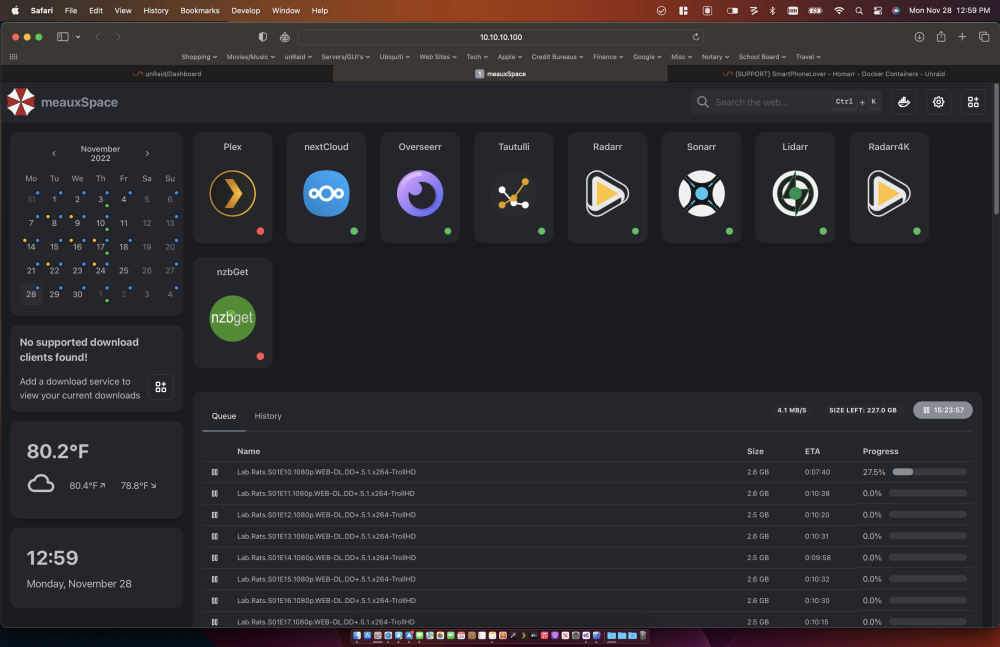
I know the NZB integration is new but I have a red dot on my Plex and NZB services. I have tried IP, Proxy URL, localhost. I can't get a green dot on either. My other 8 services work fine. And click-thru works as expected. Although I can see what NZB is downloading at the bottom, I still get the message that there is no download service setup.
-
For myself and my friend, we generate thumbnails which gets rather large as your library grows. That's the main reason. Plex can have a 1TB pool for itself. If I exclude my plex app data from my CA Backup I drop from 510Gb to about 27Gb with ~30 dockers. I now exclude three sub folders in my plex app data to basically obtain the same results but it's still in it's own pool now. I also moved my nextCloud data folder to the new pool so it's served from a never spun down SSD and somewhat protected with the pool's RAID. I then syncthing my nextCloud folder to my friends server and he does the same to mine for an offsite. (send only/receive only setup)
-
Tried searching but can't find the answer I'm looking for. Managing a friends server and he has his Plex appdata in a separate pool by itself. Was wondering if CA Backup would grab his Cache and plexCache simultaneously or what is the best way to accomplish this? Can "appdata source" be comma separated for multiple locations?
-
[SOLVED] - changed 'user' to 'cache'. Went from 480GB to 58GB. I have these three paths in my excluded field, yet I don't think they are being excluded. Can anyone see a typo or a problem. They are end to end, comma separated, and no space after the comma. I only word wrapped them for this post. /mnt/user/appdata/Plex/Library/Application Support/Plex Media Server/Cache, /mnt/user/appdata/Plex/Library/Application Support/Plex Media Server/Media, /mnt/user/appdata/Plex/Library/Application Support/Plex Media Server/Metadata EDIT: I need a / at the end of each path, don't I? EDIT 2: Nope, no change. [SOLVED] - changed 'user' to 'cache'. Went from 480GB to 58GB.
-
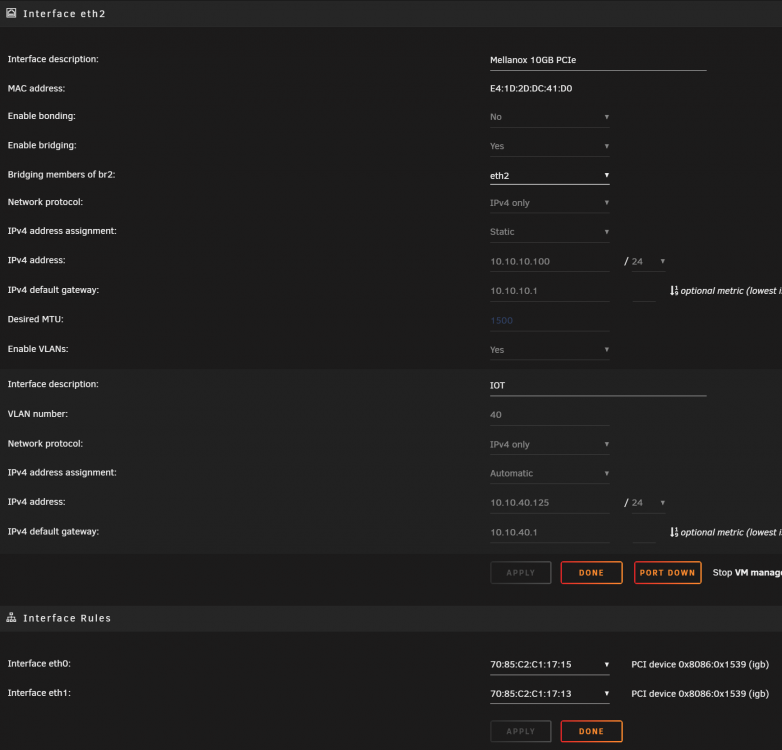
EDIT SOLVED = Deleting "network.cfg and network-rules.cfg at the same time and rebooting resolved this. I installed a Mellanox ConectX-3 10Gb NIC and it works fine to my UniFi Agg switch. My MoBo already has two 1Gb eth ports. I am trying to assign the new card NIC as eth0 but it is not in the dropdown menu as an option under interface rules. I can only see the two 1Gb ports. I have read about 50 post with similar questions but none of their solutions helped me. I have tried to delete the contents of "network-rules.cfg" and reboot I have tried switching back to a 1Gb port in hopes of "freeing up" the 10Gb NIC. I have set all three ports to different subnets in case that was an issue. And attached diagnostics in case someone can help. I have tried running: ifconfig -s -a and I get: Iface MTU RX-OK RX-ERR RX-DRP RX-OVR TX-OK TX-ERR TX-DRP TX-OVR Flg br2 1500 704120 0 9 0 183746 0 0 0 BMRU br-7d2d9 1500 0 0 0 0 0 0 0 0 BMU br2.40 1500 13697 0 0 0 2740 0 0 0 BMRU docker0 1500 163904 0 0 0 658842 0 0 0 BMRU erspan0 1450 0 0 0 0 0 0 0 0 BM eth0 1500 14411 0 0 0 3127 0 0 0 BMRU eth1 1500 0 0 0 0 0 0 0 0 BM eth2 1500 725989 0 48 0 191279 0 0 0 BMPRU eth2.40 1500 13697 0 0 0 2736 0 0 0 BMPRU gre0 1476 0 0 0 0 0 0 0 0 O gretap0 1462 0 0 0 0 0 0 0 0 BM ip_vti0 1480 0 0 0 0 0 0 0 0 O lo 65536 18358 0 0 0 18358 0 0 0 LRU shim-br2 1500 19623 0 0 0 17251 0 0 0 BMRU shim-br2 1500 4096 0 0 0 1091 0 0 0 BMRU shim-eth 1500 5996 0 0 0 2021 0 0 0 BMRU sit0 1480 0 0 0 0 0 0 0 0 O tunl0 1480 0 0 0 0 0 0 0 0 O veth0283 1500 8632 0 0 0 8762 0 0 0 BMRU veth0c67 1500 0 0 0 0 97 0 0 0 BMRU veth3c83 1500 148633 0 0 0 643222 0 0 0 BMRU veth4ace 1500 107 0 0 0 218 0 0 0 BMRU veth4bcd 1500 0 0 0 0 100 0 0 0 BMRU veth4dd9 1500 5 0 0 0 104 0 0 0 BMRU veth53c9 1500 993 0 0 0 1073 0 0 0 BMRU veth64e7 1500 212 0 0 0 323 0 0 0 BMRU veth80bc 1500 1944 0 0 0 2397 0 0 0 BMRU veth8da1 1500 0 0 0 0 86 0 0 0 BMRU vethc67a 1500 1482 0 0 0 1313 0 0 0 BMRU vethd1a4 1500 943 0 0 0 1408 0 0 0 BMRU vethf6b3 1500 191 0 0 0 288 0 0 0 BMRU vethf817 1500 357 0 0 0 466 0 0 0 BMRU vethf83d 1500 385 0 0 0 507 0 0 0 BMRU vethfbe8 1500 15 0 0 0 118 0 0 0 BMRU vethfcbe 1500 5 0 0 0 108 0 0 0 BMRU unraid-diagnostics-20220830-2003.zip Also no stubbing in syslinux area: default menu.c32 menu title Lime Technology, Inc. prompt 0 timeout 50 label unRAID OS menu default kernel /bzimage append initrd=/bzroot label unRAID OS GUI Mode kernel /bzimage append initrd=/bzroot,/bzroot-gui label unRAID OS Safe Mode (no plugins, no GUI) kernel /bzimage append initrd=/bzroot unraidsafemode label unRAID OS GUI Safe Mode (no plugins) kernel /bzimage append initrd=/bzroot,/bzroot-gui unraidsafemode label Memtest86+ kernel /memtest label Xen/unRAID OS kernel /syslinux/mboot.c32 append /xen --- /bzimage --- /bzroot label Xen/unRAID OS Safe Mode (no plugins) kernel /syslinux/mboot.c32 append /xen --- /bzimage --- /bzroot unraidsafemode EDIT SOLVED = Deleting "network.cfg and network-rules.cfg at the same time and rebooting resolved this.
-
That was it. It seemed to all be there. But I followed your steps and I'm back up. Sorry about post location. I didn't know where to put it since it maybe involved nvidia, beta OS, Plex, and then stable OS. Thanks though.




