





The Transplant
Members
-
Joined
-
Last visited
Everything posted by The Transplant
-
I have this issue with Windows VMs even after I shut them down gracefully in VNC. But I still have to force stop them. So in theory they should not be asking for any more user input - unless there is something happening that VNC is not picking up? Pulling the plug is presumably not ideal in case an app doesn't close gracefully in windows?
-
Anyone have any ideas on this mission critical app? Thanks.
-
I wanted to install this on my unraid server - https://github.com/mmcc-xx/BirdCAGE I followed the instructions but got the following errors from the docker-compose: Error response from daemon: failed to create shim task: OCI runtime create failed: runc create failed: unable to start container process: error during container init: error mounting "/etc/timezone" to rootfs at "/etc/timezone": mount /etc/timezone:/etc/timezone (via /proc/self/fd/6), flags: 0x5001: not a directory: unknown: Are you trying to mount a directory onto a file (or vice-versa)? Check if the specified host path exists and is the expected type Any help appreciated. Thanks.
-
My MacBook cannot access the GUI when I type in the local IP. Was working until recently. Now I get a blank page after logging in. All other computers work fine. Have tried cleaning cookies, etc. and still no luck. It does it in Safari and in Chrome. Cannot figure out what is causing the issue. Diagnostics attached. Thanks. odin-diagnostics-20230930-2220.zip
-
Thanks, so how would I setup Krusader so it maps the root path of the server and I could see all folders beneath it. Same with QDirStat?
-
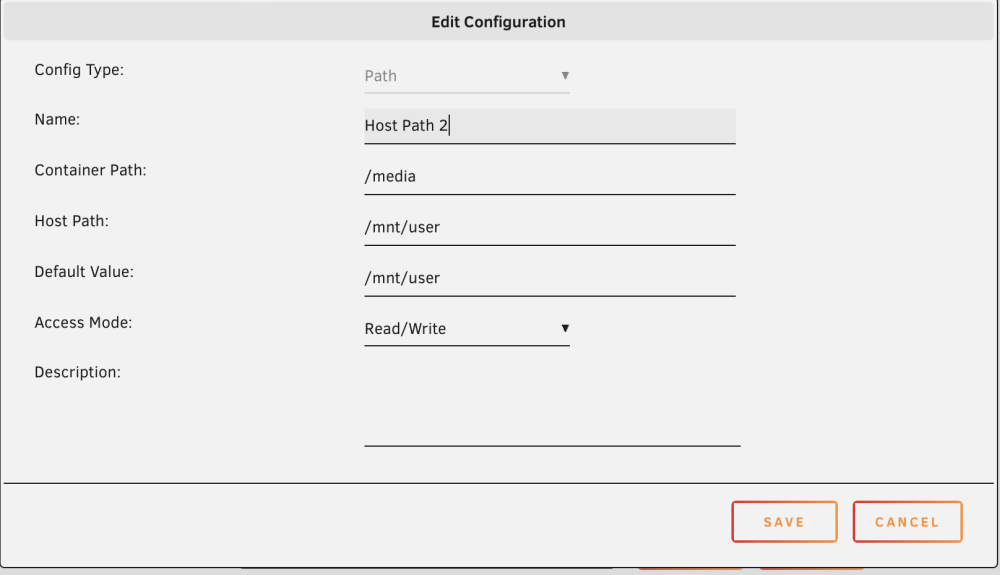
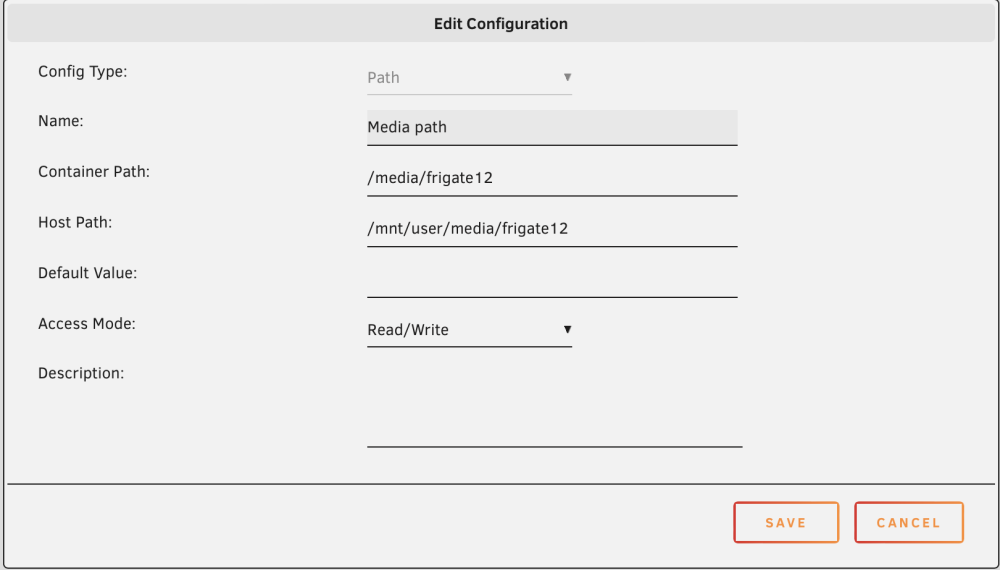
Hopefully this will help others that are new to unraid. I am confused about the file system. For example: I have Frigate setup as follows: /mnt/user/appdata/frigate12/ /mnt/user/media/frigate12 I then look for this folder in Krusader and I see that /mnt is empty. Yet when I click on /media I see the appdata and other folders under this folder? I look in the docker and I see the following setting (below). This must have been the default as I didn't specify it and I see that it is required. I know that appdata is actually located at /mnt/user. So why wouldn't it just appear there? And I installed QDirStat and I see nothing under /mnt. Likely a permissions issue but after searching I can't see how to change that? Thanks - getting to understand this will very helpful.
-
I will look into FFMPEG - I haven't found any how-tos so will see if I can figure that out. Before doing that I wanted to get it running cleanly. Right now I can only see clips in UI when in progress. Some show the clip link as greyed out or others report "The media could not be loaded, either because the server or network failed or because the format is not supported." Probably related, I noticed that the media folder frigate12 I configured has nothing in it. But the frigate folder set up for the original docker is still showing new files. The old Frigate docker is not started. The media path is setup - but I think something is getting crossed here? I captured what I think are the log entries when I try to play a clip that returns the error. 2023-09-04 09:43:51.189378806 [2023-09-04 09:43:51] frigate.http ERROR : No recordings found for the requested time range 2023-09-04 09:43:51.709133133 2023/09/04 09:43:51 [error] 172#172: *275 ngx_child_request_wev_handler: upstream returned a bad status 404 while sending to client, client: 192.168.2.201, server: , request: "GET /vod/event/1693824835.69601-0uhrev/master.m3u8 HTTP/1.1", host: "192.168.2.110:5000", referrer: "http://192.168.2.110:5000/events" 2023-09-04 09:43:51.709171127 192.168.2.201 - - [04/Sep/2023:09:43:51 -0400] "GET /vod/event/1693824835.69601-0uhrev/master.m3u8 HTTP/1.1" 502 559 "http://192.168.2.110:5000/events" "Mozilla/5.0 (Macintosh; Intel Mac OS X 10_15_7) AppleWebKit/537.36 (KHTML, like Gecko) Chrome/114.0.5735.106 Safari/537.36 WebCatalogPhoton/34.2.0" "-" 2023-09-04 09:43:51.736153730 [2023-09-04 09:43:51] frigate.http ERROR : Event does not have recordings: 1693824835.69601-0uhrev 2023-09-04 09:43:51.736772756 2023/09/04 09:43:51 [error] 172#172: *275 ngx_child_request_wev_handler: upstream returned a bad status 404 while sending to client, client: 192.168.2.201, server: , request: "GET /vod/event/1693824835.69601-0uhrev/master.m3u8 HTTP/1.1", host: "192.168.2.110:5000", referrer: "http://192.168.2.110:5000/events" 2023-09-04 09:43:51.736777945 192.168.2.201 - - [04/Sep/2023:09:43:51 -0400] "GET /vod/event/1693824835.69601-0uhrev/master.m3u8 HTTP/1.1" 502 559 "http://192.168.2.110:5000/events" "Mozilla/5.0 (Macintosh; Intel Mac OS X 10_15_7) AppleWebKit/537.36 (KHTML, like Gecko) Chrome/114.0.5735.106 Safari/537.36 WebCatalogPhoton/34.2.0" "-" 2023-09-04 09:43:58.377046426 192.168.2.113 - - [04/Sep/2023:09:43:58 -0400] "GET /api/stats HTTP/1.1" 200 4241 "-" "HomeAssistant/2023.8.3 aiohttp/3.8.5 Python/3.11" "-" And my config: mqtt: host: 192.168.2.110 port: 1883 topic_prefix: frigate client_id: frigate user: frigate password: depeche6667 stats_interval: 60 detectors: coral: type: edgetpu device: usb record: enabled: true retain: days: 30 mode: all birdseye: enabled: True mode: continuous cameras: garage: ffmpeg: inputs: - path: rtsp://admin:[email protected]:554//h264Preview_01_main roles: - rtmp - record - detect objects: track: - person - car - dog - cat snapshots: enabled: true timestamp: true bounding_box: true retain: default: 30 record: enabled: true retain: days: 30 mode: all events: pre_capture: 2 post_capture: 2 motion: mask: - 0,720,441,720,643,308,573,129,1168,131,1168,0,513,0,0,0 back_garden: ffmpeg: inputs: - path: rtsp://admin:[email protected]:554//h264Preview_01_main roles: - rtmp - record - detect objects: track: - person - dog - cat snapshots: enabled: true timestamp: true bounding_box: true retain: default: 30 record: enabled: true retain: days: 30 mode: all events: pre_capture: 2 post_capture: 2 motion: mask: - 441,707,437,671,11,676,11,710 zones: back_step: coordinates: 979,720,1122,720,1086,564,1059,533,965,533 front_door: ffmpeg: inputs: - path: rtsp://admin:[email protected]:554//h264Preview_01_main roles: - rtmp - record - detect objects: track: - person - dog - cat snapshots: enabled: true timestamp: true bounding_box: true retain: default: 30 record: enabled: true retain: days: 30 mode: all events: pre_capture: 2 post_capture: 2 motion: mask: - 14,676,437,672,439,704,16,703 zones: front_step: coordinates: 0,361,244,225,664,720,253,720 porch: ffmpeg: inputs: - path: rtsp://admin:[email protected]:554//h264Preview_01_main roles: - rtmp - record - detect objects: track: - person - dog - cat snapshots: enabled: true timestamp: true bounding_box: true retain: default: 30 record: enabled: true retain: days: 30 mode: all events: pre_capture: 2 post_capture: 2 motion: mask: - 442,707,442,664,14,665,12,711 front_garden: ffmpeg: inputs: - path: rtsp://admin:[email protected]:554//h264Preview_01_main roles: - rtmp - record - detect objects: track: - person - dog - cat snapshots: enabled: true timestamp: true bounding_box: true retain: default: 30 record: enabled: true retain: days: 30 mode: all events: pre_capture: 2 post_capture: 2 motion: mask: - 12,705,439,703,437,666,11,671 - 0,0,1280,0,1280,274,908,292,351,354,0,452 kitchen: ffmpeg: inputs: - path: rtsp://admin:[email protected]:554//h264Preview_01_main roles: - rtmp - detect detect: enabled: false motion: mask: - 0,720,433,720,433,677,0,676 - 856,123,1193,125,1222,505,1193,720,700,720,735,530,851,521,854,315,730,306,732,141 #living_room: # ffmpeg: # inputs: # - path: rtsp://192.168.2.110:8554/livingroom # roles: # - rtmp # - detect # detect: # enabled: false # birdseye: # enabled: False # motion: # mask: # - 8,713,428,715,429,668,7,666 home_office: ffmpeg: inputs: - path: rtsp://admin:[email protected]:554/live roles: - rtmp - detect detect: enabled: false birdseye: enabled: False motion: mask: - 918,718,1251,716,1253,664,915,669 home_theater: ffmpeg: inputs: - path: rtsp://admin:[email protected]:554/live roles: - rtmp - detect detect: enabled: false birdseye: enabled: False motion: mask: - 920,712,1255,712,1253,666,916,666
-
Thanks - very helpful. I got everything working and even discovered that I had a snapshot command twice in the same camera. Although it appears to be working I am getting the following error repeatedly: frigate.comms.dispatcher ERROR : Recordings must be enabled in the config to be turned on via MQTT. The message seems obvious but I have recordings turned on. I've attached the config in case it is helpful. Thanks. frigate config
-
Nope, but I figured out what that mean't and just did it. And it's working. Thanks for that. Does the advertise command need to be run on reboot of unraid or is this once and done?
-
Then I must have done something wrong as I can't access any local IPs remotely. I am able to get to the Unraid server through the IP in the Tailscale console screen - 100.X.X.X. But anything with 192.2.168.X is not responding. Looked in Tailscale log and it doesn't show any errors - just activity around the 100.X.X.X IP address.
-
Noobie - got my .11 version up and running in the docker and have been using it for some time now. Trying to figure out how to move to .12? At the beginning of the thread it says to uninstall the current app and reinstall it. In other words, reinstall the same app again and it will then pull the .12 version? Also, I backup my dockers regularly using the Backup/Restore AppData. Is this sufficient in case everything goes wrong? Thanks.
-
Thanks, I substituted 192.168.2.0 for my local IP network, which I assume I was supposed to do, and it worked. Next question - how do I access other IPs on my local network without having to install Tailscale on each one?
-
Noobie questions. I want to be able to access unraid server console, home assistant, etc. with local IPs I successfully installed the plugin. I see my unraid server in the admin console in Tailscale. Have my laptop connected as well. Can't figure out what to do next. I see an IP address associated with the server in the console but this doesn't work if I try to access it through the web browser. I am sure this is a simple configuration step that I am missing. Thanks for the help.
-
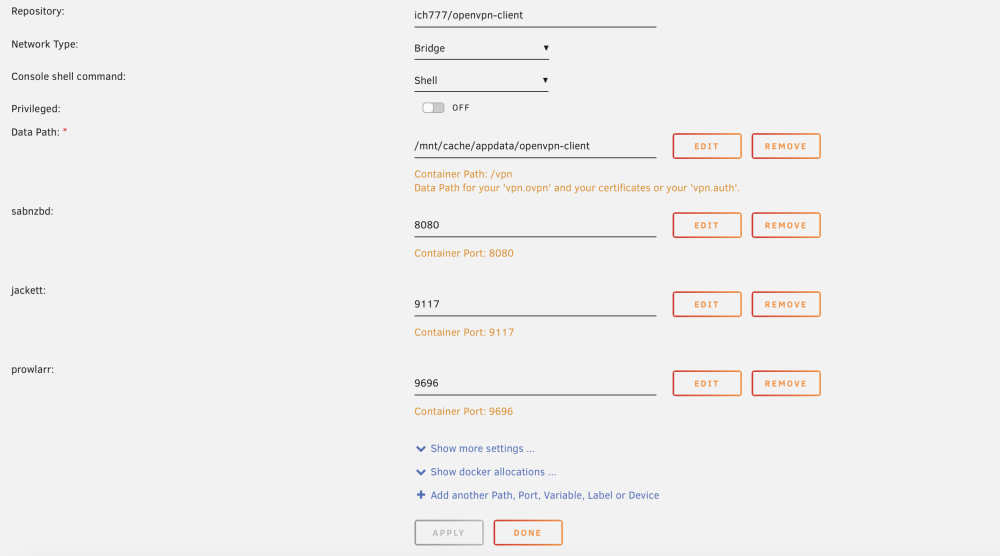
Awesome - now I am getting it. I did add a second cache but I renamed both of the caches to define their specific use. This appears to be the only docker I have installed that has a data path specified so presumably the other dockers were fine with the change in name of the cache. I am in the process of moving the cache files back onto the array and then onto the new cache right now. When I am done I assume I update this from "/mnt/cache/appdata/openvpn-client" to "/mnt/new_cache/appdata/openvpn-client"? Thanks for the help.
-
I upgraded to 6.12.3 The change I made was to add a second cache drive and I moved the appdata cache to this second cache drive. Not sure if this caused the problem, but it's the only thing I changed so just assuming this was the cause. Here is my information (below). Happy to include more info as needed to help diagnose this. Thanks.


-
Just had the same issue. Cannot get most files to move on appdata from cache A to cache B. I set appdata to array then I stopped all of the dockers individually. When I run mover all I get is the following: Aug 15 20:05:37 Odin emhttpd: shcmd (194): /usr/local/sbin/mover |& logger -t move & Aug 15 20:05:37 Odin move: mover: started Aug 15 20:05:37 Odin move: skip: /mnt/cache_default/isos/virtio-win-0.1.221-1.iso Aug 15 20:05:37 Odin move: file: /mnt/cache_default/isos/.DS_Store Aug 15 20:05:37 Odin move: move_object: /mnt/cache_default/isos/.DS_Store File exists Aug 15 20:05:37 Odin move: skip: /mnt/cache_default/isos/Win10_21H2_English_x64.iso Aug 15 20:05:37 Odin move: mover: finished No mention of appdata files moving. Tried it several times and Mover does not move anything. Both of my caches are XFS, which if I understand the last comment, means they won't migrate automatically? What do I need to do to move these files? Thanks.
-
I am having an issue with Open-VPN. Out of the blue I started getting the errors below. I checked the VPN credentials and configuration file and nothing has changed. The only thing I have done recently on my unraid server is add a second cache drive. I did move appdata to this new cache drive so not sure if this created the issue? Haven't seen issues with any other apps so far. Thanks. Unraid 6.11.5 Docker last updated July 2, 2023 ls: cannot access '/vpn/*': No such file or directory Error: ipv4: FIB table does not exist. Dump terminated grep: /vpn/vpn.conf: No such file or directory + exec sg vpn -c 'openvpn --cd /vpn --config /vpn/vpn.conf --script-security 2 --redirect-gateway def1 ' ls: cannot access '/vpn/*': No such file or directory ls: cannot access '/vpn/*': No such file or directory Error: ipv4: FIB table does not exist. Dump terminated ERROR: VPN not configured! ERROR: VPN CA cert missing! Options error: In [CMD-LINE]:1: Error opening configuration file: /vpn/vpn.conf Use --help for more information. ---Checking for optional scripts--- ---No optional script found, continuing--- ---Taking ownership of data...--- ---Starting...---
-
Thanks, I don't know how I ended up using a docker.
-
@Kilrah In disk2\system\docker I have one file docker.img with a timestamp of 22-10-17. In cache\system\docker I have one file docker.img with a timestamp of 23-1-08. For system I have Prefer : Cache. So should I delete the docker.img file in disk2\system\docker, the older file, and then run mover? Similarly in disk2\system\libvirt I have a file libvirt.img with a timestamp of 22-10-17. In cache\system\libvirt I have a file libvirt.img with a timestamp of 23-1-1. Should I delete the older file in disk2\system\libvirt? Thanks.
-
Ha, it definitely was not that log. I just clicked on the docker and logs. My bad. Here is the file you reference. Apparently the fireguard config file is missing but since I don't (yet) no what I am doing I will leave the diagnosis up to those that do! wg-quick down wg0 wg-quick: `/etc/wireguard/wg0.conf' does not exist wg-quick down wg0 wg-quick: `wg0' is not a WireGuard interface wg-quick down wg0 wg-quick: `wg0' is not a WireGuard interface wg-quick down wg0 wg-quick: `wg0' is not a WireGuard interface
-
@ljm42 Here you go - log below. I did search for this error but couldn't find anything that could point me in the right direction. Thanks for helping. 2022-12-31T19:53:56.216Z Server Listening on http://0.0.0.0:51821 Error: WG_HOST Environment Variable Not Set! at /app/lib/WireGuard.js:34:17 at processTicksAndRejections (internal/process/task_queues.js:95:5) 2022-12-31T19:54:03.037Z Server Listening on http://0.0.0.0:51821 Error: WG_HOST Environment Variable Not Set! at /app/lib/WireGuard.js:34:17 at processTicksAndRejections (internal/process/task_queues.js:95:5) 2022-12-31T19:55:35.896Z Server Listening on http://0.0.0.0:51821 Error: WG_HOST Environment Variable Not Set! at /app/lib/WireGuard.js:34:17 at processTicksAndRejections (internal/process/task_queues.js:95:5) 2023-01-02T12:26:58.617Z Server Listening on http://0.0.0.0:51821 Error: WG_HOST Environment Variable Not Set! at /app/lib/WireGuard.js:34:17 at processTicksAndRejections (internal/process/task_queues.js:95:5) 2023-01-03T22:04:25.242Z Server Listening on http://0.0.0.0:51821 Error: WG_HOST Environment Variable Not Set! at /app/lib/WireGuard.js:34:17 at processTicksAndRejections (internal/process/task_queues.js:95:5)
-
@kilrah I did a quick run through of disk2 and cache and didn't see anything older on disk2. Just out of curiosity is there a reason you said to check between disk2 and cache vs. any other disk? Should I check the other disks? Also, if I set a disk to prefer:cache and then ran mover manually, then turned cache off - would it correct out of date files? Thanks.
-
I know this was posted as an open item on V2 but I am still seeing this under V3. One docker, Jackett, does not restart after backup: Jan 2 03:10:00 Odin CA Backup/Restore: Starting jackett... (try #1) Jan 2 03:10:00 Odin CA Backup/Restore: Error while starting container! - Code: Image can not be deleted, in use by other container(s) Jan 2 03:10:00 Odin kernel: pcieport 0000:00:1d.0: AER: Corrected error received: 0000:00:1d.0 Jan 2 03:10:00 Odin kernel: pcieport 0000:00:1d.0: PCIe Bus Error: severity=Corrected, type=Data Link Layer, (Transmitter ID) Jan 2 03:10:00 Odin kernel: pcieport 0000:00:1d.0: device [8086:a118] error status/mask=00001000/00002000 Jan 2 03:10:00 Odin kernel: pcieport 0000:00:1d.0: [12] Timeout Jan 2 03:10:05 Odin CA Backup/Restore: Starting jackett... (try #2) Jan 2 03:10:05 Odin CA Backup/Restore: Error while starting container! - Code: Image can not be deleted, in use by other container(s) Jan 2 03:10:10 Odin CA Backup/Restore: Starting jackett... (try #3) Jan 2 03:10:10 Odin CA Backup/Restore: Error while starting container! - Code: Image can not be deleted, in use by other container(s) When I check in the morning and see it stopped I start it manually and it works fine. In other posts I saw that people were having this happen with in Jackett and other dockers: Is this a timing issue, perhaps a delay is required before restarting the docker?
-
@Kilrah How do I confirm that there are duplicate files on cache and disk2? I don't feel comfortable deleting files until I understand this more. Also, I just realized that my backup runs weekly on a Monday. So this should not have been causing the bump in disk usage every night. Since switching to cache:no on domains yesterday, I only got warnings about utilization and no alerts. So something is still happening. I do have the second SSD drive attached that is unused. I could add this as a second cache drive since I am not using it for anything else?
-
I am having the same issue on 6.11.5 - clean install of Wireguard. Wireguard starts up and shutdowns immediately. I tried the resolution steps above but no luck. I assume all of the 0.0.0.0's below are not good? 2022-12-31T19:53:56.216Z Server Listening on http://0.0.0.0:51821 Error: WG_HOST Environment Variable Not Set! at /app/lib/WireGuard.js:34:17 at processTicksAndRejections (internal/process/task_queues.js:95:5) 2022-12-31T19:54:03.037Z Server Listening on http://0.0.0.0:51821 Error: WG_HOST Environment Variable Not Set! at /app/lib/WireGuard.js:34:17 at processTicksAndRejections (internal/process/task_queues.js:95:5) 2022-12-31T19:55:35.896Z Server Listening on http://0.0.0.0:51821 Error: WG_HOST Environment Variable Not Set! at /app/lib/WireGuard.js:34:17 at processTicksAndRejections (internal/process/task_queues.js:95:5)





