





Thunder7ga
Members
-
Joined
-
Last visited
-
The latest release that I upgraded to this morning seems not to be happy after about 15-20 minutes, the API stops responding, and I get an error trying to go to the UI of "Failed to load series from API - Version 4.0.16.2944", which is new after the update. Restarting the docker makes it work again for the same 15-20 minutes. So, I'd like to roll back, but I'm not sure how, as the tags I keep trying based on the info in the GitHub don't seem to like it . Any insights on how to roll back properly?
-
I came here looking for any options on the parity check after X days since the last one. The situation was that I had to replace a drive. I did that on Thursday. The new parity check starts and finishes on Friday. Now, here we are on Saturday, and the normal scheduled check starts again. It would be nice to have something more like this as at least optional some day.
-
Good lord, trying to restore from this thing is an exercise in frustration. Trying to use the script from @petchav but it just doesn't work. Just says the Backup file not Found, even though I am following the instructions exactly. Seems others had this issue too in the past, as its an open issue in the github for the script. Not sure what I can do to get my linux VM back again...even though I have backups I am staring at. Backup file not Found · Issue #8 · Emilien-Lambert/Unraid-VM-Backup-Plugin-Restoration-Script
-
No, still happens on this one server. The backup to Connect is working fine, and I get copies downloaded from there though when needed.
-
I let it run for ~45 mins this morning and it never completed, after a little more than 10 minutes, this error popped into the syslog: Apr 9 06:48:44 NAS1 nginx: 2024/04/09 06:48:44 [error] 9996#9996: *889539 upstream timed out (110: Connection timed out) while reading response header from upstream, client: 192.168.1.<x>, server: , request: "POST /webGui/include/Download.php HTTP/1.1", upstream: "fastcgi://unix:/var/run/php5-fpm.sock", host: "192.168.1.<x>:8280", referrer: "http://192.168.1.<x>:8280/Main/Settings/Flash?name=flash" The flash backup on this server historically (same hardware) had never been more than 2-3 minutes to do it...then it "seems" after moving to .8 it started to do this. I was seeing some weirdness with the flash drive, so I replaced it with a new one, but the problem trying to backup continued. The other weirdness stopped.
-
Having issues with doing manual flash backups...it just sits on "Please wait... creating Flash backup zip file (this may take several minutes)" indefinately....I let it go 10 minutes+ a few times....the Connect backup seems to be updating fine....so its weird I can't manually do a backup. I see nothing in the syslog either....I've rebooted several times, went to .9 but had to roll back to .8 due to the SMB share issue (which is now fixed in .10, but have not tried it yet)...and still cannot backup manually.
-
Got some help on the discord a bit ago...did these steps and it got it back working: Uninstall the connect plugin, check the flash drives config > plugins folder for anything related to connect or myservers and delete it, reboot unraid and install the plugin again and sign in
-
Still looking for some help on this...
-
When trying to upgrade to 2024.03.06.0724, I am getting failures due to "file missing". Once this is run and fails, it kills all the shares on the server too, and only a reboot will restore them. Here is the error:
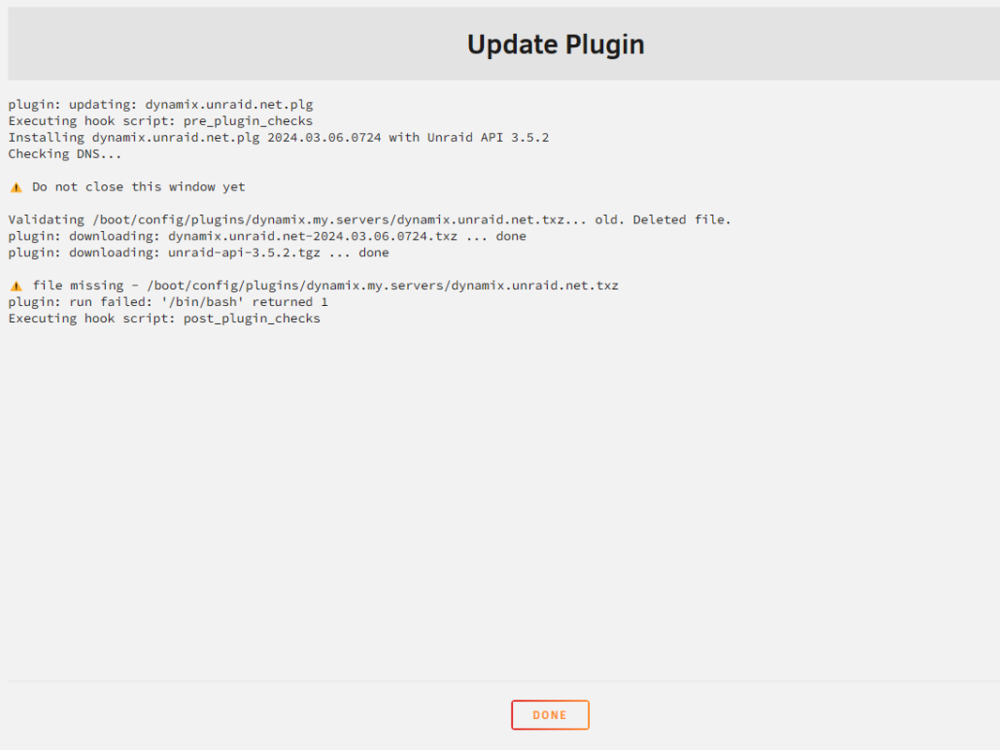
-
If I am already running 6.12.4 without issue for a while now, is this needed? It comes up as an issue with Fix Common Problems, naturally since I do have this NIC, but I don't want to create an issue with installing it either I am planning on upgrading to .6 in the near future.
-
v4 officially released last night....looking forward to the new build.
-
This worked great. Transitioned from the soon-to-be unsupported "other" app, and had been trying to migrate to the mongo hosted version, and that was just a nightmare of frustration. Tried this docker this morning, and it just works. Thanks.
-
10 in my main server, 9 in my backup server.
-
I have not seen that yet.... I've only had 2 failed test in the 2 or so weeks I have been using it.
-
https://forums.unraid.net/topic/130245-support-devzwf-speedtest-tracker/



