






ijuarez
Members
-
Joined
-
Last visited
Everything posted by ijuarez
-
I do have that, pfsense does it for me. I can do a nslookup from outside my home network and it will reply with the correct ip. But when the docket runs it just says no valid ip for my Google domains.
-
So I've also tried using google domain with the docker to failure like you and peruse the forums at letsencrypt and finally found one person that said create the A record and put the public ip. In you case 68.XXX.XXX.XXX ip, go to the section labeled custom resource records leave @ A 1H add your ip. then run the docker boom you'll get your cert. Only drawback is if your IP changes you have to update google. I don't understand why google is so hard and duckdns.org works flawlessly but i have a feeling they want to control that too and pay them money.
-
that's what i will do then,thanks
-
Ahh good point that's why we ask and knowledge is given.
-
I am going to ASSume that you can run multiple instances of this docker, making sure no ports overlap there should be no issues?
-
I would look at your router logs see if it tells why its blocking streaming.
-
I don't have experience with ubiquity, but your setup should not have change because of a router switch, I say you need to investigate the router.
-
Just saying....
-
after the last update i am getting this error, did a little googling and it looks like they are going to fix it. In the interim they post a fix but i'm not sure the syntax the use is the same for this container. Error This version of Nextcloud is not compatible with PHP 7.1. You are currently running 7.1.4.
-
great job, used his guide and was able to get my reverse proxy to work
-
I had this problem and kept searching for an answer my fix was simple, i am using Sonarr LSIO, i install BinHex, not saying that his does not work, but i had the same issue. Deleted that docker and installed LSIO and boom it works. Yes the paths were the same when using binhex just would keep giving me that error.
-
got a A+ but were not on the latest patch level. is that something we have to wait for Linux|Server to update or can it be done thru the application.
-
got mine working, yay!
-
So its setup like Sonarr and it works up until it needs to import the file the error i get. Import failed, path does not exist or is not accessible by Radarr: /downloads/ i've search the google's and some suggested the download path was incorrect. Compare to Sab or Nzbget, Nope path is correct. Like i said sonarr works with no issues. Anyone else having this issue. I might just use couchpotato to do the rename and import. but that would stink. anyone no what might be the problem?
-
TOUCHE. in that case i'll dive right in.
-
how's the development of this docker, is it couchpotato level yet?
-
I believe you, I'm not sure I like the auto of mapping plugings/dockers with the latest update but it is what it is.
-
now that he/she mentions this , that could also have been my issue, i thought maybe the update magically fixed my issue never though of a reboot, i rm -r the snot of the mariadb and nextcloud folders when it keep failing. very odd indeed.
-
What are the file permissions on the custom.cnf file? sorry this took a long while to reply to. root@9ce0020c5a71:/config# ls -l total 8 -rw-r--r-- 1 root root 3753 Oct 1 22:44 custom.bak.cnf -rw-r--r-- 1 abc users 3773 Oct 2 14:32 custom.cnf drwxr-xr-x 1 abc users 400 Oct 1 23:17 databases drwxr-xr-x 1 abc users 72 Oct 1 22:39 log What about file perms in /mnt/cache/appdata/mariadb/ Would expect them to be the same... Sorry again for the delay, drwxrwxrwx 4 nobody users 168 Oct 2 14:32 mariadb/ drwxrwxrwx 2 nobody users 48 Aug 11 12:53 netdata/ drwxrwxrwx 6 nobody users 144 Oct 1 10:54 nextcloud/ I've just done a completely fresh install to test this and I'm still not able to reproduce the problems you're having. Five mins and I was up and running. did the same thing after update to 6.2.1, both mariadb and nextcloud, and boom it working now. Thank you for the help
-
What are the file permissions on the custom.cnf file? sorry this took a long while to reply to. root@9ce0020c5a71:/config# ls -l total 8 -rw-r--r-- 1 root root 3753 Oct 1 22:44 custom.bak.cnf -rw-r--r-- 1 abc users 3773 Oct 2 14:32 custom.cnf drwxr-xr-x 1 abc users 400 Oct 1 23:17 databases drwxr-xr-x 1 abc users 72 Oct 1 22:39 log What about file perms in /mnt/cache/appdata/mariadb/ Would expect them to be the same... Sorry again for the delay, drwxrwxrwx 4 nobody users 168 Oct 2 14:32 mariadb/ drwxrwxrwx 2 nobody users 48 Aug 11 12:53 netdata/ drwxrwxrwx 6 nobody users 144 Oct 1 10:54 nextcloud/
-
What are the file permissions on the custom.cnf file? sorry this took a long while to reply to. root@9ce0020c5a71:/config# ls -l total 8 -rw-r--r-- 1 root root 3753 Oct 1 22:44 custom.bak.cnf -rw-r--r-- 1 abc users 3773 Oct 2 14:32 custom.cnf drwxr-xr-x 1 abc users 400 Oct 1 23:17 databases drwxr-xr-x 1 abc users 72 Oct 1 22:39 log
-
What are the file permissions on the custom.cnf file? Been busy at work have not had a chance to check, but will post results.
-
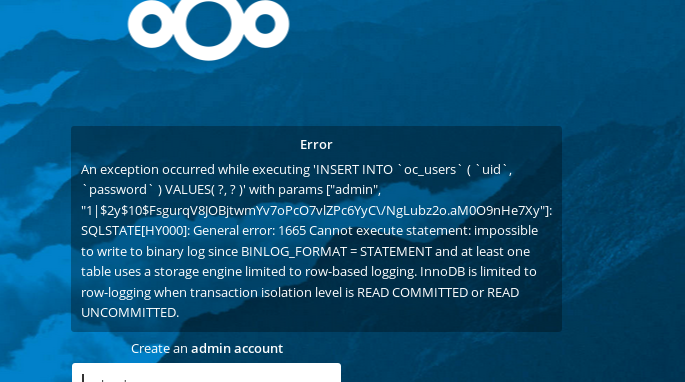
I need help cause i can't get this to work correctly. I had it working and then it messed up so i just didn't mess with it. Updated to 6.2 and tried to get this going and i am meet with this. (see attached) I have remove, reinstalled, did not work, remove reinstall. over and over. yes i have my binlog statement, i docker exec and fixed the custom.cnf files still get this error.
-
You need to fix that link it does not work.... 8) 8)
-
will do thanks


