





Joloxx9
Members
-
Joined
-
Last visited
Everything posted by Joloxx9
-
I've edited the post. Yes I did fixed it by changing permissions, it looks like I need env to change e-mail settings, that is weird :D
-
I've managed to install it after short fight - but something doesn't make sense. I need to run it with folders set to user 1000 - why do we then set puid/guid to 99/100? What is the point? Why docker can't create these folders with correct rights in the first place?
-
I didn't put one thing in my initial post, I had weird issue with power/sata so basically as I had 6 ssd sata drives (3x 240gb+ 3X 500gb) Instarted seeing udma errors where 2 x 240gb had issues to maintain connection and had spam in logs due to that, one of my HDD's was doing that as well for few days also 2 of 500gb drives had randomly crc erroes after start that returned to normal after few minutes. What I've done today - replaced all sata cables, and power supply instead of 2 lines and a lot of sata power splitters I have 4 lines that covers all drives and I throw away old 240Gb drives - so far so good can stop array and there are no sata/udma/crc errors.
-
This is the problem, docker is off and I didn't have VM on, also it is not happening always, I managed to stop array this morning without any issues, but not now.
-
Hi as per title, yesterday I clicked rteboot and it rebooted then noticed unclean shutdown. Checked logs(they are saved on another machine, there was nothing special(might post them if neede) anyway today I took different approach - stopped array, or at least I was trying to stop it it stuck for 10 minutes and had to shut it down from the button. It hang on stopping services and docker is already off, can someone at least point what is holding the system alive? Please see the filearrakis-diagnostics-20251217-1201.zip for diagnostic which I run when array was stuck for good couple of minutes.
-
Huh? It does ignore the hex code for background - this is a bug.
-
Same, I think there is an bug in it.
-
I've posted a bug report. Was told to do syslog and what, once it crashes syslog doesn't record anything it just stops. You are saying that something disconencted, well I have only 2 things plugged in, UPS and Unraid, UPS is plugged to another controller, 1.10.1 is the one where my unraid is plugged, so not sure what is happening here.
-
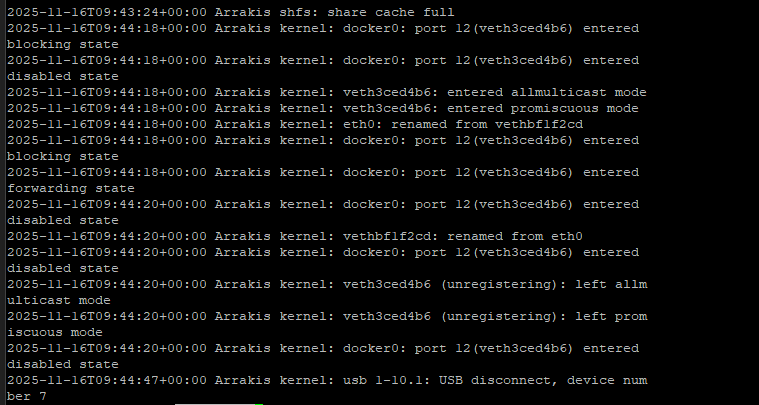
@itimpi This is end of the log right before the crash:
-
I can asure you that was all what was listed, it was barely usable. Had another ceash this morning at this time nothing was in CLI, couldn't even log in through it so had to do another hard restart. This is getting to the point where system is being unusable for me as server
-
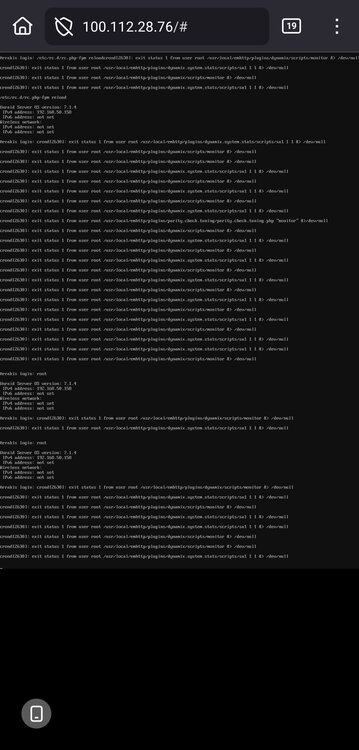
The server stops responding, you can't connect to it, SSH doesn't work either, through KVM I see spam like in the attached image, you can kind of log in but literally no command works, you can't restart/shut it down, you have to do a hard reset with the button. Containers in the background are running because you can access them via IP:port, but for example the network interface isn't working properly because Cloudflare Tunnel and Nginx reverse proxy are down, here's the whole thread about this bug. What should I do because today is the second crash in 10 days, I attached the logs, please help. There is a topic where more peopl got this isue. https://forums.unraid.net/topic/186600-unraid-crashes-with-stop-running-nchan-processes-webgui-not-reachable/page/2/#comment-1590585 arrakis-diagnostics-20251114-2217.zip
-
during the crash I have following output: @Squid please advise!

-
Another crash in 2 weeks, what am I supposed to do?
-
I can confirm that system was running in my case for 30 days+ and I left 5 windows of unraid open on my machine and left it for like 16 hours, at 23:30 all was good but system crashed right before midnight. I could still access containers through IP:port Nginx reverse proxy was not working CF tunnel was down(even that all containters were running) I could not SSH to the server - connection refused I could not log in directly on the machine as you can see on above screenshot, putting anything as login was doing nothing. After restart from the button(thank god for KVM!) all is back an running, minus 30hours for parity check -.-
-
root@Arrakis:~# ls -ail /usr/local/emhttp/plugins/dynamix/scripts total 174 5500 drwxr-xr-x 1 root root 80 Nov 4 01:51 ./ 37 drwxr-xr-x 1 root root 300 Nov 4 01:51 ../ 5205 -rwxr-xr-x 1 root root 434 Nov 15 2023 agent* 5206 -rwxr-xr-x 1 root root 229 Nov 15 2023 bootmode* 5207 -rwxr-xr-x 1 root root 420 Nov 15 2023 btrfs_balance* 5208 -rwxr-xr-x 1 root root 1397 Jun 6 2024 btrfs_check* 5209 -rwxr-xr-x 1 root root 819 Nov 15 2023 btrfs_scrub* 5210 -rwxr-xr-x 1 root root 775 Nov 15 2023 console* 5211 -rwxr-xr-x 1 root root 37808 May 1 2025 diagnostics* 5212 -rwxr-xr-x 1 root root 774 Nov 15 2023 disk_size* 5213 -rwxr-xr-x 1 root root 489 Nov 15 2023 emcmd* 5214 -rwxr-xr-x 1 root root 728 Feb 16 2025 error_interfaces* 5215 -rwxr-xr-x 1 root root 13602 Apr 4 2025 feedback* 5216 -rwxr-xr-x 1 root root 1693 Nov 15 2023 flash_backup* 5217 -rwxr-xr-x 1 root root 577 Nov 15 2023 ftpusers* 5218 -rwxr-xr-x 1 root root 2399 Nov 15 2023 install_key* 5219 -rwxr-xr-x 1 root root 15620 Jun 29 2024 monitor* 5220 -rwxr-xr-x 1 root root 6538 Feb 26 2025 netconfig* 5221 -rwxr-xr-x 1 root root 2703 Sep 21 2024 newperms* 5222 -rwxr-xr-x 1 root root 849 Jan 9 2025 nfsSettings* 5223 -rwxr-xr-x 1 root root 9915 Feb 16 2025 notify* 5224 -rwxr-xr-x 1 root root 1282 Apr 22 2025 open_ssl* 5225 -rwxr-xr-x 1 root root 3390 Dec 17 2024 outgoingproxy* 5226 -rwxr-xr-x 1 root root 1154 Nov 15 2023 parity_control* 53832 -rwxr-xr-x 1 root root 8099 Nov 4 01:51 parity_history* 53830 -rwxr-xr-x 1 root root 3150 Feb 5 2024 parity_history.orig* 5228 -rwxr-xr-x 1 root root 141 Dec 29 2023 powermode* 5229 -rwxr-xr-x 1 root root 676 Oct 11 2024 reiserfs_check* 5230 -rwxr-xr-x 1 root root 336 Jun 2 17:22 reload_services* 5231 -rwxr-xr-x 1 root root 649 Feb 5 2024 replace_key_job* 5232 -rwxr-xr-x 1 root root 677 Mar 26 2025 restore_favorites* 5233 -rwxr-xr-x 1 root root 3583 Feb 16 2024 rsyslog_config* 5234 -rwxr-xr-x 1 root root 1437 Nov 15 2023 run_cmd* 5235 -rwxr-xr-x 1 root root 2967 Feb 5 2024 select_case* 5236 -rwxr-xr-x 1 root root 4182 Jul 16 2024 set_proxy* 5237 -rwxr-xr-x 1 root root 826 Nov 15 2023 share_size* 5238 -rwxr-xr-x 1 root root 269 Jul 27 2024 show_interfaces* 5239 -rwxr-xr-x 1 root root 4272 Feb 27 2025 ssd_trim* 5240 -rwxr-xr-x 1 root root 8080 Mar 23 2024 statuscheck* 5241 -rwxr-xr-x 1 root root 10104 Feb 25 2025 system_information* 5242 -rwxr-xr-x 1 root root 1771 Apr 22 2025 update_access* 5243 -rwxr-xr-x 1 root root 541 Jun 2 17:22 update_services* 5244 -rwxr-xr-x 1 root root 1602 Nov 15 2023 upnp_poller* 5245 -rwxr-xr-x 1 root root 104 Nov 15 2023 upnp_poller_start* 5246 -rwxr-xr-x 1 root root 1334 Nov 15 2023 upnp_port* 5247 -rwxr-xr-x 1 root root 2304 Feb 5 2024 wg_config* 5248 -rwxr-xr-x 1 root root 1649 Mar 31 2025 wireless* 5249 -rwxr-xr-x 1 root root 2640 Jul 1 2024 xfs_check* 5250 -rwxr-xr-x 1 root root 518 Nov 15 2023 zfs_scrub*
-
I just faced this issue on 7.1.4. @squid
-
Looks like it is because of that as I use cross seed, if I change mover tuning to rsync will it break cross-seed/qbittorent hard links or they should be fine? I seed for 30+ days so my 4TB NVME would run of space quickly.
-
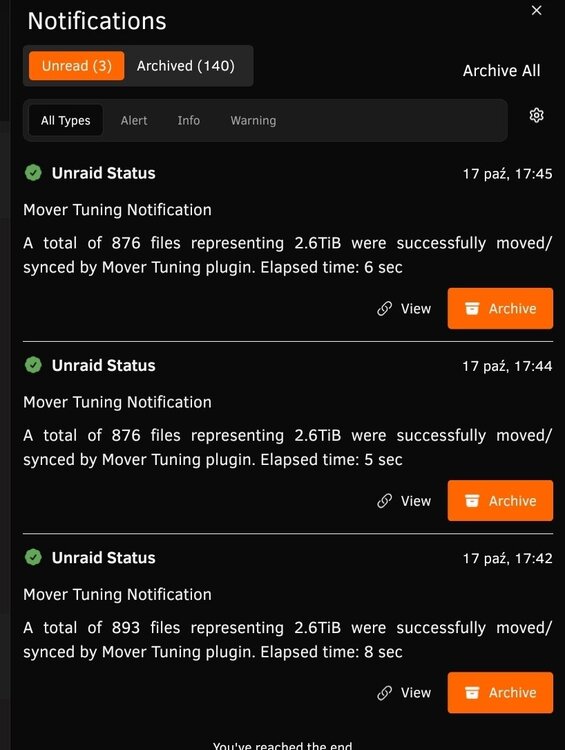
Mover tuning is not moving the files, it is happening usually after few days, these are mostly files that sits in qbittorent but are not active, I have informations like 123 files 1.2TB moved in 9 seconds. Why is it happening? Without plugin all is working ok. Also noticed, RSYNC is working but when it is set to mover it doesn't work.
-
How do I install latest version? The one pasted in OP is 6 months old.
-
Removing plugin works, I will reinstall and test it again.
-
As per title mover doesn't move the files, it does say that 2.6TB of data was moved in few seconds but nothing is moved. I am using mover plugin. What settings is messing with it? arrakis-diagnostics-20251017-1801.zip ca.mover.tuning-debug-20251017-1705.zip
-
Topi can be closed: mover was trying to move Docker folder as I requested and appdata, there were few million files in them and it would take so much time to index/validate them that I was under impression that it is freezing. Anyway, ditched idea to move docker as it would break anyway and re-created it on the new cache :)
-
Power cable was power not seated fully :) I will check mover log tomorrow morning. But what I see I think there is an issue with docker/appdata folder due to massive amount of tiny files. At least that's how it looks like from unbalanced point of view.
-
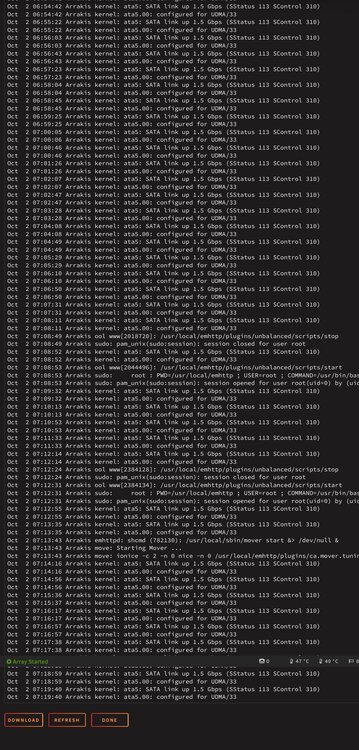
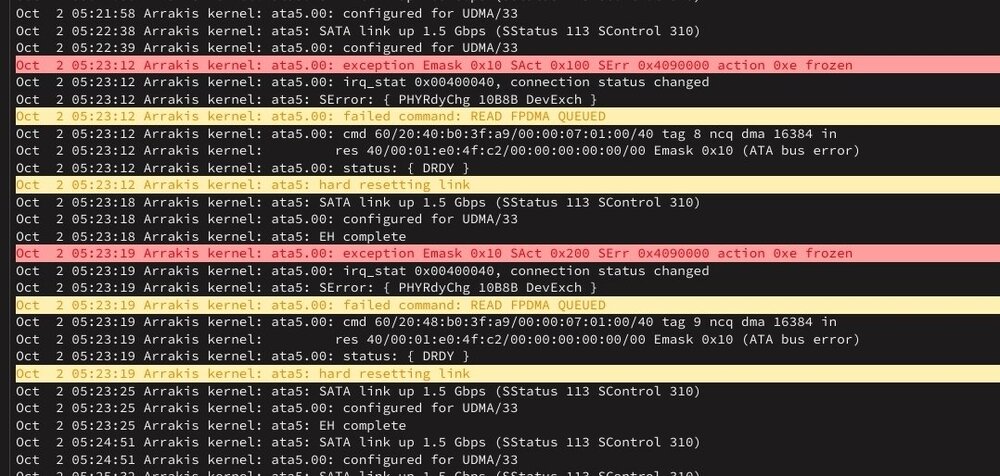
Thanks I will do, but I think I found the issue, so there is a problem with one of the HDD's, I have added 2 drives recently, they are working fine, but sata cable access in my case are terrible. And I am using thin sata wires, I suspect I have damaged on of them as I am getting a lot of weird errors on one of the drives and I could even hear it spinning up every 30 sec etc. This is few months old device which contains no data, and as everything started when I was messing with wires I suspect I just need to replace it..
-
Hi, as per topic name, I am trying to move my appdata and docker folders from cache to one of the drives in order to create a new bigger cache drive. However it looks like due to massive quantity files in both of the folders mover seems to do nothing, icon is gray but nothing is moved for 5-10 min, and when I select any of these folders unbalanced freeze in Plan tab while it is Getting items etc. Docker is off of course. Is there anything I can do to move them temporary?




