PinkCarlos
Members
-
Joined
-
Last visited
Everything posted by PinkCarlos
-
Safe reboot without emhttp-errors. What does it mean "related to Connect"?. Are these errors critical? Do you need logs for further analysis?
-
Leider hat ein Wechsel des Sticks die Fehlermeldungen nicht verhindert. Sie sind auch mit dem neuen Stick weiterhin in den Logs vorhanden. Neben den o.a. Logs aus der Datei "graphql-api.log" wirft Syslog auch den folgenden Fehler aus: Error response from daemon: invalid pool request: Pool overlaps with other one on this address space.
-
Hallo, in der log-Datei "graphql-api.txt" sind folgende Fehler aufgeführt: [07:01:39 ERROR emhttp]: Failed loading state file from "/usr/local/emhttp/state/var.ini" with "Invalid File Path: /usr/local/emhttp/state/var.ini, or Extension: ini" {"apiVersion":"4.29.2+c39b0b26","logger":"emhttp"} [07:01:39 ERROR emhttp]: Failed loading state file from "/usr/local/emhttp/state/devs.ini" with "Invalid File Path: /usr/local/emhttp/state/devs.ini, or Extension: ini" {"apiVersion":"4.29.2+c39b0b26","logger":"emhttp"} [07:01:39 ERROR emhttp]: Failed loading state file from "/usr/local/emhttp/state/nginx.ini" with "Invalid File Path: /usr/local/emhttp/state/nginx.ini, or Extension: ini" {"apiVersion":"4.29.2+c39b0b26","logger":"emhttp"} [07:01:39 ERROR emhttp]: Failed loading state file from "/usr/local/emhttp/state/shares.ini" with "Invalid File Path: /usr/local/emhttp/state/shares.ini, or Extension: ini" {"apiVersion":"4.29.2+c39b0b26","logger":"emhttp"} [07:01:39 ERROR emhttp]: Failed loading state file from "/usr/local/emhttp/state/disks.ini" with "Invalid File Path: /usr/local/emhttp/state/disks.ini, or Extension: ini" {"apiVersion":"4.29.2+c39b0b26","logger":"emhttp"} [07:01:39 ERROR emhttp]: Failed loading state file from "/usr/local/emhttp/state/users.ini" with "Invalid File Path: /usr/local/emhttp/state/users.ini, or Extension: ini" {"apiVersion":"4.29.2+c39b0b26","logger":"emhttp"} [07:01:39 ERROR emhttp]: Failed loading state file from "/usr/local/emhttp/state/sec.ini" with "Invalid File Path: /usr/local/emhttp/state/sec.ini, or Extension: ini" {"apiVersion":"4.29.2+c39b0b26","logger":"emhttp"} [07:01:39 ERROR emhttp]: Failed loading state file from "/usr/local/emhttp/state/sec_nfs.ini" with "Invalid File Path: /usr/local/emhttp/state/sec_nfs.ini, or Extension: ini" {"apiVersion":"4.29.2+c39b0b26","logger":"emhttp"} [07:01:39 ERROR UnraidFileModificationService]: Failed to apply modification: auth-request: {} {"apiVersion":"4.29.2+c39b0b26","logger":"api","context":"UnraidFileModificationService"} [07:01:39 ERROR UnraidFileModificationService]: Failed to check if file /usr/local/emhttp/plugins/dynamix/include/DefaultPageLayout.php should be applied: Error: Failed to compare Unraid version - missing unraid version {"apiVersion":"4.29.2+c39b0b26","logger":"api","context":"UnraidFileModificationService"} [07:01:39 ERROR UnraidFileModificationService]: Failed to check if file /usr/local/emhttp/plugins/dynamix/DisplaySettings.page should be applied: Error: Failed to compare Unraid version - missing unraid version {"apiVersion":"4.29.2+c39b0b26","logger":"api","context":"UnraidFileModificationService"} [07:01:39 ERROR UnraidFileModificationService]: Failed to check if file /etc/hosts should be applied: Error: Failed to compare Unraid version - missing unraid version {"apiVersion":"4.29.2+c39b0b26","logger":"api","context":"UnraidFileModificationService"} [07:01:39 ERROR UnraidFileModificationService]: Failed to check if file /etc/nginx/nginx.conf should be applied: Error: Failed to compare Unraid version - missing unraid version {"apiVersion":"4.29.2+c39b0b26","logger":"api","context":"UnraidFileModificationService"} [07:01:39 ERROR UnraidFileModificationService]: Failed to check if file /usr/local/emhttp/plugins/dynamix/Notifications.page should be applied: Error: Failed to compare Unraid version - missing unraid version {"apiVersion":"4.29.2+c39b0b26","logger":"api","context":"UnraidFileModificationService"} [07:01:39 ERROR UnraidFileModificationService]: Failed to check if file /etc/rc.d/rc.nginx should be applied: Error: Failed to compare Unraid version - missing unraid version {"apiVersion":"4.29.2+c39b0b26","logger":"api","context":"UnraidFileModificationService"} [07:01:39 ERROR UnraidFileModificationService]: Failed to check if file /usr/local/emhttp/plugins/dynamix/include/.set-password.php should be applied: Error: Failed to compare Unraid version - missing unraid version {"apiVersion":"4.29.2+c39b0b26","logger":"api","context":"UnraidFileModificationService"} [07:01:39 ERROR UnraidFileModificationService]: Failed to check if file /usr/local/emhttp/plugins/dynamix/include/.login.php should be applied: Error: Failed to compare Unraid version - missing unraid version {"apiVersion":"4.29.2+c39b0b26","logger":"api","context":"UnraidFileModificationService"} [07:01:39 INFO ConnectPluginModule]: Connect plugin initialized with {"mothership":{"status":"PRE_INIT"},"dynamicRemoteAccess":{"runningType":"DISABLED","error":null,"lastPing":null,"allowedUrl":null},"config":{"wanaccess":false,"wanport":null,"upnpEnabled":false,"apikey":"***REDACTED***","localApiKey":"***REDACTED***","username":"","avatar":"","regWizTime":"","dynamicRemoteAccessType":"DISABLED"}} {"apiVersion":"4.29.2+c39b0b26","logger":"api","context":"ConnectPluginModule"} [08:01:09 INFO ConnectPluginModule]: Connect plugin initialized with {"mothership":{"status":"PRE_INIT"},"dynamicRemoteAccess":{"runningType":"DISABLED","error":null,"lastPing":null,"allowedUrl":null},"config":{"wanaccess":false,"wanport":null,"upnpEnabled":false,"apikey":"***REDACTED***","localApiKey":"***REDACTED***","username":"","avatar":"","regWizTime":"","dynamicRemoteAccessType":"DISABLED"}} {"apiVersion":"4.29.2+c39b0b26","logger":"api","context":"ConnectPluginModule"} Aufruf der "Management Settings" in der unraid GUI führt zudem zu einen Absturz der Webgui (reagiert nicht mehr). Mit CLI folgendes erfolglos versucht: etc/rc.d/rc.nginx restart etc/rc.d/tc.php-fpm. restart Beide Befehle reagieren nicht. Beim anschließenden "reboot" hängt der Start bei "Starting diadnostics collection". Hard reset startet dann neu. Weiß jemand Abhilfe?
-
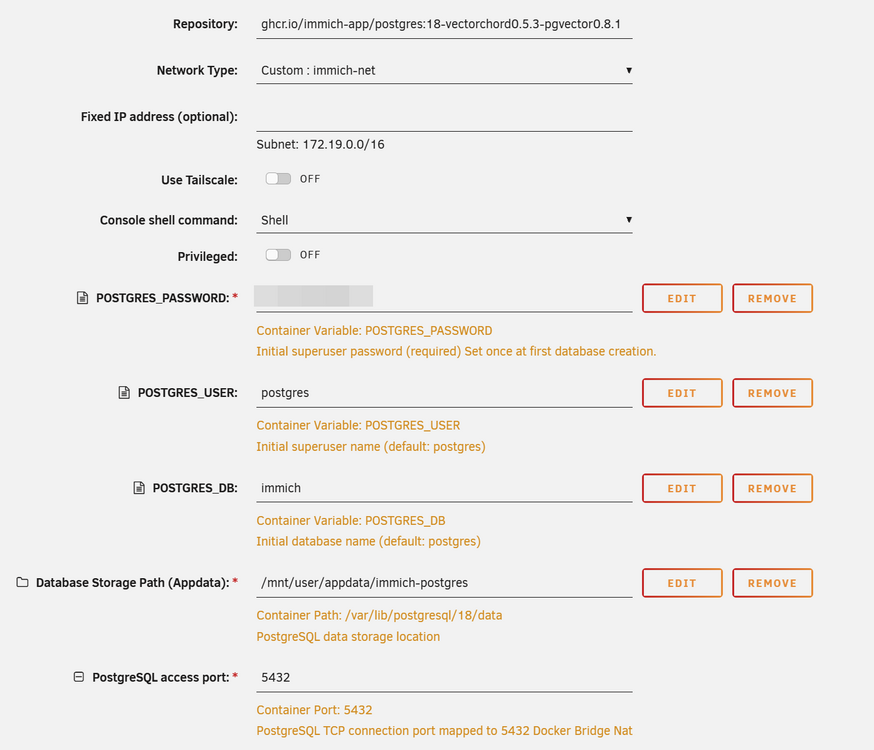
Dies sind die Einstellungen im Postgres-Template. Ist der Pfad zur DB bei Dir identisch?
-
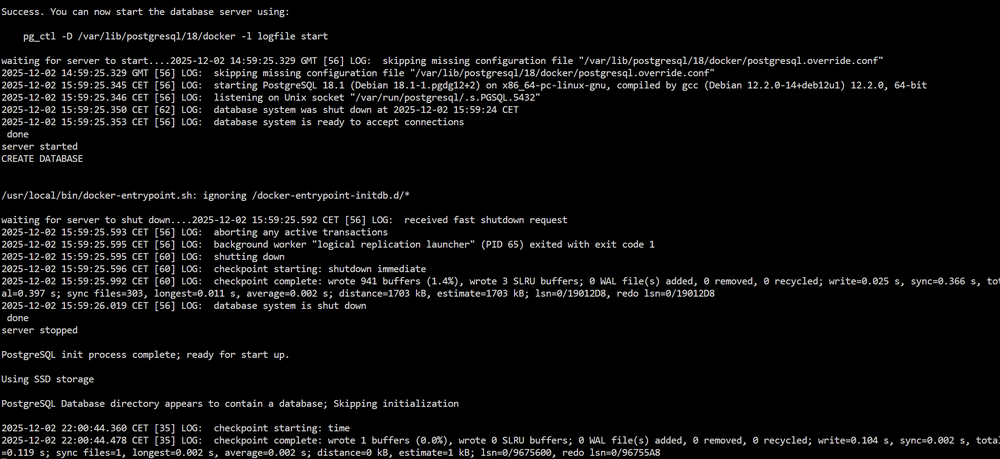
Ich betreibe immich in der folgenden Konstellation, die bisher problemlos lief: * immich_server * immich_postgres * immich_valkey Alle Apps in der jeweils aktuellen Version und in einem custom net, Postgres läuft in der Version 18 mit folgendem Repo: ghcr.io/immich-app/postgres:18-vectorchord0.5.3-pgvector0.8.1 Dann zeigte die postgres App ein Update an, dass ich dann auch durchgeführt haben (immich zuvor gestoppt). Nach dem Update immich wieder gestartet und dann erschien der Login-Screen der Erstinstallation. D.h. die existiertende Datenbank wurde scheinbar nicht erkannt. In der log-Datei der postgres App wird angezeigt, dass eine Datenbank erstellt wird, aber auch dass im Datenbank-Verzeichnis eine DB vorhanden ist. Es ist kein Problem, die Fotos in immich wieder neu einzulesen, da ich sie in einem separaten Share zusätzlich gespeichert habe. Es geht mir darum, dies zu verstehen und beim nächsten postgres Update nicht wieder in den selben Fehler zu laufen. Kann hier jemand weiterhelfen?
-
Please, can you describe this. What did you change that you can reach OC with nginx proxy manager?
-
Hat jemand Erfahrungen, Erkenntnisse etc. mit immich je nach gewählter Art der Installation? Lt. immich Dokumentation wird das unraid template nicht offiziell von immich unterstützt. Das, so nach meiner Einschätzung, sollte auch für eine Reihe weiterer unraid templates gelten. Aber was genau bedeutet dies im konkreten Fall von immich.
-
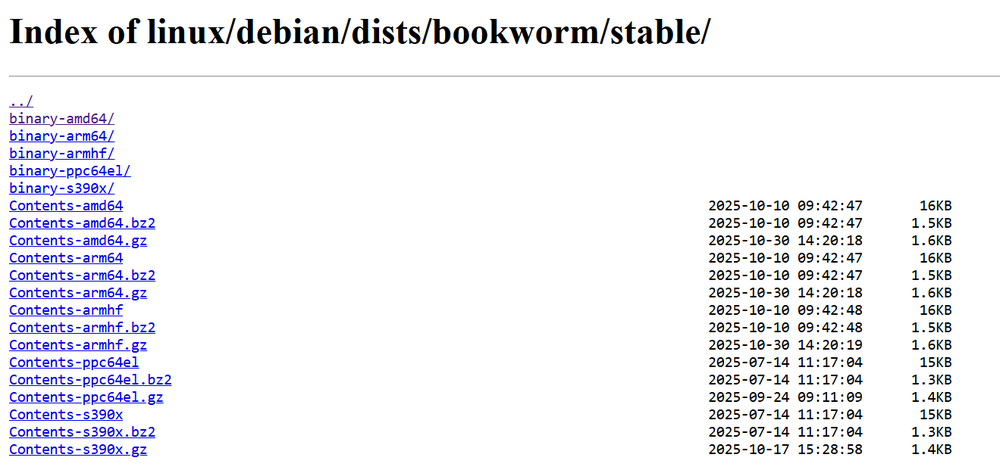
Ich erhalte den folgenden Fehler: /# echo \ "deb [arch=$(dpkg --print-architecture) signed-by=/etc/apt/keyrings/docker.asc] https://download.docker.com/linux/debian \ $(. /etc/os-release && echo "$VERSION_CODENAME") stable" | \ > sudo tee /etc/apt/sources.list.d/docker.list > /dev/null bash: deb [arch=amd64 signed-by=/etc/apt/keyrings/docker.asc] https://download.docker.com/linux/debian bookworm stable: No such file or directory Muss da ggf. der Verzeichnispfad angepasst werden, aber welches ist erforderlich?
-
Has anyone ever had to perform disaster recovery on an unraid server using UnraidConfigGuardian? What was your experience?
-
First of all: for all subsequent attempts, I set the permissions for the OC config and data directory to 1000:1000 using chown. I installed OC with init as a post argument in a first run. Then, after OC stopped, I removed init and restarted the template. Log file without notes. When I call up the OC WebUI, I get the following message (in German): "Missing or incorrect configuration. Please check whether the config.json configuration file exists and is valid. Please also check the browser console for further information." Based on a tip in another forum, I reset everything and reinstalled OC with the post argument: opencloud init --diff. Template installed (log without errors) and after stopping the container, I removed the post argument on the second run. The log then displays this message twice (in English): "The jwt_secret has not been set properly in your config for opencloud. Make sure your /etc/opencloud config contains the proper values (e.g. by using ‘opencloud init --diff’ and applying the patch or setting a value manually in the config/corresponding environment variable)", with the result that the container does not start. Can anyone help here, or do I have to work with NC because it seems to be easier to install under unraid?
-
no longer relevant
-
Is there a env variable for setting log levels? proxy-host-1_access.log, proxy-host-1_error.log, and fallback_error.log have no entries. Logfiles and loglevel can be set via CLI, but also with env?
-
I want to process docker-compose with the following yaml: services: feishin: container_name: feishin image: 'ghcr.io/jeffvli/feishin:latest' environment: - SERVER_NAME=navidrome # pre defined server name - SERVER_LOCK=true # When true AND name/type/url are set, only username/password can be toggled - SERVER_TYPE=navidrome # navidrome also works - SERVER_URL=https://subdomaon.mydomain.tld:4533 # http://address:port - PUID=1000 - PGID=1000 - UMASK=002 - TZ=Europe/Berlin ports: - 9180:9180 networks: default: ipv4_address: 192.168.23.152 networks: default: name: bond0 external: true restart: unless-stopped I receive this error message: validating /boot/config/plugins/compose.manager/projects/feishin/docker-compose.yml: (root) Additional property restart is not allowed Any hints?
-
I would be interested in identifying the possible cause of the error. Even existing Wireguard network connections were deleted. What configuration could have such a massive impact on the system?
-
What do mean with "keeps happening"? Shares including data and dockers are totally deleted.
-
I booted in safe mode with Docker disabled, VM was never be enabled. unraid tried to start the array for more than 10 minutes without success, GUI is blocked and system can only be restarted by cutting the power.
-
Sorry, keine Ahnung was das sein soll. In welchem logfile steht das?
-
Wie gesagt: Ich habe nichts dergleichen eingegeben ... Ich glaube auch nicht an Voodoo. In der CLI-history (Terminal) sehe ich keinen verdächtigen Befehl ... Aber Löschen bzw. Formatieren sollte doch in den logs stehen, oder? Die Inhalte der beiden Ordner in disk1 sind leer.
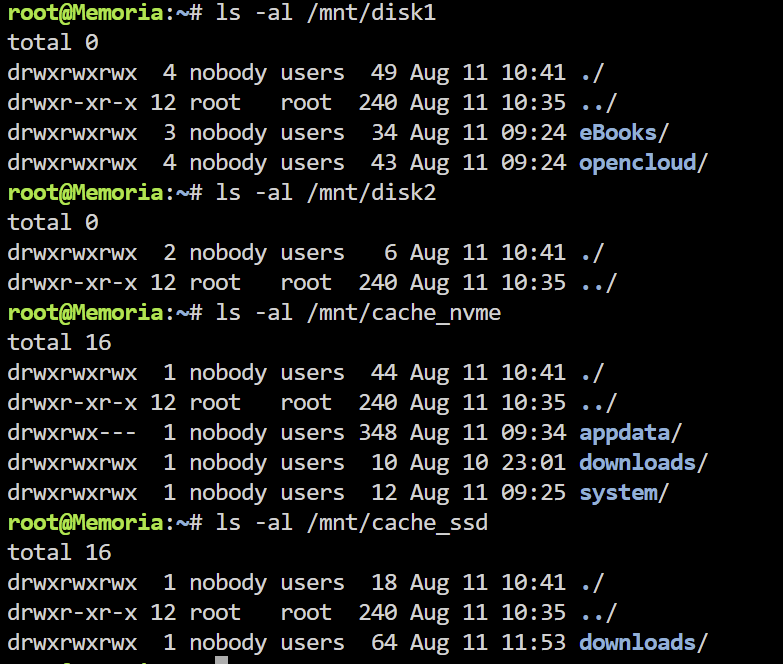
-
Ich frage mich, wie ein so massiver Vorfall überhaupt möglich ist, ohne dass die logs dies zumindest dokumentieren: Alle Docker und alle Inhalte auf den Disks gelöscht. Ich zweifle an der Fehlertoleranz und der Zuverlässigkeit des Systems.
-
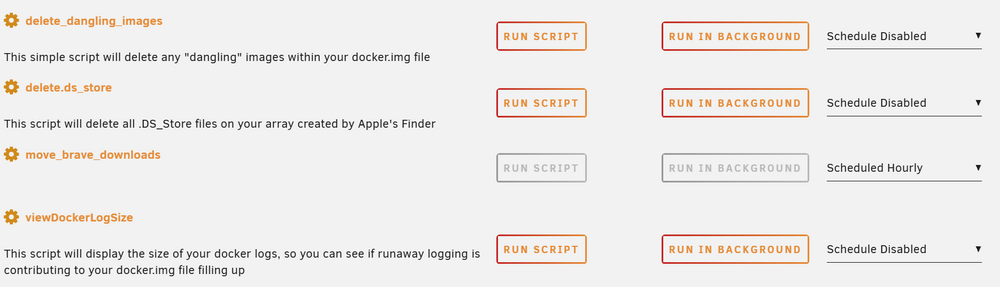
Habe das Script aus diesem Beitrag abgewandelt: #!/usr/bin/env bash ## source (watching) and target pathes source="/mnt/user/appdata/brave/Downloads/" target="/mnt/user/downloads/brave" while true; do ## watch source -r recursive and -e ... inotifywatch -r -e modify -e create -e moved_to -t 1 "$source" 2>/dev/null | grep total && ## move -v (verbose) -u (update) mv -vu "$source"/* "$target"/ done
-
Falls es interessiert: Er war dieses Video:
-
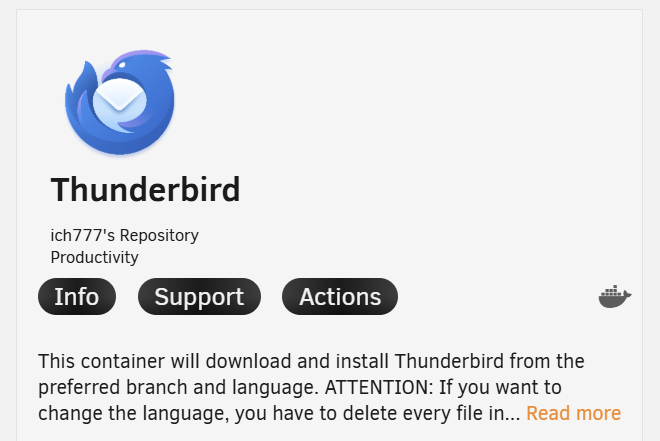
keine solchen Tools im Einsatz ja leider Ich musste viele Daten per rsync von einer Synology auf unraid kopieren. In einem Video wurde empfohlen, bei ausreichend Speicher diesen Wert so zu setzen, da damit dass Kopieren beschleunigt wird. Der letzte Docker, der unmittelbar vor dem Crash installiert wurde, war dieser: Ich habe nur ein zusätzliches Script im Einsatz (es überwacht ein Verzeichnis und schiebt die Daten in ein anderes):
-
Ich habe nichts dergleichen gemacht
-
Das ist ja gerade das Problem: Ich habe aktiv nichts gelöscht, trotzdem sind alle Docker und 95% der User-Shares komplett gelöscht, deshalb sind die Disks auch leer. Wie kann das sein? Geben die logs dazu Auskunft?
-
Caches wurden nicht gewechselt, beide bestehen parallel, Cache_ssd dient zur Ablage von Downloads Array ist gestartet